mirror of
https://github.com/estruyf/vscode-front-matter.git
synced 2026-03-28 17:42:40 +01:00

291 lines
11 KiB
Markdown
291 lines
11 KiB
Markdown
<h1 align="center">
|
|
<a href="https://frontmatter.codes">
|
|
<img alt="Front Matter" src="https://frontmatter.codes/assets/frontmatter-social.png">
|
|
</a>
|
|
</h1>
|
|
|
|
<h2 align="center">Front Matter - A Headless CMS for Visual Studio Code</h2>
|
|
|
|
> **📢 2026 Open Source Priorities Update**
|
|
>
|
|
> I love working with and creating open source products, but after careful
|
|
> evaluation and working with a coach, I've decided to focus my efforts on
|
|
> creating a better revenue stream. As open-source isn't providing me a
|
|
> sustainable income, I need to focus my time and effort more strategically on
|
|
> how to make my work sustainable.
|
|
>
|
|
> **Front Matter CMS will continue to be maintained** as I use it daily.
|
|
> However, major changes will only happen if there's a personal reason, a
|
|
> company commitment, or significant community support. Feature requests may
|
|
> take longer to be addressed.
|
|
>
|
|
> I'm shifting focus to open source projects that I can learn from or that have
|
|
> different outcomes, like **Demo Time**, which I use when presenting at
|
|
> conferences. If you or your company would like to sponsor my work on Front
|
|
> Matter CMS or other projects, I'd love to discuss how we can collaborate to
|
|
> make it even better!
|
|
>
|
|
> This is not about Front Matter CMS going away, but rather about managing
|
|
> expectations around feature development timelines.
|
|
|
|
<p align="center">
|
|
<a href="https://marketplace.visualstudio.com/items?itemName=eliostruyf.vscode-front-matter" title="Check it out on the Visual Studio Marketplace">
|
|
<img src="https://vscode-marketplace-badge.vercel.app/api/badge/version/eliostruyf.vscode-front-matter" alt="Visual Studio Marketplace" style="display: inline-block" />
|
|
</a>
|
|
|
|
<img src="https://vscode-marketplace-badge.vercel.app/api/badge/installs/eliostruyf.vscode-front-matter" alt="Number of installs" style="display: inline-block;margin-left:10px" />
|
|
|
|
<img src="https://vscode-marketplace-badge.vercel.app/api/badge/rating/eliostruyf.vscode-front-matter" alt="Ratings" style="display: inline-block;margin-left:10px" />
|
|
|
|
<a href="https://github.com/sponsors/estruyf" title="Become a sponsor" style="margin-left:10px">
|
|
<img src="https://img.shields.io/github/sponsors/estruyf?color=%23CE2E7C&logo=github&style=flat" alt="Sponsor the project" style="display: inline-block" />
|
|
</a>
|
|
</p>
|
|
|
|
<h2 align="center">
|
|
<a href="https://frontmatter.codes" title="Documentation @ frontmatter.codes">
|
|
Check out the extension documentation at frontmatter.codes
|
|
</a>
|
|
</h2>
|
|
|
|
## ❓ What is Front Matter?
|
|
|
|
Front Matter is a CMS that runs within Visual Studio Code. It gives you the
|
|
power and control of a full-blown CMS while also providing you the flexibility
|
|
and speed of the static site generator of your choice. Jump right into editing
|
|
and creating content with Front Matter and be able to preview it straight in VS
|
|
Code.
|
|
|
|
The extension supports various static-site generators and frameworks like Hugo,
|
|
Jekyll, Hexo, NextJs, Gatsby, and more.
|
|
|
|
A couple of our extension highlights that hopefully get you interested in giving
|
|
Front Matter a try:
|
|
|
|
- Content, data, and media management
|
|
- Search, filter, sort, etc. all your content
|
|
- Create new content
|
|
- Supporting tools to edit content and media
|
|
- Preview your site/content straight in Visual Studio Code
|
|
- SEO checks for title, description, and keywords
|
|
- Extensibility
|
|
- As we know, we cannot support all use cases. We provide a way to extend the
|
|
functionality of the extension to your needs
|
|
- and many more features ...
|
|
|
|
> Missing something? Let us know by opening an issue on the
|
|
> [GitHub repository](https://github.com/estruyf/vscode-front-matter/issues/new/choose)
|
|
|
|
<p align="center">
|
|
<img src="https://frontmatter.codes/assets/marketplace/v6.0.0/content-preview.png" alt="Site preview" style="display: inline-block" />
|
|
</p>
|
|
|
|
> If you see something missing in your article creation flow, please feel free
|
|
> to reach out.
|
|
|
|
**Version 10**
|
|
|
|
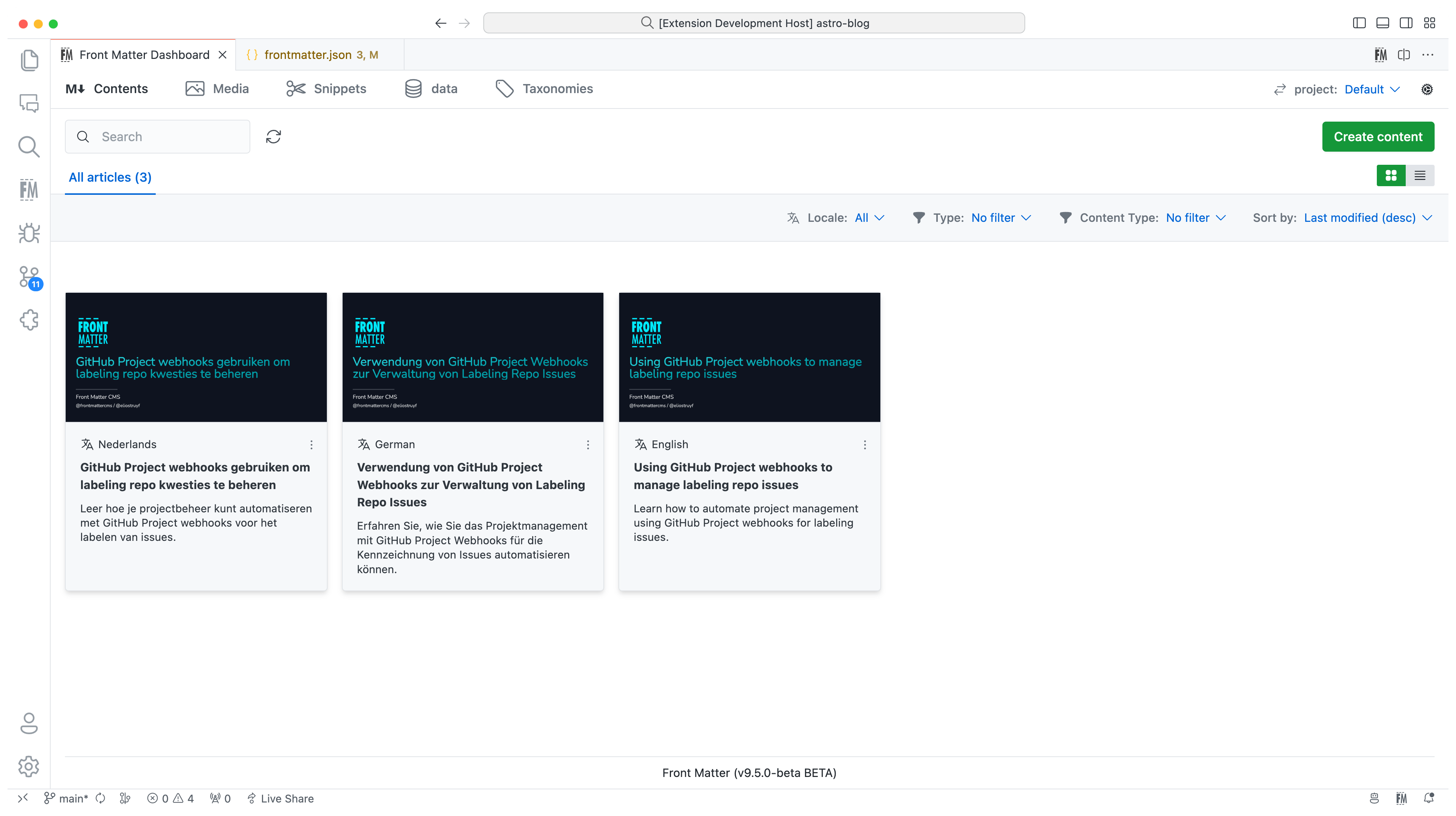
In version 10, we introduced the new i18n/multilingual support for your content.
|
|
You can now manage your content in multiple languages, more information can be
|
|
found in the
|
|
[multilingual](https://frontmatter.codes/docs/content-creation/multilingual)
|
|
section of our documentation.
|
|
|
|
|
|
|
|
**Version 9**
|
|
|
|
The extension is now available in multiple languages: English, German, and
|
|
Japanese. Want to add your language? Check out the
|
|
[localization the extension](https://frontmatter.codes/docs/contributing#translating-the-extension).
|
|
|
|
**Version 8**
|
|
|
|
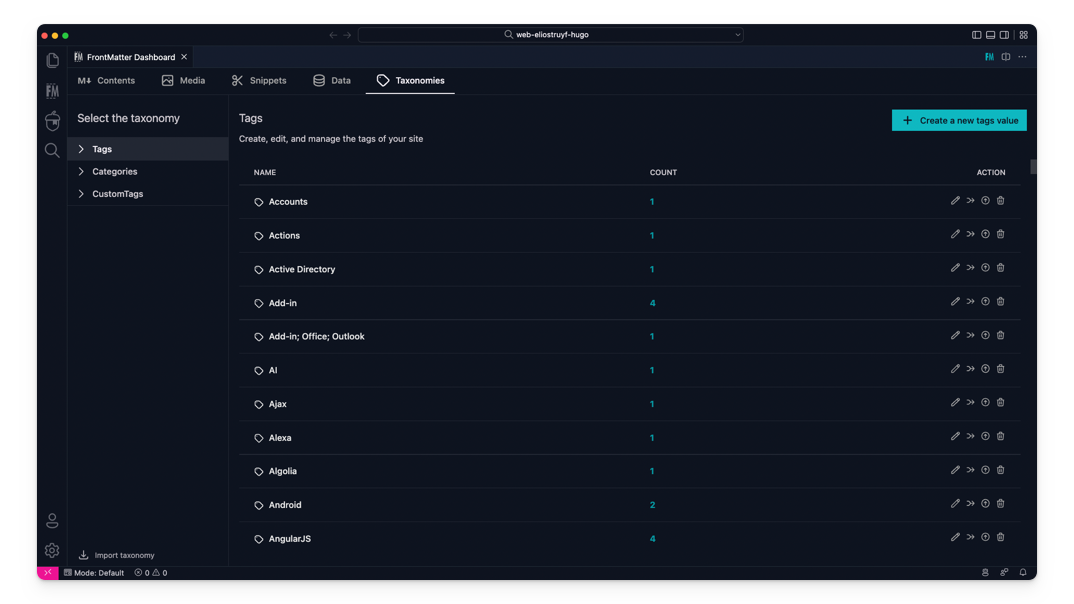
The taxonomy dashboard got introduced on which you can manage your tags,
|
|
categories, and custom taxonomy.
|
|
|
|
|
|
|
|
**Version 7**
|
|
|
|
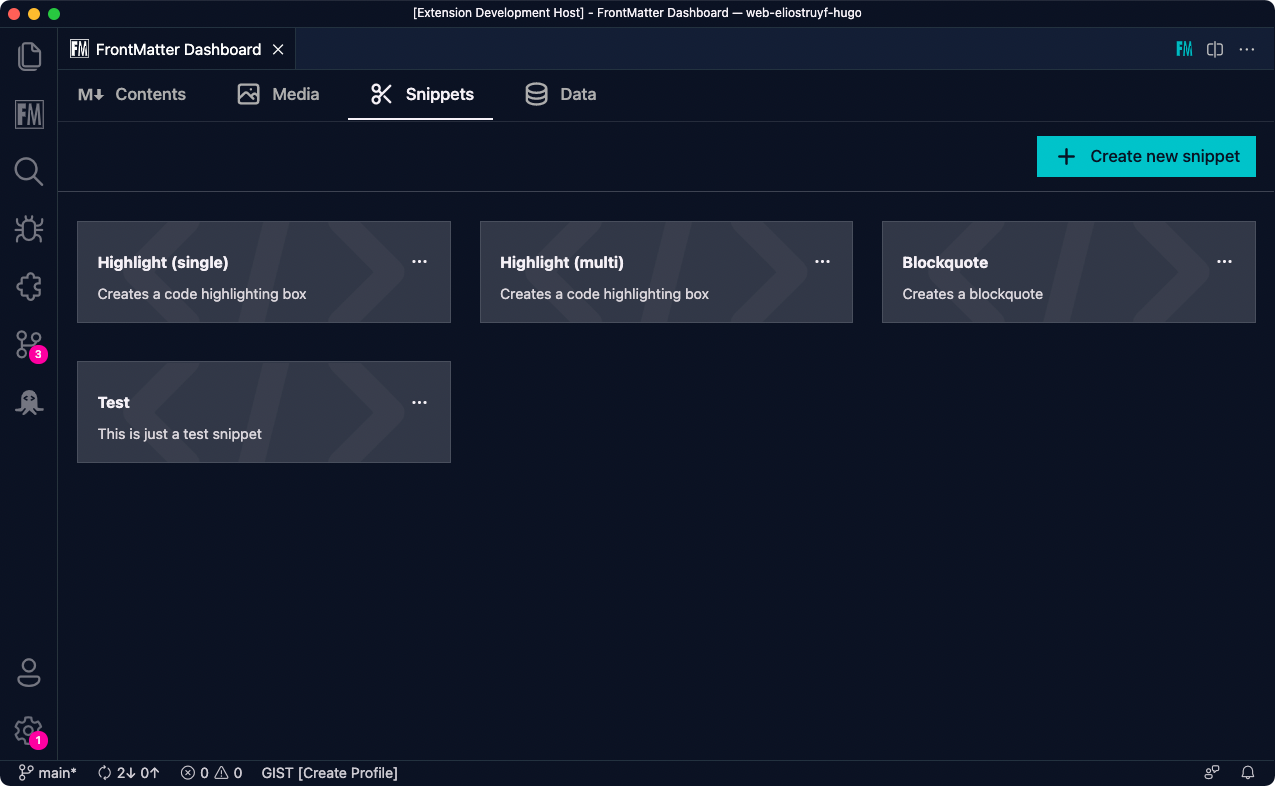
Snippets support for Front Matter has been added!
|
|
|
|
|
|
|
|
**Version 6**
|
|
|
|
In this version, we introduced the new data files/folders dashboard. You can
|
|
find more information about the release in our
|
|
[v6.0.0 release notes](https://frontmatter.codes/updates/v6.0.0).
|
|
|
|
<p align="center">
|
|
<img src="https://frontmatter.codes/assets/marketplace/v6.0.0/data-dashboard.png" alt="Data dashboard" style="display: inline-block" />
|
|
</p>
|
|
|
|
> Data files/folders are pieces of content that do not belong to any markdown
|
|
> content, but live on their own. Most of the time, these data files are used to
|
|
> store additional information about your project/blog/website that will be used
|
|
> to render the content.
|
|
|
|
**Version 5**
|
|
|
|
The new media dashboard redesign got introduced + support for setting metadata
|
|
on media files
|
|
[v5.0.0 release notes](https://frontmatter.codes/updates/v5.0.0).
|
|
|
|
<p align="center">
|
|
<img src="https://frontmatter.codes/assets/marketplace/v5.9.0/media-dashboard.png" alt="Data dashboard" style="display: inline-block" />
|
|
</p>
|
|
|
|
**Version 4**
|
|
|
|
Support for Team level settings, content-types, and image support. Get to know
|
|
more at: [v4.0.0 release notes](https://frontmatter.codes/updates/v4_0_0).
|
|
|
|
**Version 3**
|
|
|
|
In version v3 we introduced the welcome and dashboard webview. The welcome view
|
|
allows to get you started using the extension, and the dashboard allows you to
|
|
manage all your markdown pages in one place. This makes it easy to search,
|
|
filter, sort, and more.
|
|
|
|
**Version 2**
|
|
|
|
In version v2 we released the re-designed sidebar panel with improved SEO
|
|
support. This extension makes it the only extension to manage your Markdown
|
|
pages for your static sites in Visual Studio Code.
|
|
|
|
<p align="center" style="margin-top: 2rem;">
|
|
<a href="https://www.producthunt.com/posts/front-matter?utm_source=badge-featured&utm_medium=badge&utm_souce=badge-front-matter" target="_blank">
|
|
<img src="https://api.producthunt.com/widgets/embed-image/v1/featured.png?post_id=309033&theme=dark" alt="Front Matter - Managing your static sites straight from within VS Code | Product Hunt" style="width: 250px; height: 40px;" />
|
|
</a>
|
|
</p>
|
|
|
|
## ⚙️ Installation
|
|
|
|
You can get the extension via:
|
|
|
|
- The VS Code marketplace:
|
|
[VS Code Marketplace - Front Matter](https://marketplace.visualstudio.com/items?itemName=eliostruyf.vscode-front-matter).
|
|
- The extension CLI: `ext install eliostruyf.vscode-front-matter`
|
|
- Or by clicking on the following link: <a href="" title="open extension in VS
|
|
Code" data-vscode="vscode:extension/eliostruyf.vscode-front-matter">open
|
|
extension in VS Code</a>
|
|
|
|
> **Info**: The docs can be found on
|
|
> [frontmatter.codes](https://frontmatter.codes).
|
|
|
|
### 🧪 Beta version
|
|
|
|
If you have the courage to test out the beta features, we made available a beta
|
|
version as well. You can install this via:
|
|
|
|
- Uninstall the main Front Matter version
|
|
- Install the beta version
|
|
- VS Code marketplace:
|
|
[VS Code Marketplace - Front Matter BETA](https://marketplace.visualstudio.com/items?itemName=eliostruyf.vscode-front-matter-beta).
|
|
- The extension CLI: `ext install eliostruyf.vscode-front-matter-beta`
|
|
- Or by clicking on the following link: <a href="" title="open extension in VS
|
|
Code"
|
|
data-vscode="vscode:extension/eliostruyf.vscode-front-matter-beta">open
|
|
extension in VS Code</a>
|
|
|
|
> **Info**: The BETA docs can be found on
|
|
> [beta.frontmatter.codes](https://beta.frontmatter.codes).
|
|
|
|
## 📖 Documentation
|
|
|
|
All documentation can be found on
|
|
[frontmatter.codes](https://frontmatter.codes).
|
|
|
|
Documentation repository:
|
|
[GitHub - Front Matter DOCs](https://github.com/FrontMatter/web-documentation-nextjs)
|
|
|
|
## 💪 Contributing
|
|
|
|
Pull requests are welcome. Please open an issue first to discuss what you would
|
|
like to change, or which problem you would like to fix. This makes it easier for
|
|
us to follow-up and plan for future releases.
|
|
|
|
You can always help us improve the extension in varous ways like:
|
|
|
|
- Testing out the extension and providing feedback
|
|
- Reporting issues and bugs
|
|
- Suggesting new features
|
|
- Fixing an issue
|
|
- Updating documentation
|
|
- UI improvements
|
|
- Tutorials
|
|
- etc.
|
|
|
|
Eager to start contributing? Great 🤩, you can contribute to the following
|
|
projects:
|
|
|
|
- [Extension](https://github.com/estruyf/vscode-front-matter)
|
|
- [Documentation](https://github.com/FrontMatter/web-documentation-nextjs)
|
|
- [Sample Projects](https://github.com/FrontMatter/project-samples)
|
|
|
|
## 👀 Show the work you are using Front Matter
|
|
|
|
Are you using Front Matter and are you interested in showing for which websites
|
|
you use it? You can show your work by opening a
|
|
[showcase issue](https://github.com/estruyf/vscode-front-matter/issues/new?assignees=&labels=&template=showcase.md&title=Showcase%3A+).
|
|
|
|
You can open showcase issues for the following things:
|
|
|
|
- Show the website for which you use Front Matter;
|
|
- Share an article/video/webcast/... that explains how you use Front Matter;
|
|
- Got something else to share? Open an issue and we can see where it fits on our
|
|
website.
|
|
|
|
## 👉 Contributors 🤘
|
|
|
|
<p align="center">
|
|
<a href="https://github.com/estruyf/vscode-front-matter/graphs/contributors">
|
|
<img src="https://contrib.rocks/image?repo=estruyf/vscode-front-matter" alt="Front Matter contributors" />
|
|
</a>
|
|
</p>
|
|
|
|
## 💚 Backers & Sponsors 👇 🤘
|
|
|
|
<p align="center">
|
|
<img src="https://api.frontmatter.codes/img-sponsors" alt="Front Matter sponsors" />
|
|
</p>
|
|
|
|
<br />
|
|
|
|
<p align="center" title="Powered by Netlify">
|
|
<a href="https://www.netlify.com?utm_source=vscode-frontmatter&utm_campaign=oss">
|
|
<img src="https://frontmatter.codes/assets/sponsors/netlify-dark.png" alt="Deploys by Netlify" height="51px" />
|
|
</a>
|
|
</p>
|
|
|
|
## 📊 Telemetry
|
|
|
|
The Front Matter CMS extension only uses telemetry on application crashes. The
|
|
extension respects the `telemetry.enableTelemetry` setting which you can learn
|
|
more about in the
|
|
[Visual Studio Code FAQ](https://aka.ms/vscode-remote/telemetry).
|
|
|
|
For crash reports in the webviews, we make use of Sentry to help us understand
|
|
what went wrong. This data is only used to fix issues and improve the extension.
|
|
You can find more information about the Sentry implementation in the following
|
|
files:
|
|
|
|
- [Sentry config](https://github.com/estruyf/vscode-front-matter/blob/63e296d62f11be73ac86d9e823084247952a7ddc/src/utils/sentryInit.ts)
|
|
|
|
> The user ip address is not collected.
|
|
|
|
## 🔑 License
|
|
|
|
[MIT](./LICENSE)
|
|
|
|
<br />
|
|
<br />
|
|
|
|
<p align="center">
|
|
<a href="https://visitorbadge.io">
|
|
<img src="https://api.visitorbadge.io/api/VisitorHit?user=estruyf&repo=vscode-front-matter&countColor=%23F05450&labelColor=%230E131F" height="25px" alt="Front Matter visitors" />
|
|
</a>
|
|
</p>
|