mirror of
https://github.com/estruyf/vscode-front-matter.git
synced 2026-03-28 17:42:40 +01:00
Compare commits
45 Commits
copilot/fi
...
beta
| Author | SHA1 | Date | |
|---|---|---|---|

|
c49d3ef00f | ||
|
|
479e84a21e | ||
|
|
4ea0ca06e7 | ||

|
d75dc9aff7 | ||
|
|
5e602a20c1 | ||
|
|
05fcf95a00 | ||
|
|
753bb3dc14 | ||
|
|
aa7c201a07 | ||
|
|
767af177e8 | ||

|
7415ea786e | ||
|
|
2ca2993786 | ||
|
|
fb95439452 | ||
|
|
b6ac0ea1e6 | ||
|
|
1c0ce6a6f2 | ||
|
|
bdb2179e3e | ||
|
|
bd8cd1f1d6 | ||
|
|
09f97b9c8c | ||
|
|
70c17d5de3 | ||
|
|
1f52b02bf7 | ||
|
|
7d2ecc53af | ||
|
|
66d21cc255 | ||
|
|
13a80b33e3 | ||
|
|
7847464899 | ||
|
|
7db95ca091 | ||
|
|
5c0076b9b2 | ||
|
|
7ea0fbad05 | ||
|
|
2e8472dd75 | ||
|
|
0842133db4 | ||
|
|
e25cb9796a | ||
|
|
648541d9a5 | ||
|
|
57e0e2e7b7 | ||
|
|
3b65bb3cd7 | ||
|
|
829c5c6e64 | ||
|
|
e6ef7555e3 | ||
|
|
2af6c57a49 | ||
|
|
5de91cf683 | ||
|
|
2b7fd1d1e7 | ||
|
|
c179364f2b | ||
|
|
4bee998d9b | ||
|
|
17f390545a | ||
|
|
de569d37d5 | ||
|
|
d59969cbe1 | ||
|
|
a387d5eb89 | ||
|
|
f1ae60f280 | ||
|
|
0e2aea626f |
18
CHANGELOG.md
18
CHANGELOG.md
@@ -1,16 +1,30 @@
|
||||
# Change Log
|
||||
|
||||
## [10.10.0] - 2025-xx-xx
|
||||
## [10.10.0] - 2026-xx-xx
|
||||
|
||||
- Removed the chatbot command and all related code and references
|
||||
- [#983](https://github.com/estruyf/vscode-front-matter/issues/983): Removal of the `frontMatter.sponsors.ai.enabled` features
|
||||
|
||||
### 🎨 Enhancements
|
||||
|
||||
- [#937](https://github.com/estruyf/vscode-front-matter/issues/937): Dashboard "Structure" view for documentation sites
|
||||
- [#937](https://github.com/estruyf/vscode-front-matter/issues/937): Dashboard "Structure" view for documentation sites *WIP*
|
||||
- [#965](https://github.com/estruyf/vscode-front-matter/issues/965): Added SEO support for the keyword in the first paragraph
|
||||
- [#973](https://github.com/estruyf/vscode-front-matter/issues/973): Support for number fields in the snippets
|
||||
- [#990](https://github.com/estruyf/vscode-front-matter/issues/990): Schema and validation for front matter in markdown files. It can be turned off by the `frontMatter.validation.enabled` setting.
|
||||
- [#1005](https://github.com/estruyf/vscode-front-matter/issues/1005): Support the integrated VSCode browser for the preview command
|
||||
- [#1017](https://github.com/estruyf/vscode-front-matter/issues/1017): Allow adding new values for custom taxonomy fields
|
||||
|
||||
### 🐞 Fixes
|
||||
|
||||
- [#950](https://github.com/estruyf/vscode-front-matter/issues/950): Fix for template is not applied to new content type when created
|
||||
- [#958](https://github.com/estruyf/vscode-front-matter/issues/958): Fix variable frontmatter leads to error
|
||||
- [#964](https://github.com/estruyf/vscode-front-matter/issues/964): Fix settings page for dark themes
|
||||
- [#969](https://github.com/estruyf/vscode-front-matter/issues/969): Fix typo on welcome screen
|
||||
- [#972](https://github.com/estruyf/vscode-front-matter/issues/972): Fix content view sorting for Modified Date not working as expected
|
||||
- [#979](https://github.com/estruyf/vscode-front-matter/issues/979): Fix unwanted automatic updates in the publishDate field of TOML front matter
|
||||
- [#984](https://github.com/estruyf/vscode-front-matter/issues/984): Fix in `frontMatter.global.timezone` is invalid
|
||||
- [#1004](https://github.com/estruyf/vscode-front-matter/issues/1004): Fix for `mediaDB.json` containing full paths on Windows instead of relative paths
|
||||
- [#1006](https://github.com/estruyf/vscode-front-matter/issues/1006): Fix output channel colorizer schema to only apply to the Front Matter output channel
|
||||
|
||||
## [10.9.0] - 2025-07-01 - [Release notes](https://beta.frontmatter.codes/updates/v10.9.0)
|
||||
|
||||
|
||||
157
README.md
157
README.md
@@ -4,7 +4,29 @@
|
||||
</a>
|
||||
</h1>
|
||||
|
||||
<h2 align="center">Front Matter a CMS running straight in Visual Studio Code</h2>
|
||||
<h2 align="center">Front Matter - A Headless CMS for Visual Studio Code</h2>
|
||||
|
||||
> **📢 2026 Open Source Priorities Update**
|
||||
>
|
||||
> I love working with and creating open source products, but after careful
|
||||
> evaluation and working with a coach, I've decided to focus my efforts on
|
||||
> creating a better revenue stream. As open-source isn't providing me a
|
||||
> sustainable income, I need to focus my time and effort more strategically on
|
||||
> how to make my work sustainable.
|
||||
>
|
||||
> **Front Matter CMS will continue to be maintained** as I use it daily.
|
||||
> However, major changes will only happen if there's a personal reason, a
|
||||
> company commitment, or significant community support. Feature requests may
|
||||
> take longer to be addressed.
|
||||
>
|
||||
> I'm shifting focus to open source projects that I can learn from or that have
|
||||
> different outcomes, like **Demo Time**, which I use when presenting at
|
||||
> conferences. If you or your company would like to sponsor my work on Front
|
||||
> Matter CMS or other projects, I'd love to discuss how we can collaborate to
|
||||
> make it even better!
|
||||
>
|
||||
> This is not about Front Matter CMS going away, but rather about managing
|
||||
> expectations around feature development timelines.
|
||||
|
||||
<p align="center">
|
||||
<a href="https://marketplace.visualstudio.com/items?itemName=eliostruyf.vscode-front-matter" title="Check it out on the Visual Studio Marketplace">
|
||||
@@ -28,11 +50,17 @@
|
||||
|
||||
## ❓ What is Front Matter?
|
||||
|
||||
Front Matter is a CMS that runs within Visual Studio Code. It gives you the power and control of a full-blown CMS while also providing you the flexibility and speed of the static site generator of your choice. Jump right into editing and creating content with Front Matter and be able to preview it straight in VS Code.
|
||||
Front Matter is a CMS that runs within Visual Studio Code. It gives you the
|
||||
power and control of a full-blown CMS while also providing you the flexibility
|
||||
and speed of the static site generator of your choice. Jump right into editing
|
||||
and creating content with Front Matter and be able to preview it straight in VS
|
||||
Code.
|
||||
|
||||
The extension supports various static-site generators and frameworks like Hugo, Jekyll, Hexo, NextJs, Gatsby, and more.
|
||||
The extension supports various static-site generators and frameworks like Hugo,
|
||||
Jekyll, Hexo, NextJs, Gatsby, and more.
|
||||
|
||||
A couple of our extension highlights that hopefully get you interested in giving Front Matter a try:
|
||||
A couple of our extension highlights that hopefully get you interested in giving
|
||||
Front Matter a try:
|
||||
|
||||
- Content, data, and media management
|
||||
- Search, filter, sort, etc. all your content
|
||||
@@ -41,30 +69,40 @@ A couple of our extension highlights that hopefully get you interested in giving
|
||||
- Preview your site/content straight in Visual Studio Code
|
||||
- SEO checks for title, description, and keywords
|
||||
- Extensibility
|
||||
- As we know, we cannot support all use cases. We provide a way to extend the functionality of the extension to your needs
|
||||
- As we know, we cannot support all use cases. We provide a way to extend the
|
||||
functionality of the extension to your needs
|
||||
- and many more features ...
|
||||
|
||||
> Missing something? Let us know by opening an issue on the [GitHub repository](https://github.com/estruyf/vscode-front-matter/issues/new/choose)
|
||||
> Missing something? Let us know by opening an issue on the
|
||||
> [GitHub repository](https://github.com/estruyf/vscode-front-matter/issues/new/choose)
|
||||
|
||||
<p align="center">
|
||||
<img src="https://frontmatter.codes/assets/marketplace/v6.0.0/content-preview.png" alt="Site preview" style="display: inline-block" />
|
||||
</p>
|
||||
|
||||
> If you see something missing in your article creation flow, please feel free to reach out.
|
||||
> If you see something missing in your article creation flow, please feel free
|
||||
> to reach out.
|
||||
|
||||
**Version 10**
|
||||
|
||||
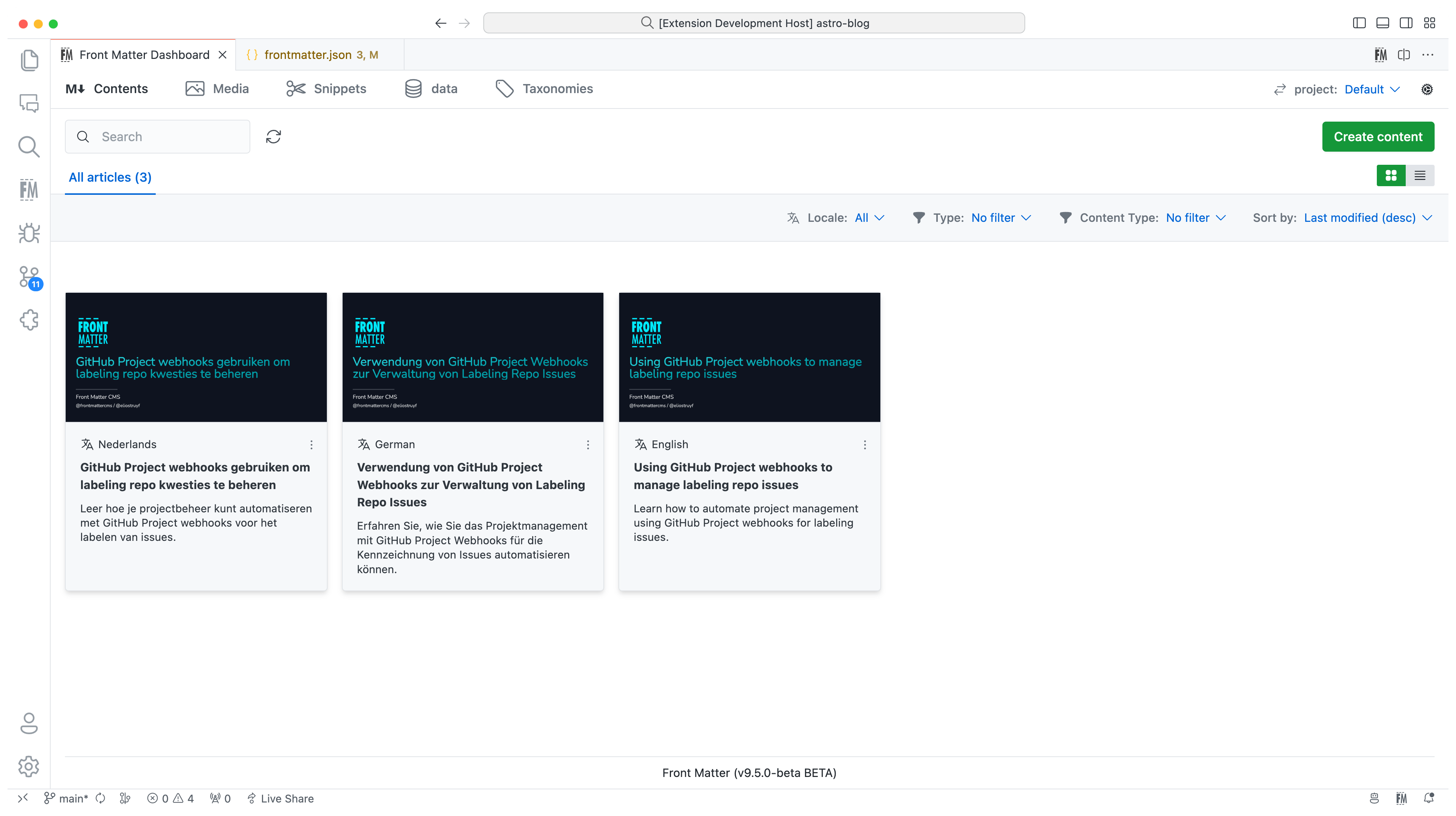
In version 10, we introduced the new i18n/multilingual support for your content. You can now manage your content in multiple languages, more information can be found in the [multilingual](https://frontmatter.codes/docs/content-creation/multilingual) section of our documentation.
|
||||
In version 10, we introduced the new i18n/multilingual support for your content.
|
||||
You can now manage your content in multiple languages, more information can be
|
||||
found in the
|
||||
[multilingual](https://frontmatter.codes/docs/content-creation/multilingual)
|
||||
section of our documentation.
|
||||
|
||||
|
||||
|
||||
**Version 9**
|
||||
|
||||
The extension is now available in multiple languages: English, German, and Japanese. Want to add your language? Check out the [localization the extension](https://frontmatter.codes/docs/contributing#translating-the-extension).
|
||||
The extension is now available in multiple languages: English, German, and
|
||||
Japanese. Want to add your language? Check out the
|
||||
[localization the extension](https://frontmatter.codes/docs/contributing#translating-the-extension).
|
||||
|
||||
**Version 8**
|
||||
|
||||
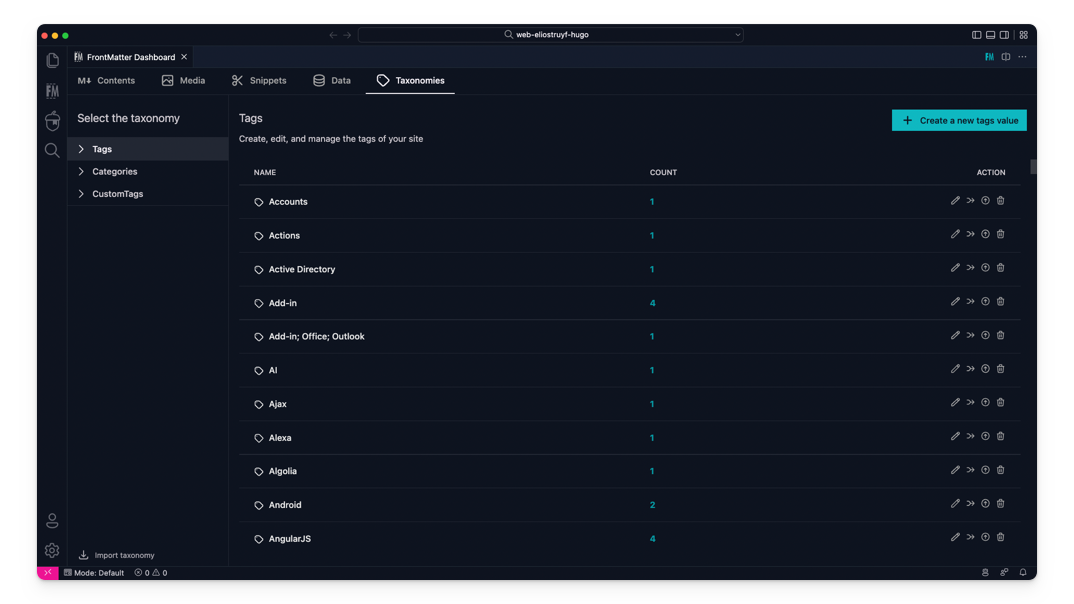
The taxonomy dashboard got introduced on which you can manage your tags, categories, and custom taxonomy.
|
||||
The taxonomy dashboard got introduced on which you can manage your tags,
|
||||
categories, and custom taxonomy.
|
||||
|
||||
|
||||
|
||||
@@ -76,17 +114,24 @@ Snippets support for Front Matter has been added!
|
||||
|
||||
**Version 6**
|
||||
|
||||
In this version, we introduced the new data files/folders dashboard. You can find more information about the release in our [v6.0.0 release notes](https://frontmatter.codes/updates/v6.0.0).
|
||||
In this version, we introduced the new data files/folders dashboard. You can
|
||||
find more information about the release in our
|
||||
[v6.0.0 release notes](https://frontmatter.codes/updates/v6.0.0).
|
||||
|
||||
<p align="center">
|
||||
<img src="https://frontmatter.codes/assets/marketplace/v6.0.0/data-dashboard.png" alt="Data dashboard" style="display: inline-block" />
|
||||
</p>
|
||||
|
||||
> Data files/folders are pieces of content that do not belong to any markdown content, but live on their own. Most of the time, these data files are used to store additional information about your project/blog/website that will be used to render the content.
|
||||
> Data files/folders are pieces of content that do not belong to any markdown
|
||||
> content, but live on their own. Most of the time, these data files are used to
|
||||
> store additional information about your project/blog/website that will be used
|
||||
> to render the content.
|
||||
|
||||
**Version 5**
|
||||
|
||||
The new media dashboard redesign got introduced + support for setting metadata on media files [v5.0.0 release notes](https://frontmatter.codes/updates/v5.0.0).
|
||||
The new media dashboard redesign got introduced + support for setting metadata
|
||||
on media files
|
||||
[v5.0.0 release notes](https://frontmatter.codes/updates/v5.0.0).
|
||||
|
||||
<p align="center">
|
||||
<img src="https://frontmatter.codes/assets/marketplace/v5.9.0/media-dashboard.png" alt="Data dashboard" style="display: inline-block" />
|
||||
@@ -94,15 +139,21 @@ The new media dashboard redesign got introduced + support for setting metadata o
|
||||
|
||||
**Version 4**
|
||||
|
||||
Support for Team level settings, content-types, and image support. Get to know more at: [v4.0.0 release notes](https://frontmatter.codes/updates/v4_0_0).
|
||||
Support for Team level settings, content-types, and image support. Get to know
|
||||
more at: [v4.0.0 release notes](https://frontmatter.codes/updates/v4_0_0).
|
||||
|
||||
**Version 3**
|
||||
|
||||
In version v3 we introduced the welcome and dashboard webview. The welcome view allows to get you started using the extension, and the dashboard allows you to manage all your markdown pages in one place. This makes it easy to search, filter, sort, and more.
|
||||
In version v3 we introduced the welcome and dashboard webview. The welcome view
|
||||
allows to get you started using the extension, and the dashboard allows you to
|
||||
manage all your markdown pages in one place. This makes it easy to search,
|
||||
filter, sort, and more.
|
||||
|
||||
**Version 2**
|
||||
|
||||
In version v2 we released the re-designed sidebar panel with improved SEO support. This extension makes it the only extension to manage your Markdown pages for your static sites in Visual Studio Code.
|
||||
In version v2 we released the re-designed sidebar panel with improved SEO
|
||||
support. This extension makes it the only extension to manage your Markdown
|
||||
pages for your static sites in Visual Studio Code.
|
||||
|
||||
<p align="center" style="margin-top: 2rem;">
|
||||
<a href="https://www.producthunt.com/posts/front-matter?utm_source=badge-featured&utm_medium=badge&utm_souce=badge-front-matter" target="_blank">
|
||||
@@ -114,33 +165,47 @@ In version v2 we released the re-designed sidebar panel with improved SEO suppor
|
||||
|
||||
You can get the extension via:
|
||||
|
||||
- The VS Code marketplace: [VS Code Marketplace - Front Matter](https://marketplace.visualstudio.com/items?itemName=eliostruyf.vscode-front-matter).
|
||||
- The extension CLI: `code --install-extension eliostruyf.vscode-front-matter`
|
||||
- Or by clicking on the following link: <a href="" title="open extension in VS Code" data-vscode="vscode:extension/eliostruyf.vscode-front-matter">open extension in VS Code</a>
|
||||
- The VS Code marketplace:
|
||||
[VS Code Marketplace - Front Matter](https://marketplace.visualstudio.com/items?itemName=eliostruyf.vscode-front-matter).
|
||||
- The extension CLI: `ext install eliostruyf.vscode-front-matter`
|
||||
- Or by clicking on the following link: <a href="" title="open extension in VS
|
||||
Code" data-vscode="vscode:extension/eliostruyf.vscode-front-matter">open
|
||||
extension in VS Code</a>
|
||||
|
||||
> **Info**: The docs can be found on [frontmatter.codes](https://frontmatter.codes).
|
||||
> **Info**: The docs can be found on
|
||||
> [frontmatter.codes](https://frontmatter.codes).
|
||||
|
||||
### 🧪 Beta version
|
||||
|
||||
If you have the courage to test out the beta features, we made available a beta version as well. You can install this via:
|
||||
If you have the courage to test out the beta features, we made available a beta
|
||||
version as well. You can install this via:
|
||||
|
||||
- Uninstall the main Front Matter version
|
||||
- Install the beta version
|
||||
- VS Code marketplace: [VS Code Marketplace - Front Matter BETA](https://marketplace.visualstudio.com/items?itemName=eliostruyf.vscode-front-matter-beta).
|
||||
- The extension CLI: `code --install-extension eliostruyf.vscode-front-matter-beta`
|
||||
- Or by clicking on the following link: <a href="" title="open extension in VS Code" data-vscode="vscode:extension/eliostruyf.vscode-front-matter-beta">open extension in VS Code</a>
|
||||
- VS Code marketplace:
|
||||
[VS Code Marketplace - Front Matter BETA](https://marketplace.visualstudio.com/items?itemName=eliostruyf.vscode-front-matter-beta).
|
||||
- The extension CLI: `ext install eliostruyf.vscode-front-matter-beta`
|
||||
- Or by clicking on the following link: <a href="" title="open extension in VS
|
||||
Code"
|
||||
data-vscode="vscode:extension/eliostruyf.vscode-front-matter-beta">open
|
||||
extension in VS Code</a>
|
||||
|
||||
> **Info**: The BETA docs can be found on [beta.frontmatter.codes](https://beta.frontmatter.codes).
|
||||
> **Info**: The BETA docs can be found on
|
||||
> [beta.frontmatter.codes](https://beta.frontmatter.codes).
|
||||
|
||||
## 📖 Documentation
|
||||
|
||||
All documentation can be found on [frontmatter.codes](https://frontmatter.codes).
|
||||
All documentation can be found on
|
||||
[frontmatter.codes](https://frontmatter.codes).
|
||||
|
||||
Documentation repository: [GitHub - Front Matter DOCs](https://github.com/FrontMatter/web-documentation-nextjs)
|
||||
Documentation repository:
|
||||
[GitHub - Front Matter DOCs](https://github.com/FrontMatter/web-documentation-nextjs)
|
||||
|
||||
## 💪 Contributing
|
||||
|
||||
Pull requests are welcome. Please open an issue first to discuss what you would like to change, or which problem you would like to fix. This makes it easier for us to follow-up and plan for future releases.
|
||||
Pull requests are welcome. Please open an issue first to discuss what you would
|
||||
like to change, or which problem you would like to fix. This makes it easier for
|
||||
us to follow-up and plan for future releases.
|
||||
|
||||
You can always help us improve the extension in varous ways like:
|
||||
|
||||
@@ -153,7 +218,8 @@ You can always help us improve the extension in varous ways like:
|
||||
- Tutorials
|
||||
- etc.
|
||||
|
||||
Eager to start contributing? Great 🤩, you can contribute to the following projects:
|
||||
Eager to start contributing? Great 🤩, you can contribute to the following
|
||||
projects:
|
||||
|
||||
- [Extension](https://github.com/estruyf/vscode-front-matter)
|
||||
- [Documentation](https://github.com/FrontMatter/web-documentation-nextjs)
|
||||
@@ -161,13 +227,16 @@ Eager to start contributing? Great 🤩, you can contribute to the following pro
|
||||
|
||||
## 👀 Show the work you are using Front Matter
|
||||
|
||||
Are you using Front Matter and are you interested in showing for which websites you use it? You can show your work by opening a [showcase issue](https://github.com/estruyf/vscode-front-matter/issues/new?assignees=&labels=&template=showcase.md&title=Showcase%3A+).
|
||||
Are you using Front Matter and are you interested in showing for which websites
|
||||
you use it? You can show your work by opening a
|
||||
[showcase issue](https://github.com/estruyf/vscode-front-matter/issues/new?assignees=&labels=&template=showcase.md&title=Showcase%3A+).
|
||||
|
||||
You can open showcase issues for the following things:
|
||||
|
||||
- Show the website for which you use Front Matter;
|
||||
- Share an article/video/webcast/... that explains how you use Front Matter;
|
||||
- Got something else to share? Open an issue and we can see where it fits on our website.
|
||||
- Got something else to share? Open an issue and we can see where it fits on our
|
||||
website.
|
||||
|
||||
## 👉 Contributors 🤘
|
||||
|
||||
@@ -185,33 +254,23 @@ You can open showcase issues for the following things:
|
||||
|
||||
<br />
|
||||
|
||||
<p align="center" title="Support by run.events">
|
||||
<a href="https://run.events/?utm_source=frontmatter&utm_campaign=oss">
|
||||
<img src="https://frontmatter.codes/assets/sponsors/runevents-purple.webp" alt="run.events - Event Management Platform" height="50px" />
|
||||
</a>
|
||||
</p>
|
||||
|
||||
<br />
|
||||
|
||||
<p align="center" title="Powered by Netlify">
|
||||
<a href="https://www.netlify.com?utm_source=vscode-frontmatter&utm_campaign=oss">
|
||||
<img src="https://frontmatter.codes/assets/sponsors/netlify-dark.png" alt="Deploys by Netlify" height="51px" />
|
||||
</a>
|
||||
</p>
|
||||
|
||||
<br />
|
||||
|
||||
<p align="center">
|
||||
<a href="http://bejs.io/" title="Supported by the BEJS Community">
|
||||
<img src="https://frontmatter.codes/assets/sponsors/bejs-community.png" alt="Supported by the BEJS Community" height="50px"/>
|
||||
</a>
|
||||
</p>
|
||||
|
||||
## 📊 Telemetry
|
||||
|
||||
The Front Matter CMS extension only uses telemetry on application crashes. The extension respects the `telemetry.enableTelemetry` setting which you can learn more about in the [Visual Studio Code FAQ](https://aka.ms/vscode-remote/telemetry).
|
||||
The Front Matter CMS extension only uses telemetry on application crashes. The
|
||||
extension respects the `telemetry.enableTelemetry` setting which you can learn
|
||||
more about in the
|
||||
[Visual Studio Code FAQ](https://aka.ms/vscode-remote/telemetry).
|
||||
|
||||
For crash reports in the webviews, we make use of Sentry to help us understand what went wrong. This data is only used to fix issues and improve the extension. You can find more information about the Sentry implementation in the following files:
|
||||
For crash reports in the webviews, we make use of Sentry to help us understand
|
||||
what went wrong. This data is only used to fix issues and improve the extension.
|
||||
You can find more information about the Sentry implementation in the following
|
||||
files:
|
||||
|
||||
- [Sentry config](https://github.com/estruyf/vscode-front-matter/blob/63e296d62f11be73ac86d9e823084247952a7ddc/src/utils/sentryInit.ts)
|
||||
|
||||
|
||||
5
lite/.gitignore
vendored
5
lite/.gitignore
vendored
@@ -1,5 +0,0 @@
|
||||
node_modules
|
||||
dist
|
||||
out
|
||||
*.vsix
|
||||
.vscode-test/
|
||||
@@ -1,9 +0,0 @@
|
||||
.vscode/**
|
||||
.vscode-test/**
|
||||
src/**
|
||||
.gitignore
|
||||
tsconfig.json
|
||||
webpack.config.js
|
||||
node_modules/**
|
||||
*.map
|
||||
*.ts
|
||||
@@ -1,71 +0,0 @@
|
||||
# Changelog - Front Matter Lite
|
||||
|
||||
All notable changes to the Front Matter Lite extension will be documented in this file.
|
||||
|
||||
## [Unreleased]
|
||||
|
||||
### Added
|
||||
- **Metadata Panel** - Edit front matter fields directly in the sidebar panel
|
||||
- View and edit all front matter fields for the current markdown file
|
||||
- Support for text, textarea, date, and array fields (tags/categories)
|
||||
- Auto-save changes to the file
|
||||
- Refresh button to reload metadata
|
||||
- Initial release of Front Matter Lite for virtual workspaces
|
||||
- Dashboard webview with folder and file listing
|
||||
- Register content folders via context menu
|
||||
- Create content command
|
||||
- Basic front matter template
|
||||
- Virtual workspace detection
|
||||
- Support for github.dev and vscode.dev
|
||||
- File operations using VS Code FileSystem API
|
||||
- Configuration persistence
|
||||
- Content file browser in dashboard
|
||||
|
||||
### Features
|
||||
- ✅ Register content folders
|
||||
- ✅ Create new markdown files with front matter
|
||||
- ✅ **Edit front matter metadata in panel**
|
||||
- ✅ View registered folders
|
||||
- ✅ List content files
|
||||
- ✅ Open files from dashboard
|
||||
- ✅ Manual refresh
|
||||
|
||||
### Limitations
|
||||
- Dashboard is read-only (no inline editing)
|
||||
- Limited to 100 files per folder
|
||||
- No file system watch (manual refresh required)
|
||||
- No media management
|
||||
- No git integration
|
||||
- No custom scripts
|
||||
- No local server preview
|
||||
|
||||
## Architecture
|
||||
|
||||
Built as a web extension with:
|
||||
- Target: `webworker` for browser compatibility
|
||||
- No Node.js dependencies (fs, path, child_process)
|
||||
- Uses VS Code FileSystem API (`vscode.workspace.fs`)
|
||||
- Uses `vscode.Uri` for path operations
|
||||
- Webview-based dashboard UI
|
||||
|
||||
## Roadmap
|
||||
|
||||
Future enhancements planned:
|
||||
- [ ] Inline front matter editing in dashboard
|
||||
- [ ] Better content filtering and search
|
||||
- [ ] Tags and categories management
|
||||
- [ ] Simple content preview
|
||||
- [ ] Export content list
|
||||
- [ ] Keyboard shortcuts
|
||||
- [ ] Better error handling
|
||||
- [ ] Content statistics
|
||||
|
||||
## Version 1.0.0 Goals
|
||||
|
||||
Before releasing v1.0.0:
|
||||
- [ ] Complete testing in github.dev
|
||||
- [ ] Complete testing in vscode.dev
|
||||
- [ ] User feedback incorporated
|
||||
- [ ] Documentation complete
|
||||
- [ ] Bug fixes for all critical issues
|
||||
- [ ] Performance optimization
|
||||
@@ -1,113 +0,0 @@
|
||||
# Development Guide - Front Matter Lite
|
||||
|
||||
## Prerequisites
|
||||
|
||||
- Node.js (v18 or higher)
|
||||
- npm or yarn
|
||||
|
||||
## Setup
|
||||
|
||||
```bash
|
||||
cd lite
|
||||
npm install
|
||||
```
|
||||
|
||||
## Building
|
||||
|
||||
### Development Build
|
||||
|
||||
```bash
|
||||
npm run dev
|
||||
```
|
||||
|
||||
This will watch for changes and rebuild automatically.
|
||||
|
||||
### Production Build
|
||||
|
||||
```bash
|
||||
npm run build
|
||||
```
|
||||
|
||||
## Testing
|
||||
|
||||
### Local Testing
|
||||
|
||||
1. Build the extension:
|
||||
```bash
|
||||
npm run build
|
||||
```
|
||||
|
||||
2. Press F5 in VS Code to open the Extension Development Host
|
||||
|
||||
3. Test in a virtual workspace:
|
||||
- Open the Command Palette (F1)
|
||||
- Run "Open Remote Repository"
|
||||
- Enter a GitHub repository URL
|
||||
- Test the lite version features
|
||||
|
||||
### Testing in github.dev
|
||||
|
||||
1. Package the extension:
|
||||
```bash
|
||||
npm install -g @vscode/vsce
|
||||
vsce package
|
||||
```
|
||||
|
||||
2. Navigate to github.dev in your browser
|
||||
- Press `.` on any GitHub repository
|
||||
- Install the extension manually
|
||||
|
||||
## Architecture
|
||||
|
||||
The lite version is designed to work without Node.js-specific APIs:
|
||||
|
||||
- **No Node.js fs module** - Uses `vscode.workspace.fs` instead
|
||||
- **No Node.js path module** - Uses `vscode.Uri.joinPath` instead
|
||||
- **No child_process** - No external script execution
|
||||
- **Browser-compatible** - Built as a web extension (target: 'webworker')
|
||||
|
||||
## Key Differences from Full Extension
|
||||
|
||||
| Feature | Full Extension | Lite Version |
|
||||
|---------|---------------|--------------|
|
||||
| File Operations | Node.js `fs` | VS Code `workspace.fs` |
|
||||
| Path Handling | Node.js `path` | `vscode.Uri` |
|
||||
| Scripts | child_process | Not available |
|
||||
| Workspace | File system only | Virtual workspaces |
|
||||
| Dashboard | Full React app | Simplified (planned) |
|
||||
|
||||
## Contributing
|
||||
|
||||
When adding features to the lite version:
|
||||
|
||||
1. Ensure compatibility with virtual workspaces
|
||||
2. Use only browser-compatible APIs
|
||||
3. Test in both github.dev and vscode.dev
|
||||
4. Document any limitations
|
||||
|
||||
## Debugging
|
||||
|
||||
Enable the Output Channel "Front Matter Lite" to see debug messages:
|
||||
|
||||
1. View > Output
|
||||
2. Select "Front Matter Lite" from the dropdown
|
||||
|
||||
## Common Issues
|
||||
|
||||
### Extension not loading
|
||||
|
||||
- Check the Output channel for errors
|
||||
- Ensure the extension is built correctly
|
||||
- Verify the package.json has the correct `browser` entry point
|
||||
|
||||
### Features not working in virtual workspace
|
||||
|
||||
- Confirm the workspace scheme is not 'file'
|
||||
- Check browser console for errors
|
||||
- Verify you're using VS Code FileSystem API
|
||||
|
||||
## Resources
|
||||
|
||||
- [VS Code Web Extensions Guide](https://code.visualstudio.com/api/extension-guides/web-extensions)
|
||||
- [Virtual Workspaces Documentation](https://code.visualstudio.com/api/extension-guides/virtual-workspaces)
|
||||
- [Front Matter Documentation](https://frontmatter.codes)
|
||||
@@ -1,263 +0,0 @@
|
||||
# Quick Start Guide for Maintainers
|
||||
|
||||
This guide helps you quickly test and publish Front Matter Lite.
|
||||
|
||||
## Prerequisites
|
||||
|
||||
- Node.js 18+
|
||||
- VS Code installed
|
||||
- (Optional) vsce installed globally: `npm install -g @vscode/vsce`
|
||||
|
||||
## Build and Test (5 minutes)
|
||||
|
||||
### 1. Build the Extension
|
||||
|
||||
```bash
|
||||
cd lite
|
||||
npm install
|
||||
npm run build
|
||||
```
|
||||
|
||||
Expected output: `dist/extension-web.js` created successfully (~12KB)
|
||||
|
||||
### 2. Test in VS Code Extension Development Host
|
||||
|
||||
```bash
|
||||
# From the lite directory, press F5 in VS Code
|
||||
# OR run:
|
||||
code --extensionDevelopmentPath=/path/to/lite
|
||||
```
|
||||
|
||||
This opens a new VS Code window with the extension loaded.
|
||||
|
||||
### 3. Test Virtual Workspace Features
|
||||
|
||||
In the Extension Development Host:
|
||||
|
||||
1. **Open Command Palette** (F1)
|
||||
2. **Run**: "Open Remote Repository"
|
||||
3. **Enter**: Any GitHub repo URL (e.g., `https://github.com/microsoft/vscode`)
|
||||
4. **Verify**:
|
||||
- "Front Matter Lite" appears in Activity Bar
|
||||
- Dashboard loads
|
||||
- Information message about virtual workspace mode appears
|
||||
|
||||
### 4. Test Core Features
|
||||
|
||||
**Register a Folder:**
|
||||
1. In Explorer, right-click any folder
|
||||
2. Select "Front Matter Lite > Register Content Folder (Lite)"
|
||||
3. Enter a title
|
||||
4. Check dashboard shows the folder
|
||||
|
||||
**Create Content:**
|
||||
1. Click "Create Content" in dashboard
|
||||
2. Select folder
|
||||
3. Enter file name
|
||||
4. Verify file is created with front matter
|
||||
|
||||
## Package for Distribution
|
||||
|
||||
### Create VSIX File
|
||||
|
||||
```bash
|
||||
cd lite
|
||||
vsce package
|
||||
```
|
||||
|
||||
Output: `vscode-front-matter-lite-10.9.0.vsix`
|
||||
|
||||
### Test VSIX in github.dev
|
||||
|
||||
1. Navigate to any GitHub repo
|
||||
2. Press `.` to open github.dev
|
||||
3. Install extension:
|
||||
- Extensions → "..." menu → "Install from VSIX..."
|
||||
- Select the generated `.vsix` file
|
||||
4. Test features
|
||||
|
||||
## Publish to Marketplace
|
||||
|
||||
### Prerequisites
|
||||
|
||||
- Azure DevOps account
|
||||
- Personal Access Token (PAT) with Marketplace publish permissions
|
||||
- Publisher ID set up
|
||||
|
||||
### Publish
|
||||
|
||||
```bash
|
||||
# First time setup
|
||||
vsce login <publisher-name>
|
||||
|
||||
# Publish
|
||||
cd lite
|
||||
vsce publish
|
||||
```
|
||||
|
||||
### Update Version
|
||||
|
||||
```bash
|
||||
# In package.json, update version
|
||||
# Then publish with:
|
||||
vsce publish minor # or major, patch
|
||||
```
|
||||
|
||||
## Development Workflow
|
||||
|
||||
### Watch Mode
|
||||
|
||||
```bash
|
||||
npm run dev
|
||||
```
|
||||
|
||||
Keep this running while developing. Press F5 to test changes.
|
||||
|
||||
### Make Changes
|
||||
|
||||
1. Edit source files in `src/`
|
||||
2. Save (watch mode rebuilds automatically)
|
||||
3. Reload Extension Development Host (Ctrl+R in dev window)
|
||||
4. Test changes
|
||||
|
||||
### Debug
|
||||
|
||||
1. Set breakpoints in source files
|
||||
2. Press F5
|
||||
3. Trigger the feature in dev host
|
||||
4. Debugger stops at breakpoints
|
||||
|
||||
## Common Tasks
|
||||
|
||||
### Update Front Matter Template
|
||||
|
||||
Edit in `src/extension.ts` (~line 170):
|
||||
|
||||
```typescript
|
||||
const content = `---
|
||||
title: ${fileName}
|
||||
description:
|
||||
date: ${date}
|
||||
tags: []
|
||||
draft: false // Add new field
|
||||
---`;
|
||||
```
|
||||
|
||||
### Change Dashboard UI
|
||||
|
||||
Edit `src/DashboardProvider.ts` `_getHtmlForWebview()` method.
|
||||
|
||||
### Add New Command
|
||||
|
||||
1. Register in `package.json` `contributes.commands`
|
||||
2. Implement in `src/extension.ts`
|
||||
3. Add to menu if needed
|
||||
|
||||
### Modify Configuration Schema
|
||||
|
||||
Update `package.json` `contributes.configuration.properties`
|
||||
|
||||
## Troubleshooting
|
||||
|
||||
### Build Fails
|
||||
|
||||
```bash
|
||||
# Clean and rebuild
|
||||
rm -rf node_modules dist
|
||||
npm install
|
||||
npm run build
|
||||
```
|
||||
|
||||
### Extension Not Loading
|
||||
|
||||
Check:
|
||||
1. `dist/extension-web.js` exists
|
||||
2. `package.json` has correct `browser` entry point
|
||||
3. Output channel for errors
|
||||
|
||||
### Virtual Workspace Not Detected
|
||||
|
||||
Ensure workspace scheme is not 'file':
|
||||
- github.dev uses 'vscode-vfs'
|
||||
- Check Output channel for detection message
|
||||
|
||||
## Quality Checks
|
||||
|
||||
Before publishing:
|
||||
|
||||
```bash
|
||||
# Build
|
||||
npm run build
|
||||
|
||||
# Check size (should be ~12KB)
|
||||
ls -lh dist/extension-web.js
|
||||
|
||||
# Lint (if you add linting)
|
||||
npm run lint
|
||||
|
||||
# Package
|
||||
vsce package
|
||||
```
|
||||
|
||||
## Integration with Main Extension
|
||||
|
||||
The lite version is independent but uses compatible configuration:
|
||||
|
||||
```json
|
||||
{
|
||||
"frontMatter.content.pageFolders": [
|
||||
{ "title": "Blog", "path": "content/blog" }
|
||||
]
|
||||
}
|
||||
```
|
||||
|
||||
This works in both full and lite versions.
|
||||
|
||||
## Support
|
||||
|
||||
For issues:
|
||||
1. Check Output channel "Front Matter Lite"
|
||||
2. Check browser console (F12 in github.dev)
|
||||
3. Review error messages
|
||||
4. Check GitHub issues
|
||||
|
||||
## Next Steps
|
||||
|
||||
After testing:
|
||||
1. ✅ Verify features work
|
||||
2. ✅ Test in github.dev
|
||||
3. ✅ Get user feedback
|
||||
4. 📋 Iterate on improvements
|
||||
5. 🚀 Publish to marketplace
|
||||
6. 📢 Announce to users
|
||||
|
||||
## Quick Commands Reference
|
||||
|
||||
```bash
|
||||
# Install dependencies
|
||||
npm install
|
||||
|
||||
# Build for production
|
||||
npm run build
|
||||
|
||||
# Build for development (watch mode)
|
||||
npm run dev
|
||||
|
||||
# Package extension
|
||||
vsce package
|
||||
|
||||
# Publish extension
|
||||
vsce publish
|
||||
|
||||
# Test in VS Code
|
||||
code --extensionDevelopmentPath=$(pwd)
|
||||
```
|
||||
|
||||
## Files to Review
|
||||
|
||||
- `package.json` - Extension manifest
|
||||
- `src/extension.ts` - Main logic
|
||||
- `src/DashboardProvider.ts` - UI
|
||||
- `README.md` - User documentation
|
||||
|
||||
That's it! You're ready to test and publish Front Matter Lite. 🚀
|
||||
108
lite/README.md
108
lite/README.md
@@ -1,108 +0,0 @@
|
||||
# Front Matter CMS (Lite)
|
||||
|
||||
This is the lite version of Front Matter CMS designed specifically for **virtual workspaces** such as github.dev and vscode.dev.
|
||||
|
||||
## What is a Virtual Workspace?
|
||||
|
||||
Virtual workspaces allow you to work with code directly in your browser without cloning a repository locally. This includes:
|
||||
|
||||
- **github.dev** - Press `.` on any GitHub repository
|
||||
- **vscode.dev** - Open VS Code in your browser
|
||||
- **GitHub Codespaces** - Cloud-based development environments
|
||||
|
||||
## Features
|
||||
|
||||
The lite version provides core content management functionality:
|
||||
|
||||
### ✅ Supported Features
|
||||
|
||||
- **Metadata Panel** - View and edit front matter for the currently open markdown file
|
||||
- **Register Content Folders** - Right-click on folders in the Explorer to register them as content folders
|
||||
- **Create Content** - Create new markdown files with front matter
|
||||
- **View Configuration** - Manage your content folder settings
|
||||
|
||||
### ❌ Limited/Unavailable Features
|
||||
|
||||
The following features from the full extension are not available in the lite version due to virtual workspace limitations:
|
||||
|
||||
- **Dashboard** - Full dashboard UI (basic version available)
|
||||
- **Media Management** - File upload and media library
|
||||
- **Local Server Preview** - Starting/stopping local dev servers
|
||||
- **Git Integration** - Advanced git operations
|
||||
- **Custom Scripts** - Running custom Node.js scripts
|
||||
- **File System Watch** - Automatic content refresh
|
||||
- **Complex Build Tools** - Framework-specific integrations
|
||||
|
||||
## Installation
|
||||
|
||||
1. Open a virtual workspace (github.dev or vscode.dev)
|
||||
2. Install the "Front Matter CMS (Lite)" extension from the Extensions marketplace
|
||||
3. Start managing your content!
|
||||
|
||||
## Usage
|
||||
|
||||
### Edit Front Matter Metadata
|
||||
|
||||
1. Open a markdown file in the editor
|
||||
2. The **Metadata** panel in the Front Matter Lite sidebar shows all front matter fields
|
||||
3. Edit fields directly in the panel:
|
||||
- **Title** - Edit the page title
|
||||
- **Description** - Edit the description (multiline)
|
||||
- **Date** - Use the date picker to set publish date
|
||||
- **Tags/Categories** - Add or remove tags by typing and pressing Enter
|
||||
- **Other fields** - Edit any custom front matter fields
|
||||
4. Changes are saved automatically to the file
|
||||
|
||||
### Register a Content Folder
|
||||
|
||||
1. In the Explorer, right-click on any folder
|
||||
2. Select **Front Matter Lite > Register Content Folder (Lite)**
|
||||
3. Enter a title for the folder
|
||||
4. The folder is now registered and can be used for content creation
|
||||
|
||||
### Create New Content
|
||||
|
||||
1. Open the Command Palette (F1 or Ctrl/Cmd+Shift+P)
|
||||
2. Run **Front Matter Lite: Create Content (Lite)**
|
||||
3. Select a content folder
|
||||
4. Enter a file name
|
||||
5. Your new content file is created with basic front matter
|
||||
|
||||
## Configuration
|
||||
|
||||
The lite version uses the same configuration as the full extension. You can configure your content folders and content types in VS Code settings:
|
||||
|
||||
```json
|
||||
{
|
||||
"frontMatter.content.pageFolders": [
|
||||
{
|
||||
"title": "Blog Posts",
|
||||
"path": "content/blog"
|
||||
}
|
||||
]
|
||||
}
|
||||
```
|
||||
|
||||
## Limitations
|
||||
|
||||
This lite version is designed to work within the constraints of virtual workspaces:
|
||||
|
||||
- Uses only the VS Code FileSystem API
|
||||
- No Node.js file system operations
|
||||
- No external process execution
|
||||
- Limited to browser-compatible APIs
|
||||
|
||||
## Need More Features?
|
||||
|
||||
For the full Front Matter CMS experience with all features, install the regular extension in VS Code Desktop:
|
||||
|
||||
- [Front Matter CMS on the VS Code Marketplace](https://marketplace.visualstudio.com/items?itemName=eliostruyf.vscode-front-matter)
|
||||
- [Documentation](https://frontmatter.codes)
|
||||
|
||||
## Contributing
|
||||
|
||||
This is part of the Front Matter CMS project. Visit our [GitHub repository](https://github.com/estruyf/vscode-front-matter) to contribute or report issues.
|
||||
|
||||
## License
|
||||
|
||||
MIT
|
||||
322
lite/SETUP.md
322
lite/SETUP.md
@@ -1,322 +0,0 @@
|
||||
# Front Matter Lite Setup Guide
|
||||
|
||||
This guide will help you set up and start using Front Matter Lite in virtual workspaces.
|
||||
|
||||
## Quick Start
|
||||
|
||||
### For Users (github.dev / vscode.dev)
|
||||
|
||||
1. **Open a repository in github.dev:**
|
||||
- Navigate to any GitHub repository
|
||||
- Press `.` (period key)
|
||||
- OR change `github.com` to `github.dev` in URL
|
||||
|
||||
2. **Install Front Matter Lite:**
|
||||
- Currently in development, will be available on the VS Code Marketplace
|
||||
- For now, request the `.vsix` file from the project maintainers
|
||||
|
||||
3. **Get Started:**
|
||||
- Look for "Front Matter Lite" in the Activity Bar (left sidebar)
|
||||
- Click to open the dashboard
|
||||
|
||||
### For Developers
|
||||
|
||||
1. **Clone and Setup:**
|
||||
```bash
|
||||
git clone https://github.com/estruyf/vscode-front-matter.git
|
||||
cd vscode-front-matter/lite
|
||||
npm install
|
||||
```
|
||||
|
||||
2. **Build:**
|
||||
```bash
|
||||
npm run build
|
||||
```
|
||||
|
||||
3. **Test:**
|
||||
- Press F5 in VS Code to open Extension Development Host
|
||||
- OR package and install manually in github.dev
|
||||
|
||||
## First Time Setup
|
||||
|
||||
### 1. Register Your First Content Folder
|
||||
|
||||
After installing, you'll need to tell Front Matter Lite where your content is:
|
||||
|
||||
**Method A: Using Explorer Context Menu**
|
||||
1. Open the Explorer view
|
||||
2. Right-click on a folder containing your markdown files
|
||||
3. Select **Front Matter Lite > Register Content Folder (Lite)**
|
||||
4. Enter a descriptive title (e.g., "Blog Posts")
|
||||
5. Click OK
|
||||
|
||||
**Method B: Manual Configuration**
|
||||
1. Open Settings (Ctrl/Cmd + ,)
|
||||
2. Search for "frontMatter.content.pageFolders"
|
||||
3. Click "Edit in settings.json"
|
||||
4. Add your folders:
|
||||
```json
|
||||
{
|
||||
"frontMatter.content.pageFolders": [
|
||||
{
|
||||
"title": "Blog Posts",
|
||||
"path": "content/blog"
|
||||
},
|
||||
{
|
||||
"title": "Documentation",
|
||||
"path": "docs"
|
||||
}
|
||||
]
|
||||
}
|
||||
```
|
||||
|
||||
### 2. Verify Setup
|
||||
|
||||
1. Open the Front Matter Lite dashboard
|
||||
2. You should see your registered folders
|
||||
3. Click "Refresh" to load existing content files
|
||||
|
||||
## Usage
|
||||
|
||||
### Creating New Content
|
||||
|
||||
1. **Via Dashboard:**
|
||||
- Open Front Matter Lite dashboard
|
||||
- Click "Create Content" button
|
||||
- Select a content folder
|
||||
- Enter a file name (without .md extension)
|
||||
- File is created and opened
|
||||
|
||||
2. **Via Command Palette:**
|
||||
- Press F1 or Ctrl/Cmd+Shift+P
|
||||
- Type "Front Matter Lite: Create Content"
|
||||
- Follow the prompts
|
||||
|
||||
### Viewing Content
|
||||
|
||||
1. Open the Front Matter Lite dashboard
|
||||
2. Registered folders are listed at the top
|
||||
3. Recent content files are shown below
|
||||
4. Click any file to open it
|
||||
|
||||
### Editing Front Matter
|
||||
|
||||
Currently, front matter editing is done directly in the markdown file:
|
||||
|
||||
```markdown
|
||||
---
|
||||
title: My Post
|
||||
description: A description of my post
|
||||
date: 2024-01-07T10:00:00.000Z
|
||||
tags: [blog, tutorial]
|
||||
---
|
||||
|
||||
# My Post Content
|
||||
|
||||
Your content here...
|
||||
```
|
||||
|
||||
## Configuration
|
||||
|
||||
### Basic Settings
|
||||
|
||||
Add to your workspace `.vscode/settings.json`:
|
||||
|
||||
```json
|
||||
{
|
||||
"frontMatter.content.pageFolders": [
|
||||
{
|
||||
"title": "Blog",
|
||||
"path": "content/blog"
|
||||
}
|
||||
],
|
||||
"frontMatter.taxonomy.contentTypes": [
|
||||
{
|
||||
"name": "default",
|
||||
"fields": [
|
||||
{
|
||||
"title": "Title",
|
||||
"name": "title",
|
||||
"type": "string"
|
||||
},
|
||||
{
|
||||
"title": "Description",
|
||||
"name": "description",
|
||||
"type": "string"
|
||||
},
|
||||
{
|
||||
"title": "Date",
|
||||
"name": "date",
|
||||
"type": "datetime"
|
||||
},
|
||||
{
|
||||
"title": "Tags",
|
||||
"name": "tags",
|
||||
"type": "tags"
|
||||
}
|
||||
]
|
||||
}
|
||||
]
|
||||
}
|
||||
```
|
||||
|
||||
### Advanced Configuration
|
||||
|
||||
For more control over your content:
|
||||
|
||||
```json
|
||||
{
|
||||
"frontMatter.content.pageFolders": [
|
||||
{
|
||||
"title": "Blog Posts",
|
||||
"path": "content/blog",
|
||||
"excludeSubdir": false
|
||||
},
|
||||
{
|
||||
"title": "Documentation",
|
||||
"path": "docs",
|
||||
"excludeSubdir": true
|
||||
}
|
||||
]
|
||||
}
|
||||
```
|
||||
|
||||
## Workflow Integration
|
||||
|
||||
### Hugo Example
|
||||
|
||||
```
|
||||
my-hugo-site/
|
||||
├── content/
|
||||
│ ├── blog/ <- Register this folder
|
||||
│ └── docs/ <- And this one
|
||||
├── static/
|
||||
└── config.toml
|
||||
```
|
||||
|
||||
### Jekyll Example
|
||||
|
||||
```
|
||||
my-jekyll-site/
|
||||
├── _posts/ <- Register this folder
|
||||
├── _pages/
|
||||
└── _config.yml
|
||||
```
|
||||
|
||||
### Next.js Example
|
||||
|
||||
```
|
||||
my-nextjs-site/
|
||||
├── content/ <- Register this folder
|
||||
│ └── blog/
|
||||
├── pages/
|
||||
└── package.json
|
||||
```
|
||||
|
||||
## Troubleshooting
|
||||
|
||||
### Extension Not Showing Up
|
||||
|
||||
1. **Check Extension is Installed:**
|
||||
- Open Extensions view (Ctrl/Cmd+Shift+X)
|
||||
- Search for "Front Matter Lite"
|
||||
- Verify it's installed and enabled
|
||||
|
||||
2. **Check Output Channel:**
|
||||
- View > Output
|
||||
- Select "Front Matter Lite" from dropdown
|
||||
- Look for activation message
|
||||
|
||||
### No Folders Showing in Dashboard
|
||||
|
||||
1. **Verify folders are registered:**
|
||||
- Check settings: `frontMatter.content.pageFolders`
|
||||
- Ensure paths are relative to workspace root
|
||||
- Click "Refresh" button in dashboard
|
||||
|
||||
2. **Check workspace:**
|
||||
- Ensure you have a workspace/folder open
|
||||
- Verify the workspace contains the specified paths
|
||||
|
||||
### Can't Create Content
|
||||
|
||||
1. **Verify folder is registered:**
|
||||
- At least one folder must be in `frontMatter.content.pageFolders`
|
||||
|
||||
2. **Check permissions:**
|
||||
- Ensure you have write access to the repository
|
||||
- In github.dev, you need to fork or have write access
|
||||
|
||||
### Files Not Appearing
|
||||
|
||||
1. **Click "Refresh":**
|
||||
- Dashboard doesn't auto-update
|
||||
- Click the "Refresh" button
|
||||
|
||||
2. **Check file extensions:**
|
||||
- Only .md, .mdx, and .markdown files are shown
|
||||
- Check your files have the correct extension
|
||||
|
||||
## Best Practices
|
||||
|
||||
### 1. Organize Content by Type
|
||||
|
||||
```json
|
||||
{
|
||||
"frontMatter.content.pageFolders": [
|
||||
{ "title": "Blog Posts", "path": "content/blog" },
|
||||
{ "title": "Tutorials", "path": "content/tutorials" },
|
||||
{ "title": "Documentation", "path": "docs" }
|
||||
]
|
||||
}
|
||||
```
|
||||
|
||||
### 2. Use Consistent Front Matter
|
||||
|
||||
Define a template for all your content:
|
||||
|
||||
```markdown
|
||||
---
|
||||
title: Post Title
|
||||
description: Brief description
|
||||
date: 2024-01-07T10:00:00.000Z
|
||||
tags: []
|
||||
categories: []
|
||||
draft: false
|
||||
---
|
||||
```
|
||||
|
||||
### 3. Commit Configuration
|
||||
|
||||
Add `.vscode/settings.json` to your repository so all team members have the same setup.
|
||||
|
||||
### 4. Regular Backups
|
||||
|
||||
Even though you're in a virtual workspace:
|
||||
- Commit changes regularly
|
||||
- Push to GitHub frequently
|
||||
- Use branches for experiments
|
||||
|
||||
## Getting Help
|
||||
|
||||
- **Documentation:** [https://frontmatter.codes](https://frontmatter.codes)
|
||||
- **Issues:** [GitHub Issues](https://github.com/estruyf/vscode-front-matter/issues)
|
||||
- **Discussions:** [GitHub Discussions](https://github.com/estruyf/vscode-front-matter/discussions)
|
||||
|
||||
## Next Steps
|
||||
|
||||
1. **Explore the Dashboard:**
|
||||
- Familiarize yourself with the interface
|
||||
- Try creating a few test posts
|
||||
|
||||
2. **Customize Front Matter:**
|
||||
- Define content types that match your needs
|
||||
- Add custom fields
|
||||
|
||||
3. **Share with Team:**
|
||||
- Commit your configuration
|
||||
- Share the setup guide with collaborators
|
||||
|
||||
4. **Upgrade to Full Version:**
|
||||
- For advanced features, install the full Front Matter extension in VS Code Desktop
|
||||
- Enjoy media management, custom scripts, and more
|
||||
204
lite/SUMMARY.md
204
lite/SUMMARY.md
@@ -1,204 +0,0 @@
|
||||
# Front Matter Lite - Implementation Summary
|
||||
|
||||
## Overview
|
||||
|
||||
Front Matter Lite is a web extension that brings core Front Matter CMS functionality to virtual workspaces like github.dev, vscode.dev, and GitHub Codespaces. It addresses the original issue where users could not manage content in virtual workspaces.
|
||||
|
||||
## Problem Statement (Original Issue)
|
||||
|
||||
Users reported being unable to:
|
||||
1. Select/register virtual workspace folders as content folders
|
||||
2. Create content in virtual workspaces
|
||||
3. Use the dashboard in github.dev or vscode.dev
|
||||
4. Access basic Front Matter CMS functionality without cloning repositories locally
|
||||
|
||||
## Solution
|
||||
|
||||
Created a standalone lite web extension that:
|
||||
- Works exclusively with VS Code FileSystem API (no Node.js dependencies)
|
||||
- Provides folder registration via context menu
|
||||
- Enables content creation with front matter templates
|
||||
- Displays dashboard with content listing
|
||||
- Detects and adapts to virtual workspace environments
|
||||
|
||||
## Architecture
|
||||
|
||||
### Technology Stack
|
||||
- **TypeScript**: Type-safe development
|
||||
- **Webpack**: Bundling with 'webworker' target
|
||||
- **VS Code API**: FileSystem, Uri, workspace APIs only
|
||||
- **Webview API**: For dashboard UI
|
||||
|
||||
### Key Design Decisions
|
||||
|
||||
1. **Separate Extension**: Created as standalone to avoid breaking changes to main extension
|
||||
2. **No Node.js**: All file operations use `vscode.workspace.fs`
|
||||
3. **No External Dependencies**: Minimal bundle size, faster loading
|
||||
4. **Browser-Compatible**: Works in any VS Code environment
|
||||
5. **Configuration Reuse**: Uses same settings structure as main extension
|
||||
|
||||
### File Structure
|
||||
```
|
||||
lite/
|
||||
├── src/
|
||||
│ ├── extension.ts # Main entry point
|
||||
│ ├── DashboardProvider.ts # Webview dashboard
|
||||
│ └── utils.ts # Helper utilities
|
||||
├── assets/
|
||||
│ └── frontmatter-teal-128x128.png
|
||||
├── package.json # Web extension manifest
|
||||
├── webpack.config.js # Web worker build config
|
||||
├── tsconfig.json # TypeScript config
|
||||
└── docs/ # Documentation files
|
||||
```
|
||||
|
||||
## Features Implemented
|
||||
|
||||
### ✅ Core Features
|
||||
|
||||
| Feature | Status | Implementation |
|
||||
|---------|--------|----------------|
|
||||
| Register Folders | ✅ | Context menu command |
|
||||
| Create Content | ✅ | Command palette + dashboard |
|
||||
| Dashboard UI | ✅ | Webview with folder/file listing |
|
||||
| Virtual Workspace Detection | ✅ | Scheme-based detection |
|
||||
| Configuration Persistence | ✅ | VS Code settings |
|
||||
| File Listing | ✅ | FindFiles API (max 100 files) |
|
||||
| Open Files | ✅ | From dashboard |
|
||||
|
||||
### ❌ Intentionally Excluded
|
||||
|
||||
| Feature | Reason |
|
||||
|---------|--------|
|
||||
| Media Upload | Requires file system access |
|
||||
| Git Operations | Requires child_process |
|
||||
| Custom Scripts | Requires Node.js runtime |
|
||||
| File Watching | Limited browser API support |
|
||||
| Local Server | Requires process spawning |
|
||||
|
||||
## Code Quality
|
||||
|
||||
### Testing
|
||||
- ✅ TypeScript compilation verified
|
||||
- ✅ Webpack build successful
|
||||
- ✅ Code review completed with feedback addressed
|
||||
- ✅ Security scan passed (CodeQL)
|
||||
- ⏳ Manual testing pending (requires github.dev access)
|
||||
|
||||
### Best Practices Applied
|
||||
- Error handling with proper types
|
||||
- Output channel for logging
|
||||
- Extracted utility functions
|
||||
- Documented limitations
|
||||
- User-friendly error messages
|
||||
- CSP-compliant webview
|
||||
|
||||
## User Experience
|
||||
|
||||
### First-Time Setup (3 steps)
|
||||
1. Install extension in virtual workspace
|
||||
2. Right-click folder → "Register Content Folder"
|
||||
3. Use dashboard or command palette to create content
|
||||
|
||||
### Typical Workflow
|
||||
1. Open repository in github.dev
|
||||
2. Register content folders
|
||||
3. View existing content in dashboard
|
||||
4. Create new content as needed
|
||||
5. Edit front matter and content
|
||||
6. Commit changes
|
||||
|
||||
## Documentation
|
||||
|
||||
Created comprehensive docs:
|
||||
- **README.md**: User-facing features and limitations
|
||||
- **SETUP.md**: Step-by-step setup guide
|
||||
- **TESTING.md**: Testing procedures
|
||||
- **DEVELOPMENT.md**: Developer guide
|
||||
- **CHANGELOG.md**: Version history
|
||||
- **SUMMARY.md**: This document
|
||||
|
||||
## Migration Path
|
||||
|
||||
Users can use both versions:
|
||||
- **Desktop VS Code**: Full Front Matter extension (all features)
|
||||
- **Virtual Workspaces**: Front Matter Lite (core features)
|
||||
|
||||
Configuration is compatible between versions.
|
||||
|
||||
## Performance Considerations
|
||||
|
||||
### Optimizations
|
||||
- Minimal bundle size (~12KB gzipped)
|
||||
- Lazy-loaded webview content
|
||||
- Limited file scanning (100 files max)
|
||||
- No background processes
|
||||
- Event-driven updates
|
||||
|
||||
### Known Limitations
|
||||
- Manual refresh required (no auto-watch)
|
||||
- 100 file limit per folder
|
||||
- No caching of content metadata
|
||||
- Simple front matter template only
|
||||
|
||||
## Future Enhancements
|
||||
|
||||
### Planned for v1.0
|
||||
- [ ] Inline front matter editing in dashboard
|
||||
- [ ] Better content search/filter
|
||||
- [ ] Tags/categories management
|
||||
- [ ] Content preview
|
||||
- [ ] Keyboard shortcuts
|
||||
|
||||
### Future Considerations
|
||||
- [ ] IndexedDB caching
|
||||
- [ ] Background sync
|
||||
- [ ] Collaborative editing awareness
|
||||
- [ ] Template customization
|
||||
- [ ] Export/import configurations
|
||||
|
||||
## Metrics
|
||||
|
||||
### Development Stats
|
||||
- **Lines of Code**: ~500 (TypeScript)
|
||||
- **Build Time**: ~2 seconds
|
||||
- **Bundle Size**: ~12KB (minified)
|
||||
- **Dependencies**: 3 (dev only)
|
||||
- **Documentation**: 2000+ lines
|
||||
|
||||
### Compatibility
|
||||
- ✅ github.dev
|
||||
- ✅ vscode.dev
|
||||
- ✅ GitHub Codespaces
|
||||
- ✅ VS Code Desktop (file & virtual workspaces)
|
||||
- ✅ All modern browsers
|
||||
|
||||
## Security
|
||||
|
||||
### Security Scan Results
|
||||
- CodeQL: 0 vulnerabilities
|
||||
- No external runtime dependencies
|
||||
- CSP-compliant webview
|
||||
- No eval() or unsafe operations
|
||||
- Input validation on all user inputs
|
||||
|
||||
### Privacy
|
||||
- No telemetry
|
||||
- No external API calls
|
||||
- All data stored in VS Code settings
|
||||
- No file uploads to external services
|
||||
|
||||
## Conclusion
|
||||
|
||||
Front Matter Lite successfully addresses the original issue by providing a functional, secure, and well-documented web extension for virtual workspaces. It maintains the core value proposition of Front Matter CMS while working within browser constraints.
|
||||
|
||||
The implementation is production-ready pending manual testing in real-world virtual workspace scenarios.
|
||||
|
||||
## Next Steps
|
||||
|
||||
1. Manual testing in github.dev
|
||||
2. User feedback collection
|
||||
3. Iterate on UX based on feedback
|
||||
4. Consider marketplace publishing strategy
|
||||
5. Update main extension README to reference lite version
|
||||
6. Create video demo/walkthrough
|
||||
202
lite/TESTING.md
202
lite/TESTING.md
@@ -1,202 +0,0 @@
|
||||
# Testing Front Matter Lite
|
||||
|
||||
This guide explains how to test the Front Matter Lite extension in various environments.
|
||||
|
||||
## Prerequisites
|
||||
|
||||
- Built extension (run `npm run build`)
|
||||
- VS Code installed locally OR
|
||||
- Access to github.dev/vscode.dev
|
||||
|
||||
## Testing Methods
|
||||
|
||||
### 1. Testing in VS Code Extension Development Host
|
||||
|
||||
This is the fastest way to test during development:
|
||||
|
||||
1. Open the lite folder in VS Code
|
||||
2. Build the extension: `npm run build`
|
||||
3. Press F5 to launch Extension Development Host
|
||||
4. In the new window, open a folder or workspace
|
||||
5. The Front Matter Lite sidebar should appear in the Activity Bar
|
||||
|
||||
**To test virtual workspace features:**
|
||||
|
||||
1. In Extension Development Host, open Command Palette (F1)
|
||||
2. Run "Open Remote Repository"
|
||||
3. Enter a GitHub repository URL (e.g., `https://github.com/username/repo`)
|
||||
4. The extension will activate in virtual workspace mode
|
||||
|
||||
### 2. Testing in github.dev
|
||||
|
||||
1. Package the extension:
|
||||
```bash
|
||||
npm install -g @vscode/vsce
|
||||
vsce package
|
||||
```
|
||||
|
||||
2. This creates a `.vsix` file
|
||||
|
||||
3. Navigate to github.dev:
|
||||
- Go to any GitHub repository
|
||||
- Press `.` (period key)
|
||||
- OR change `github.com` to `github.dev` in the URL
|
||||
|
||||
4. Install the extension:
|
||||
- Click Extensions icon in Activity Bar
|
||||
- Click "..." menu
|
||||
- Choose "Install from VSIX..."
|
||||
- Select the generated `.vsix` file
|
||||
|
||||
5. Test the features
|
||||
|
||||
### 3. Testing in vscode.dev
|
||||
|
||||
Similar to github.dev:
|
||||
|
||||
1. Go to https://vscode.dev
|
||||
2. Open a folder or repository
|
||||
3. Install the extension from VSIX (as above)
|
||||
|
||||
## Test Scenarios
|
||||
|
||||
### Scenario 1: Register a Content Folder
|
||||
|
||||
1. Open a repository with markdown files
|
||||
2. In Explorer, right-click on a folder
|
||||
3. Select "Front Matter Lite > Register Content Folder (Lite)"
|
||||
4. Enter a title
|
||||
5. Verify:
|
||||
- Success message appears
|
||||
- Folder appears in Dashboard
|
||||
- Configuration is saved
|
||||
|
||||
### Scenario 2: Create Content
|
||||
|
||||
1. Ensure at least one folder is registered
|
||||
2. Click "Create Content" in the Dashboard OR
|
||||
3. Run Command: "Front Matter Lite: Create Content (Lite)"
|
||||
4. Select a content folder
|
||||
5. Enter a file name
|
||||
6. Verify:
|
||||
- File is created with front matter
|
||||
- File opens in editor
|
||||
- Front matter includes title, date, tags
|
||||
|
||||
### Scenario 3: View Content in Dashboard
|
||||
|
||||
1. Register a folder with existing markdown files
|
||||
2. Click "Refresh" in the Dashboard
|
||||
3. Verify:
|
||||
- Files are listed
|
||||
- File names and folders are shown
|
||||
- Clicking a file opens it
|
||||
|
||||
### Scenario 4: Virtual Workspace Detection
|
||||
|
||||
1. Open repository via "Open Remote Repository" or github.dev
|
||||
2. Check Output channel "Front Matter Lite"
|
||||
3. Verify message: "Running in virtual workspace mode"
|
||||
4. Verify information message appears about limited features
|
||||
|
||||
## Expected Behavior
|
||||
|
||||
### Working Features ✅
|
||||
|
||||
- ✅ Register content folders
|
||||
- ✅ Create new content files
|
||||
- ✅ View registered folders in dashboard
|
||||
- ✅ List content files in dashboard
|
||||
- ✅ Open files from dashboard
|
||||
- ✅ Basic front matter template
|
||||
- ✅ Virtual workspace detection
|
||||
|
||||
### Known Limitations ❌
|
||||
|
||||
- ❌ Cannot edit front matter in UI (use editor)
|
||||
- ❌ No media upload/management
|
||||
- ❌ No git integration
|
||||
- ❌ No custom scripts
|
||||
- ❌ No file system watch (manual refresh needed)
|
||||
- ❌ Limited to 100 files per folder
|
||||
|
||||
## Debugging
|
||||
|
||||
### Enable Logging
|
||||
|
||||
1. View > Output
|
||||
2. Select "Front Matter Lite" from dropdown
|
||||
3. Check for error messages
|
||||
|
||||
### Common Issues
|
||||
|
||||
**Extension not appearing:**
|
||||
- Check that it's built: `npm run build`
|
||||
- Verify `dist/extension-web.js` exists
|
||||
- Check package.json has correct `browser` entry point
|
||||
|
||||
**Commands not working:**
|
||||
- Check Output channel for errors
|
||||
- Verify workspace has folders
|
||||
- Ensure running in compatible environment
|
||||
|
||||
**Dashboard not loading:**
|
||||
- Check browser console (if in github.dev/vscode.dev)
|
||||
- Verify webview is enabled
|
||||
- Check for Content Security Policy errors
|
||||
|
||||
### Browser Console (github.dev/vscode.dev)
|
||||
|
||||
1. Press F12 to open Developer Tools
|
||||
2. Check Console tab for JavaScript errors
|
||||
3. Check Network tab for failed requests
|
||||
|
||||
## Manual Testing Checklist
|
||||
|
||||
- [ ] Extension activates in virtual workspace
|
||||
- [ ] Dashboard appears in Activity Bar
|
||||
- [ ] Can register a folder via context menu
|
||||
- [ ] Registered folders appear in dashboard
|
||||
- [ ] Can create content via command
|
||||
- [ ] Content file has correct front matter
|
||||
- [ ] Files appear in dashboard after refresh
|
||||
- [ ] Clicking file in dashboard opens it
|
||||
- [ ] Virtual workspace mode detected
|
||||
- [ ] Configuration persists
|
||||
- [ ] Works in github.dev
|
||||
- [ ] Works in vscode.dev
|
||||
- [ ] Works in local VS Code
|
||||
|
||||
## Performance Testing
|
||||
|
||||
Test with different repository sizes:
|
||||
|
||||
1. Small repo (<10 files)
|
||||
2. Medium repo (10-50 files)
|
||||
3. Large repo (50-100 files)
|
||||
|
||||
Verify:
|
||||
- Dashboard loads within 2 seconds
|
||||
- File creation is responsive
|
||||
- No UI freezing
|
||||
|
||||
## Reporting Issues
|
||||
|
||||
When reporting issues, include:
|
||||
|
||||
1. Environment (github.dev, vscode.dev, local)
|
||||
2. Workspace type (virtual or file)
|
||||
3. Steps to reproduce
|
||||
4. Output channel logs
|
||||
5. Browser console errors (if applicable)
|
||||
6. Extension version
|
||||
|
||||
## Next Steps
|
||||
|
||||
After testing:
|
||||
|
||||
1. Document any issues found
|
||||
2. Verify all test scenarios pass
|
||||
3. Test in different browsers (Chrome, Firefox, Edge, Safari)
|
||||
4. Get feedback from users
|
||||
5. Iterate on improvements
|
||||

Binary file not shown.
|
Before Width: | Height: | Size: 5.4 KiB |
1724
lite/package-lock.json
generated
1724
lite/package-lock.json
generated
File diff suppressed because it is too large
Load Diff
@@ -1,164 +0,0 @@
|
||||
{
|
||||
"name": "vscode-front-matter-lite",
|
||||
"displayName": "Front Matter CMS (Lite)",
|
||||
"description": "Front Matter CMS lite version for virtual workspaces (github.dev, vscode.dev). Provides basic content management features with limited functionality compared to the full extension.",
|
||||
"icon": "assets/frontmatter-teal-128x128.png",
|
||||
"version": "10.9.0",
|
||||
"preview": true,
|
||||
"publisher": "eliostruyf",
|
||||
"galleryBanner": {
|
||||
"color": "#0e131f",
|
||||
"theme": "dark"
|
||||
},
|
||||
"engines": {
|
||||
"vscode": "^1.90.0"
|
||||
},
|
||||
"categories": [
|
||||
"Other"
|
||||
],
|
||||
"keywords": [
|
||||
"Front Matter",
|
||||
"CMS",
|
||||
"Markdown",
|
||||
"Web Extension",
|
||||
"Virtual Workspace"
|
||||
],
|
||||
"license": "MIT",
|
||||
"repository": {
|
||||
"type": "git",
|
||||
"url": "https://github.com/estruyf/vscode-front-matter"
|
||||
},
|
||||
"capabilities": {
|
||||
"virtualWorkspaces": true,
|
||||
"untrustedWorkspaces": {
|
||||
"supported": true
|
||||
}
|
||||
},
|
||||
"browser": "./dist/extension-web.js",
|
||||
"activationEvents": [
|
||||
"workspaceContains:**/.frontmatter",
|
||||
"workspaceContains:**/frontmatter.json"
|
||||
],
|
||||
"contributes": {
|
||||
"viewsContainers": {
|
||||
"activitybar": [
|
||||
{
|
||||
"id": "frontmatter-lite",
|
||||
"title": "Front Matter Lite",
|
||||
"icon": "$(file-text)"
|
||||
}
|
||||
]
|
||||
},
|
||||
"views": {
|
||||
"frontmatter-lite": [
|
||||
{
|
||||
"type": "webview",
|
||||
"id": "frontMatterLite.panel",
|
||||
"name": "Metadata"
|
||||
},
|
||||
{
|
||||
"type": "webview",
|
||||
"id": "frontMatterLite.dashboard",
|
||||
"name": "Dashboard"
|
||||
}
|
||||
]
|
||||
},
|
||||
"commands": [
|
||||
{
|
||||
"command": "frontMatter.lite.dashboard",
|
||||
"title": "Open Dashboard (Lite)",
|
||||
"category": "Front Matter Lite"
|
||||
},
|
||||
{
|
||||
"command": "frontMatter.lite.registerFolder",
|
||||
"title": "Register Content Folder (Lite)",
|
||||
"category": "Front Matter Lite"
|
||||
},
|
||||
{
|
||||
"command": "frontMatter.lite.createContent",
|
||||
"title": "Create Content (Lite)",
|
||||
"category": "Front Matter Lite"
|
||||
}
|
||||
],
|
||||
"configuration": {
|
||||
"title": "Front Matter Lite",
|
||||
"type": "object",
|
||||
"properties": {
|
||||
"frontMatter.content.pageFolders": {
|
||||
"type": "array",
|
||||
"default": [],
|
||||
"markdownDescription": "Configure the folders that contain your content",
|
||||
"items": {
|
||||
"type": "object",
|
||||
"properties": {
|
||||
"title": {
|
||||
"type": "string",
|
||||
"description": "The title of the folder"
|
||||
},
|
||||
"path": {
|
||||
"type": "string",
|
||||
"description": "The path to the folder"
|
||||
}
|
||||
},
|
||||
"required": [
|
||||
"title",
|
||||
"path"
|
||||
]
|
||||
}
|
||||
},
|
||||
"frontMatter.taxonomy.contentTypes": {
|
||||
"type": "array",
|
||||
"default": [
|
||||
{
|
||||
"name": "default",
|
||||
"fields": [
|
||||
{
|
||||
"title": "Title",
|
||||
"name": "title",
|
||||
"type": "string"
|
||||
},
|
||||
{
|
||||
"title": "Description",
|
||||
"name": "description",
|
||||
"type": "string"
|
||||
},
|
||||
{
|
||||
"title": "Publishing date",
|
||||
"name": "date",
|
||||
"type": "datetime"
|
||||
},
|
||||
{
|
||||
"title": "Tags",
|
||||
"name": "tags",
|
||||
"type": "tags"
|
||||
}
|
||||
]
|
||||
}
|
||||
],
|
||||
"markdownDescription": "Configure your content types"
|
||||
}
|
||||
}
|
||||
},
|
||||
"menus": {
|
||||
"explorer/context": [
|
||||
{
|
||||
"command": "frontMatter.lite.registerFolder",
|
||||
"when": "explorerResourceIsFolder",
|
||||
"group": "frontmatter@1"
|
||||
}
|
||||
]
|
||||
}
|
||||
},
|
||||
"scripts": {
|
||||
"vscode:prepublish": "npm run build",
|
||||
"build": "webpack --mode production --config ./webpack.config.js",
|
||||
"dev": "webpack --mode development --watch --config ./webpack.config.js"
|
||||
},
|
||||
"devDependencies": {
|
||||
"@types/vscode": "^1.90.0",
|
||||
"ts-loader": "^9.4.2",
|
||||
"typescript": "^4.9.5",
|
||||
"webpack": "^5.75.0",
|
||||
"webpack-cli": "^4.10.0"
|
||||
}
|
||||
}
|
||||
@@ -1,279 +0,0 @@
|
||||
import * as vscode from 'vscode';
|
||||
|
||||
export class DashboardProvider implements vscode.WebviewViewProvider {
|
||||
public static readonly viewType = 'frontMatterLite.dashboard';
|
||||
private _view?: vscode.WebviewView;
|
||||
private _outputChannel: vscode.OutputChannel;
|
||||
|
||||
constructor(
|
||||
private readonly _extensionUri: vscode.Uri,
|
||||
outputChannel: vscode.OutputChannel
|
||||
) {
|
||||
this._outputChannel = outputChannel;
|
||||
}
|
||||
|
||||
public resolveWebviewView(
|
||||
webviewView: vscode.WebviewView,
|
||||
context: vscode.WebviewViewResolveContext,
|
||||
_token: vscode.CancellationToken
|
||||
) {
|
||||
this._view = webviewView;
|
||||
|
||||
webviewView.webview.options = {
|
||||
enableScripts: true,
|
||||
localResourceRoots: [this._extensionUri]
|
||||
};
|
||||
|
||||
webviewView.webview.html = this._getHtmlForWebview(webviewView.webview);
|
||||
|
||||
// Handle messages from the webview
|
||||
webviewView.webview.onDidReceiveMessage(async (data) => {
|
||||
switch (data.type) {
|
||||
case 'createContent': {
|
||||
await vscode.commands.executeCommand('frontMatter.lite.createContent');
|
||||
break;
|
||||
}
|
||||
case 'registerFolder': {
|
||||
vscode.window.showInformationMessage(
|
||||
'Please right-click on a folder in the Explorer and select "Front Matter Lite > Register Content Folder"'
|
||||
);
|
||||
break;
|
||||
}
|
||||
case 'refreshContent': {
|
||||
await this._refreshContent();
|
||||
break;
|
||||
}
|
||||
case 'openFile': {
|
||||
try {
|
||||
const uri = vscode.Uri.parse(data.uri);
|
||||
const doc = await vscode.workspace.openTextDocument(uri);
|
||||
await vscode.window.showTextDocument(doc);
|
||||
} catch (error) {
|
||||
vscode.window.showErrorMessage(`Failed to open file: ${error instanceof Error ? error.message : 'Unknown error'}`);
|
||||
}
|
||||
break;
|
||||
}
|
||||
}
|
||||
});
|
||||
|
||||
// Initial load
|
||||
this._refreshContent();
|
||||
}
|
||||
|
||||
private async _refreshContent() {
|
||||
if (!this._view) {
|
||||
return;
|
||||
}
|
||||
|
||||
const config = vscode.workspace.getConfiguration('frontMatter');
|
||||
const pageFolders = config.get<Array<{ title: string; path: string }>>('content.pageFolders') || [];
|
||||
|
||||
const contentFiles: Array<{ uri: string; name: string; folder: string }> = [];
|
||||
|
||||
// Scan all registered folders for markdown files
|
||||
for (const folder of pageFolders) {
|
||||
try {
|
||||
const workspaceFolders = vscode.workspace.workspaceFolders;
|
||||
if (!workspaceFolders) continue;
|
||||
|
||||
const folderUri = vscode.Uri.joinPath(workspaceFolders[0].uri, folder.path);
|
||||
const pattern = new vscode.RelativePattern(folderUri, '**/*.{md,mdx,markdown}');
|
||||
// Note: Limited to 100 files per folder to prevent performance issues in large repositories
|
||||
const files = await vscode.workspace.findFiles(pattern, '**/node_modules/**', 100);
|
||||
|
||||
for (const file of files) {
|
||||
const relativePath = vscode.workspace.asRelativePath(file);
|
||||
const fileName = relativePath.split('/').pop() || '';
|
||||
contentFiles.push({
|
||||
uri: file.toString(),
|
||||
name: fileName,
|
||||
folder: folder.title
|
||||
});
|
||||
}
|
||||
} catch (error) {
|
||||
const errorMsg = `Error scanning folder ${folder.path}: ${error instanceof Error ? error.message : 'Unknown error'}`;
|
||||
this._outputChannel.appendLine(errorMsg);
|
||||
}
|
||||
}
|
||||
|
||||
// Send data to webview
|
||||
this._view.webview.postMessage({
|
||||
type: 'updateContent',
|
||||
folders: pageFolders,
|
||||
files: contentFiles
|
||||
});
|
||||
}
|
||||
|
||||
private _getHtmlForWebview(webview: vscode.Webview) {
|
||||
return `<!DOCTYPE html>
|
||||
<html lang="en">
|
||||
<head>
|
||||
<meta charset="UTF-8">
|
||||
<meta name="viewport" content="width=device-width, initial-scale=1.0">
|
||||
<title>Front Matter Lite</title>
|
||||
<style>
|
||||
body {
|
||||
padding: 10px;
|
||||
color: var(--vscode-foreground);
|
||||
font-family: var(--vscode-font-family);
|
||||
font-size: var(--vscode-font-size);
|
||||
}
|
||||
.header {
|
||||
margin-bottom: 20px;
|
||||
}
|
||||
h2 {
|
||||
font-size: 18px;
|
||||
margin: 0 0 10px 0;
|
||||
}
|
||||
.button-group {
|
||||
display: flex;
|
||||
gap: 8px;
|
||||
margin-bottom: 20px;
|
||||
}
|
||||
button {
|
||||
background: var(--vscode-button-background);
|
||||
color: var(--vscode-button-foreground);
|
||||
border: none;
|
||||
padding: 8px 12px;
|
||||
cursor: pointer;
|
||||
border-radius: 2px;
|
||||
}
|
||||
button:hover {
|
||||
background: var(--vscode-button-hoverBackground);
|
||||
}
|
||||
.section {
|
||||
margin-bottom: 20px;
|
||||
}
|
||||
.section-title {
|
||||
font-weight: bold;
|
||||
margin-bottom: 8px;
|
||||
font-size: 14px;
|
||||
}
|
||||
.folder-list, .file-list {
|
||||
list-style: none;
|
||||
padding: 0;
|
||||
margin: 0;
|
||||
}
|
||||
.folder-item, .file-item {
|
||||
padding: 8px;
|
||||
margin-bottom: 4px;
|
||||
background: var(--vscode-list-inactiveSelectionBackground);
|
||||
border-radius: 2px;
|
||||
}
|
||||
.file-item {
|
||||
cursor: pointer;
|
||||
}
|
||||
.file-item:hover {
|
||||
background: var(--vscode-list-hoverBackground);
|
||||
}
|
||||
.file-name {
|
||||
font-weight: 500;
|
||||
}
|
||||
.file-folder {
|
||||
font-size: 12px;
|
||||
color: var(--vscode-descriptionForeground);
|
||||
margin-top: 2px;
|
||||
}
|
||||
.empty-state {
|
||||
text-align: center;
|
||||
padding: 40px 20px;
|
||||
color: var(--vscode-descriptionForeground);
|
||||
}
|
||||
.empty-state-icon {
|
||||
font-size: 48px;
|
||||
margin-bottom: 10px;
|
||||
}
|
||||
</style>
|
||||
</head>
|
||||
<body>
|
||||
<div class="header">
|
||||
<h2>Front Matter Lite</h2>
|
||||
<div class="button-group">
|
||||
<button id="createBtn">Create Content</button>
|
||||
<button id="registerBtn">Register Folder</button>
|
||||
<button id="refreshBtn">Refresh</button>
|
||||
</div>
|
||||
</div>
|
||||
|
||||
<div id="content">
|
||||
<div class="empty-state">
|
||||
<div class="empty-state-icon">📝</div>
|
||||
<p>Loading content...</p>
|
||||
</div>
|
||||
</div>
|
||||
|
||||
<script>
|
||||
const vscode = acquireVsCodeApi();
|
||||
|
||||
document.getElementById('createBtn').addEventListener('click', () => {
|
||||
vscode.postMessage({ type: 'createContent' });
|
||||
});
|
||||
|
||||
document.getElementById('registerBtn').addEventListener('click', () => {
|
||||
vscode.postMessage({ type: 'registerFolder' });
|
||||
});
|
||||
|
||||
document.getElementById('refreshBtn').addEventListener('click', () => {
|
||||
vscode.postMessage({ type: 'refreshContent' });
|
||||
});
|
||||
|
||||
window.addEventListener('message', event => {
|
||||
const message = event.data;
|
||||
switch (message.type) {
|
||||
case 'updateContent': {
|
||||
updateContent(message.folders, message.files);
|
||||
break;
|
||||
}
|
||||
}
|
||||
});
|
||||
|
||||
function updateContent(folders, files) {
|
||||
const contentDiv = document.getElementById('content');
|
||||
|
||||
if (folders.length === 0) {
|
||||
contentDiv.innerHTML = \`
|
||||
<div class="empty-state">
|
||||
<div class="empty-state-icon">📁</div>
|
||||
<p>No content folders registered</p>
|
||||
<p style="font-size: 12px;">Click "Register Folder" to get started</p>
|
||||
</div>
|
||||
\`;
|
||||
return;
|
||||
}
|
||||
|
||||
let html = '<div class="section"><div class="section-title">Content Folders</div><ul class="folder-list">';
|
||||
folders.forEach(folder => {
|
||||
html += \`<li class="folder-item">\${folder.title} <span style="color: var(--vscode-descriptionForeground);">(\${folder.path})</span></li>\`;
|
||||
});
|
||||
html += '</ul></div>';
|
||||
|
||||
if (files.length > 0) {
|
||||
html += '<div class="section"><div class="section-title">Recent Content</div><ul class="file-list">';
|
||||
files.forEach(file => {
|
||||
html += \`
|
||||
<li class="file-item" data-uri="\${file.uri}">
|
||||
<div class="file-name">\${file.name}</div>
|
||||
<div class="file-folder">\${file.folder}</div>
|
||||
</li>
|
||||
\`;
|
||||
});
|
||||
html += '</ul></div>';
|
||||
} else {
|
||||
html += '<div class="empty-state"><p>No content files found</p></div>';
|
||||
}
|
||||
|
||||
contentDiv.innerHTML = html;
|
||||
|
||||
// Add click handlers to files
|
||||
document.querySelectorAll('.file-item').forEach(item => {
|
||||
item.addEventListener('click', () => {
|
||||
const uri = item.getAttribute('data-uri');
|
||||
vscode.postMessage({ type: 'openFile', uri });
|
||||
});
|
||||
});
|
||||
}
|
||||
</script>
|
||||
</body>
|
||||
</html>`;
|
||||
}
|
||||
}
|
||||
@@ -1,527 +0,0 @@
|
||||
import * as vscode from 'vscode';
|
||||
|
||||
/**
|
||||
* Panel provider for editing front matter metadata of the current file
|
||||
*/
|
||||
export class PanelProvider implements vscode.WebviewViewProvider {
|
||||
public static readonly viewType = 'frontMatterLite.panel';
|
||||
private _view?: vscode.WebviewView;
|
||||
private _outputChannel: vscode.OutputChannel;
|
||||
private _currentFileUri?: vscode.Uri;
|
||||
|
||||
constructor(
|
||||
private readonly _extensionUri: vscode.Uri,
|
||||
outputChannel: vscode.OutputChannel
|
||||
) {
|
||||
this._outputChannel = outputChannel;
|
||||
}
|
||||
|
||||
public resolveWebviewView(
|
||||
webviewView: vscode.WebviewView,
|
||||
context: vscode.WebviewViewResolveContext,
|
||||
_token: vscode.CancellationToken
|
||||
) {
|
||||
this._view = webviewView;
|
||||
|
||||
webviewView.webview.options = {
|
||||
enableScripts: true,
|
||||
localResourceRoots: [this._extensionUri]
|
||||
};
|
||||
|
||||
webviewView.webview.html = this._getHtmlForWebview(webviewView.webview);
|
||||
|
||||
// Handle messages from the webview
|
||||
webviewView.webview.onDidReceiveMessage(async (data) => {
|
||||
switch (data.type) {
|
||||
case 'updateField': {
|
||||
await this._updateFrontMatterField(data.field, data.value);
|
||||
break;
|
||||
}
|
||||
case 'refresh': {
|
||||
await this._loadCurrentFile();
|
||||
break;
|
||||
}
|
||||
}
|
||||
});
|
||||
|
||||
// Listen for active editor changes
|
||||
vscode.window.onDidChangeActiveTextEditor(() => {
|
||||
this._loadCurrentFile();
|
||||
});
|
||||
|
||||
// Initial load
|
||||
this._loadCurrentFile();
|
||||
}
|
||||
|
||||
private async _loadCurrentFile() {
|
||||
if (!this._view) {
|
||||
return;
|
||||
}
|
||||
|
||||
const editor = vscode.window.activeTextEditor;
|
||||
if (!editor) {
|
||||
this._view.webview.postMessage({
|
||||
type: 'noFile'
|
||||
});
|
||||
return;
|
||||
}
|
||||
|
||||
const doc = editor.document;
|
||||
const fileName = doc.uri.path.split('/').pop() || '';
|
||||
|
||||
// Only process markdown files
|
||||
if (!fileName.match(/\.(md|mdx|markdown)$/i)) {
|
||||
this._view.webview.postMessage({
|
||||
type: 'notMarkdown'
|
||||
});
|
||||
return;
|
||||
}
|
||||
|
||||
this._currentFileUri = doc.uri;
|
||||
|
||||
try {
|
||||
const content = doc.getText();
|
||||
const frontMatter = this._parseFrontMatter(content);
|
||||
|
||||
this._view.webview.postMessage({
|
||||
type: 'fileLoaded',
|
||||
fileName,
|
||||
frontMatter
|
||||
});
|
||||
} catch (error) {
|
||||
this._outputChannel.appendLine(`Error loading file: ${error}`);
|
||||
this._view.webview.postMessage({
|
||||
type: 'error',
|
||||
message: error instanceof Error ? error.message : 'Unknown error'
|
||||
});
|
||||
}
|
||||
}
|
||||
|
||||
/**
|
||||
* Parse front matter from markdown content
|
||||
* Note: This is a simplified YAML parser that handles basic key: value pairs
|
||||
* Limitations:
|
||||
* - Only supports bracket-style arrays: [item1, item2]
|
||||
* - Does not support dash-style arrays (- item)
|
||||
* - Does not handle multiline values
|
||||
* - May not handle special YAML characters in strings
|
||||
*/
|
||||
private _parseFrontMatter(content: string): Record<string, any> {
|
||||
const frontMatterRegex = /^---\s*\n([\s\S]*?)\n---/;
|
||||
const match = content.match(frontMatterRegex);
|
||||
|
||||
if (!match) {
|
||||
return {};
|
||||
}
|
||||
|
||||
const frontMatterText = match[1];
|
||||
const frontMatter: Record<string, any> = {};
|
||||
|
||||
// Simple YAML parser (for basic key: value pairs)
|
||||
const lines = frontMatterText.split('\n');
|
||||
for (const line of lines) {
|
||||
const colonIndex = line.indexOf(':');
|
||||
if (colonIndex === -1) continue;
|
||||
|
||||
const key = line.substring(0, colonIndex).trim();
|
||||
let valueStr = line.substring(colonIndex + 1).trim();
|
||||
|
||||
// Handle arrays
|
||||
if (valueStr.startsWith('[') && valueStr.endsWith(']')) {
|
||||
frontMatter[key] = valueStr.substring(1, valueStr.length - 1)
|
||||
.split(',')
|
||||
.map(v => v.trim().replace(/^['"]|['"]$/g, ''));
|
||||
} else {
|
||||
// Remove quotes
|
||||
frontMatter[key] = valueStr.replace(/^['"]|['"]$/g, '');
|
||||
}
|
||||
}
|
||||
|
||||
return frontMatter;
|
||||
}
|
||||
|
||||
private async _updateFrontMatterField(field: string, value: any) {
|
||||
if (!this._currentFileUri) {
|
||||
return;
|
||||
}
|
||||
|
||||
try {
|
||||
const doc = await vscode.workspace.openTextDocument(this._currentFileUri);
|
||||
const content = doc.getText();
|
||||
const frontMatterRegex = /^---\s*\n([\s\S]*?)\n---/;
|
||||
const match = content.match(frontMatterRegex);
|
||||
|
||||
if (!match) {
|
||||
vscode.window.showErrorMessage('No front matter found in file');
|
||||
return;
|
||||
}
|
||||
|
||||
const frontMatterText = match[1];
|
||||
const lines = frontMatterText.split('\n');
|
||||
let updated = false;
|
||||
|
||||
// Update the field
|
||||
for (let i = 0; i < lines.length; i++) {
|
||||
const line = lines[i];
|
||||
const colonIndex = line.indexOf(':');
|
||||
if (colonIndex === -1) continue;
|
||||
|
||||
const key = line.substring(0, colonIndex).trim();
|
||||
if (key === field) {
|
||||
// Format the value
|
||||
// Note: String values with special characters should ideally be quoted
|
||||
// This simple implementation may not handle all YAML edge cases
|
||||
let formattedValue: string;
|
||||
if (Array.isArray(value)) {
|
||||
formattedValue = `[${value.map(v => `"${v}"`).join(', ')}]`;
|
||||
} else if (typeof value === 'string') {
|
||||
// Add quotes if value contains special characters
|
||||
formattedValue = value.match(/[:\[\]{}]/) ? `"${value}"` : value;
|
||||
} else {
|
||||
formattedValue = String(value);
|
||||
}
|
||||
|
||||
lines[i] = `${key}: ${formattedValue}`;
|
||||
updated = true;
|
||||
break;
|
||||
}
|
||||
}
|
||||
|
||||
if (!updated) {
|
||||
// Field doesn't exist, add it
|
||||
let formattedValue: string;
|
||||
if (Array.isArray(value)) {
|
||||
formattedValue = `[${value.map(v => `"${v}"`).join(', ')}]`;
|
||||
} else if (typeof value === 'string') {
|
||||
// Add quotes if value contains special characters
|
||||
formattedValue = value.match(/[:\[\]{}]/) ? `"${value}"` : value;
|
||||
} else {
|
||||
formattedValue = String(value);
|
||||
}
|
||||
lines.push(`${field}: ${formattedValue}`);
|
||||
}
|
||||
|
||||
const newFrontMatter = lines.join('\n');
|
||||
const newContent = content.replace(frontMatterRegex, `---\n${newFrontMatter}\n---`);
|
||||
|
||||
// Write the updated content
|
||||
const edit = new vscode.WorkspaceEdit();
|
||||
edit.replace(
|
||||
this._currentFileUri,
|
||||
new vscode.Range(0, 0, doc.lineCount, 0),
|
||||
newContent
|
||||
);
|
||||
|
||||
await vscode.workspace.applyEdit(edit);
|
||||
|
||||
// Reload to show updated values
|
||||
await this._loadCurrentFile();
|
||||
|
||||
this._outputChannel.appendLine(`Updated field "${field}" with value: ${value}`);
|
||||
} catch (error) {
|
||||
const errorMsg = `Error updating front matter: ${error instanceof Error ? error.message : 'Unknown error'}`;
|
||||
vscode.window.showErrorMessage(errorMsg);
|
||||
this._outputChannel.appendLine(errorMsg);
|
||||
}
|
||||
}
|
||||
|
||||
private _getHtmlForWebview(webview: vscode.Webview) {
|
||||
return `<!DOCTYPE html>
|
||||
<html lang="en">
|
||||
<head>
|
||||
<meta charset="UTF-8">
|
||||
<meta name="viewport" content="width=device-width, initial-scale=1.0">
|
||||
<title>Front Matter Panel</title>
|
||||
<style>
|
||||
body {
|
||||
padding: 10px;
|
||||
color: var(--vscode-foreground);
|
||||
font-family: var(--vscode-font-family);
|
||||
font-size: var(--vscode-font-size);
|
||||
}
|
||||
.header {
|
||||
margin-bottom: 15px;
|
||||
padding-bottom: 10px;
|
||||
border-bottom: 1px solid var(--vscode-panel-border);
|
||||
}
|
||||
h2 {
|
||||
font-size: 14px;
|
||||
margin: 0 0 5px 0;
|
||||
font-weight: 600;
|
||||
}
|
||||
.file-name {
|
||||
font-size: 12px;
|
||||
color: var(--vscode-descriptionForeground);
|
||||
}
|
||||
.field-group {
|
||||
margin-bottom: 15px;
|
||||
}
|
||||
label {
|
||||
display: block;
|
||||
font-size: 12px;
|
||||
font-weight: 500;
|
||||
margin-bottom: 4px;
|
||||
color: var(--vscode-foreground);
|
||||
}
|
||||
input[type="text"],
|
||||
input[type="datetime-local"],
|
||||
textarea {
|
||||
width: 100%;
|
||||
background: var(--vscode-input-background);
|
||||
color: var(--vscode-input-foreground);
|
||||
border: 1px solid var(--vscode-input-border);
|
||||
padding: 6px 8px;
|
||||
font-family: var(--vscode-font-family);
|
||||
font-size: var(--vscode-font-size);
|
||||
box-sizing: border-box;
|
||||
}
|
||||
input[type="text"]:focus,
|
||||
input[type="datetime-local"]:focus,
|
||||
textarea:focus {
|
||||
outline: 1px solid var(--vscode-focusBorder);
|
||||
outline-offset: -1px;
|
||||
}
|
||||
textarea {
|
||||
resize: vertical;
|
||||
min-height: 60px;
|
||||
}
|
||||
.tags-input {
|
||||
display: flex;
|
||||
flex-wrap: wrap;
|
||||
gap: 4px;
|
||||
padding: 4px;
|
||||
background: var(--vscode-input-background);
|
||||
border: 1px solid var(--vscode-input-border);
|
||||
min-height: 32px;
|
||||
}
|
||||
.tag {
|
||||
background: var(--vscode-badge-background);
|
||||
color: var(--vscode-badge-foreground);
|
||||
padding: 2px 8px;
|
||||
border-radius: 2px;
|
||||
font-size: 11px;
|
||||
display: flex;
|
||||
align-items: center;
|
||||
gap: 4px;
|
||||
}
|
||||
.tag-remove {
|
||||
cursor: pointer;
|
||||
font-weight: bold;
|
||||
}
|
||||
.tag-input {
|
||||
border: none;
|
||||
background: transparent;
|
||||
color: var(--vscode-input-foreground);
|
||||
flex: 1;
|
||||
min-width: 100px;
|
||||
padding: 4px;
|
||||
outline: none;
|
||||
}
|
||||
.empty-state {
|
||||
text-align: center;
|
||||
padding: 40px 20px;
|
||||
color: var(--vscode-descriptionForeground);
|
||||
}
|
||||
.empty-state-icon {
|
||||
font-size: 48px;
|
||||
margin-bottom: 10px;
|
||||
}
|
||||
button {
|
||||
background: var(--vscode-button-background);
|
||||
color: var(--vscode-button-foreground);
|
||||
border: none;
|
||||
padding: 6px 12px;
|
||||
cursor: pointer;
|
||||
font-size: 12px;
|
||||
margin-top: 10px;
|
||||
}
|
||||
button:hover {
|
||||
background: var(--vscode-button-hoverBackground);
|
||||
}
|
||||
</style>
|
||||
</head>
|
||||
<body>
|
||||
<div id="content">
|
||||
<div class="empty-state">
|
||||
<div class="empty-state-icon">📄</div>
|
||||
<p>Open a markdown file to edit its front matter</p>
|
||||
</div>
|
||||
</div>
|
||||
|
||||
<script>
|
||||
const vscode = acquireVsCodeApi();
|
||||
let currentFrontMatter = {};
|
||||
let currentFileName = '';
|
||||
|
||||
window.addEventListener('message', event => {
|
||||
const message = event.data;
|
||||
switch (message.type) {
|
||||
case 'fileLoaded': {
|
||||
currentFrontMatter = message.frontMatter;
|
||||
currentFileName = message.fileName;
|
||||
renderFrontMatter();
|
||||
break;
|
||||
}
|
||||
case 'noFile': {
|
||||
renderEmptyState('No file open');
|
||||
break;
|
||||
}
|
||||
case 'notMarkdown': {
|
||||
renderEmptyState('Not a markdown file');
|
||||
break;
|
||||
}
|
||||
case 'error': {
|
||||
renderEmptyState(\`Error: \${message.message}\`);
|
||||
break;
|
||||
}
|
||||
}
|
||||
});
|
||||
|
||||
function renderEmptyState(message) {
|
||||
const contentDiv = document.getElementById('content');
|
||||
contentDiv.innerHTML = \`
|
||||
<div class="empty-state">
|
||||
<div class="empty-state-icon">📄</div>
|
||||
<p>\${message}</p>
|
||||
</div>
|
||||
\`;
|
||||
}
|
||||
|
||||
function renderFrontMatter() {
|
||||
const contentDiv = document.getElementById('content');
|
||||
|
||||
let html = \`
|
||||
<div class="header">
|
||||
<h2>Front Matter</h2>
|
||||
<div class="file-name">\${currentFileName}</div>
|
||||
</div>
|
||||
\`;
|
||||
|
||||
// Render common fields
|
||||
const commonFields = ['title', 'description', 'date', 'tags', 'categories', 'draft'];
|
||||
|
||||
for (const field of commonFields) {
|
||||
const value = currentFrontMatter[field];
|
||||
if (value !== undefined) {
|
||||
html += renderField(field, value);
|
||||
}
|
||||
}
|
||||
|
||||
// Render other fields
|
||||
for (const [field, value] of Object.entries(currentFrontMatter)) {
|
||||
if (!commonFields.includes(field)) {
|
||||
html += renderField(field, value);
|
||||
}
|
||||
}
|
||||
|
||||
html += \`<button onclick="refreshPanel()">Refresh</button>\`;
|
||||
|
||||
contentDiv.innerHTML = html;
|
||||
|
||||
// Add event listeners
|
||||
addFieldListeners();
|
||||
}
|
||||
|
||||
function renderField(field, value) {
|
||||
const fieldId = \`field-\${field}\`;
|
||||
|
||||
if (Array.isArray(value)) {
|
||||
return \`
|
||||
<div class="field-group">
|
||||
<label>\${capitalizeFirst(field)}</label>
|
||||
<div class="tags-input" id="\${fieldId}">
|
||||
\${value.map(tag => \`<span class="tag">\${tag} <span class="tag-remove" onclick="removeTag('\${field}', '\${tag}')">×</span></span>\`).join('')}
|
||||
<input type="text" class="tag-input" placeholder="Add \${field}..." onkeydown="handleTagInput(event, '\${field}')">
|
||||
</div>
|
||||
</div>
|
||||
\`;
|
||||
} else if (field === 'description') {
|
||||
return \`
|
||||
<div class="field-group">
|
||||
<label>\${capitalizeFirst(field)}</label>
|
||||
<textarea id="\${fieldId}" data-field="\${field}">\${value || ''}</textarea>
|
||||
</div>
|
||||
\`;
|
||||
} else if (field === 'date') {
|
||||
// Try to format date for datetime-local input
|
||||
let dateValue = value;
|
||||
if (value) {
|
||||
try {
|
||||
const d = new Date(value);
|
||||
dateValue = d.toISOString().slice(0, 16);
|
||||
} catch (e) {
|
||||
dateValue = value;
|
||||
}
|
||||
}
|
||||
return \`
|
||||
<div class="field-group">
|
||||
<label>\${capitalizeFirst(field)}</label>
|
||||
<input type="datetime-local" id="\${fieldId}" data-field="\${field}" value="\${dateValue || ''}">
|
||||
</div>
|
||||
\`;
|
||||
} else {
|
||||
return \`
|
||||
<div class="field-group">
|
||||
<label>\${capitalizeFirst(field)}</label>
|
||||
<input type="text" id="\${fieldId}" data-field="\${field}" value="\${value || ''}">
|
||||
</div>
|
||||
\`;
|
||||
}
|
||||
}
|
||||
|
||||
function capitalizeFirst(str) {
|
||||
return str.charAt(0).toUpperCase() + str.slice(1);
|
||||
}
|
||||
|
||||
function addFieldListeners() {
|
||||
const inputs = document.querySelectorAll('input[data-field], textarea[data-field]');
|
||||
inputs.forEach(input => {
|
||||
input.addEventListener('change', (e) => {
|
||||
const field = e.target.getAttribute('data-field');
|
||||
let value = e.target.value;
|
||||
|
||||
// Convert datetime-local to ISO string
|
||||
if (e.target.type === 'datetime-local' && value) {
|
||||
value = new Date(value).toISOString();
|
||||
}
|
||||
|
||||
updateField(field, value);
|
||||
});
|
||||
});
|
||||
}
|
||||
|
||||
function handleTagInput(event, field) {
|
||||
if (event.key === 'Enter' && event.target.value.trim()) {
|
||||
const tag = event.target.value.trim();
|
||||
const currentTags = currentFrontMatter[field] || [];
|
||||
|
||||
if (!currentTags.includes(tag)) {
|
||||
const newTags = [...currentTags, tag];
|
||||
updateField(field, newTags);
|
||||
event.target.value = '';
|
||||
}
|
||||
}
|
||||
}
|
||||
|
||||
function removeTag(field, tag) {
|
||||
const currentTags = currentFrontMatter[field] || [];
|
||||
const newTags = currentTags.filter(t => t !== tag);
|
||||
updateField(field, newTags);
|
||||
}
|
||||
|
||||
function updateField(field, value) {
|
||||
vscode.postMessage({
|
||||
type: 'updateField',
|
||||
field,
|
||||
value
|
||||
});
|
||||
}
|
||||
|
||||
function refreshPanel() {
|
||||
vscode.postMessage({ type: 'refresh' });
|
||||
}
|
||||
</script>
|
||||
</body>
|
||||
</html>`;
|
||||
}
|
||||
}
|
||||
@@ -1,233 +0,0 @@
|
||||
import * as vscode from 'vscode';
|
||||
import { DashboardProvider } from './DashboardProvider';
|
||||
import { PanelProvider } from './PanelProvider';
|
||||
import { isVirtualWorkspace } from './utils';
|
||||
|
||||
/**
|
||||
* Lite version of Front Matter CMS for virtual workspaces
|
||||
* This version provides basic content management functionality using
|
||||
* the VS Code FileSystem API which works in virtual workspaces like github.dev
|
||||
*/
|
||||
|
||||
let outputChannel: vscode.OutputChannel;
|
||||
|
||||
export function activate(context: vscode.ExtensionContext) {
|
||||
outputChannel = vscode.window.createOutputChannel('Front Matter Lite');
|
||||
outputChannel.appendLine('Front Matter Lite activated for virtual workspace');
|
||||
|
||||
// Register Panel Webview Provider
|
||||
const panelProvider = new PanelProvider(context.extensionUri, outputChannel);
|
||||
context.subscriptions.push(
|
||||
vscode.window.registerWebviewViewProvider(
|
||||
PanelProvider.viewType,
|
||||
panelProvider
|
||||
)
|
||||
);
|
||||
|
||||
// Register Dashboard Webview Provider
|
||||
const dashboardProvider = new DashboardProvider(context.extensionUri, outputChannel);
|
||||
context.subscriptions.push(
|
||||
vscode.window.registerWebviewViewProvider(
|
||||
DashboardProvider.viewType,
|
||||
dashboardProvider
|
||||
)
|
||||
);
|
||||
|
||||
// Register Dashboard command
|
||||
context.subscriptions.push(
|
||||
vscode.commands.registerCommand('frontMatter.lite.dashboard', async () => {
|
||||
// Focus on the dashboard view
|
||||
vscode.commands.executeCommand('frontMatterLite.dashboard.focus');
|
||||
})
|
||||
);
|
||||
|
||||
// Register folder registration command
|
||||
context.subscriptions.push(
|
||||
vscode.commands.registerCommand('frontMatter.lite.registerFolder', async (uri: vscode.Uri) => {
|
||||
try {
|
||||
const config = vscode.workspace.getConfiguration('frontMatter');
|
||||
const pageFolders = config.get<Array<{ title: string; path: string }>>('content.pageFolders') || [];
|
||||
|
||||
// Get workspace folder
|
||||
const workspaceFolder = vscode.workspace.getWorkspaceFolder(uri);
|
||||
if (!workspaceFolder) {
|
||||
vscode.window.showErrorMessage('No workspace folder found');
|
||||
return;
|
||||
}
|
||||
|
||||
// Calculate relative path
|
||||
const relativePath = vscode.workspace.asRelativePath(uri, false);
|
||||
|
||||
// Check if folder is already registered
|
||||
const exists = pageFolders.some(f => f.path === relativePath);
|
||||
if (exists) {
|
||||
vscode.window.showInformationMessage(`Folder "${relativePath}" is already registered`);
|
||||
return;
|
||||
}
|
||||
|
||||
// Prompt for folder title
|
||||
const title = await vscode.window.showInputBox({
|
||||
prompt: 'Enter a title for this content folder',
|
||||
value: relativePath
|
||||
});
|
||||
|
||||
if (!title) {
|
||||
return;
|
||||
}
|
||||
|
||||
// Add folder to configuration
|
||||
pageFolders.push({
|
||||
title,
|
||||
path: relativePath
|
||||
});
|
||||
|
||||
await config.update('content.pageFolders', pageFolders, vscode.ConfigurationTarget.Workspace);
|
||||
|
||||
vscode.window.showInformationMessage(
|
||||
`Content folder "${title}" registered successfully!`,
|
||||
'View Configuration'
|
||||
).then(selection => {
|
||||
if (selection === 'View Configuration') {
|
||||
vscode.commands.executeCommand('workbench.action.openSettings', 'frontMatter.content.pageFolders');
|
||||
}
|
||||
});
|
||||
|
||||
outputChannel.appendLine(`Registered content folder: ${title} (${relativePath})`);
|
||||
} catch (error) {
|
||||
vscode.window.showErrorMessage(`Failed to register folder: ${error}`);
|
||||
outputChannel.appendLine(`Error registering folder: ${error}`);
|
||||
}
|
||||
})
|
||||
);
|
||||
|
||||
// Register create content command
|
||||
context.subscriptions.push(
|
||||
vscode.commands.registerCommand('frontMatter.lite.createContent', async () => {
|
||||
try {
|
||||
const config = vscode.workspace.getConfiguration('frontMatter');
|
||||
const pageFolders = config.get<Array<{ title: string; path: string }>>('content.pageFolders') || [];
|
||||
|
||||
if (pageFolders.length === 0) {
|
||||
const action = await vscode.window.showWarningMessage(
|
||||
'No content folders configured. Please register a content folder first.',
|
||||
'Register Folder'
|
||||
);
|
||||
|
||||
if (action === 'Register Folder') {
|
||||
vscode.window.showInformationMessage(
|
||||
'Please right-click on a folder in the Explorer and select "Front Matter Lite > Register Content Folder"'
|
||||
);
|
||||
}
|
||||
return;
|
||||
}
|
||||
|
||||
// Select a content folder
|
||||
const selectedFolder = await vscode.window.showQuickPick(
|
||||
pageFolders.map(f => ({ label: f.title, description: f.path, folder: f })),
|
||||
{ placeHolder: 'Select a content folder' }
|
||||
);
|
||||
|
||||
if (!selectedFolder) {
|
||||
return;
|
||||
}
|
||||
|
||||
// Prompt for file name
|
||||
const fileName = await vscode.window.showInputBox({
|
||||
prompt: 'Enter the file name (without extension)',
|
||||
validateInput: (value) => {
|
||||
if (!value) {
|
||||
return 'File name is required';
|
||||
}
|
||||
if (!/^[a-zA-Z0-9-_]+$/.test(value)) {
|
||||
return 'File name can only contain letters, numbers, hyphens, and underscores';
|
||||
}
|
||||
return null;
|
||||
}
|
||||
});
|
||||
|
||||
if (!fileName) {
|
||||
return;
|
||||
}
|
||||
|
||||
// Create the file
|
||||
const workspaceFolders = vscode.workspace.workspaceFolders;
|
||||
if (!workspaceFolders) {
|
||||
vscode.window.showErrorMessage('No workspace folder found');
|
||||
return;
|
||||
}
|
||||
|
||||
const folderUri = vscode.Uri.joinPath(
|
||||
workspaceFolders[0].uri,
|
||||
selectedFolder.folder.path
|
||||
);
|
||||
|
||||
const fileUri = vscode.Uri.joinPath(folderUri, `${fileName}.md`);
|
||||
|
||||
// Check if file already exists
|
||||
try {
|
||||
await vscode.workspace.fs.stat(fileUri);
|
||||
vscode.window.showErrorMessage(`File "${fileName}.md" already exists`);
|
||||
return;
|
||||
} catch (error) {
|
||||
// Only proceed if the error is FileNotFound
|
||||
if (error instanceof vscode.FileSystemError && error.code !== 'FileNotFound') {
|
||||
vscode.window.showErrorMessage(`Error checking file: ${error.message}`);
|
||||
outputChannel.appendLine(`Error checking file: ${error}`);
|
||||
return;
|
||||
}
|
||||
// File doesn't exist, continue
|
||||
}
|
||||
|
||||
// Create basic front matter content
|
||||
const date = new Date().toISOString();
|
||||
const content = `---
|
||||
title: ${fileName}
|
||||
description:
|
||||
date: ${date}
|
||||
tags: []
|
||||
---
|
||||
|
||||
# ${fileName}
|
||||
|
||||
Your content here...
|
||||
`;
|
||||
|
||||
const encoder = new TextEncoder();
|
||||
await vscode.workspace.fs.writeFile(fileUri, encoder.encode(content));
|
||||
|
||||
// Open the file
|
||||
const doc = await vscode.workspace.openTextDocument(fileUri);
|
||||
await vscode.window.showTextDocument(doc);
|
||||
|
||||
vscode.window.showInformationMessage(`Content "${fileName}.md" created successfully!`);
|
||||
outputChannel.appendLine(`Created content: ${fileUri.fsPath}`);
|
||||
} catch (error) {
|
||||
vscode.window.showErrorMessage(`Failed to create content: ${error}`);
|
||||
outputChannel.appendLine(`Error creating content: ${error}`);
|
||||
}
|
||||
})
|
||||
);
|
||||
|
||||
// Check if running in virtual workspace
|
||||
if (isVirtualWorkspace()) {
|
||||
outputChannel.appendLine('Running in virtual workspace mode');
|
||||
vscode.window.showInformationMessage(
|
||||
'Front Matter Lite is running in virtual workspace mode. Some features may be limited.',
|
||||
'Learn More'
|
||||
).then(selection => {
|
||||
if (selection === 'Learn More') {
|
||||
vscode.env.openExternal(
|
||||
vscode.Uri.parse('https://frontmatter.codes/docs/virtual-workspaces')
|
||||
);
|
||||
}
|
||||
});
|
||||
}
|
||||
|
||||
outputChannel.appendLine('Front Matter Lite: All commands registered');
|
||||
}
|
||||
|
||||
export function deactivate() {
|
||||
if (outputChannel) {
|
||||
outputChannel.dispose();
|
||||
}
|
||||
}
|
||||
@@ -1,15 +0,0 @@
|
||||
import * as vscode from 'vscode';
|
||||
|
||||
/**
|
||||
* Check if the current workspace is a virtual workspace
|
||||
* Virtual workspaces use schemes other than 'file' (e.g., 'vscode-vfs', 'github')
|
||||
*/
|
||||
export function isVirtualWorkspace(): boolean {
|
||||
if (!vscode.workspace.workspaceFolders) {
|
||||
return false;
|
||||
}
|
||||
|
||||
return vscode.workspace.workspaceFolders.some(
|
||||
folder => folder.uri.scheme !== 'file'
|
||||
);
|
||||
}
|
||||
@@ -1,16 +0,0 @@
|
||||
{
|
||||
"compilerOptions": {
|
||||
"module": "commonjs",
|
||||
"target": "ES2020",
|
||||
"outDir": "out",
|
||||
"lib": ["ES2020"],
|
||||
"sourceMap": true,
|
||||
"rootDir": "src",
|
||||
"strict": true,
|
||||
"strictNullChecks": true,
|
||||
"esModuleInterop": true,
|
||||
"skipLibCheck": true,
|
||||
"forceConsistentCasingInFileNames": true
|
||||
},
|
||||
"exclude": ["node_modules", ".vscode-test"]
|
||||
}
|
||||
@@ -1,53 +0,0 @@
|
||||
//@ts-check
|
||||
|
||||
'use strict';
|
||||
|
||||
const path = require('path');
|
||||
|
||||
/**@type {import('webpack').Configuration}*/
|
||||
const config = {
|
||||
target: 'webworker', // Web extension target
|
||||
entry: './src/extension.ts',
|
||||
output: {
|
||||
path: path.resolve(__dirname, 'dist'),
|
||||
filename: 'extension-web.js',
|
||||
libraryTarget: 'commonjs2',
|
||||
devtoolModuleFilenameTemplate: '../[resource-path]'
|
||||
},
|
||||
devtool: 'nosources-source-map',
|
||||
externals: {
|
||||
vscode: 'commonjs vscode' // The vscode-module is created on-the-fly and must be excluded
|
||||
},
|
||||
resolve: {
|
||||
extensions: ['.ts', '.js'],
|
||||
fallback: {
|
||||
// Webpack 5 no longer polyfills Node.js core modules automatically
|
||||
path: false,
|
||||
fs: false,
|
||||
os: false,
|
||||
crypto: false,
|
||||
stream: false,
|
||||
assert: false,
|
||||
buffer: false,
|
||||
util: false
|
||||
}
|
||||
},
|
||||
module: {
|
||||
rules: [
|
||||
{
|
||||
test: /\.ts$/,
|
||||
exclude: /node_modules/,
|
||||
use: [
|
||||
{
|
||||
loader: 'ts-loader'
|
||||
}
|
||||
]
|
||||
}
|
||||
]
|
||||
},
|
||||
performance: {
|
||||
hints: false
|
||||
}
|
||||
};
|
||||
|
||||
module.exports = config;
|
||||
1
package-lock.json
generated
1
package-lock.json
generated
@@ -18041,6 +18041,7 @@
|
||||
"resolved": "https://registry.npmjs.org/webpack-bundle-analyzer/-/webpack-bundle-analyzer-4.10.2.tgz",
|
||||
"integrity": "sha512-vJptkMm9pk5si4Bv922ZbKLV8UTT4zib4FPgXMhgzUny0bfDDkLXAVQs3ly3fS4/TN9ROFtb0NFrm04UXFE/Vw==",
|
||||
"dev": true,
|
||||
"license": "MIT",
|
||||
"dependencies": {
|
||||
"@discoveryjs/json-ext": "0.5.7",
|
||||
"acorn": "^8.0.4",
|
||||
|
||||
36
package.json
36
package.json
@@ -139,12 +139,6 @@
|
||||
}
|
||||
}
|
||||
},
|
||||
"frontMatter.sponsors.ai.enabled": {
|
||||
"type": "boolean",
|
||||
"default": false,
|
||||
"markdownDescription": "%setting.frontMatter.sponsors.ai.enabled.markdownDescription%",
|
||||
"scope": "Sponsors"
|
||||
},
|
||||
"frontMatter.extensibility.scripts": {
|
||||
"type": "array",
|
||||
"markdownDescription": "%setting.frontMatter.extensibility.scripts.markdownDescription%",
|
||||
@@ -2110,6 +2104,12 @@
|
||||
"markdownDescription": "%setting.frontMatter.templates.prefix.markdownDescription%",
|
||||
"scope": "Templates"
|
||||
},
|
||||
"frontMatter.validation.enabled": {
|
||||
"type": "boolean",
|
||||
"default": true,
|
||||
"markdownDescription": "%setting.frontMatter.validation.enabled.markdownDescription%",
|
||||
"scope": "Validation"
|
||||
},
|
||||
"frontMatter.website.host": {
|
||||
"type": "string",
|
||||
"markdownDescription": "%setting.frontMatter.website.host.markdownDescription%"
|
||||
@@ -2391,15 +2391,6 @@
|
||||
"category": "Front Matter",
|
||||
"icon": "$(book)"
|
||||
},
|
||||
{
|
||||
"command": "frontMatter.chatbot",
|
||||
"title": "%command.frontMatter.chatbot%",
|
||||
"category": "Front Matter",
|
||||
"icon": {
|
||||
"light": "assets/icons/chatbot-light.svg",
|
||||
"dark": "assets/icons/chatbot-dark.svg"
|
||||
}
|
||||
},
|
||||
{
|
||||
"command": "frontMatter.promoteSettings",
|
||||
"title": "%command.frontMatter.promoteSettings%",
|
||||
@@ -2566,11 +2557,6 @@
|
||||
"command": "frontMatter.dashboard.close",
|
||||
"group": "navigation@-98",
|
||||
"when": "frontMatter:enabled == true && frontMatter:dashboard:open == true"
|
||||
},
|
||||
{
|
||||
"command": "frontMatter.chatbot",
|
||||
"group": "navigation@-97",
|
||||
"when": "resourceFilename == 'frontmatter.json'"
|
||||
}
|
||||
],
|
||||
"explorer/context": [
|
||||
@@ -2780,11 +2766,6 @@
|
||||
"group": "navigation@-1",
|
||||
"when": "view == frontMatter.explorer"
|
||||
},
|
||||
{
|
||||
"command": "frontMatter.chatbot",
|
||||
"group": "navigation@0",
|
||||
"when": "view == frontMatter.explorer"
|
||||
},
|
||||
{
|
||||
"command": "frontMatter.mode.switch",
|
||||
"group": "navigation@1",
|
||||
@@ -2814,10 +2795,7 @@
|
||||
},
|
||||
"languages": [
|
||||
{
|
||||
"id": "frontmatter.project.output",
|
||||
"mimetypes": [
|
||||
"text/x-code-output"
|
||||
]
|
||||
"id": "frontmatter.project.output"
|
||||
}
|
||||
],
|
||||
"grammars": [
|
||||
|
||||
@@ -52,7 +52,6 @@
|
||||
"setting.frontMatter.projects.markdownDescription": "Geben Sie die Liste der Projekte an, die in Front Matter CMS geladen werden sollen. [Dokumentation prüfen](https://frontmatter.codes/docs/settings/overview#frontmatter.projects)",
|
||||
"setting.frontMatter.projects.items.properties.name.markdownDescription": "Geben Sie den Namen des Projekts an.",
|
||||
"setting.frontMatter.projects.items.properties.default.markdownDescription": "Geben Sie an, ob dieses Projekt das Standardprojekt zum Laden ist.",
|
||||
"setting.frontMatter.sponsors.ai.enabled.markdownDescription": "Geben Sie an, ob Sie KI-Vorschläge aktivieren möchten. [Dokumentation prüfen](https://frontmatter.codes/docs/settings/overview#frontmatter.sponsors.ai.enabled)",
|
||||
"setting.frontMatter.extensibility.scripts.markdownDescription": "Geben Sie die Liste der Skripte an, die in Front Matter CMS geladen werden sollen. [Dokumentation prüfen](https://frontmatter.codes/docs/settings/overview#frontmatter.extensibility.scripts)",
|
||||
"setting.frontMatter.experimental.markdownDescription": "Geben Sie an, ob Sie experimentelle Funktionen aktivieren möchten. [Dokumentation prüfen](https://frontmatter.codes/docs/settings/overview#frontmatter.experimental)",
|
||||
"setting.frontMatter.extends.markdownDescription": "Geben Sie die Liste der Pfade/URLs an, um die Front Matter CMS-Konfiguration zu erweitern. [Dokumentation prüfen](https://frontmatter.codes/docs/settings/overview#frontmatter.extends)",
|
||||
|
||||
@@ -53,7 +53,6 @@
|
||||
"setting.frontMatter.projects.markdownDescription": "Front Matter CMSを利用するプロジェクトを設定します。[ドキュメントを確認](https://frontmatter.codes/docs/settings/overview#frontmatter.projects)",
|
||||
"setting.frontMatter.projects.items.properties.name.markdownDescription": "プロジェクトの名前を指定します。",
|
||||
"setting.frontMatter.projects.items.properties.default.markdownDescription": "このプロジェクトを読み込む既定のプロジェクトにするかどうかを指定します。",
|
||||
"setting.frontMatter.sponsors.ai.enabled.markdownDescription": "AIによる提案を利用します。[ドキュメントを確認](https://frontmatter.codes/docs/settings/overview#frontmatter.sponsors.ai.enabled)",
|
||||
"setting.frontMatter.extensibility.scripts.markdownDescription": "Front Matter CMSで読み込むスクリプトのリストを指定します。[ドキュメントを確認](https://frontmatter.codes/docs/settings/overview#frontmatter.extensibility.scripts)",
|
||||
"setting.frontMatter.experimental.markdownDescription": "実験的な機能をオンにします。[ドキュメントを確認](https://frontmatter.codes/docs/settings/overview#frontmatter.experimental)",
|
||||
"setting.frontMatter.extends.markdownDescription": "Front Matter CMSの構成を拡張するパス/URLのリストを設定します。[ドキュメントを確認](https://frontmatter.codes/docs/settings/overview#frontmatter.extends)",
|
||||
|
||||
@@ -55,7 +55,6 @@
|
||||
"setting.frontMatter.projects.markdownDescription": "Specify the list of projects to load in the Front Matter CMS. [Local](https://file%2B.vscode-resource.vscode-cdn.net/Users/eliostruyf/nodejs/frontmatter-test-projects/astro-blog/test.html) - [Docs](https://frontmatter.codes/docs/settings/overview#frontmatter.projects) - [View in VS Code](vscode://simpleBrowser.show?%5B%22https://frontmatter.codes/docs/settings/overview%23frontmatter.projects%22%5D)",
|
||||
"setting.frontMatter.projects.items.properties.name.markdownDescription": "Specify the name of the project.",
|
||||
"setting.frontMatter.projects.items.properties.default.markdownDescription": "Specify if this project is the default project to load.",
|
||||
"setting.frontMatter.sponsors.ai.enabled.markdownDescription": "Specify if you want to enable AI suggestions. [Docs](https://frontmatter.codes/docs/settings/overview#frontmatter.sponsors.ai.enabled) - [View in VS Code](command:simpleBrowser.show?%5B%22https://frontmatter.codes/docs/settings/overview%23frontmatter.sponsors.ai.enabled%22%5D)",
|
||||
"setting.frontMatter.extensibility.scripts.markdownDescription": "Specify the list of scripts to load in the Front Matter CMS. [Docs](https://frontmatter.codes/docs/settings/overview#frontmatter.extensibility.scripts) - [View in VS Code](command:simpleBrowser.show?%5B%22https://frontmatter.codes/docs/settings/overview%23frontmatter.extensibility.scripts%22%5D)",
|
||||
"setting.frontMatter.experimental.markdownDescription": "Specify if you want to enable the experimental features. [Docs](https://frontmatter.codes/docs/settings/overview#frontmatter.experimental) - [View in VS Code](command:simpleBrowser.show?%5B%22https://frontmatter.codes/docs/settings/overview%23frontmatter.experimental%22%5D)",
|
||||
"setting.frontMatter.extends.markdownDescription": "Specify the list of paths/URLs to extend the Front Matter CMS config. [Docs](https://frontmatter.codes/docs/settings/overview#frontmatter.extends) - [View in VS Code](command:simpleBrowser.show?%5B%22https://frontmatter.codes/docs/settings/overview%23frontmatter.extends%22%5D)",
|
||||
@@ -277,6 +276,7 @@
|
||||
"setting.frontMatter.taxonomy.tags.markdownDescription": "Specifies the tags which can be used in the Front Matter. [Docs](https://frontmatter.codes/docs/settings/overview#frontmatter.taxonomy.tags) - [View in VS Code](command:simpleBrowser.show?%5B%22https://frontmatter.codes/docs/settings/overview%23frontmatter.taxonomy.tags%22%5D)",
|
||||
"setting.frontMatter.telemetry.disable.markdownDescription": "Specify if you want to disable the telemetry. [Docs](https://frontmatter.codes/docs/settings/overview#frontmatter.telemetry.disable) - [View in VS Code](command:simpleBrowser.show?%5B%22https://frontmatter.codes/docs/settings/overview%23frontmatter.telemetry.disable%22%5D)",
|
||||
"setting.frontMatter.templates.enabled.markdownDescription": "Specify if you want to use templates. [Docs](https://frontmatter.codes/docs/settings/overview#frontmatter.templates.enabled) - [View in VS Code](command:simpleBrowser.show?%5B%22https://frontmatter.codes/docs/settings/overview%23frontmatter.templates.enabled%22%5D)",
|
||||
"setting.frontMatter.validation.enabled.markdownDescription": "Specify if you want to enable front matter validation. When enabled, the extension will validate your front matter against the content type schema. [Docs](https://frontmatter.codes/docs/settings/overview#frontmatter.validation.enabled) - [View in VS Code](command:simpleBrowser.show?%5B%22https://frontmatter.codes/docs/settings/overview%23frontmatter.validation.enabled%22%5D)",
|
||||
"setting.frontMatter.templates.folder.markdownDescription": "Specify the folder to use for your article templates. [Docs](https://frontmatter.codes/docs/settings/overview#frontmatter.templates.folder) - [View in VS Code](command:simpleBrowser.show?%5B%22https://frontmatter.codes/docs/settings/overview%23frontmatter.templates.folder%22%5D)",
|
||||
"setting.frontMatter.templates.prefix.markdownDescription": "Specify the prefix you want to add for your new article filenames. [Docs](https://frontmatter.codes/docs/settings/overview#frontmatter.templates.prefix) - [View in VS Code](command:simpleBrowser.show?%5B%22https://frontmatter.codes/docs/settings/overview%23frontmatter.templates.prefix%22%5D)",
|
||||
"setting.frontMatter.dashboard.mediaSnippet.deprecationMessage": "This setting is deprecated and will be removed in the next major version. Please define your media snippet in the `frontMatter.content.snippet` setting.",
|
||||
|
||||
@@ -55,7 +55,6 @@
|
||||
"setting.frontMatter.projects.markdownDescription": "指定要在 Front Matter CMS 中加载的项目列表。[本地](https://file%2B.vscode-resource.vscode-cdn.net/Users/eliostruyf/nodejs/frontmatter-test-projects/astro-blog/test.html) - [文档](https://frontmatter.codes/docs/settings/overview#frontmatter.projects) - [在 VS Code 中查看](vscode://simpleBrowser.show?%5B%22https://frontmatter.codes/docs/settings/overview%23frontmatter.projects%22%5D)",
|
||||
"setting.frontMatter.projects.items.properties.name.markdownDescription": "指定项目名称。",
|
||||
"setting.frontMatter.projects.items.properties.default.markdownDescription": "指定此项目是否为默认加载项目。",
|
||||
"setting.frontMatter.sponsors.ai.enabled.markdownDescription": "指定是否启用 AI 建议。[文档](https://frontmatter.codes/docs/settings/overview#frontmatter.sponsors.ai.enabled) - [在 VS Code 中查看](command:simpleBrowser.show?%5B%22https://frontmatter.codes/docs/settings/overview%23frontmatter.sponsors.ai.enabled%22%5D)",
|
||||
"setting.frontMatter.extensibility.scripts.markdownDescription": "指定要在 Front Matter CMS 中加载的脚本列表。[文档](https://frontmatter.codes/docs/settings/overview#frontmatter.extensibility.scripts) - [在 VS Code 中查看](command:simpleBrowser.show?%5B%22https://frontmatter.codes/docs/settings/overview%23frontmatter.extensibility.scripts%22%5D)",
|
||||
"setting.frontMatter.experimental.markdownDescription": "指定是否启用实验性功能。[文档](https://frontmatter.codes/docs/settings/overview#frontmatter.experimental) - [在 VS Code 中查看](command:simpleBrowser.show?%5B%22https://frontmatter.codes/docs/settings/overview%23frontmatter.experimental%22%5D)",
|
||||
"setting.frontMatter.extends.markdownDescription": "指定扩展 Front Matter CMS 配置的路径/URL 列表。[文档](https://frontmatter.codes/docs/settings/overview#frontmatter.extends) - [在 VS Code 中查看](command:simpleBrowser.show?%5B%22https://frontmatter.codes/docs/settings/overview%23frontmatter.extends%22%5D)",
|
||||
|
||||
@@ -37,7 +37,7 @@ import { COMMAND_NAME, DefaultFields } from '../constants';
|
||||
import { DashboardData, SnippetInfo, SnippetRange } from '../models/DashboardData';
|
||||
import { DateHelper } from '../helpers/DateHelper';
|
||||
import { parseWinPath } from '../helpers/parseWinPath';
|
||||
import { ParsedFrontMatter } from '../parsers';
|
||||
import { FrontMatterParser, ParsedFrontMatter } from '../parsers';
|
||||
import { MediaListener } from '../listeners/panel';
|
||||
import { NavigationType } from '../dashboardWebView/models';
|
||||
import { SNIPPET } from '../constants/Snippet';
|
||||
@@ -149,23 +149,58 @@ export class Article {
|
||||
return;
|
||||
}
|
||||
|
||||
const documentText = document.getText();
|
||||
const isToml = FrontMatterParser.getLanguageFromContent(documentText) === 'toml';
|
||||
const cloneArticle = Object.assign({}, article);
|
||||
const dateField = await ArticleHelper.getModifiedDateField(article);
|
||||
|
||||
let contentType;
|
||||
const dateField = isToml
|
||||
? ((contentType = await ArticleHelper.getContentType(article)),
|
||||
contentType.fields.find((f) => f.isModifiedDate))
|
||||
: await ArticleHelper.getModifiedDateField(article);
|
||||
|
||||
if (isToml) {
|
||||
Logger.verbose(
|
||||
`Article:setLastModifiedDateInner:TOML - updating all datetime fields to preserve format`
|
||||
);
|
||||
}
|
||||
|
||||
Logger.verbose(`Article:setLastModifiedDateInner:DateField - ${JSON.stringify(dateField)}`);
|
||||
|
||||
try {
|
||||
const fieldName = dateField?.name || DefaultFields.LastModified;
|
||||
const fieldValue = Article.formatDate(new Date(), dateField?.dateFormat);
|
||||
cloneArticle.data[fieldName] = fieldValue;
|
||||
|
||||
Logger.verbose(
|
||||
`Article:setLastModifiedDateInner:DateField name - ${fieldName} - value - ${fieldValue}`
|
||||
);
|
||||
|
||||
if (isToml && contentType) {
|
||||
// TOML parser returns datetime literals as Date objects.
|
||||
// Reformat them using each field dateFormat to preserve expected output on save.
|
||||
for (const field of contentType.fields) {
|
||||
if (field.type === 'datetime' && field.name !== fieldName) {
|
||||
const value = cloneArticle.data[field.name];
|
||||
if (value instanceof Date) {
|
||||
cloneArticle.data[field.name] = Article.formatDate(value, field.dateFormat);
|
||||
Logger.verbose(
|
||||
`Article:setLastModifiedDateInner:Reformat field - ${field.name} - value - ${
|
||||
cloneArticle.data[field.name]
|
||||
}`
|
||||
);
|
||||
}
|
||||
}
|
||||
}
|
||||
}
|
||||
|
||||
Logger.verbose(`Article:setLastModifiedDateInner:End`);
|
||||
return cloneArticle;
|
||||
} catch (e: unknown) {
|
||||
Notifications.error(
|
||||
l10n.t(LocalizationKey.commandsArticleSetDateError, `${CONFIG_KEY}${SETTING_DATE_FORMAT}`)
|
||||
);
|
||||
return;
|
||||
}
|
||||
}
|
||||
|
||||
|
||||
@@ -1,126 +0,0 @@
|
||||
import { PreviewCommands, GeneralCommands } from './../constants';
|
||||
import { join } from 'path';
|
||||
import { commands, Uri, ViewColumn, window } from 'vscode';
|
||||
import { Extension } from '../helpers';
|
||||
import { WebviewHelper } from '@estruyf/vscode';
|
||||
import { getLocalizationFile } from '../utils/getLocalizationFile';
|
||||
import * as l10n from '@vscode/l10n';
|
||||
import { LocalizationKey } from '../localization';
|
||||
import { getWebviewJsFiles } from '../utils';
|
||||
|
||||
export class Chatbot {
|
||||
/**
|
||||
* Open the Chatbot in the editor
|
||||
*/
|
||||
public static async open(extensionPath: string) {
|
||||
// Create the preview webview
|
||||
const webView = window.createWebviewPanel(
|
||||
'frontMatterChatbot',
|
||||
`Front Matter AI - ${l10n.t(LocalizationKey.commandsChatbotTitle)}`,
|
||||
{
|
||||
viewColumn: ViewColumn.Beside,
|
||||
preserveFocus: true
|
||||
},
|
||||
{
|
||||
enableScripts: true
|
||||
}
|
||||
);
|
||||
|
||||
webView.iconPath = {
|
||||
dark: Uri.file(join(extensionPath, 'assets/icons/frontmatter-short-dark.svg')),
|
||||
light: Uri.file(join(extensionPath, 'assets/icons/frontmatter-short-light.svg'))
|
||||
};
|
||||
|
||||
const cspSource = webView.webview.cspSource;
|
||||
|
||||
const fetchLocalization = async (requestId: string) => {
|
||||
if (!requestId) {
|
||||
return;
|
||||
}
|
||||
|
||||
const fileContents = await getLocalizationFile();
|
||||
|
||||
webView.webview.postMessage({
|
||||
command: GeneralCommands.toVSCode.getLocalization,
|
||||
requestId,
|
||||
payload: fileContents
|
||||
});
|
||||
};
|
||||
|
||||
webView.webview.onDidReceiveMessage(async (message) => {
|
||||
const { command, requestId, payload, data } = message;
|
||||
|
||||
switch (command) {
|
||||
case PreviewCommands.toVSCode.open:
|
||||
if (payload || data) {
|
||||
commands.executeCommand('vscode.open', payload || data);
|
||||
}
|
||||
break;
|
||||
case GeneralCommands.toVSCode.getLocalization:
|
||||
fetchLocalization(requestId);
|
||||
return;
|
||||
}
|
||||
});
|
||||
|
||||
const webviewFile = 'dashboard.main.js';
|
||||
const localPort = `9000`;
|
||||
const localServerUrl = `localhost:${localPort}`;
|
||||
|
||||
const nonce = WebviewHelper.getNonce();
|
||||
|
||||
const ext = Extension.getInstance();
|
||||
const isProd = ext.isProductionMode;
|
||||
const version = ext.getVersion();
|
||||
const isBeta = ext.isBetaVersion();
|
||||
|
||||
const csp = [
|
||||
`default-src 'none';`,
|
||||
`img-src ${cspSource} http: https:;`,
|
||||
`script-src ${
|
||||
isProd ? `'nonce-${nonce}'` : `http://${localServerUrl} http://0.0.0.0:${localPort}`
|
||||
} 'unsafe-eval'`,
|
||||
`style-src ${cspSource} 'self' 'unsafe-inline' http: https:`,
|
||||
`connect-src https://* ${
|
||||
isProd
|
||||
? ``
|
||||
: `ws://${localServerUrl} ws://0.0.0.0:${localPort} http://${localServerUrl} http://0.0.0.0:${localPort}`
|
||||
}`
|
||||
];
|
||||
|
||||
let scriptUris = [];
|
||||
if (isProd) {
|
||||
scriptUris = await getWebviewJsFiles('dashboard', webView.webview);
|
||||
} else {
|
||||
scriptUris.push(`http://${localServerUrl}/${webviewFile}`);
|
||||
}
|
||||
|
||||
// By default, the chatbot is seen as experimental
|
||||
const experimental = true;
|
||||
|
||||
webView.webview.html = `
|
||||
<!DOCTYPE html>
|
||||
<html lang="en" style="width:100%;height:100%;margin:0;padding:0;">
|
||||
<head>
|
||||
<meta charset="UTF-8">
|
||||
<meta http-equiv="Content-Security-Policy" content="${csp.join('; ')}">
|
||||
<meta name="viewport" content="width=device-width, initial-scale=1.0">
|
||||
|
||||
<title>Front Matter Docs Chatbot</title>
|
||||
</head>
|
||||
<body style="width:100%;height:100%;margin:0;padding:0;overflow:hidden">
|
||||
<div id="app" data-type="chatbot" data-isProd="${isProd}" data-environment="${
|
||||
isBeta ? 'BETA' : 'main'
|
||||
}" data-version="${version.usedVersion}" ${
|
||||
experimental ? `data-experimental="${experimental}"` : ''
|
||||
} style="width:100%;height:100%;margin:0;padding:0;"></div>
|
||||
|
||||
${scriptUris
|
||||
.map((uri) => `<script ${isProd ? `nonce="${nonce}"` : ''} src="${uri}"></script>`)
|
||||
.join('\n')}
|
||||
|
||||
<img style="display:none" src="https://api.visitorbadge.io/api/combined?user=estruyf&repo=frontmatter-usage&countColor=%23263759&slug=${`chatbot-${version.installedVersion}`}" alt="Daily usage" />
|
||||
</body>
|
||||
</html>
|
||||
`;
|
||||
}
|
||||
}
|
||||
@@ -54,6 +54,7 @@ export class Preview {
|
||||
return;
|
||||
}
|
||||
|
||||
const integratedBrowserCommand = await this.getIntegratedBrowserCommand();
|
||||
const browserLiteCommand = await this.getBrowserLiteCommand();
|
||||
|
||||
const editor = window.activeTextEditor;
|
||||
@@ -69,6 +70,12 @@ export class Preview {
|
||||
const slug = await this.getContentSlug(article, editor?.document.uri.fsPath);
|
||||
const localhostUrl = await this.getLocalServerUrl();
|
||||
|
||||
if (integratedBrowserCommand) {
|
||||
const pageUrl = joinUrl(localhostUrl.toString(), slug || '');
|
||||
commands.executeCommand(integratedBrowserCommand, pageUrl);
|
||||
return;
|
||||
}
|
||||
|
||||
if (browserLiteCommand) {
|
||||
const pageUrl = joinUrl(localhostUrl.toString(), slug || '');
|
||||
commands.executeCommand(browserLiteCommand, pageUrl);
|
||||
@@ -368,6 +375,17 @@ export class Preview {
|
||||
return undefined;
|
||||
}
|
||||
|
||||
/**
|
||||
* Check if Browser Lite is installed
|
||||
*/
|
||||
private static async getIntegratedBrowserCommand() {
|
||||
const allCommands = await commands.getCommands(true);
|
||||
if (allCommands.includes(`workbench.action.browser.open`)) {
|
||||
return `workbench.action.browser.open`;
|
||||
}
|
||||
return undefined;
|
||||
}
|
||||
|
||||
/**
|
||||
* Retrieve the localhost url
|
||||
* @returns
|
||||
|
||||
@@ -4,22 +4,39 @@ import {
|
||||
EXTENSION_NAME,
|
||||
NOTIFICATION_TYPE,
|
||||
SETTING_SEO_DESCRIPTION_LENGTH,
|
||||
SETTING_SEO_TITLE_LENGTH
|
||||
SETTING_SEO_TITLE_LENGTH,
|
||||
SETTING_VALIDATION_ENABLED
|
||||
} from './../constants';
|
||||
import * as vscode from 'vscode';
|
||||
import { ArticleHelper, Notifications, SeoHelper, Settings } from '../helpers';
|
||||
import {
|
||||
ArticleHelper,
|
||||
Notifications,
|
||||
SeoHelper,
|
||||
Settings,
|
||||
FrontMatterValidator,
|
||||
ValidationError
|
||||
} from '../helpers';
|
||||
import { PanelProvider } from '../panelWebView/PanelProvider';
|
||||
import { ContentType } from '../helpers/ContentType';
|
||||
import { DataListener } from '../listeners/panel';
|
||||
import { commands } from 'vscode';
|
||||
import { Field } from '../models';
|
||||
import { FrontMatterParser } from '../parsers';
|
||||
import { Preview } from './Preview';
|
||||
import * as l10n from '@vscode/l10n';
|
||||
import { LocalizationKey } from '../localization';
|
||||
import { i18n } from './i18n';
|
||||
import { getDescriptionField, getTitleField } from '../utils';
|
||||
import * as yaml from 'yaml';
|
||||
|
||||
export class StatusListener {
|
||||
private static _validator: FrontMatterValidator | undefined;
|
||||
private static get validator(): FrontMatterValidator {
|
||||
if (!StatusListener._validator) {
|
||||
StatusListener._validator = new FrontMatterValidator();
|
||||
}
|
||||
return StatusListener._validator;
|
||||
}
|
||||
/**
|
||||
* Update the text of the status bar
|
||||
*
|
||||
@@ -70,6 +87,12 @@ export class StatusListener {
|
||||
// Check the required fields
|
||||
if (editor) {
|
||||
StatusListener.verifyRequiredFields(editor, article, collection);
|
||||
|
||||
// Schema validation
|
||||
const validationEnabled = Settings.get<boolean>(SETTING_VALIDATION_ENABLED, true);
|
||||
if (validationEnabled) {
|
||||
await StatusListener.verifySchemaValidation(editor, article, collection);
|
||||
}
|
||||
}
|
||||
}
|
||||
|
||||
@@ -173,6 +196,245 @@ export class StatusListener {
|
||||
}
|
||||
}
|
||||
|
||||
/**
|
||||
* Verify schema validation
|
||||
* @param editor Text editor
|
||||
* @param article Parsed front matter
|
||||
* @param collection Diagnostic collection
|
||||
*/
|
||||
private static async verifySchemaValidation(
|
||||
editor: vscode.TextEditor,
|
||||
article: ParsedFrontMatter,
|
||||
collection: vscode.DiagnosticCollection
|
||||
) {
|
||||
try {
|
||||
const contentType = await ArticleHelper.getContentType(article);
|
||||
if (!contentType || !contentType.fields || contentType.fields.length === 0) {
|
||||
return;
|
||||
}
|
||||
|
||||
// Validate against schema
|
||||
const errors = await StatusListener.validator.validate(article.data, contentType);
|
||||
|
||||
if (errors.length === 0) {
|
||||
return;
|
||||
}
|
||||
|
||||
const text = editor.document.getText();
|
||||
const schemaDiagnostics: vscode.Diagnostic[] = [];
|
||||
|
||||
for (const error of errors) {
|
||||
const range = StatusListener.findSchemaErrorRange(editor.document, text, error);
|
||||
|
||||
if (range) {
|
||||
const diagnostic: vscode.Diagnostic = {
|
||||
code: '',
|
||||
message: error.message,
|
||||
range,
|
||||
severity: vscode.DiagnosticSeverity.Warning,
|
||||
source: EXTENSION_NAME
|
||||
};
|
||||
|
||||
schemaDiagnostics.push(diagnostic);
|
||||
}
|
||||
}
|
||||
|
||||
if (schemaDiagnostics.length > 0) {
|
||||
if (collection.has(editor.document.uri)) {
|
||||
const otherDiag = collection.get(editor.document.uri) || [];
|
||||
collection.set(editor.document.uri, [...otherDiag, ...schemaDiagnostics]);
|
||||
} else {
|
||||
collection.set(editor.document.uri, [...schemaDiagnostics]);
|
||||
}
|
||||
}
|
||||
} catch (error) {
|
||||
// Silently fail validation errors to not disrupt the user experience
|
||||
// Logger can be used here if needed for debugging
|
||||
}
|
||||
}
|
||||
|
||||
private static findSchemaErrorRange(
|
||||
document: vscode.TextDocument,
|
||||
text: string,
|
||||
error: ValidationError
|
||||
): vscode.Range | undefined {
|
||||
const language = FrontMatterParser.getLanguageFromContent(text);
|
||||
|
||||
if (language === 'yaml') {
|
||||
const yamlRange = StatusListener.findYamlSchemaErrorRange(document, text, error);
|
||||
if (yamlRange) {
|
||||
return yamlRange;
|
||||
}
|
||||
}
|
||||
|
||||
return StatusListener.findTextSchemaErrorRange(document, text, error);
|
||||
}
|
||||
|
||||
private static findYamlSchemaErrorRange(
|
||||
document: vscode.TextDocument,
|
||||
text: string,
|
||||
error: ValidationError
|
||||
): vscode.Range | undefined {
|
||||
const frontMatter = StatusListener.getYamlFrontMatter(text);
|
||||
if (!frontMatter) {
|
||||
return undefined;
|
||||
}
|
||||
|
||||
const path = StatusListener.getValidationPath(error);
|
||||
if (path.length === 0) {
|
||||
return undefined;
|
||||
}
|
||||
|
||||
const doc = yaml.parseDocument(frontMatter.content);
|
||||
const node = doc.getIn(path, true) as { range?: [number, number, number] } | null;
|
||||
|
||||
if (!node?.range || node.range.length < 2) {
|
||||
return undefined;
|
||||
}
|
||||
|
||||
const normalizedRange = StatusListener.normalizeYamlNodeRange(frontMatter.content, node.range);
|
||||
if (!normalizedRange) {
|
||||
return undefined;
|
||||
}
|
||||
|
||||
return new vscode.Range(
|
||||
document.positionAt(frontMatter.startOffset + normalizedRange.start),
|
||||
document.positionAt(frontMatter.startOffset + normalizedRange.end)
|
||||
);
|
||||
}
|
||||
|
||||
private static findTextSchemaErrorRange(
|
||||
document: vscode.TextDocument,
|
||||
text: string,
|
||||
error: ValidationError
|
||||
): vscode.Range | undefined {
|
||||
const path = StatusListener.getValidationPath(error);
|
||||
const fieldName = path.length > 0 ? String(path[path.length - 1]) : '';
|
||||
const arrayIndex =
|
||||
typeof path[path.length - 1] === 'number' ? (path[path.length - 1] as number) : undefined;
|
||||
const searchFieldName =
|
||||
arrayIndex !== undefined ? String(path[path.length - 2] || '') : fieldName;
|
||||
|
||||
if (!searchFieldName || searchFieldName === 'root') {
|
||||
return undefined;
|
||||
}
|
||||
|
||||
const frontMatterMatch = text.match(/^---\r?\n([\s\S]*?)\r?\n---/);
|
||||
const frontMatterEnd = frontMatterMatch ? frontMatterMatch[0].length : text.length;
|
||||
const searchText = text.substring(0, frontMatterEnd);
|
||||
const fieldIdx = searchText.indexOf(`${searchFieldName}:`);
|
||||
|
||||
if (fieldIdx === -1) {
|
||||
return undefined;
|
||||
}
|
||||
|
||||
let posStart = document.positionAt(fieldIdx);
|
||||
let posEnd = document.positionAt(fieldIdx + searchFieldName.length);
|
||||
|
||||
if (arrayIndex !== undefined) {
|
||||
const afterField = text.indexOf('\n', fieldIdx) + 1;
|
||||
let remaining = arrayIndex;
|
||||
let searchFrom = afterField;
|
||||
while (searchFrom < frontMatterEnd) {
|
||||
const lineEnd = text.indexOf('\n', searchFrom);
|
||||
const line = text.substring(searchFrom, lineEnd === -1 ? frontMatterEnd : lineEnd);
|
||||
if (/^\s*-\s/.test(line)) {
|
||||
if (remaining === 0) {
|
||||
const valueOffset = line.indexOf('- ') + 2;
|
||||
const rawItemValue = line.substring(valueOffset).trim();
|
||||
const isQuoted =
|
||||
rawItemValue.length > 1 &&
|
||||
((rawItemValue.startsWith('"') && rawItemValue.endsWith('"')) ||
|
||||
(rawItemValue.startsWith("'") && rawItemValue.endsWith("'")));
|
||||
const itemValue = isQuoted ? rawItemValue.slice(1, -1) : rawItemValue;
|
||||
const valueStartOffset = searchFrom + valueOffset + (isQuoted ? 1 : 0);
|
||||
posStart = document.positionAt(valueStartOffset);
|
||||
posEnd = document.positionAt(valueStartOffset + itemValue.length);
|
||||
break;
|
||||
}
|
||||
remaining--;
|
||||
} else if (line.trim() && !/^\s/.test(line)) {
|
||||
break;
|
||||
}
|
||||
searchFrom = (lineEnd === -1 ? frontMatterEnd : lineEnd) + 1;
|
||||
}
|
||||
}
|
||||
|
||||
return new vscode.Range(posStart, posEnd);
|
||||
}
|
||||
|
||||
private static getValidationPath(error: ValidationError): Array<string | number> {
|
||||
const path =
|
||||
error.field && error.field !== 'root'
|
||||
? error.field
|
||||
.split('.')
|
||||
.filter(Boolean)
|
||||
.map((segment) => (/^\d+$/.test(segment) ? parseInt(segment, 10) : segment))
|
||||
: [];
|
||||
|
||||
if (error.keyword === 'required' && typeof error.params?.missingProperty === 'string') {
|
||||
return [...path, error.params.missingProperty];
|
||||
}
|
||||
|
||||
if (
|
||||
error.keyword === 'additionalProperties' &&
|
||||
typeof error.params?.additionalProperty === 'string'
|
||||
) {
|
||||
return [...path, error.params.additionalProperty];
|
||||
}
|
||||
|
||||
return path;
|
||||
}
|
||||
|
||||
private static getYamlFrontMatter(
|
||||
text: string
|
||||
): { content: string; startOffset: number } | undefined {
|
||||
const openMatch = text.match(/^---\r?\n/);
|
||||
if (!openMatch) {
|
||||
return undefined;
|
||||
}
|
||||
|
||||
const startOffset = openMatch[0].length;
|
||||
const closeMatch = /\r?\n---/.exec(text.slice(startOffset));
|
||||
const endOffset = closeMatch ? startOffset + closeMatch.index : text.length;
|
||||
|
||||
return {
|
||||
content: text.slice(startOffset, endOffset),
|
||||
startOffset
|
||||
};
|
||||
}
|
||||
|
||||
private static normalizeYamlNodeRange(
|
||||
source: string,
|
||||
range: [number, number, number]
|
||||
): { start: number; end: number } | undefined {
|
||||
let start = range[0];
|
||||
let end = range[1];
|
||||
|
||||
if (start >= end) {
|
||||
return undefined;
|
||||
}
|
||||
|
||||
let value = source.slice(start, end);
|
||||
const leadingWhitespace = value.match(/^\s*/)?.[0].length || 0;
|
||||
const trailingWhitespace = value.match(/\s*$/)?.[0].length || 0;
|
||||
|
||||
start += leadingWhitespace;
|
||||
end -= trailingWhitespace;
|
||||
value = source.slice(start, end);
|
||||
|
||||
if (
|
||||
value.length > 1 &&
|
||||
((value.startsWith('"') && value.endsWith('"')) ||
|
||||
(value.startsWith("'") && value.endsWith("'")))
|
||||
) {
|
||||
start += 1;
|
||||
end -= 1;
|
||||
}
|
||||
|
||||
return start < end ? { start, end } : undefined;
|
||||
}
|
||||
|
||||
/**
|
||||
* Find the line of the field
|
||||
* @param text
|
||||
|
||||
@@ -1,7 +1,6 @@
|
||||
export * from './Article';
|
||||
export * from './Backers';
|
||||
export * from './Cache';
|
||||
export * from './Chatbot';
|
||||
export * from './Content';
|
||||
export * from './Dashboard';
|
||||
export * from './Diagnostics';
|
||||
|
||||
@@ -28,7 +28,6 @@ export const COMMAND_NAME = {
|
||||
collapseSections: getCommandName('collapseSections'),
|
||||
preview: getCommandName('preview'),
|
||||
docs: getCommandName('docs'),
|
||||
chatbot: getCommandName('chatbot'),
|
||||
dashboard: getCommandName('dashboard'),
|
||||
dashboardMedia: getCommandName('dashboard.media'),
|
||||
dashboardSnippets: getCommandName('dashboard.snippets'),
|
||||
|
||||
@@ -120,10 +120,7 @@ export const SETTING_COPILOT_FAMILY = 'copilot.family';
|
||||
|
||||
export const SETTING_LOGGING = 'logging';
|
||||
|
||||
/**
|
||||
* Sponsors only settings
|
||||
*/
|
||||
export const SETTING_SPONSORS_AI_ENABLED = 'sponsors.ai.enabled';
|
||||
export const SETTING_VALIDATION_ENABLED = 'validation.enabled';
|
||||
|
||||
/**
|
||||
* Project override support
|
||||
|
||||
@@ -23,6 +23,7 @@ export enum DashboardMessage {
|
||||
createContent = 'createContent',
|
||||
createByContentType = 'createByContentType',
|
||||
createByTemplate = 'createByTemplate',
|
||||
createContentInFolder = 'createContentInFolder',
|
||||
refreshPages = 'refreshPages',
|
||||
searchPages = 'searchPages',
|
||||
openFile = 'openFile',
|
||||
@@ -31,6 +32,7 @@ export enum DashboardMessage {
|
||||
pinItem = 'pinItem',
|
||||
unpinItem = 'unpinItem',
|
||||
rename = 'rename',
|
||||
moveFile = 'moveFile',
|
||||
|
||||
// Media Dashboard
|
||||
getMedia = 'getMedia',
|
||||
|
||||
@@ -1,5 +1,12 @@
|
||||
import { messageHandler } from '@estruyf/vscode/dist/client';
|
||||
import { EyeIcon, GlobeEuropeAfricaIcon, TrashIcon, LanguageIcon, EllipsisHorizontalIcon } from '@heroicons/react/24/outline';
|
||||
import {
|
||||
EyeIcon,
|
||||
GlobeEuropeAfricaIcon,
|
||||
TrashIcon,
|
||||
LanguageIcon,
|
||||
EllipsisHorizontalIcon,
|
||||
ArrowRightCircleIcon
|
||||
} from '@heroicons/react/24/outline';
|
||||
import * as React from 'react';
|
||||
import { CustomScript, I18nConfig } from '../../../models';
|
||||
import { DashboardMessage } from '../../DashboardMessage';
|
||||
@@ -58,6 +65,11 @@ export const ContentActions: React.FunctionComponent<IContentActionsProps> = ({
|
||||
setSelectedItemAction({ path, action: 'delete' });
|
||||
}, [path]);
|
||||
|
||||
const onMove = React.useCallback((e: React.MouseEvent<HTMLButtonElement | HTMLDivElement, MouseEvent>) => {
|
||||
e.stopPropagation();
|
||||
setSelectedItemAction({ path, action: 'move' });
|
||||
}, [path]);
|
||||
|
||||
const onRename = React.useCallback((e: React.MouseEvent<HTMLButtonElement | HTMLDivElement, MouseEvent>) => {
|
||||
e.stopPropagation();
|
||||
messageHandler.send(DashboardMessage.rename, path);
|
||||
@@ -122,6 +134,11 @@ export const ContentActions: React.FunctionComponent<IContentActionsProps> = ({
|
||||
<span>{l10n.t(LocalizationKey.dashboardContentsContentActionsMenuItemView)}</span>
|
||||
</DropdownMenuItem>
|
||||
|
||||
<DropdownMenuItem onClick={onMove}>
|
||||
<ArrowRightCircleIcon className={`mr-2 h-4 w-4`} aria-hidden={true} />
|
||||
<span>Move to folder</span>
|
||||
</DropdownMenuItem>
|
||||
|
||||
<DropdownMenuItem onClick={onRename}>
|
||||
<RenameIcon className={`mr-2 h-4 w-4`} aria-hidden={true} />
|
||||
<span>{l10n.t(LocalizationKey.commonRename)}</span>
|
||||
|
||||
@@ -14,6 +14,7 @@ import { GeneralCommands } from '../../../constants';
|
||||
import { PageLayout } from '../Layout/PageLayout';
|
||||
import { FilesProvider } from '../../providers/FilesProvider';
|
||||
import { Alert } from '../Modals/Alert';
|
||||
import { MoveFileDialog } from '../Modals/MoveFileDialog';
|
||||
import { LocalizationKey } from '../../../localization';
|
||||
import { deletePage } from '../../utils';
|
||||
|
||||
@@ -28,12 +29,14 @@ export const Contents: React.FunctionComponent<IContentsProps> = ({
|
||||
const settings = useRecoilValue(SettingsSelector);
|
||||
const { pageItems } = usePages(pages);
|
||||
const [showDeletionAlert, setShowDeletionAlert] = React.useState(false);
|
||||
const [showMoveDialog, setShowMoveDialog] = React.useState(false);
|
||||
const [page, setPage] = useState<Page | undefined>(undefined);
|
||||
const [selectedItemAction, setSelectedItemAction] = useRecoilState(SelectedItemActionAtom);
|
||||
|
||||
const pageFolders = [...new Set(pageItems.map((page) => page.fmFolder))];
|
||||
|
||||
const onDismiss = useCallback(() => {
|
||||
setShowMoveDialog(false);
|
||||
setShowDeletionAlert(false);
|
||||
setSelectedItemAction(undefined);
|
||||
}, []);
|
||||
@@ -46,13 +49,29 @@ export const Contents: React.FunctionComponent<IContentsProps> = ({
|
||||
setSelectedItemAction(undefined);
|
||||
}, [page]);
|
||||
|
||||
useEffect(() => {
|
||||
if (selectedItemAction && selectedItemAction.path && selectedItemAction.action === 'delete') {
|
||||
const page = pageItems.find((p) => p.fmFilePath === selectedItemAction.path);
|
||||
const onMoveConfirm = useCallback((destinationFolder: string) => {
|
||||
if (page) {
|
||||
Messenger.send(DashboardMessage.moveFile, {
|
||||
filePath: page.fmFilePath,
|
||||
destinationFolder
|
||||
});
|
||||
}
|
||||
setShowMoveDialog(false);
|
||||
setSelectedItemAction(undefined);
|
||||
}, [page]);
|
||||
|
||||
if (page) {
|
||||
setPage(page);
|
||||
setShowDeletionAlert(true);
|
||||
useEffect(() => {
|
||||
if (selectedItemAction && selectedItemAction.path) {
|
||||
const pageItem = pageItems.find((p) => p.fmFilePath === selectedItemAction.path);
|
||||
|
||||
if (pageItem) {
|
||||
setPage(pageItem);
|
||||
|
||||
if (selectedItemAction.action === 'delete') {
|
||||
setShowDeletionAlert(true);
|
||||
} else if (selectedItemAction.action === 'move') {
|
||||
setShowMoveDialog(true);
|
||||
}
|
||||
}
|
||||
|
||||
setSelectedItemAction(undefined);
|
||||
@@ -85,6 +104,15 @@ export const Contents: React.FunctionComponent<IContentsProps> = ({
|
||||
|
||||
<img className='hidden' src="https://api.visitorbadge.io/api/visitors?path=https%3A%2F%2Ffrontmatter.codes%2Fmetrics%2Fdashboards&slug=content" alt="Content metrics" />
|
||||
|
||||
{showMoveDialog && page && (
|
||||
<MoveFileDialog
|
||||
page={page}
|
||||
availableFolders={pageFolders}
|
||||
dismiss={onDismiss}
|
||||
trigger={onMoveConfirm}
|
||||
/>
|
||||
)}
|
||||
|
||||
{showDeletionAlert && page && (
|
||||
<Alert
|
||||
title={l10n.t(LocalizationKey.dashboardContentsContentActionsAlertTitle, page.title)}
|
||||
|
||||
@@ -1,10 +1,16 @@
|
||||
import { Disclosure } from '@headlessui/react';
|
||||
import { ChevronRightIcon, FolderIcon } from '@heroicons/react/24/solid';
|
||||
import { ChevronRightIcon, FolderIcon, PlusIcon, HomeIcon, ArrowLeftIcon } from '@heroicons/react/24/solid';
|
||||
import * as React from 'react';
|
||||
import { useMemo } from 'react';
|
||||
import { useRecoilState, useRecoilValue } from 'recoil';
|
||||
import { Page } from '../../models';
|
||||
import { StructureItem } from './StructureItem';
|
||||
import { parseWinPath } from '../../../helpers/parseWinPath';
|
||||
import { SelectedStructureFolderAtom, SettingsSelector } from '../../state';
|
||||
import { Messenger } from '@estruyf/vscode/dist/client';
|
||||
import { DashboardMessage } from '../../DashboardMessage';
|
||||
import * as l10n from '@vscode/l10n';
|
||||
import { LocalizationKey } from '../../../localization';
|
||||
|
||||
export interface IStructureViewProps {
|
||||
pages: Page[];
|
||||
@@ -20,6 +26,9 @@ interface FolderNode {
|
||||
export const StructureView: React.FunctionComponent<IStructureViewProps> = ({
|
||||
pages
|
||||
}: React.PropsWithChildren<IStructureViewProps>) => {
|
||||
const [selectedFolder, setSelectedFolder] = useRecoilState(SelectedStructureFolderAtom);
|
||||
const settings = useRecoilValue(SettingsSelector);
|
||||
|
||||
const folderTree = useMemo(() => {
|
||||
const root: FolderNode = {
|
||||
name: '',
|
||||
@@ -31,9 +40,8 @@ export const StructureView: React.FunctionComponent<IStructureViewProps> = ({
|
||||
const folderMap = new Map<string, FolderNode>();
|
||||
folderMap.set('', root);
|
||||
|
||||
// Helper to compute the normalized folder path for a page.
|
||||
// It ensures the page's folder starts with the `fmFolder` segment and
|
||||
// preserves any subpaths after that segment (so subfolders are created).
|
||||
// Helper to compute the normalized workspace-relative folder path for a page.
|
||||
// This returns the actual folder path relative to the workspace, not just titles.
|
||||
const computeNormalizedFolderPath = (page: Page): string => {
|
||||
if (!page.fmFolder) {
|
||||
return '';
|
||||
@@ -41,31 +49,16 @@ export const StructureView: React.FunctionComponent<IStructureViewProps> = ({
|
||||
|
||||
const fmFolder = page.fmFolder.replace(/\\/g, '/').replace(/^\/+|\/+$/g, '');
|
||||
|
||||
// If we have a file path, use its directory (exclude the filename) to compute
|
||||
// the relative path. This avoids treating filenames as folder segments.
|
||||
const filePath = page.fmFilePath ? parseWinPath(page.fmFilePath).replace(/^\/+|\/+$/g, '') : '';
|
||||
const fileDir = filePath && filePath.includes('/') ? filePath.substring(0, filePath.lastIndexOf('/')).replace(/^\/+|\/+$/g, '') : '';
|
||||
|
||||
if (fileDir) {
|
||||
// If the content folder is known, and the file directory starts with it,
|
||||
// replace that root with the fmFolder (preserving subfolders after it).
|
||||
if (page.fmPageFolder?.path) {
|
||||
const contentFolderPath = parseWinPath(page.fmPageFolder.path).replace(/^\/+|\/+$/g, '');
|
||||
if (fileDir.startsWith(contentFolderPath)) {
|
||||
const rel = fileDir.substring(contentFolderPath.length).replace(/^\/+|\/+$/g, '');
|
||||
return rel ? `${fmFolder}/${rel}` : fmFolder;
|
||||
}
|
||||
}
|
||||
|
||||
// Otherwise try to find fmFolder as a directory segment in the fileDir
|
||||
const segments = fileDir.split('/').filter(Boolean);
|
||||
const fmIndex = segments.indexOf(fmFolder);
|
||||
if (fmIndex >= 0) {
|
||||
return segments.slice(fmIndex).join('/');
|
||||
// Use fmRelFilePath which is already workspace-relative
|
||||
if (page.fmRelFilePath) {
|
||||
const relPath = parseWinPath(page.fmRelFilePath).replace(/^\/+|\/+$/g, '');
|
||||
const relDir = relPath.includes('/') ? relPath.substring(0, relPath.lastIndexOf('/')).replace(/^\/+|\/+$/g, '') : '';
|
||||
if (relDir) {
|
||||
return relDir;
|
||||
}
|
||||
}
|
||||
|
||||
// Fallback: just use the fmFolder name
|
||||
// Fallback: use fmFolder title if we can't determine the path
|
||||
return fmFolder;
|
||||
};
|
||||
|
||||
@@ -127,6 +120,57 @@ export const StructureView: React.FunctionComponent<IStructureViewProps> = ({
|
||||
return root;
|
||||
}, [pages]);
|
||||
|
||||
// Filter the folder tree based on the selected folder
|
||||
const displayedNode = useMemo(() => {
|
||||
if (!selectedFolder) {
|
||||
return folderTree;
|
||||
}
|
||||
|
||||
// Find the selected folder node in the tree
|
||||
const findNode = (node: FolderNode, path: string): FolderNode | null => {
|
||||
if (node.path === path) {
|
||||
return node;
|
||||
}
|
||||
for (const child of node.children) {
|
||||
const found = findNode(child, path);
|
||||
if (found) {
|
||||
return found;
|
||||
}
|
||||
}
|
||||
return null;
|
||||
};
|
||||
|
||||
const foundNode = findNode(folderTree, selectedFolder);
|
||||
return foundNode || folderTree;
|
||||
}, [folderTree, selectedFolder]);
|
||||
|
||||
const handleFolderClick = (folderPath: string) => {
|
||||
setSelectedFolder(folderPath);
|
||||
};
|
||||
|
||||
const handleBackClick = () => {
|
||||
if (!selectedFolder) {
|
||||
return;
|
||||
}
|
||||
|
||||
// Navigate to parent folder
|
||||
const parts = selectedFolder.split('/');
|
||||
if (parts.length > 1) {
|
||||
const parentPath = parts.slice(0, -1).join('/');
|
||||
setSelectedFolder(parentPath);
|
||||
} else {
|
||||
setSelectedFolder(null);
|
||||
}
|
||||
};
|
||||
|
||||
const handleHomeClick = () => {
|
||||
setSelectedFolder(null);
|
||||
};
|
||||
|
||||
const handleCreateContent = () => {
|
||||
Messenger.send(DashboardMessage.createContentInFolder, { folderPath: selectedFolder });
|
||||
};
|
||||
|
||||
const renderFolderNode = (node: FolderNode, depth = 0): React.ReactNode => {
|
||||
const hasContent = node.pages.length > 0 || node.children.length > 0;
|
||||
|
||||
@@ -168,24 +212,30 @@ export const StructureView: React.FunctionComponent<IStructureViewProps> = ({
|
||||
<Disclosure defaultOpen={depth <= 1}>
|
||||
{({ open }) => (
|
||||
<>
|
||||
<Disclosure.Button
|
||||
className="flex items-center w-full text-left"
|
||||
style={{ paddingLeft: `${paddingLeft}px` }}
|
||||
>
|
||||
<ChevronRightIcon
|
||||
className={`w-4 h-4 mr-2 transform transition-transform ${open ? 'rotate-90' : ''
|
||||
}`}
|
||||
/>
|
||||
<FolderIcon className="w-4 h-4 mr-2 text-[var(--vscode-symbolIcon-folderForeground)]" />
|
||||
<span className="font-medium text-[var(--vscode-editor-foreground)]">
|
||||
{node.name}
|
||||
{node.pages.length > 0 && (
|
||||
<span className="ml-2 text-sm text-[var(--vscode-descriptionForeground)]">
|
||||
({node.pages.length} {node.pages.length === 1 ? 'file' : 'files'})
|
||||
</span>
|
||||
)}
|
||||
</span>
|
||||
</Disclosure.Button>
|
||||
<div className="flex items-center w-full gap-1" style={{ paddingLeft: `${paddingLeft}px` }}>
|
||||
<Disclosure.Button className="flex items-center text-left hover:bg-[var(--vscode-list-hoverBackground)] rounded px-2 py-1 transition-colors">
|
||||
<ChevronRightIcon
|
||||
className={`w-4 h-4 transform transition-transform ${open ? 'rotate-90' : ''}`}
|
||||
/>
|
||||
</Disclosure.Button>
|
||||
|
||||
<button
|
||||
onClick={() => handleFolderClick(node.path)}
|
||||
className="flex items-center flex-1 px-2 py-1 hover:bg-[var(--vscode-list-hoverBackground)] rounded transition-colors"
|
||||
title={l10n.t(LocalizationKey.commonOpen)}
|
||||
>
|
||||
<FolderIcon className="w-4 h-4 mr-2 flex-shrink-0 text-[var(--vscode-symbolIcon-folderForeground)]" />
|
||||
<span className="flex items-center font-medium text-[var(--vscode-editor-foreground)] flex-1">
|
||||
<span className="mr-2">{node.name}</span>
|
||||
{node.pages.length > 0 && (
|
||||
<span className="text-sm text-[var(--vscode-descriptionForeground)]">
|
||||
({node.pages.length} {node.pages.length === 1 ? 'file' : 'files'})
|
||||
</span>
|
||||
)}
|
||||
</span>
|
||||
<ChevronRightIcon className="w-4 h-4 flex-shrink-0 text-[var(--vscode-descriptionForeground)]" />
|
||||
</button>
|
||||
</div>
|
||||
|
||||
<Disclosure.Panel className="mt-2">
|
||||
{/* Child folders */}
|
||||
@@ -211,7 +261,61 @@ export const StructureView: React.FunctionComponent<IStructureViewProps> = ({
|
||||
|
||||
return (
|
||||
<div className="structure-view">
|
||||
{renderFolderNode(folderTree)}
|
||||
{/* Toolbar */}
|
||||
<div className="mb-4 pb-3 border-b border-[var(--frontmatter-border)]">
|
||||
{/* Breadcrumb navigation */}
|
||||
{selectedFolder && (
|
||||
<div className="flex items-center justify-between mb-2">
|
||||
<div className="flex items-center space-x-2">
|
||||
<button
|
||||
onClick={handleHomeClick}
|
||||
className="p-1 hover:bg-[var(--vscode-list-hoverBackground)] rounded"
|
||||
title="Home"
|
||||
>
|
||||
<HomeIcon className="w-4 h-4 text-[var(--vscode-descriptionForeground)]" />
|
||||
</button>
|
||||
<button
|
||||
onClick={handleBackClick}
|
||||
className="flex items-center space-x-1 px-2 py-1 hover:bg-[var(--vscode-list-hoverBackground)] rounded text-sm"
|
||||
title={l10n.t(LocalizationKey.commonBack) || 'Back'}
|
||||
>
|
||||
<ArrowLeftIcon className="w-3 h-3" />
|
||||
<span>{l10n.t(LocalizationKey.commonBack) || 'Back'}</span>
|
||||
</button>
|
||||
<span className="text-sm text-[var(--vscode-descriptionForeground)]">
|
||||
/ {selectedFolder.split('/').join(' / ')}
|
||||
</span>
|
||||
</div>
|
||||
</div>
|
||||
)}
|
||||
|
||||
{/* Create content button */}
|
||||
<div className="flex items-center space-x-2">
|
||||
<button
|
||||
onClick={handleCreateContent}
|
||||
disabled={!settings?.initialized}
|
||||
className="inline-flex items-center px-3 py-1 border border-transparent text-xs leading-4 font-medium focus:outline-none rounded text-[var(--vscode-button-foreground)] bg-[var(--frontmatter-button-background)] hover:bg-[var(--vscode-button-hoverBackground)] disabled:opacity-50"
|
||||
title={selectedFolder
|
||||
? l10n.t(LocalizationKey.dashboardHeaderHeaderCreateContent) + ` in ${selectedFolder}`
|
||||
: l10n.t(LocalizationKey.dashboardHeaderHeaderCreateContent)}
|
||||
>
|
||||
<PlusIcon className="w-4 h-4 mr-1" />
|
||||
<span>
|
||||
{selectedFolder
|
||||
? `${l10n.t(LocalizationKey.dashboardHeaderHeaderCreateContent)} here`
|
||||
: l10n.t(LocalizationKey.dashboardHeaderHeaderCreateContent)}
|
||||
</span>
|
||||
</button>
|
||||
{selectedFolder && (
|
||||
<span className="text-xs text-[var(--vscode-descriptionForeground)]">
|
||||
in {selectedFolder}
|
||||
</span>
|
||||
)}
|
||||
</div>
|
||||
</div>
|
||||
|
||||
{/* Folder tree */}
|
||||
{renderFolderNode(displayedNode)}
|
||||
</div>
|
||||
);
|
||||
};
|
||||
175
src/dashboardWebView/components/Modals/MoveFileDialog.tsx
Normal file
175
src/dashboardWebView/components/Modals/MoveFileDialog.tsx
Normal file
@@ -0,0 +1,175 @@
|
||||
import * as React from 'react';
|
||||
import { useState, useMemo, useEffect } from 'react';
|
||||
import { FolderIcon, ChevronRightIcon } from '@heroicons/react/24/solid';
|
||||
import * as l10n from '@vscode/l10n';
|
||||
import { LocalizationKey } from '../../../localization';
|
||||
import { parseWinPath } from '../../../helpers/parseWinPath';
|
||||
import { Page } from '../../models';
|
||||
|
||||
export interface IMoveFileDialogProps {
|
||||
page: Page;
|
||||
availableFolders: string[];
|
||||
dismiss: () => void;
|
||||
trigger: (destinationFolder: string) => void;
|
||||
}
|
||||
|
||||
interface FolderNode {
|
||||
name: string;
|
||||
path: string;
|
||||
children: FolderNode[];
|
||||
level: number;
|
||||
}
|
||||
|
||||
export const MoveFileDialog: React.FunctionComponent<IMoveFileDialogProps> = ({
|
||||
page,
|
||||
availableFolders,
|
||||
dismiss,
|
||||
trigger
|
||||
}: React.PropsWithChildren<IMoveFileDialogProps>) => {
|
||||
const [selectedFolder, setSelectedFolder] = useState<string>('');
|
||||
const [expandedFolders, setExpandedFolders] = useState<Set<string>>(new Set());
|
||||
|
||||
// Build folder tree structure
|
||||
const folderTree = useMemo(() => {
|
||||
const root: FolderNode[] = [];
|
||||
const folderMap = new Map<string, FolderNode>();
|
||||
|
||||
for (const folderPath of availableFolders) {
|
||||
const normalized = parseWinPath(folderPath).replace(/^\/+|\/+$/g, '');
|
||||
const parts = normalized.split('/').filter(Boolean);
|
||||
|
||||
let currentPath = '';
|
||||
let currentLevel: FolderNode[] = root;
|
||||
|
||||
for (let i = 0; i < parts.length; i++) {
|
||||
const part = parts[i];
|
||||
const fullPath = currentPath ? `${currentPath}/${part}` : part;
|
||||
|
||||
if (!folderMap.has(fullPath)) {
|
||||
const newNode: FolderNode = {
|
||||
name: part,
|
||||
path: fullPath,
|
||||
children: [],
|
||||
level: i
|
||||
};
|
||||
folderMap.set(fullPath, newNode);
|
||||
currentLevel.push(newNode);
|
||||
}
|
||||
|
||||
const node = folderMap.get(fullPath);
|
||||
if (node) {
|
||||
currentLevel = node.children;
|
||||
}
|
||||
currentPath = fullPath;
|
||||
}
|
||||
}
|
||||
|
||||
return root;
|
||||
}, [availableFolders]);
|
||||
|
||||
const toggleFolder = (folderPath: string) => {
|
||||
const newExpanded = new Set(expandedFolders);
|
||||
if (newExpanded.has(folderPath)) {
|
||||
newExpanded.delete(folderPath);
|
||||
} else {
|
||||
newExpanded.add(folderPath);
|
||||
}
|
||||
setExpandedFolders(newExpanded);
|
||||
};
|
||||
|
||||
const renderFolderNode = (node: FolderNode): React.ReactNode => {
|
||||
const isExpanded = expandedFolders.has(node.path);
|
||||
const isSelected = selectedFolder === node.path;
|
||||
const hasChildren = node.children.length > 0;
|
||||
const paddingLeft = node.level * 20;
|
||||
|
||||
return (
|
||||
<div key={node.path}>
|
||||
<div
|
||||
className={`flex items-center py-1 px-2 cursor-pointer hover:bg-[var(--vscode-list-hoverBackground)] rounded ${isSelected ? 'bg-[var(--vscode-list-activeSelectionBackground)]' : ''
|
||||
}`}
|
||||
style={{ paddingLeft: `${paddingLeft}px` }}
|
||||
onClick={() => setSelectedFolder(node.path)}
|
||||
>
|
||||
{hasChildren && (
|
||||
<button
|
||||
onClick={(e) => {
|
||||
e.stopPropagation();
|
||||
toggleFolder(node.path);
|
||||
}}
|
||||
className="mr-1"
|
||||
>
|
||||
<ChevronRightIcon
|
||||
className={`w-3 h-3 transform transition-transform ${isExpanded ? 'rotate-90' : ''
|
||||
}`}
|
||||
/>
|
||||
</button>
|
||||
)}
|
||||
{!hasChildren && <span className="w-3 mr-1"></span>}
|
||||
<FolderIcon className="w-4 h-4 mr-2 text-[var(--vscode-symbolIcon-folderForeground)]" />
|
||||
<span className="text-sm text-[var(--vscode-editor-foreground)]">{node.name}</span>
|
||||
</div>
|
||||
{hasChildren && isExpanded && (
|
||||
<div>
|
||||
{node.children.map((child) => renderFolderNode(child))}
|
||||
</div>
|
||||
)}
|
||||
</div>
|
||||
);
|
||||
};
|
||||
|
||||
const handleMove = () => {
|
||||
if (selectedFolder) {
|
||||
trigger(selectedFolder);
|
||||
}
|
||||
};
|
||||
|
||||
// Auto-expand folders by default (first level)
|
||||
useEffect(() => {
|
||||
const firstLevelFolders = folderTree.map(node => node.path);
|
||||
setExpandedFolders(new Set(firstLevelFolders));
|
||||
}, [folderTree]);
|
||||
|
||||
return (
|
||||
<div className="fixed inset-0 z-50 flex items-center justify-center p-4 bg-black bg-opacity-50">
|
||||
<div className="bg-[var(--vscode-editor-background)] border border-[var(--frontmatter-border)] rounded-lg shadow-xl max-w-2xl w-full max-h-[80vh] flex flex-col">
|
||||
<div className="p-6 border-b border-[var(--frontmatter-border)]">
|
||||
<h2 className="text-xl font-bold text-[var(--vscode-editor-foreground)]">
|
||||
Move File
|
||||
</h2>
|
||||
<p className="mt-2 text-sm text-[var(--vscode-descriptionForeground)]">
|
||||
Move <span className="font-medium">{page.title}</span> to a different folder
|
||||
</p>
|
||||
</div>
|
||||
|
||||
<div className="flex-1 overflow-y-auto p-6">
|
||||
<div className="space-y-1">
|
||||
{folderTree.length > 0 ? (
|
||||
folderTree.map((node) => renderFolderNode(node))
|
||||
) : (
|
||||
<p className="text-sm text-[var(--vscode-descriptionForeground)]">
|
||||
No folders available
|
||||
</p>
|
||||
)}
|
||||
</div>
|
||||
</div>
|
||||
|
||||
<div className="p-6 border-t border-[var(--frontmatter-border)] flex justify-end space-x-2">
|
||||
<button
|
||||
onClick={dismiss}
|
||||
className="px-4 py-2 text-sm font-medium rounded text-[var(--vscode-button-foreground)] bg-[var(--vscode-button-secondaryBackground)] hover:bg-[var(--vscode-button-secondaryHoverBackground)]"
|
||||
>
|
||||
{l10n.t(LocalizationKey.commonCancel)}
|
||||
</button>
|
||||
<button
|
||||
onClick={handleMove}
|
||||
disabled={!selectedFolder}
|
||||
className="px-4 py-2 text-sm font-medium rounded text-[var(--vscode-button-foreground)] bg-[var(--frontmatter-button-background)] hover:bg-[var(--vscode-button-hoverBackground)] disabled:opacity-50 disabled:cursor-not-allowed"
|
||||
>
|
||||
Move
|
||||
</button>
|
||||
</div>
|
||||
</div>
|
||||
</div>
|
||||
);
|
||||
};
|
||||
@@ -67,7 +67,7 @@ export const CommonSettings: React.FunctionComponent<ICommonSettingsProps> = (pr
|
||||
}, [settings?.lastUpdated]);
|
||||
|
||||
return (
|
||||
<div className='w-full divide-y divide-[var(--frontmatter-border)]'>
|
||||
<div className='w-full divide-y divide-[var(--frontmatter-border)] text-[var(--frontmatter-text)]'>
|
||||
<div className='py-4'>
|
||||
<h2 className='text-xl mb-2'>{l10n.t(LocalizationKey.settingsOpenOnStartup)}</h2>
|
||||
|
||||
|
||||
@@ -71,7 +71,7 @@ export const IntegrationsView: React.FunctionComponent<IIntegrationsViewProps> =
|
||||
}, []);
|
||||
|
||||
return (
|
||||
<div className='w-full divide-y divide-[var(--frontmatter-border)]'>
|
||||
<div className='w-full divide-y divide-[var(--frontmatter-border)] text-[var(--frontmatter-text)]'>
|
||||
<div className='py-4 space-y-4'>
|
||||
<h2 className='text-xl mb-2'>{l10n.t(LocalizationKey.settingsIntegrationsViewDeeplTitle)}</h2>
|
||||
|
||||
|
||||
@@ -52,7 +52,7 @@ export const SettingsView: React.FunctionComponent<ISettingsViewProps> = (_: Rea
|
||||
{
|
||||
id: "view-2",
|
||||
content: (
|
||||
<div className='py-4'>
|
||||
<div className='py-4 text-[var(--frontmatter-text)]'>
|
||||
<h2 className='text-xl mb-2'>{l10n.t(LocalizationKey.settingsContentFolders)}</h2>
|
||||
|
||||
<ContentFolders
|
||||
@@ -67,7 +67,7 @@ export const SettingsView: React.FunctionComponent<ISettingsViewProps> = (_: Rea
|
||||
temp.push({
|
||||
id: "view-3",
|
||||
content: (
|
||||
<div className='py-4'>
|
||||
<div className='py-4 text-[var(--frontmatter-text)]'>
|
||||
<h2 className='text-xl mb-2'>{l10n.t(LocalizationKey.settingsContentTypes)}</h2>
|
||||
|
||||
<AstroContentTypes
|
||||
|
||||
@@ -19,7 +19,7 @@ export const SelectItem: React.FunctionComponent<ISelectItemProps> = ({
|
||||
}: React.PropsWithChildren<ISelectItemProps>) => {
|
||||
return (
|
||||
<div
|
||||
className={`text-sm flex items-center ${isSelected ? 'text-[var(--vscode-textLink-foreground)]' : ''}`}
|
||||
className={`text-sm flex items-center ${isSelected ? 'text-[var(--vscode-textLink-foreground)]' : 'text-[var(--frontmatter-text)]'}`}
|
||||
>
|
||||
<button
|
||||
onClick={onClick}
|
||||
|
||||
@@ -3,7 +3,7 @@ import { atom } from 'recoil';
|
||||
export const SelectedItemActionAtom = atom<
|
||||
| {
|
||||
path: string;
|
||||
action: 'view' | 'edit' | 'delete';
|
||||
action: 'view' | 'edit' | 'delete' | 'move';
|
||||
}
|
||||
| undefined
|
||||
>({
|
||||
|
||||
@@ -0,0 +1,6 @@
|
||||
import { atom } from 'recoil';
|
||||
|
||||
export const SelectedStructureFolderAtom = atom<string | null>({
|
||||
key: 'SelectedStructureFolderAtom',
|
||||
default: null
|
||||
});
|
||||
@@ -22,6 +22,7 @@ export * from './SearchAtom';
|
||||
export * from './SearchReadyAtom';
|
||||
export * from './SelectedItemActionAtom';
|
||||
export * from './SelectedMediaFolderAtom';
|
||||
export * from './SelectedStructureFolderAtom';
|
||||
export * from './SettingsAtom';
|
||||
export * from './SortingAtom';
|
||||
export * from './TabAtom';
|
||||
|
||||
@@ -0,0 +1,9 @@
|
||||
import { selector } from 'recoil';
|
||||
import { SelectedStructureFolderAtom } from '..';
|
||||
|
||||
export const SelectedStructureFolderSelector = selector({
|
||||
key: 'SelectedStructureFolderSelector',
|
||||
get: ({ get }) => {
|
||||
return get(SelectedStructureFolderAtom);
|
||||
}
|
||||
});
|
||||
@@ -8,6 +8,7 @@ export * from './MediaTotalSelector';
|
||||
export * from './PageSelector';
|
||||
export * from './SearchSelector';
|
||||
export * from './SelectedMediaFolderSelector';
|
||||
export * from './SelectedStructureFolderSelector';
|
||||
export * from './SettingsSelector';
|
||||
export * from './SortingSelector';
|
||||
export * from './TabSelector';
|
||||
|
||||
@@ -30,7 +30,6 @@ import {
|
||||
Article,
|
||||
Settings,
|
||||
StatusListener,
|
||||
Chatbot,
|
||||
Taxonomy
|
||||
} from './commands';
|
||||
import { join } from 'path';
|
||||
@@ -194,17 +193,12 @@ export async function activate(context: vscode.ExtensionContext) {
|
||||
subscriptions.push(
|
||||
vscode.commands.registerCommand(COMMAND_NAME.docs, () => {
|
||||
vscode.commands.executeCommand(
|
||||
`simpleBrowser.show`,
|
||||
`workbench.action.browser.open`,
|
||||
`https://${extension.isBetaVersion() ? `beta.` : ``}frontmatter.codes/docs`
|
||||
);
|
||||
})
|
||||
);
|
||||
|
||||
// Chat to the bot
|
||||
subscriptions.push(
|
||||
vscode.commands.registerCommand(COMMAND_NAME.chatbot, () => Chatbot.open(extensionPath))
|
||||
);
|
||||
|
||||
// Create the editor experience for bulk scripts
|
||||
subscriptions.push(
|
||||
vscode.workspace.registerTextDocumentContentProvider(
|
||||
|
||||
@@ -149,12 +149,17 @@ export class ArticleHelper {
|
||||
* @returns A promise that resolves to the contents of the file, or undefined if the file does not exist.
|
||||
*/
|
||||
public static async getContents(filePath: string): Promise<string | undefined> {
|
||||
const file = await workspace.fs.readFile(Uri.file(parseWinPath(filePath)));
|
||||
if (!file) {
|
||||
try {
|
||||
const file = await workspace.fs.readFile(Uri.file(parseWinPath(filePath)));
|
||||
if (!file) {
|
||||
return undefined;
|
||||
}
|
||||
|
||||
return new TextDecoder().decode(file);
|
||||
} catch (error) {
|
||||
Logger.error(`ArticleHelper.getContents: Failed to read file ${filePath}: ${error}`);
|
||||
return undefined;
|
||||
}
|
||||
|
||||
return new TextDecoder().decode(file);
|
||||
}
|
||||
|
||||
/**
|
||||
|
||||
@@ -34,7 +34,6 @@ import { Folders } from '../commands/Folders';
|
||||
import { Questions } from './Questions';
|
||||
import { Notifications } from './Notifications';
|
||||
import { DEFAULT_CONTENT_TYPE_NAME } from '../constants/ContentType';
|
||||
import { Telemetry } from './Telemetry';
|
||||
import { basename } from 'path';
|
||||
import { ParsedFrontMatter } from '../parsers';
|
||||
import { encodeEmoji, existsAsync, fieldWhenClause, getTitleField, writeFileAsync } from '../utils';
|
||||
@@ -408,7 +407,7 @@ export class ContentType {
|
||||
* @param parents
|
||||
* @returns
|
||||
*/
|
||||
public static getFieldValue(data: any, parents: string[]): string | string[] {
|
||||
public static getFieldValue(data: any, parents: string[]): any {
|
||||
let fieldValue = [];
|
||||
let crntPageData = data;
|
||||
|
||||
@@ -575,7 +574,8 @@ export class ContentType {
|
||||
fieldValue === null ||
|
||||
fieldValue === undefined ||
|
||||
fieldValue === '' ||
|
||||
fieldValue.length === 0 ||
|
||||
(Array.isArray(fieldValue) && fieldValue.length === 0) ||
|
||||
(typeof fieldValue === 'string' && fieldValue.length === 0) ||
|
||||
fieldValue === DefaultFieldValues.faultyCustomPlaceholder
|
||||
) {
|
||||
emptyFields.push(fields);
|
||||
@@ -956,8 +956,25 @@ export class ContentType {
|
||||
let templatePath = contentType.template;
|
||||
let templateData: ParsedFrontMatter | null | undefined = null;
|
||||
if (templatePath) {
|
||||
templatePath = Folders.getAbsFilePath(templatePath);
|
||||
templateData = await ArticleHelper.getFrontMatterByPath(templatePath);
|
||||
try {
|
||||
templatePath = Folders.getAbsFilePath(templatePath);
|
||||
templateData = await ArticleHelper.getFrontMatterByPath(templatePath);
|
||||
if (!templateData) {
|
||||
Logger.warning(
|
||||
`ContentType.create: Template file not found or could not be parsed: ${templatePath}`
|
||||
);
|
||||
Notifications.warning(
|
||||
l10n.t(LocalizationKey.commonError) + ` Template not found: ${templatePath}`
|
||||
);
|
||||
}
|
||||
} catch (error) {
|
||||
Logger.error(
|
||||
`ContentType.create: Error loading template from ${templatePath}: ${error}`
|
||||
);
|
||||
Notifications.error(
|
||||
l10n.t(LocalizationKey.commonError) + ` Template loading failed: ${templatePath}`
|
||||
);
|
||||
}
|
||||
}
|
||||
|
||||
const newFilePath: string | undefined = await ArticleHelper.createContent(
|
||||
|
||||
370
src/helpers/ContentTypeSchemaGenerator.ts
Normal file
370
src/helpers/ContentTypeSchemaGenerator.ts
Normal file
@@ -0,0 +1,370 @@
|
||||
import { ContentType, Field, FieldType, CustomTaxonomy } from '../models';
|
||||
import { Settings } from '../helpers/SettingsHelper';
|
||||
import { SETTING_TAXONOMY_FIELD_GROUPS, SETTING_TAXONOMY_CUSTOM } from '../constants';
|
||||
import { TaxonomyHelper } from './TaxonomyHelper';
|
||||
import { TaxonomyType } from '../models/TaxonomyType';
|
||||
|
||||
/**
|
||||
* JSON Schema type definition
|
||||
*/
|
||||
export interface JSONSchema {
|
||||
$schema?: string;
|
||||
type?: string | string[];
|
||||
properties?: { [key: string]: JSONSchema };
|
||||
required?: string[];
|
||||
items?: JSONSchema;
|
||||
enum?: any[];
|
||||
format?: string;
|
||||
anyOf?: JSONSchema[];
|
||||
oneOf?: JSONSchema[];
|
||||
allOf?: JSONSchema[];
|
||||
description?: string;
|
||||
default?: any;
|
||||
minimum?: number;
|
||||
maximum?: number;
|
||||
}
|
||||
|
||||
/**
|
||||
* Generates JSON Schema from Front Matter Content Type definitions
|
||||
*
|
||||
* This utility converts Front Matter content type definitions into JSON Schema format
|
||||
* which can then be used for validation. It handles all field types supported by
|
||||
* Front Matter CMS including nested fields, blocks, and field groups.
|
||||
*
|
||||
* Field Type Mappings:
|
||||
* - string, slug, image, file, customField → string
|
||||
* - number → number (with optional min/max)
|
||||
* - boolean, draft → boolean
|
||||
* - datetime → string with date-time format
|
||||
* - choice → string with enum (or array if multiple)
|
||||
* - tags, categories, taxonomy, list → array of strings
|
||||
* - fields → nested object with properties
|
||||
* - block → array of objects with oneOf for field groups
|
||||
* - json → any valid JSON type
|
||||
* - dataFile, contentRelationship → string or array
|
||||
*
|
||||
* Features:
|
||||
* - Required field validation
|
||||
* - Type validation
|
||||
* - Enum/choice validation
|
||||
* - Number range validation (min/max)
|
||||
* - Nested object support
|
||||
* - Block field support with multiple field group options
|
||||
*
|
||||
* Usage:
|
||||
* ```typescript
|
||||
* const schema = ContentTypeSchemaGenerator.generateSchema(contentType);
|
||||
* // Use schema for validation with AJV or other JSON Schema validators
|
||||
* ```
|
||||
*/
|
||||
export class ContentTypeSchemaGenerator {
|
||||
/**
|
||||
* Generate JSON Schema from a content type
|
||||
* @param contentType The content type to generate schema from
|
||||
* @returns JSON Schema object
|
||||
*/
|
||||
public static async generateSchema(contentType: ContentType): Promise<JSONSchema> {
|
||||
const schema: JSONSchema = {
|
||||
$schema: 'http://json-schema.org/draft-07/schema#',
|
||||
type: 'object',
|
||||
properties: {},
|
||||
required: []
|
||||
};
|
||||
|
||||
if (!contentType.fields || contentType.fields.length === 0) {
|
||||
return schema;
|
||||
}
|
||||
|
||||
// Process each field in the content type
|
||||
for (const field of contentType.fields) {
|
||||
const fieldSchema = await this.generateFieldSchema(field);
|
||||
if (fieldSchema && schema.properties) {
|
||||
schema.properties[field.name] = fieldSchema;
|
||||
|
||||
// Add to required array if field is required
|
||||
if (field.required && schema.required) {
|
||||
schema.required.push(field.name);
|
||||
}
|
||||
}
|
||||
}
|
||||
|
||||
// Remove required array if empty
|
||||
if (schema.required && schema.required.length === 0) {
|
||||
delete schema.required;
|
||||
}
|
||||
|
||||
return schema;
|
||||
}
|
||||
|
||||
/**
|
||||
* Generate JSON Schema for a single field
|
||||
* @param field The field to generate schema from
|
||||
* @returns JSON Schema object for the field
|
||||
*/
|
||||
private static async generateFieldSchema(field: Field): Promise<JSONSchema | null> {
|
||||
// Skip divider and heading fields as they are UI-only
|
||||
if (field.type === 'divider' || field.type === 'heading') {
|
||||
return null;
|
||||
}
|
||||
|
||||
const schema: JSONSchema = {};
|
||||
|
||||
// Add description if available
|
||||
if (field.description) {
|
||||
schema.description = field.description;
|
||||
}
|
||||
|
||||
// Add default value if specified
|
||||
if (field.default !== undefined && field.default !== null) {
|
||||
schema.default = field.default;
|
||||
}
|
||||
|
||||
// Map field type to JSON Schema type
|
||||
switch (field.type) {
|
||||
case 'string':
|
||||
case 'slug':
|
||||
case 'image':
|
||||
case 'file':
|
||||
case 'customField':
|
||||
schema.type = 'string';
|
||||
break;
|
||||
|
||||
case 'number':
|
||||
schema.type = 'number';
|
||||
if (field.numberOptions) {
|
||||
if (field.numberOptions.min !== undefined) {
|
||||
schema.minimum = field.numberOptions.min;
|
||||
}
|
||||
if (field.numberOptions.max !== undefined) {
|
||||
schema.maximum = field.numberOptions.max;
|
||||
}
|
||||
}
|
||||
break;
|
||||
|
||||
case 'boolean':
|
||||
case 'draft':
|
||||
schema.type = 'boolean';
|
||||
break;
|
||||
|
||||
case 'datetime':
|
||||
schema.type = 'string';
|
||||
schema.format = 'date-time';
|
||||
break;
|
||||
|
||||
case 'choice':
|
||||
if (field.multiple) {
|
||||
schema.type = 'array';
|
||||
schema.items = {
|
||||
type: 'string'
|
||||
};
|
||||
if (field.choices && field.choices.length > 0) {
|
||||
schema.items.enum = this.extractChoiceValues(field.choices);
|
||||
}
|
||||
} else {
|
||||
schema.type = 'string';
|
||||
if (field.choices && field.choices.length > 0) {
|
||||
schema.enum = this.extractChoiceValues(field.choices);
|
||||
}
|
||||
}
|
||||
break;
|
||||
|
||||
case 'tags': {
|
||||
schema.type = 'array';
|
||||
schema.items = {
|
||||
type: 'string'
|
||||
};
|
||||
|
||||
// Get available tags and add as enum for validation
|
||||
const availableTags = await TaxonomyHelper.get(TaxonomyType.Tag);
|
||||
if (availableTags && availableTags.length > 0) {
|
||||
schema.items.enum = availableTags;
|
||||
}
|
||||
break;
|
||||
}
|
||||
|
||||
case 'categories': {
|
||||
schema.type = 'array';
|
||||
schema.items = {
|
||||
type: 'string'
|
||||
};
|
||||
|
||||
// Get available categories and add as enum for validation
|
||||
const availableCategories = await TaxonomyHelper.get(TaxonomyType.Category);
|
||||
if (availableCategories && availableCategories.length > 0) {
|
||||
schema.items.enum = availableCategories;
|
||||
}
|
||||
break;
|
||||
}
|
||||
|
||||
case 'taxonomy': {
|
||||
schema.type = 'array';
|
||||
schema.items = {
|
||||
type: 'string'
|
||||
};
|
||||
|
||||
// Get custom taxonomy options if taxonomyId is specified
|
||||
if (field.taxonomyId) {
|
||||
const customTaxonomies = Settings.get<CustomTaxonomy[]>(SETTING_TAXONOMY_CUSTOM);
|
||||
if (customTaxonomies && customTaxonomies.length > 0) {
|
||||
const taxonomy = customTaxonomies.find((t) => t.id === field.taxonomyId);
|
||||
if (taxonomy && taxonomy.options && taxonomy.options.length > 0) {
|
||||
schema.items.enum = taxonomy.options;
|
||||
}
|
||||
}
|
||||
}
|
||||
break;
|
||||
}
|
||||
|
||||
case 'list':
|
||||
schema.type = 'array';
|
||||
schema.items = {
|
||||
type: 'string'
|
||||
};
|
||||
break;
|
||||
|
||||
case 'fields':
|
||||
schema.type = 'object';
|
||||
schema.properties = {};
|
||||
schema.required = [];
|
||||
|
||||
if (field.fields && field.fields.length > 0) {
|
||||
for (const subField of field.fields) {
|
||||
const subFieldSchema = await this.generateFieldSchema(subField);
|
||||
if (subFieldSchema && schema.properties) {
|
||||
schema.properties[subField.name] = subFieldSchema;
|
||||
|
||||
if (subField.required && schema.required) {
|
||||
schema.required.push(subField.name);
|
||||
}
|
||||
}
|
||||
}
|
||||
}
|
||||
|
||||
// Remove required array if empty
|
||||
if (schema.required && schema.required.length === 0) {
|
||||
delete schema.required;
|
||||
}
|
||||
break;
|
||||
|
||||
case 'block': {
|
||||
// Block fields can contain different field groups
|
||||
schema.type = 'array';
|
||||
schema.items = {
|
||||
type: 'object'
|
||||
};
|
||||
|
||||
// Try to get the field group schemas
|
||||
const blockSchemas = await this.getBlockFieldGroupSchemas(field);
|
||||
if (blockSchemas.length > 0) {
|
||||
schema.items = {
|
||||
oneOf: blockSchemas
|
||||
};
|
||||
}
|
||||
break;
|
||||
}
|
||||
|
||||
case 'json':
|
||||
// JSON fields can be any valid JSON
|
||||
schema.type = ['object', 'array', 'string', 'number', 'boolean', 'null'];
|
||||
break;
|
||||
|
||||
case 'dataFile':
|
||||
// Data file references are typically strings (IDs or keys)
|
||||
schema.type = 'string';
|
||||
break;
|
||||
|
||||
case 'contentRelationship':
|
||||
// Content relationships can be a string (slug/path) or array of strings
|
||||
if (field.multiple) {
|
||||
schema.type = 'array';
|
||||
schema.items = {
|
||||
type: 'string'
|
||||
};
|
||||
} else {
|
||||
schema.type = 'string';
|
||||
}
|
||||
break;
|
||||
|
||||
case 'fieldCollection':
|
||||
// Field collections reference field groups, handle similarly to blocks
|
||||
schema.type = 'array';
|
||||
schema.items = {
|
||||
type: 'object'
|
||||
};
|
||||
break;
|
||||
|
||||
default:
|
||||
// Unknown field type, default to string
|
||||
schema.type = 'string';
|
||||
break;
|
||||
}
|
||||
|
||||
return schema;
|
||||
}
|
||||
|
||||
/**
|
||||
* Extract choice values from field choices
|
||||
* @param choices Array of choice strings or objects
|
||||
* @returns Array of choice values
|
||||
*/
|
||||
private static extractChoiceValues(choices: (string | { id?: string | null; title: string })[]): string[] {
|
||||
return choices.map((choice) => {
|
||||
if (typeof choice === 'string') {
|
||||
return choice;
|
||||
} else {
|
||||
return choice.id || choice.title;
|
||||
}
|
||||
});
|
||||
}
|
||||
|
||||
/**
|
||||
* Get schemas for block field groups
|
||||
* @param field The block field
|
||||
* @returns Array of JSON Schemas for each field group
|
||||
*/
|
||||
private static async getBlockFieldGroupSchemas(field: Field): Promise<JSONSchema[]> {
|
||||
const schemas: JSONSchema[] = [];
|
||||
|
||||
if (!field.fieldGroup) {
|
||||
return schemas;
|
||||
}
|
||||
|
||||
const fieldGroupIds = Array.isArray(field.fieldGroup) ? field.fieldGroup : [field.fieldGroup];
|
||||
const fieldGroups = Settings.get(SETTING_TAXONOMY_FIELD_GROUPS) as { id: string; fields: Field[] }[] | undefined;
|
||||
|
||||
if (!fieldGroups || fieldGroups.length === 0) {
|
||||
return schemas;
|
||||
}
|
||||
|
||||
for (const groupId of fieldGroupIds) {
|
||||
const fieldGroup = fieldGroups.find((fg) => fg.id === groupId);
|
||||
if (fieldGroup && fieldGroup.fields) {
|
||||
const groupSchema: JSONSchema = {
|
||||
type: 'object',
|
||||
properties: {},
|
||||
required: []
|
||||
};
|
||||
|
||||
for (const groupField of fieldGroup.fields) {
|
||||
const fieldSchema = await this.generateFieldSchema(groupField);
|
||||
if (fieldSchema && groupSchema.properties) {
|
||||
groupSchema.properties[groupField.name] = fieldSchema;
|
||||
|
||||
if (groupField.required && groupSchema.required) {
|
||||
groupSchema.required.push(groupField.name);
|
||||
}
|
||||
}
|
||||
}
|
||||
|
||||
// Remove required array if empty
|
||||
if (groupSchema.required && groupSchema.required.length === 0) {
|
||||
delete groupSchema.required;
|
||||
}
|
||||
|
||||
schemas.push(groupSchema);
|
||||
}
|
||||
}
|
||||
|
||||
return schemas;
|
||||
}
|
||||
}
|
||||
216
src/helpers/FrontMatterValidator.ts
Normal file
216
src/helpers/FrontMatterValidator.ts
Normal file
@@ -0,0 +1,216 @@
|
||||
import Ajv, { ErrorObject } from 'ajv';
|
||||
import { ContentType } from '../models';
|
||||
import { ContentTypeSchemaGenerator, JSONSchema } from './ContentTypeSchemaGenerator';
|
||||
|
||||
/**
|
||||
* Validation error with location information
|
||||
*/
|
||||
export interface ValidationError {
|
||||
field: string;
|
||||
message: string;
|
||||
keyword?: string;
|
||||
params?: Record<string, any>;
|
||||
}
|
||||
|
||||
/**
|
||||
* Validates front matter data against content type schemas
|
||||
*
|
||||
* This validator uses JSON Schema validation (via AJV) to ensure that front matter
|
||||
* in markdown files conforms to the structure defined in content types.
|
||||
*
|
||||
* Features:
|
||||
* - Automatic schema generation from content type definitions
|
||||
* - Type validation (string, number, boolean, datetime, arrays, etc.)
|
||||
* - Required field validation
|
||||
* - Enum/choice validation
|
||||
* - Number range validation (min/max)
|
||||
* - Nested object validation
|
||||
*
|
||||
* Usage:
|
||||
* ```typescript
|
||||
* const validator = new FrontMatterValidator();
|
||||
* const errors = validator.validate(frontMatterData, contentType);
|
||||
* if (errors.length > 0) {
|
||||
* // Handle validation errors
|
||||
* }
|
||||
* ```
|
||||
*/
|
||||
export class FrontMatterValidator {
|
||||
private ajv: Ajv;
|
||||
private schemaCache: Map<string, JSONSchema>;
|
||||
|
||||
constructor() {
|
||||
this.ajv = new Ajv({
|
||||
allErrors: true,
|
||||
verbose: true,
|
||||
strict: false,
|
||||
allowUnionTypes: true
|
||||
});
|
||||
this.schemaCache = new Map();
|
||||
}
|
||||
|
||||
/**
|
||||
* Validate front matter data against a content type
|
||||
* @param data The front matter data to validate
|
||||
* @param contentType The content type to validate against
|
||||
* @returns Array of validation errors (empty if valid)
|
||||
*/
|
||||
public async validate(data: any, contentType: ContentType): Promise<ValidationError[]> {
|
||||
if (!contentType || !contentType.fields || contentType.fields.length === 0) {
|
||||
return [];
|
||||
}
|
||||
|
||||
// Get or generate schema
|
||||
const schema = await this.getSchema(contentType);
|
||||
if (!schema) {
|
||||
return [];
|
||||
}
|
||||
|
||||
// Compile and validate
|
||||
const validate = this.ajv.compile(schema);
|
||||
const valid = validate(data);
|
||||
|
||||
if (valid) {
|
||||
return [];
|
||||
}
|
||||
|
||||
// Convert AJV errors to our format
|
||||
return this.convertAjvErrors(validate.errors || []);
|
||||
}
|
||||
|
||||
/**
|
||||
* Get or generate schema for a content type
|
||||
* @param contentType The content type
|
||||
* @returns JSON Schema
|
||||
*/
|
||||
private async getSchema(contentType: ContentType): Promise<JSONSchema | null> {
|
||||
// Check cache first
|
||||
const cacheKey = contentType.name;
|
||||
if (this.schemaCache.has(cacheKey)) {
|
||||
return this.schemaCache.get(cacheKey) || null;
|
||||
}
|
||||
|
||||
// Generate new schema
|
||||
const schema = await ContentTypeSchemaGenerator.generateSchema(contentType);
|
||||
this.schemaCache.set(cacheKey, schema);
|
||||
|
||||
return schema;
|
||||
}
|
||||
|
||||
/**
|
||||
* Clear the schema cache
|
||||
*/
|
||||
public clearCache(): void {
|
||||
this.schemaCache.clear();
|
||||
}
|
||||
|
||||
/**
|
||||
* Convert AJV errors to validation errors
|
||||
* @param ajvErrors AJV error objects
|
||||
* @returns Array of validation errors
|
||||
*/
|
||||
private convertAjvErrors(ajvErrors: ErrorObject[]): ValidationError[] {
|
||||
const errors: ValidationError[] = [];
|
||||
|
||||
for (const error of ajvErrors) {
|
||||
const field = this.extractFieldName(error.instancePath);
|
||||
const message = this.formatErrorMessage(error, field);
|
||||
|
||||
errors.push({
|
||||
field,
|
||||
message,
|
||||
keyword: error.keyword,
|
||||
params: error.params
|
||||
});
|
||||
}
|
||||
|
||||
return errors;
|
||||
}
|
||||
|
||||
/**
|
||||
* Extract field name from instance path
|
||||
* @param instancePath The JSON pointer path
|
||||
* @returns Field name
|
||||
*/
|
||||
private extractFieldName(instancePath: string): string {
|
||||
if (!instancePath || instancePath === '') {
|
||||
return 'root';
|
||||
}
|
||||
|
||||
// Remove leading slash and convert to dot notation
|
||||
return instancePath
|
||||
.replace(/^\//, '')
|
||||
.replace(/\//g, '.')
|
||||
.replace(/~1/g, '/')
|
||||
.replace(/~0/g, '~');
|
||||
}
|
||||
|
||||
/**
|
||||
* Format error message for display
|
||||
* @param error AJV error object
|
||||
* @param field Field name
|
||||
* @returns Formatted error message
|
||||
*/
|
||||
private formatErrorMessage(error: ErrorObject, field: string): string {
|
||||
const displayField = field === 'root' ? 'The document' : `Field '${field}'`;
|
||||
|
||||
switch (error.keyword) {
|
||||
case 'required': {
|
||||
const missingProperty = error.params?.missingProperty;
|
||||
return `Missing required field '${missingProperty}'`;
|
||||
}
|
||||
|
||||
case 'type': {
|
||||
const expectedType = error.params?.type;
|
||||
return `${displayField} must be of type ${expectedType}`;
|
||||
}
|
||||
|
||||
case 'enum': {
|
||||
const allowedValues = error.params?.allowedValues;
|
||||
if (allowedValues && Array.isArray(allowedValues)) {
|
||||
return `${displayField} must be one of: ${allowedValues.join(', ')}`;
|
||||
}
|
||||
return `${displayField} has an invalid value`;
|
||||
}
|
||||
|
||||
case 'format': {
|
||||
const format = error.params?.format;
|
||||
return `${displayField} must be in ${format} format`;
|
||||
}
|
||||
|
||||
case 'minimum': {
|
||||
const minimum = error.params?.limit;
|
||||
return `${displayField} must be greater than or equal to ${minimum}`;
|
||||
}
|
||||
|
||||
case 'maximum': {
|
||||
const maximum = error.params?.limit;
|
||||
return `${displayField} must be less than or equal to ${maximum}`;
|
||||
}
|
||||
|
||||
case 'minItems': {
|
||||
const minItems = error.params?.limit;
|
||||
return `${displayField} must have at least ${minItems} items`;
|
||||
}
|
||||
|
||||
case 'maxItems': {
|
||||
const maxItems = error.params?.limit;
|
||||
return `${displayField} must have at most ${maxItems} items`;
|
||||
}
|
||||
|
||||
case 'additionalProperties': {
|
||||
const additionalProperty = error.params?.additionalProperty;
|
||||
return `Unexpected field '${additionalProperty}' is not allowed`;
|
||||
}
|
||||
|
||||
case 'oneOf':
|
||||
return `${displayField} must match exactly one of the allowed schemas`;
|
||||
|
||||
case 'anyOf':
|
||||
return `${displayField} must match at least one of the allowed schemas`;
|
||||
|
||||
default:
|
||||
return error.message || `${displayField} is invalid`;
|
||||
}
|
||||
}
|
||||
}
|
||||
@@ -12,7 +12,7 @@ export class Logger {
|
||||
|
||||
private constructor() {
|
||||
const displayName = Extension.getInstance().displayName;
|
||||
Logger.channel = window.createOutputChannel(displayName);
|
||||
Logger.channel = window.createOutputChannel(displayName, 'frontmatter.project.output');
|
||||
commands.registerCommand(COMMAND_NAME.showOutputChannel, () => {
|
||||
Logger.channel?.show();
|
||||
});
|
||||
|
||||
@@ -214,7 +214,7 @@ export class MediaHelpers {
|
||||
if (selectedFolder) {
|
||||
if (await existsAsync(selectedFolder)) {
|
||||
foldersFromSelection = (await readdirAsync(selectedFolder, { withFileTypes: true }))
|
||||
.filter((dir) => dir.isDirectory())
|
||||
.filter((dir) => dir.isDirectory() && !dir.name.startsWith('.'))
|
||||
.map((dir) => parseWinPath(join(selectedFolder, dir.name)));
|
||||
}
|
||||
}
|
||||
@@ -225,7 +225,7 @@ export class MediaHelpers {
|
||||
const contentPath = contentFolder.path;
|
||||
if (contentPath && (await existsAsync(contentPath))) {
|
||||
const subFolders = (await readdirAsync(contentPath, { withFileTypes: true }))
|
||||
.filter((dir) => dir.isDirectory())
|
||||
.filter((dir) => dir.isDirectory() && !dir.name.startsWith('.'))
|
||||
.map((dir) => parseWinPath(join(contentPath, dir.name)));
|
||||
allContentFolders = [...allContentFolders, ...subFolders];
|
||||
}
|
||||
@@ -243,7 +243,7 @@ export class MediaHelpers {
|
||||
|
||||
if (staticPath && (await existsAsync(staticPath))) {
|
||||
allFolders = (await readdirAsync(staticPath, { withFileTypes: true }))
|
||||
.filter((dir) => dir.isDirectory())
|
||||
.filter((dir) => dir.isDirectory() && !dir.name.startsWith('.'))
|
||||
.map((dir) => parseWinPath(join(staticPath, dir.name)));
|
||||
}
|
||||
|
||||
|
||||
@@ -113,7 +113,7 @@ export class MediaLibrary {
|
||||
|
||||
public async get(id: string): Promise<MediaRecord | undefined> {
|
||||
try {
|
||||
const fileId = this.parsePath(id);
|
||||
const fileId = MediaLibrary.parsePath(id);
|
||||
if (await this.db?.exists(fileId)) {
|
||||
return await this.db?.getData(fileId);
|
||||
}
|
||||
@@ -142,13 +142,13 @@ export class MediaLibrary {
|
||||
}
|
||||
|
||||
public set(id: string, metadata: any): void {
|
||||
const fileId = this.parsePath(id);
|
||||
const fileId = MediaLibrary.parsePath(id);
|
||||
this.db?.push(fileId, metadata, true);
|
||||
}
|
||||
|
||||
public async rename(oldId: string, newId: string): Promise<void> {
|
||||
const fileId = this.parsePath(oldId);
|
||||
const newFileId = this.parsePath(newId);
|
||||
const fileId = MediaLibrary.parsePath(oldId);
|
||||
const newFileId = MediaLibrary.parsePath(newId);
|
||||
const data = await this.get(fileId);
|
||||
if (data) {
|
||||
this.db?.delete(fileId);
|
||||
@@ -157,7 +157,7 @@ export class MediaLibrary {
|
||||
}
|
||||
|
||||
public async remove(path: string): Promise<void> {
|
||||
const fileId = this.parsePath(path);
|
||||
const fileId = MediaLibrary.parsePath(path);
|
||||
await this.db?.delete(fileId);
|
||||
}
|
||||
|
||||
@@ -183,9 +183,12 @@ export class MediaLibrary {
|
||||
}
|
||||
}
|
||||
|
||||
public parsePath(path: string) {
|
||||
public static parsePath(path: string) {
|
||||
const wsFolder = Folders.getWorkspaceFolder();
|
||||
let absPath = path.replace(parseWinPath(wsFolder?.fsPath || ''), WORKSPACE_PLACEHOLDER);
|
||||
let absPath = parseWinPath(path).replace(
|
||||
parseWinPath(wsFolder?.fsPath || ''),
|
||||
WORKSPACE_PLACEHOLDER
|
||||
);
|
||||
absPath = isWindows() ? absPath.split('\\').join('/') : absPath;
|
||||
return absPath.toLowerCase();
|
||||
}
|
||||
|
||||
@@ -1,7 +1,6 @@
|
||||
import {
|
||||
SETTING_GLOBAL_TIMEZONE,
|
||||
SETTING_PANEL_ACTIONS_DISABLED,
|
||||
SETTING_SPONSORS_AI_ENABLED,
|
||||
SETTING_WEBSITE_URL
|
||||
} from './../constants/settings';
|
||||
import { workspace } from 'vscode';
|
||||
@@ -52,7 +51,6 @@ export class PanelSettings {
|
||||
|
||||
try {
|
||||
return {
|
||||
aiEnabled: Settings.get<boolean>(SETTING_SPONSORS_AI_ENABLED) || false,
|
||||
copilotEnabled: await Copilot.isInstalled(),
|
||||
git: await GitListener.getSettings(),
|
||||
seo: {
|
||||
@@ -70,7 +68,7 @@ export class PanelSettings {
|
||||
},
|
||||
date: {
|
||||
format: Settings.get<string>(SETTING_DATE_FORMAT) || '',
|
||||
timezone: Settings.get<string>(SETTING_GLOBAL_TIMEZONE) || ''
|
||||
timezone: Settings.get<string>(SETTING_GLOBAL_TIMEZONE) || 'UTC'
|
||||
},
|
||||
tags: (await TaxonomyHelper.get(TaxonomyType.Tag)) || [],
|
||||
categories: (await TaxonomyHelper.get(TaxonomyType.Category)) || [],
|
||||
|
||||
@@ -1,11 +1,8 @@
|
||||
import { authentication, QuickPickItem, QuickPickItemKind, window } from 'vscode';
|
||||
import { QuickPickItem, QuickPickItemKind, window } from 'vscode';
|
||||
import { Folders } from '../commands/Folders';
|
||||
import { SETTING_SPONSORS_AI_ENABLED } from '../constants';
|
||||
import { ContentType } from './ContentType';
|
||||
import { Notifications } from './Notifications';
|
||||
import { Settings } from './SettingsHelper';
|
||||
import { Logger } from './Logger';
|
||||
import { SponsorAi } from '../services/SponsorAI';
|
||||
import * as l10n from '@vscode/l10n';
|
||||
import { LocalizationKey } from '../localization';
|
||||
import { ContentFolder } from '../models';
|
||||
@@ -40,56 +37,28 @@ export class Questions {
|
||||
* @returns
|
||||
*/
|
||||
public static async ContentTitle(showWarning = true): Promise<string | undefined> {
|
||||
const aiEnabled = Settings.get<boolean>(SETTING_SPONSORS_AI_ENABLED);
|
||||
let title: string | undefined = '';
|
||||
const isCopilotInstalled = await Copilot.isInstalled();
|
||||
|
||||
let aiTitles: string[] | undefined;
|
||||
|
||||
if (aiEnabled || isCopilotInstalled) {
|
||||
if (isCopilotInstalled) {
|
||||
title = await window.showInputBox({
|
||||
title: l10n.t(LocalizationKey.helpersQuestionsContentTitleAiInputTitle),
|
||||
prompt: l10n.t(LocalizationKey.helpersQuestionsContentTitleAiInputPrompt),
|
||||
placeHolder: l10n.t(LocalizationKey.helpersQuestionsContentTitleAiInputPlaceholder),
|
||||
ignoreFocusOut: true
|
||||
});
|
||||
if (isCopilotInstalled) {
|
||||
title = await window.showInputBox({
|
||||
title: l10n.t(LocalizationKey.helpersQuestionsContentTitleAiInputTitle),
|
||||
prompt: l10n.t(LocalizationKey.helpersQuestionsContentTitleAiInputPrompt),
|
||||
placeHolder: l10n.t(LocalizationKey.helpersQuestionsContentTitleAiInputPlaceholder),
|
||||
ignoreFocusOut: true
|
||||
});
|
||||
|
||||
if (title) {
|
||||
try {
|
||||
aiTitles = await Copilot.suggestTitles(title);
|
||||
} catch (e) {
|
||||
Logger.error((e as Error).message);
|
||||
Notifications.error(
|
||||
l10n.t(LocalizationKey.helpersQuestionsContentTitleCopilotInputFailed)
|
||||
);
|
||||
title = undefined;
|
||||
}
|
||||
}
|
||||
} else {
|
||||
const githubAuth = await authentication.getSession('github', ['read:user'], {
|
||||
silent: true
|
||||
});
|
||||
|
||||
if (githubAuth && githubAuth.account.label) {
|
||||
title = await window.showInputBox({
|
||||
title: l10n.t(LocalizationKey.helpersQuestionsContentTitleAiInputTitle),
|
||||
prompt: l10n.t(LocalizationKey.helpersQuestionsContentTitleAiInputPrompt),
|
||||
placeHolder: l10n.t(LocalizationKey.helpersQuestionsContentTitleAiInputPlaceholder),
|
||||
ignoreFocusOut: true
|
||||
});
|
||||
|
||||
if (title) {
|
||||
try {
|
||||
aiTitles = await SponsorAi.getTitles(githubAuth.accessToken, title);
|
||||
} catch (e) {
|
||||
Logger.error((e as Error).message);
|
||||
Notifications.error(
|
||||
l10n.t(LocalizationKey.helpersQuestionsContentTitleAiInputFailed)
|
||||
);
|
||||
title = undefined;
|
||||
}
|
||||
}
|
||||
if (title) {
|
||||
try {
|
||||
aiTitles = await Copilot.suggestTitles(title);
|
||||
} catch (e) {
|
||||
Logger.error((e as Error).message);
|
||||
Notifications.error(
|
||||
l10n.t(LocalizationKey.helpersQuestionsContentTitleCopilotInputFailed)
|
||||
);
|
||||
title = undefined;
|
||||
}
|
||||
}
|
||||
|
||||
|
||||
@@ -38,3 +38,5 @@ export * from './processFmPlaceholders';
|
||||
export * from './processI18nPlaceholders';
|
||||
export * from './processPathPlaceholders';
|
||||
export * from './processTimePlaceholders';
|
||||
export * from './ContentTypeSchemaGenerator';
|
||||
export * from './FrontMatterValidator';
|
||||
|
||||
@@ -75,25 +75,30 @@ export class MediaListener extends BaseListener {
|
||||
return;
|
||||
}
|
||||
|
||||
window.withProgress({
|
||||
location: ProgressLocation.Notification,
|
||||
title: localize(LocalizationKey.listenersDashboardMediaListenersDeleteMediaFolderProgressTitle),
|
||||
cancellable: false
|
||||
}, async () => {
|
||||
const folderPath = parse(msg.folder).dir;
|
||||
window.withProgress(
|
||||
{
|
||||
location: ProgressLocation.Notification,
|
||||
title: localize(
|
||||
LocalizationKey.listenersDashboardMediaListenersDeleteMediaFolderProgressTitle
|
||||
),
|
||||
cancellable: false
|
||||
},
|
||||
async () => {
|
||||
const folderPath = parse(msg.folder).dir;
|
||||
|
||||
const mediaLib = MediaLibrary.getInstance();
|
||||
const parsedPath = mediaLib.parsePath(msg.folder);
|
||||
const mediaFiles = await mediaLib.getAllByPath(parsedPath);
|
||||
const mediaLib = MediaLibrary.getInstance();
|
||||
const parsedPath = MediaLibrary.parsePath(msg.folder);
|
||||
const mediaFiles = await mediaLib.getAllByPath(parsedPath);
|
||||
|
||||
for (const fileName of Object.keys(mediaFiles)) {
|
||||
const filePath = join(msg.folder, fileName);
|
||||
await mediaLib.remove(filePath);
|
||||
for (const fileName of Object.keys(mediaFiles)) {
|
||||
const filePath = join(msg.folder, fileName);
|
||||
await mediaLib.remove(filePath);
|
||||
}
|
||||
|
||||
await workspace.fs.delete(Uri.file(msg.folder), { recursive: true, useTrash: false });
|
||||
await MediaListener.sendMediaFiles(0, folderPath);
|
||||
}
|
||||
|
||||
await workspace.fs.delete(Uri.file(msg.folder), { recursive: true, useTrash: false });
|
||||
await MediaListener.sendMediaFiles(0, folderPath);
|
||||
});
|
||||
);
|
||||
}
|
||||
|
||||
public static async updateMediaFolder(msg: {
|
||||
@@ -105,41 +110,48 @@ export class MediaListener extends BaseListener {
|
||||
return;
|
||||
}
|
||||
|
||||
window.withProgress({
|
||||
location: ProgressLocation.Notification,
|
||||
title: localize(LocalizationKey.listenersDashboardMediaListenersUpdateMediaFolderProgressTitle),
|
||||
cancellable: false
|
||||
}, async () => {
|
||||
const folderName = parse(msg.folder).base;
|
||||
|
||||
const newFolderName = await window.showInputBox({
|
||||
prompt: 'Enter new folder name',
|
||||
value: folderName
|
||||
});
|
||||
window.withProgress(
|
||||
{
|
||||
location: ProgressLocation.Notification,
|
||||
title: localize(
|
||||
LocalizationKey.listenersDashboardMediaListenersUpdateMediaFolderProgressTitle
|
||||
),
|
||||
cancellable: false
|
||||
},
|
||||
async () => {
|
||||
const folderName = parse(msg.folder).base;
|
||||
|
||||
if (!newFolderName || newFolderName === folderName) {
|
||||
return;
|
||||
const newFolderName = await window.showInputBox({
|
||||
prompt: 'Enter new folder name',
|
||||
value: folderName
|
||||
});
|
||||
|
||||
if (!newFolderName || newFolderName === folderName) {
|
||||
return;
|
||||
}
|
||||
|
||||
const newFolderPath = join(parse(msg.folder).dir, newFolderName);
|
||||
|
||||
// Get all media files from the folder
|
||||
const mediaLib = MediaLibrary.getInstance();
|
||||
const parsedPath = MediaLibrary.parsePath(msg.folder);
|
||||
const mediaFiles = await mediaLib.getAllByPath(parsedPath);
|
||||
|
||||
// Update the folder
|
||||
await workspace.fs.rename(Uri.file(msg.folder), Uri.file(newFolderPath), {
|
||||
overwrite: false
|
||||
});
|
||||
|
||||
// Update the media files
|
||||
for (const fileName of Object.keys(mediaFiles)) {
|
||||
const newFilePath = join(newFolderPath, fileName);
|
||||
const oldFilePath = join(msg.folder, fileName);
|
||||
await mediaLib.rename(oldFilePath, newFilePath);
|
||||
}
|
||||
|
||||
await this.sendMediaFiles(0, parse(msg.folder).dir);
|
||||
}
|
||||
|
||||
const newFolderPath = join(parse(msg.folder).dir, newFolderName);
|
||||
|
||||
// Get all media files from the folder
|
||||
const mediaLib = MediaLibrary.getInstance();
|
||||
const parsedPath = mediaLib.parsePath(msg.folder);
|
||||
const mediaFiles = await mediaLib.getAllByPath(parsedPath);
|
||||
|
||||
// Update the folder
|
||||
await workspace.fs.rename(Uri.file(msg.folder), Uri.file(newFolderPath), { overwrite: false });
|
||||
|
||||
// Update the media files
|
||||
for (const fileName of Object.keys(mediaFiles)) {
|
||||
const newFilePath = join(newFolderPath, fileName);
|
||||
const oldFilePath = join(msg.folder, fileName);
|
||||
await mediaLib.rename(oldFilePath, newFilePath);
|
||||
}
|
||||
|
||||
await this.sendMediaFiles(0, parse(msg.folder).dir);
|
||||
});
|
||||
);
|
||||
}
|
||||
|
||||
/**
|
||||
@@ -205,7 +217,7 @@ export class MediaListener extends BaseListener {
|
||||
for (const file of filesEndingWith) {
|
||||
const absPath = FilesHelper.relToAbsPath(file);
|
||||
if (!(await existsAsync(absPath))) {
|
||||
const parsedPath = mediaLib.parsePath(absPath);
|
||||
const parsedPath = MediaLibrary.parsePath(absPath);
|
||||
const metadata = await mediaLib.get(parsedPath);
|
||||
if (metadata) {
|
||||
unmappedFiles.push({
|
||||
|
||||
@@ -1,5 +1,5 @@
|
||||
import { PostMessageData } from './../../models/PostMessageData';
|
||||
import { basename } from 'path';
|
||||
import { basename, join } from 'path';
|
||||
import { commands, FileSystemWatcher, RelativePattern, TextDocument, Uri, workspace } from 'vscode';
|
||||
import { Dashboard } from '../../commands/Dashboard';
|
||||
import { Folders } from '../../commands/Folders';
|
||||
@@ -12,13 +12,24 @@ import {
|
||||
import { DashboardCommand } from '../../dashboardWebView/DashboardCommand';
|
||||
import { DashboardMessage } from '../../dashboardWebView/DashboardMessage';
|
||||
import { Page } from '../../dashboardWebView/models';
|
||||
import { ArticleHelper, Extension, Logger, parseWinPath, Settings } from '../../helpers';
|
||||
import { ContentFolder } from '../../models/ContentFolder';
|
||||
import {
|
||||
ArticleHelper,
|
||||
Extension,
|
||||
Logger,
|
||||
parseWinPath,
|
||||
Settings,
|
||||
ContentType,
|
||||
Notifications
|
||||
} from '../../helpers';
|
||||
import { BaseListener } from './BaseListener';
|
||||
import { DataListener } from '../panel';
|
||||
import Fuse from 'fuse.js';
|
||||
import { PagesParser } from '../../services/PagesParser';
|
||||
import { unlinkAsync, rmdirAsync } from '../../utils';
|
||||
import { LoadingType } from '../../models';
|
||||
import { Questions } from '../../helpers/Questions';
|
||||
import { Template } from '../../commands/Template';
|
||||
|
||||
export class PagesListener extends BaseListener {
|
||||
private static watchers: { [path: string]: FileSystemWatcher } = {};
|
||||
@@ -45,6 +56,9 @@ export class PagesListener extends BaseListener {
|
||||
case DashboardMessage.createByTemplate:
|
||||
await commands.executeCommand(COMMAND_NAME.createByTemplate);
|
||||
break;
|
||||
case DashboardMessage.createContentInFolder:
|
||||
await this.createContentInFolder(msg.payload);
|
||||
break;
|
||||
case DashboardMessage.refreshPages:
|
||||
this.getPagesData(true);
|
||||
break;
|
||||
@@ -57,6 +71,9 @@ export class PagesListener extends BaseListener {
|
||||
case DashboardMessage.rename:
|
||||
ArticleHelper.rename(msg.payload);
|
||||
break;
|
||||
case DashboardMessage.moveFile:
|
||||
await this.moveFile(msg.payload);
|
||||
break;
|
||||
}
|
||||
}
|
||||
|
||||
@@ -306,6 +323,246 @@ export class PagesListener extends BaseListener {
|
||||
this.sendMsg(DashboardCommand.searchPages, pageResults);
|
||||
}
|
||||
|
||||
/**
|
||||
* Move a file to a different folder
|
||||
* @param payload
|
||||
*/
|
||||
private static async moveFile(payload: { filePath: string; destinationFolder: string }) {
|
||||
if (!payload || !payload.filePath || !payload.destinationFolder) {
|
||||
return;
|
||||
}
|
||||
|
||||
const { filePath, destinationFolder } = payload;
|
||||
|
||||
try {
|
||||
const wsFolder = Folders.getWorkspaceFolder();
|
||||
if (!wsFolder) {
|
||||
Logger.error('Workspace folder not found');
|
||||
return;
|
||||
}
|
||||
|
||||
// Get all content folders
|
||||
const folders = await Folders.get();
|
||||
if (!folders || folders.length === 0) {
|
||||
Logger.error('No content folders found');
|
||||
return;
|
||||
}
|
||||
|
||||
// Find the destination folder
|
||||
let targetFolderPath = '';
|
||||
for (const folder of folders) {
|
||||
const absoluteFolderPath = Folders.getFolderPath(Uri.file(folder.path));
|
||||
const relativeFolderPath = parseWinPath(absoluteFolderPath)
|
||||
.replace(parseWinPath(wsFolder.fsPath), '')
|
||||
.replace(/^\/+|\/+$/g, '');
|
||||
|
||||
if (
|
||||
destinationFolder === relativeFolderPath ||
|
||||
destinationFolder.startsWith(relativeFolderPath + '/')
|
||||
) {
|
||||
targetFolderPath = absoluteFolderPath;
|
||||
// Add subfolder if any
|
||||
if (destinationFolder !== relativeFolderPath) {
|
||||
const subPath = destinationFolder
|
||||
.substring(relativeFolderPath.length)
|
||||
.replace(/^\/+|\/+$/g, '');
|
||||
targetFolderPath = join(targetFolderPath, subPath);
|
||||
}
|
||||
break;
|
||||
}
|
||||
}
|
||||
|
||||
if (!targetFolderPath) {
|
||||
Logger.error('Target folder not found');
|
||||
return;
|
||||
}
|
||||
|
||||
// Get the file name
|
||||
const fileName = basename(filePath);
|
||||
const newFilePath = join(targetFolderPath, fileName);
|
||||
|
||||
// Check if target already exists
|
||||
try {
|
||||
await workspace.fs.stat(Uri.file(newFilePath));
|
||||
Logger.error(`File already exists at destination: ${newFilePath}`);
|
||||
return;
|
||||
} catch {
|
||||
// File doesn't exist, which is good
|
||||
}
|
||||
|
||||
// Check if it's a page bundle
|
||||
const article = await ArticleHelper.getFrontMatterByPath(filePath);
|
||||
if (article) {
|
||||
const contentType = await ArticleHelper.getContentType(article);
|
||||
|
||||
if (contentType.pageBundle) {
|
||||
// Move the entire folder
|
||||
const sourceFolder = parseWinPath(filePath).substring(
|
||||
0,
|
||||
parseWinPath(filePath).lastIndexOf('/')
|
||||
);
|
||||
const folderName = basename(sourceFolder);
|
||||
const newFolderPath = join(targetFolderPath, folderName);
|
||||
|
||||
// Move the folder
|
||||
await workspace.fs.rename(Uri.file(sourceFolder), Uri.file(newFolderPath), {
|
||||
overwrite: false
|
||||
});
|
||||
|
||||
Logger.info(`Moved page bundle from ${sourceFolder} to ${newFolderPath}`);
|
||||
} else {
|
||||
// Move just the file
|
||||
await workspace.fs.rename(Uri.file(filePath), Uri.file(newFilePath), {
|
||||
overwrite: false
|
||||
});
|
||||
|
||||
Logger.info(`Moved file from ${filePath} to ${newFilePath}`);
|
||||
}
|
||||
} else {
|
||||
// Move just the file
|
||||
await workspace.fs.rename(Uri.file(filePath), Uri.file(newFilePath), {
|
||||
overwrite: false
|
||||
});
|
||||
|
||||
Logger.info(`Moved file from ${filePath} to ${newFilePath}`);
|
||||
}
|
||||
|
||||
// Refresh the pages data
|
||||
this.getPagesData(true);
|
||||
} catch (error) {
|
||||
Logger.error(`Error moving file: ${(error as Error).message}`);
|
||||
}
|
||||
}
|
||||
|
||||
/**
|
||||
* Create content in a specific folder
|
||||
* @param payload
|
||||
*/
|
||||
private static async createContentInFolder(payload: { folderPath: string | null }) {
|
||||
if (!payload) {
|
||||
// Fall back to regular content creation
|
||||
await commands.executeCommand(COMMAND_NAME.createContent);
|
||||
return;
|
||||
}
|
||||
|
||||
const { folderPath } = payload;
|
||||
|
||||
// Get all content folders (including those with disableCreation)
|
||||
const allFolders = await Folders.get();
|
||||
|
||||
if (!allFolders || allFolders.length === 0) {
|
||||
await commands.executeCommand(COMMAND_NAME.createContent);
|
||||
return;
|
||||
}
|
||||
|
||||
let targetFolder = null;
|
||||
let subPath = '';
|
||||
|
||||
if (folderPath) {
|
||||
// The folderPath is a relative path like "content/posts" or "blog/en"
|
||||
// We need to find the matching content folder and determine the subfolder
|
||||
Logger.info(`[createContentInFolder] folderPath: ${folderPath}`);
|
||||
|
||||
let bestMatch: { folder: ContentFolder; subPath: string; matchLength: number } | null = null;
|
||||
|
||||
for (const folder of allFolders) {
|
||||
const wsFolder = Folders.getWorkspaceFolder();
|
||||
if (!wsFolder) {
|
||||
continue;
|
||||
}
|
||||
|
||||
const absoluteFolderPath = Folders.getFolderPath(Uri.file(folder.path));
|
||||
const relativeFolderPath = parseWinPath(absoluteFolderPath)
|
||||
.replace(parseWinPath(wsFolder.fsPath), '')
|
||||
.replace(/^\/+|\/+$/g, '');
|
||||
|
||||
Logger.info(
|
||||
`[createContentInFolder] Checking folder: ${folder.title}, relativePath: ${relativeFolderPath}`
|
||||
);
|
||||
|
||||
// Check if the folderPath matches or starts with this content folder
|
||||
if (folderPath === relativeFolderPath || folderPath.startsWith(relativeFolderPath + '/')) {
|
||||
const currentSubPath =
|
||||
folderPath !== relativeFolderPath
|
||||
? folderPath.substring(relativeFolderPath.length).replace(/^\/+|\/+$/g, '')
|
||||
: '';
|
||||
|
||||
// Keep track of the best (longest/most specific) match
|
||||
if (!bestMatch || relativeFolderPath.length > bestMatch.matchLength) {
|
||||
bestMatch = {
|
||||
folder,
|
||||
subPath: currentSubPath,
|
||||
matchLength: relativeFolderPath.length
|
||||
};
|
||||
}
|
||||
}
|
||||
}
|
||||
|
||||
if (bestMatch) {
|
||||
targetFolder = bestMatch.folder;
|
||||
subPath = bestMatch.subPath;
|
||||
Logger.info(
|
||||
`[createContentInFolder] Best match: ${targetFolder.title}, subPath: ${subPath}`
|
||||
);
|
||||
|
||||
// Check if content creation is disabled for this folder
|
||||
if (targetFolder.disableCreation) {
|
||||
Notifications.error(`Content creation is disabled for folder: ${targetFolder.title}`);
|
||||
return;
|
||||
}
|
||||
}
|
||||
}
|
||||
|
||||
if (!targetFolder) {
|
||||
// If no folder matches, let the user select one (filter out disabled folders)
|
||||
const availableFolders = allFolders.filter((f) => !f.disableCreation);
|
||||
if (availableFolders.length === 0) {
|
||||
await commands.executeCommand(COMMAND_NAME.createContent);
|
||||
return;
|
||||
}
|
||||
|
||||
const selectedFolder = await Questions.SelectContentFolder();
|
||||
if (!selectedFolder) {
|
||||
return;
|
||||
}
|
||||
targetFolder = allFolders.find((f) => f.path === selectedFolder.path);
|
||||
}
|
||||
|
||||
if (!targetFolder) {
|
||||
return;
|
||||
}
|
||||
|
||||
// Get the folder path
|
||||
let absoluteFolderPath = Folders.getFolderPath(Uri.file(targetFolder.path));
|
||||
|
||||
// Add the subfolder if any
|
||||
if (subPath) {
|
||||
absoluteFolderPath = join(absoluteFolderPath, subPath);
|
||||
}
|
||||
|
||||
// Check if templates are enabled
|
||||
const templatesEnabled = Settings.get('dashboardState.contents.templatesEnabled');
|
||||
|
||||
if (templatesEnabled) {
|
||||
// Use the template creation flow
|
||||
await Template.create(absoluteFolderPath);
|
||||
} else {
|
||||
// Use the content type creation flow
|
||||
const selectedContentType = await Questions.SelectContentType(
|
||||
targetFolder.contentTypes || []
|
||||
);
|
||||
if (!selectedContentType) {
|
||||
return;
|
||||
}
|
||||
|
||||
const contentTypes = ContentType.getAll();
|
||||
const contentType = contentTypes?.find((ct) => ct.name === selectedContentType);
|
||||
if (contentType) {
|
||||
ContentType['create'](contentType, absoluteFolderPath);
|
||||
}
|
||||
}
|
||||
}
|
||||
|
||||
/**
|
||||
* Get fresh page data
|
||||
*/
|
||||
|
||||
@@ -5,6 +5,8 @@ import { authentication, window } from 'vscode';
|
||||
import { ArticleHelper, Extension, Settings, TaxonomyHelper } from '../../helpers';
|
||||
import { BlockFieldData, CustomTaxonomyData, PostMessageData, TaxonomyType } from '../../models';
|
||||
import { DataListener } from '.';
|
||||
import { SettingsListener as PanelSettingsListener } from '.';
|
||||
import { SettingsListener as DashboardSettingsListener } from '../dashboard';
|
||||
import { SponsorAi } from '../../services/SponsorAI';
|
||||
import { PanelProvider } from '../../panelWebView/PanelProvider';
|
||||
import { MessageHandlerData } from '@estruyf/vscode';
|
||||
@@ -279,6 +281,9 @@ export class TaxonomyListener extends BaseListener {
|
||||
}
|
||||
|
||||
await Settings.updateCustomTaxonomy(data.id, data.option);
|
||||
|
||||
PanelSettingsListener.getSettings();
|
||||
DashboardSettingsListener.getSettings(true);
|
||||
}
|
||||
|
||||
/**
|
||||
|
||||
@@ -28,7 +28,6 @@ export interface PanelSettings {
|
||||
dataTypes: DataType[] | undefined;
|
||||
fieldGroups: FieldGroup[] | undefined;
|
||||
commaSeparatedFields: string[];
|
||||
aiEnabled: boolean;
|
||||
copilotEnabled: boolean;
|
||||
contentFolders: ContentFolder[];
|
||||
websiteUrl: string;
|
||||
|
||||
@@ -12,7 +12,7 @@ import { FieldMessage } from '../Fields/FieldMessage';
|
||||
import { FieldTitle } from '../Fields/FieldTitle';
|
||||
import { useRecoilValue } from 'recoil';
|
||||
import { PanelSettingsAtom } from '../../state';
|
||||
import { SparklesIcon } from '@heroicons/react/24/outline';
|
||||
import { XMarkIcon } from '@heroicons/react/24/outline';
|
||||
import { LocalizationKey, localize } from '../../../localization';
|
||||
import useDropdownStyle from '../../hooks/useDropdownStyle';
|
||||
import { CopilotIcon } from '../Icons';
|
||||
@@ -311,21 +311,6 @@ const TagPicker: React.FunctionComponent<ITagPickerProps> = ({
|
||||
|
||||
return (
|
||||
<>
|
||||
{settings?.aiEnabled && (
|
||||
<button
|
||||
className="metadata_field__title__action"
|
||||
title={localize(
|
||||
LocalizationKey.panelTagPickerAiSuggest,
|
||||
label?.toLowerCase() || type.toLowerCase()
|
||||
)}
|
||||
type="button"
|
||||
onClick={() => suggestTaxonomy('ai', type)}
|
||||
disabled={!!loading}
|
||||
>
|
||||
<SparklesIcon />
|
||||
</button>
|
||||
)}
|
||||
|
||||
{settings?.copilotEnabled && (
|
||||
<button
|
||||
className="metadata_field__title__action"
|
||||
@@ -342,7 +327,7 @@ const TagPicker: React.FunctionComponent<ITagPickerProps> = ({
|
||||
)}
|
||||
</>
|
||||
);
|
||||
}, [settings?.aiEnabled, settings?.copilotEnabled, label, type]);
|
||||
}, [settings?.copilotEnabled, label, type]);
|
||||
|
||||
const sortedSelectedTags = useMemo(() => {
|
||||
const safeSelected = selected || [];
|
||||
|
||||
@@ -1,4 +1,4 @@
|
||||
import { PencilIcon, SparklesIcon } from '@heroicons/react/24/outline';
|
||||
import { PencilIcon } from '@heroicons/react/24/outline';
|
||||
import * as React from 'react';
|
||||
import { useCallback, useEffect, useMemo } from 'react';
|
||||
import { useRecoilState } from 'recoil';
|
||||
@@ -132,18 +132,6 @@ export const TextField: React.FunctionComponent<ITextFieldProps> = ({
|
||||
|
||||
return (
|
||||
<>
|
||||
{settings?.aiEnabled && settings.seo.descriptionField === name && (
|
||||
<button
|
||||
className="metadata_field__title__action inline-block text-[var(--vscode-editor-foreground)] disabled:opacity-50"
|
||||
title={localize(LocalizationKey.panelFieldsTextFieldAiMessage, label?.toLowerCase())}
|
||||
type="button"
|
||||
onClick={() => suggestDescription('ai')}
|
||||
disabled={!!loading}
|
||||
>
|
||||
<SparklesIcon />
|
||||
</button>
|
||||
)}
|
||||
|
||||
{settings?.copilotEnabled && (
|
||||
<button
|
||||
className="metadata_field__title__action inline-block text-[var(--vscode-editor-foreground)] disabled:opacity-50"
|
||||
@@ -157,7 +145,7 @@ export const TextField: React.FunctionComponent<ITextFieldProps> = ({
|
||||
)}
|
||||
</>
|
||||
);
|
||||
}, [settings?.aiEnabled, settings?.copilotEnabled, settings?.seo, name, actions, loading]);
|
||||
}, [settings?.copilotEnabled, settings?.seo, name, actions, loading]);
|
||||
|
||||
useEffect(() => {
|
||||
if (showRequiredState) {
|
||||
|
||||
@@ -201,7 +201,7 @@ export class PagesParser {
|
||||
const modifiedField = await ArticleHelper.getModifiedDateField(article);
|
||||
const modifiedFieldValue =
|
||||
modifiedField?.name && article?.data[modifiedField.name]
|
||||
? DateHelper.tryParse(article?.data[modifiedField.name])?.getTime()
|
||||
? DateHelper.tryParse(article?.data[modifiedField.name], modifiedField.dateFormat)?.getTime()
|
||||
: undefined;
|
||||
|
||||
const staticFolder = Folders.getStaticFolderRelativePath();
|
||||
@@ -219,7 +219,6 @@ export class PagesParser {
|
||||
const isDefaultLanguage = await i18n.isDefaultLanguage(filePath);
|
||||
const locale = await i18n.getLocale(filePath);
|
||||
const translations = await i18n.getTranslations(filePath);
|
||||
const pageFolder = await Folders.getPageFolderByFilePath(filePath);
|
||||
|
||||
const page: Page = {
|
||||
...article.data,
|
||||
@@ -242,7 +241,6 @@ export class PagesParser {
|
||||
fmContentType: contentType.name || DEFAULT_CONTENT_TYPE_NAME,
|
||||
fmBody: article?.content || '',
|
||||
fmDateFormat: dateFormat,
|
||||
fmPageFolder: pageFolder,
|
||||
// i18n properties
|
||||
fmDefaultLocale: isDefaultLanguage,
|
||||
fmLocale: locale,
|
||||
@@ -255,7 +253,8 @@ export class PagesParser {
|
||||
Article.generateSlug(escapedTitle, article, contentType.slugTemplate)
|
||||
?.slugWithPrefixAndSuffix,
|
||||
date: article?.data[dateField] || '',
|
||||
draft: article?.data.draft
|
||||
draft: article?.data.draft,
|
||||
fmPageFolder: undefined
|
||||
};
|
||||
|
||||
let previewFieldParents = ContentType.findPreviewField(contentType.fields);
|
||||
@@ -335,38 +334,52 @@ export class PagesParser {
|
||||
|
||||
// Revalidate as the array could have been empty
|
||||
if (fieldValue) {
|
||||
// Check if the value already starts with https - if that is the case, it is an external image
|
||||
if (fieldValue.startsWith('http')) {
|
||||
page.fmPreviewImage = fieldValue;
|
||||
// Handle both string and object formats for the field value
|
||||
let imageValue: string | undefined;
|
||||
if (typeof fieldValue === 'string') {
|
||||
imageValue = fieldValue;
|
||||
} else if (typeof fieldValue === 'object' && fieldValue.src) {
|
||||
// Handle object format like { src: "filename.jpg", title: "title" }
|
||||
imageValue = fieldValue.src;
|
||||
} else {
|
||||
let staticPath = join(wsFolder.fsPath, staticFolder || '', fieldValue);
|
||||
// Skip processing if the value is neither a string nor an object with src
|
||||
imageValue = undefined;
|
||||
}
|
||||
|
||||
if (staticFolder === STATIC_FOLDER_PLACEHOLDER.hexo.placeholder) {
|
||||
const crntFilePath = parseWinPath(filePath);
|
||||
const pathWithoutExtension = crntFilePath.replace(extname(crntFilePath), '');
|
||||
staticPath = join(pathWithoutExtension, fieldValue);
|
||||
}
|
||||
if (imageValue) {
|
||||
// Check if the value already starts with https - if that is the case, it is an external image
|
||||
if (imageValue.startsWith('http')) {
|
||||
page.fmPreviewImage = imageValue;
|
||||
} else {
|
||||
let staticPath = join(wsFolder.fsPath, staticFolder || '', imageValue);
|
||||
|
||||
const contentFolderPath = join(dirname(filePath), fieldValue);
|
||||
|
||||
let previewUri = null;
|
||||
if (await existsAsync(staticPath)) {
|
||||
previewUri = Uri.file(staticPath);
|
||||
} else if (await existsAsync(contentFolderPath)) {
|
||||
previewUri = Uri.file(contentFolderPath);
|
||||
}
|
||||
|
||||
if (previewUri) {
|
||||
let previewPath = '';
|
||||
|
||||
const Webview = Dashboard.getWebview();
|
||||
if (Webview) {
|
||||
previewPath = Webview.asWebviewUri(previewUri).toString();
|
||||
} else {
|
||||
previewPath = PagesParser.getWebviewUri(previewUri).toString();
|
||||
if (staticFolder === STATIC_FOLDER_PLACEHOLDER.hexo.placeholder) {
|
||||
const crntFilePath = parseWinPath(filePath);
|
||||
const pathWithoutExtension = crntFilePath.replace(extname(crntFilePath), '');
|
||||
staticPath = join(pathWithoutExtension, imageValue);
|
||||
}
|
||||
|
||||
page['fmPreviewImage'] = previewPath || '';
|
||||
const contentFolderPath = join(dirname(filePath), imageValue);
|
||||
|
||||
let previewUri = null;
|
||||
if (await existsAsync(staticPath)) {
|
||||
previewUri = Uri.file(staticPath);
|
||||
} else if (await existsAsync(contentFolderPath)) {
|
||||
previewUri = Uri.file(contentFolderPath);
|
||||
}
|
||||
|
||||
if (previewUri) {
|
||||
let previewPath = '';
|
||||
|
||||
const Webview = Dashboard.getWebview();
|
||||
if (Webview) {
|
||||
previewPath = Webview.asWebviewUri(previewUri).toString();
|
||||
} else {
|
||||
previewPath = PagesParser.getWebviewUri(previewUri).toString();
|
||||
}
|
||||
|
||||
page['fmPreviewImage'] = previewPath || '';
|
||||
}
|
||||
}
|
||||
}
|
||||
}
|
||||
|
||||
@@ -2,6 +2,6 @@ import { SETTING_GLOBAL_TIMEZONE } from '../constants';
|
||||
import { DateHelper, Settings } from '../helpers';
|
||||
|
||||
export const formatInTimezone = (date: Date, dateFormat: string) => {
|
||||
const timezone = Settings.get<string>(SETTING_GLOBAL_TIMEZONE);
|
||||
const timezone = Settings.get<string>(SETTING_GLOBAL_TIMEZONE) || 'UTC';
|
||||
return DateHelper.formatInTimezone(date, dateFormat, timezone) || '';
|
||||
};
|
||||
|
||||
Reference in New Issue
Block a user