mirror of
https://github.com/estruyf/vscode-front-matter.git
synced 2026-03-28 17:42:40 +01:00
Compare commits
10 Commits
copilot/fi
...
main
| Author | SHA1 | Date | |
|---|---|---|---|

|
1c0ce6a6f2 | ||
|
|
bdb2179e3e | ||
|
|
bd8cd1f1d6 | ||
|
|
3b65bb3cd7 | ||
|
|
829c5c6e64 | ||
|
|
e6ef7555e3 | ||
|
|
2af6c57a49 | ||

|
a387d5eb89 | ||
|
|
f1ae60f280 | ||
|
|
0e2aea626f |
153
README.md
153
README.md
@@ -4,7 +4,29 @@
|
||||
</a>
|
||||
</h1>
|
||||
|
||||
<h2 align="center">Front Matter a CMS running straight in Visual Studio Code</h2>
|
||||
<h2 align="center">Front Matter - A Headless CMS for Visual Studio Code</h2>
|
||||
|
||||
> **📢 2026 Open Source Priorities Update**
|
||||
>
|
||||
> I love working with and creating open source products, but after careful
|
||||
> evaluation and working with a coach, I've decided to focus my efforts on
|
||||
> creating a better revenue stream. As open-source isn't providing me a
|
||||
> sustainable income, I need to focus my time and effort more strategically on
|
||||
> how to make my work sustainable.
|
||||
>
|
||||
> **Front Matter CMS will continue to be maintained** as I use it daily.
|
||||
> However, major changes will only happen if there's a personal reason, a
|
||||
> company commitment, or significant community support. Feature requests may
|
||||
> take longer to be addressed.
|
||||
>
|
||||
> I'm shifting focus to open source projects that I can learn from or that have
|
||||
> different outcomes, like **Demo Time**, which I use when presenting at
|
||||
> conferences. If you or your company would like to sponsor my work on Front
|
||||
> Matter CMS or other projects, I'd love to discuss how we can collaborate to
|
||||
> make it even better!
|
||||
>
|
||||
> This is not about Front Matter CMS going away, but rather about managing
|
||||
> expectations around feature development timelines.
|
||||
|
||||
<p align="center">
|
||||
<a href="https://marketplace.visualstudio.com/items?itemName=eliostruyf.vscode-front-matter" title="Check it out on the Visual Studio Marketplace">
|
||||
@@ -28,11 +50,17 @@
|
||||
|
||||
## ❓ What is Front Matter?
|
||||
|
||||
Front Matter is a CMS that runs within Visual Studio Code. It gives you the power and control of a full-blown CMS while also providing you the flexibility and speed of the static site generator of your choice. Jump right into editing and creating content with Front Matter and be able to preview it straight in VS Code.
|
||||
Front Matter is a CMS that runs within Visual Studio Code. It gives you the
|
||||
power and control of a full-blown CMS while also providing you the flexibility
|
||||
and speed of the static site generator of your choice. Jump right into editing
|
||||
and creating content with Front Matter and be able to preview it straight in VS
|
||||
Code.
|
||||
|
||||
The extension supports various static-site generators and frameworks like Hugo, Jekyll, Hexo, NextJs, Gatsby, and more.
|
||||
The extension supports various static-site generators and frameworks like Hugo,
|
||||
Jekyll, Hexo, NextJs, Gatsby, and more.
|
||||
|
||||
A couple of our extension highlights that hopefully get you interested in giving Front Matter a try:
|
||||
A couple of our extension highlights that hopefully get you interested in giving
|
||||
Front Matter a try:
|
||||
|
||||
- Content, data, and media management
|
||||
- Search, filter, sort, etc. all your content
|
||||
@@ -41,30 +69,40 @@ A couple of our extension highlights that hopefully get you interested in giving
|
||||
- Preview your site/content straight in Visual Studio Code
|
||||
- SEO checks for title, description, and keywords
|
||||
- Extensibility
|
||||
- As we know, we cannot support all use cases. We provide a way to extend the functionality of the extension to your needs
|
||||
- As we know, we cannot support all use cases. We provide a way to extend the
|
||||
functionality of the extension to your needs
|
||||
- and many more features ...
|
||||
|
||||
> Missing something? Let us know by opening an issue on the [GitHub repository](https://github.com/estruyf/vscode-front-matter/issues/new/choose)
|
||||
> Missing something? Let us know by opening an issue on the
|
||||
> [GitHub repository](https://github.com/estruyf/vscode-front-matter/issues/new/choose)
|
||||
|
||||
<p align="center">
|
||||
<img src="https://frontmatter.codes/assets/marketplace/v6.0.0/content-preview.png" alt="Site preview" style="display: inline-block" />
|
||||
</p>
|
||||
|
||||
> If you see something missing in your article creation flow, please feel free to reach out.
|
||||
> If you see something missing in your article creation flow, please feel free
|
||||
> to reach out.
|
||||
|
||||
**Version 10**
|
||||
|
||||
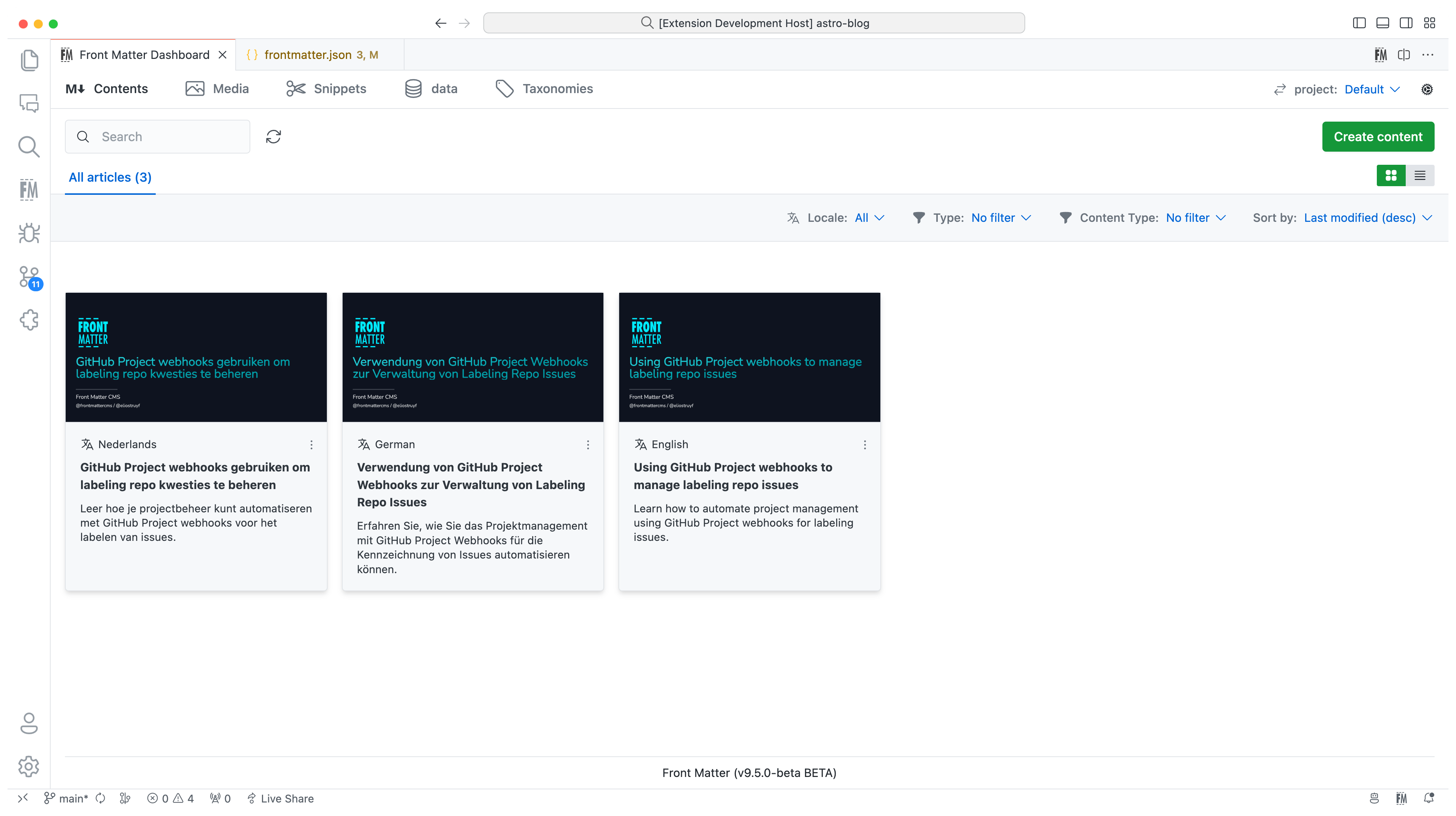
In version 10, we introduced the new i18n/multilingual support for your content. You can now manage your content in multiple languages, more information can be found in the [multilingual](https://frontmatter.codes/docs/content-creation/multilingual) section of our documentation.
|
||||
In version 10, we introduced the new i18n/multilingual support for your content.
|
||||
You can now manage your content in multiple languages, more information can be
|
||||
found in the
|
||||
[multilingual](https://frontmatter.codes/docs/content-creation/multilingual)
|
||||
section of our documentation.
|
||||
|
||||
|
||||
|
||||
**Version 9**
|
||||
|
||||
The extension is now available in multiple languages: English, German, and Japanese. Want to add your language? Check out the [localization the extension](https://frontmatter.codes/docs/contributing#translating-the-extension).
|
||||
The extension is now available in multiple languages: English, German, and
|
||||
Japanese. Want to add your language? Check out the
|
||||
[localization the extension](https://frontmatter.codes/docs/contributing#translating-the-extension).
|
||||
|
||||
**Version 8**
|
||||
|
||||
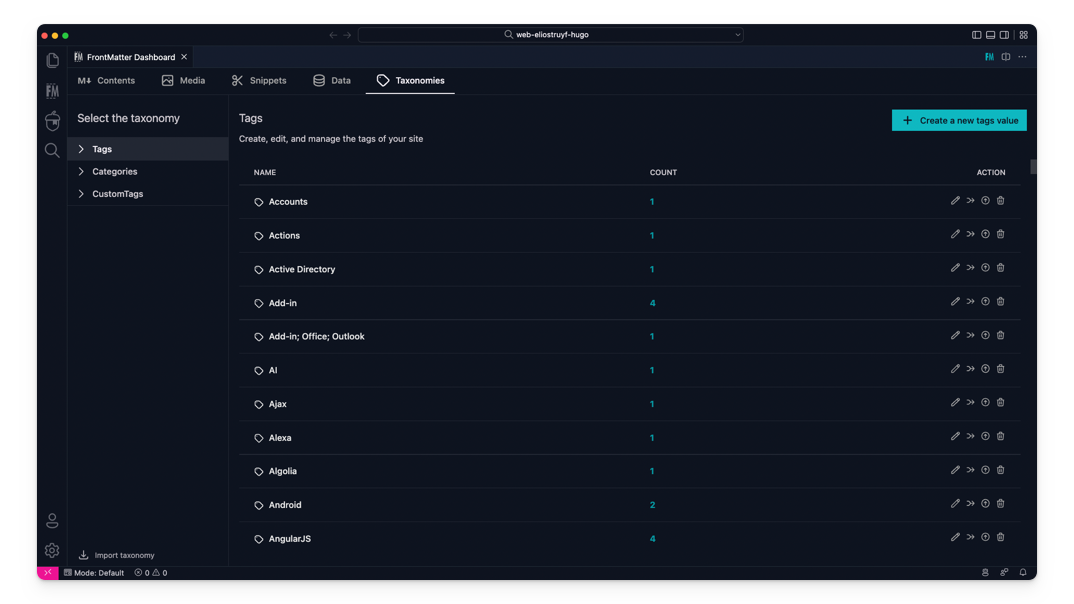
The taxonomy dashboard got introduced on which you can manage your tags, categories, and custom taxonomy.
|
||||
The taxonomy dashboard got introduced on which you can manage your tags,
|
||||
categories, and custom taxonomy.
|
||||
|
||||
|
||||
|
||||
@@ -76,17 +114,24 @@ Snippets support for Front Matter has been added!
|
||||
|
||||
**Version 6**
|
||||
|
||||
In this version, we introduced the new data files/folders dashboard. You can find more information about the release in our [v6.0.0 release notes](https://frontmatter.codes/updates/v6.0.0).
|
||||
In this version, we introduced the new data files/folders dashboard. You can
|
||||
find more information about the release in our
|
||||
[v6.0.0 release notes](https://frontmatter.codes/updates/v6.0.0).
|
||||
|
||||
<p align="center">
|
||||
<img src="https://frontmatter.codes/assets/marketplace/v6.0.0/data-dashboard.png" alt="Data dashboard" style="display: inline-block" />
|
||||
</p>
|
||||
|
||||
> Data files/folders are pieces of content that do not belong to any markdown content, but live on their own. Most of the time, these data files are used to store additional information about your project/blog/website that will be used to render the content.
|
||||
> Data files/folders are pieces of content that do not belong to any markdown
|
||||
> content, but live on their own. Most of the time, these data files are used to
|
||||
> store additional information about your project/blog/website that will be used
|
||||
> to render the content.
|
||||
|
||||
**Version 5**
|
||||
|
||||
The new media dashboard redesign got introduced + support for setting metadata on media files [v5.0.0 release notes](https://frontmatter.codes/updates/v5.0.0).
|
||||
The new media dashboard redesign got introduced + support for setting metadata
|
||||
on media files
|
||||
[v5.0.0 release notes](https://frontmatter.codes/updates/v5.0.0).
|
||||
|
||||
<p align="center">
|
||||
<img src="https://frontmatter.codes/assets/marketplace/v5.9.0/media-dashboard.png" alt="Data dashboard" style="display: inline-block" />
|
||||
@@ -94,15 +139,21 @@ The new media dashboard redesign got introduced + support for setting metadata o
|
||||
|
||||
**Version 4**
|
||||
|
||||
Support for Team level settings, content-types, and image support. Get to know more at: [v4.0.0 release notes](https://frontmatter.codes/updates/v4_0_0).
|
||||
Support for Team level settings, content-types, and image support. Get to know
|
||||
more at: [v4.0.0 release notes](https://frontmatter.codes/updates/v4_0_0).
|
||||
|
||||
**Version 3**
|
||||
|
||||
In version v3 we introduced the welcome and dashboard webview. The welcome view allows to get you started using the extension, and the dashboard allows you to manage all your markdown pages in one place. This makes it easy to search, filter, sort, and more.
|
||||
In version v3 we introduced the welcome and dashboard webview. The welcome view
|
||||
allows to get you started using the extension, and the dashboard allows you to
|
||||
manage all your markdown pages in one place. This makes it easy to search,
|
||||
filter, sort, and more.
|
||||
|
||||
**Version 2**
|
||||
|
||||
In version v2 we released the re-designed sidebar panel with improved SEO support. This extension makes it the only extension to manage your Markdown pages for your static sites in Visual Studio Code.
|
||||
In version v2 we released the re-designed sidebar panel with improved SEO
|
||||
support. This extension makes it the only extension to manage your Markdown
|
||||
pages for your static sites in Visual Studio Code.
|
||||
|
||||
<p align="center" style="margin-top: 2rem;">
|
||||
<a href="https://www.producthunt.com/posts/front-matter?utm_source=badge-featured&utm_medium=badge&utm_souce=badge-front-matter" target="_blank">
|
||||
@@ -114,33 +165,47 @@ In version v2 we released the re-designed sidebar panel with improved SEO suppor
|
||||
|
||||
You can get the extension via:
|
||||
|
||||
- The VS Code marketplace: [VS Code Marketplace - Front Matter](https://marketplace.visualstudio.com/items?itemName=eliostruyf.vscode-front-matter).
|
||||
- The VS Code marketplace:
|
||||
[VS Code Marketplace - Front Matter](https://marketplace.visualstudio.com/items?itemName=eliostruyf.vscode-front-matter).
|
||||
- The extension CLI: `ext install eliostruyf.vscode-front-matter`
|
||||
- Or by clicking on the following link: <a href="" title="open extension in VS Code" data-vscode="vscode:extension/eliostruyf.vscode-front-matter">open extension in VS Code</a>
|
||||
- Or by clicking on the following link: <a href="" title="open extension in VS
|
||||
Code" data-vscode="vscode:extension/eliostruyf.vscode-front-matter">open
|
||||
extension in VS Code</a>
|
||||
|
||||
> **Info**: The docs can be found on [frontmatter.codes](https://frontmatter.codes).
|
||||
> **Info**: The docs can be found on
|
||||
> [frontmatter.codes](https://frontmatter.codes).
|
||||
|
||||
### 🧪 Beta version
|
||||
|
||||
If you have the courage to test out the beta features, we made available a beta version as well. You can install this via:
|
||||
If you have the courage to test out the beta features, we made available a beta
|
||||
version as well. You can install this via:
|
||||
|
||||
- Uninstall the main Front Matter version
|
||||
- Install the beta version
|
||||
- VS Code marketplace: [VS Code Marketplace - Front Matter BETA](https://marketplace.visualstudio.com/items?itemName=eliostruyf.vscode-front-matter-beta).
|
||||
- VS Code marketplace:
|
||||
[VS Code Marketplace - Front Matter BETA](https://marketplace.visualstudio.com/items?itemName=eliostruyf.vscode-front-matter-beta).
|
||||
- The extension CLI: `ext install eliostruyf.vscode-front-matter-beta`
|
||||
- Or by clicking on the following link: <a href="" title="open extension in VS Code" data-vscode="vscode:extension/eliostruyf.vscode-front-matter-beta">open extension in VS Code</a>
|
||||
- Or by clicking on the following link: <a href="" title="open extension in VS
|
||||
Code"
|
||||
data-vscode="vscode:extension/eliostruyf.vscode-front-matter-beta">open
|
||||
extension in VS Code</a>
|
||||
|
||||
> **Info**: The BETA docs can be found on [beta.frontmatter.codes](https://beta.frontmatter.codes).
|
||||
> **Info**: The BETA docs can be found on
|
||||
> [beta.frontmatter.codes](https://beta.frontmatter.codes).
|
||||
|
||||
## 📖 Documentation
|
||||
|
||||
All documentation can be found on [frontmatter.codes](https://frontmatter.codes).
|
||||
All documentation can be found on
|
||||
[frontmatter.codes](https://frontmatter.codes).
|
||||
|
||||
Documentation repository: [GitHub - Front Matter DOCs](https://github.com/FrontMatter/web-documentation-nextjs)
|
||||
Documentation repository:
|
||||
[GitHub - Front Matter DOCs](https://github.com/FrontMatter/web-documentation-nextjs)
|
||||
|
||||
## 💪 Contributing
|
||||
|
||||
Pull requests are welcome. Please open an issue first to discuss what you would like to change, or which problem you would like to fix. This makes it easier for us to follow-up and plan for future releases.
|
||||
Pull requests are welcome. Please open an issue first to discuss what you would
|
||||
like to change, or which problem you would like to fix. This makes it easier for
|
||||
us to follow-up and plan for future releases.
|
||||
|
||||
You can always help us improve the extension in varous ways like:
|
||||
|
||||
@@ -153,7 +218,8 @@ You can always help us improve the extension in varous ways like:
|
||||
- Tutorials
|
||||
- etc.
|
||||
|
||||
Eager to start contributing? Great 🤩, you can contribute to the following projects:
|
||||
Eager to start contributing? Great 🤩, you can contribute to the following
|
||||
projects:
|
||||
|
||||
- [Extension](https://github.com/estruyf/vscode-front-matter)
|
||||
- [Documentation](https://github.com/FrontMatter/web-documentation-nextjs)
|
||||
@@ -161,13 +227,16 @@ Eager to start contributing? Great 🤩, you can contribute to the following pro
|
||||
|
||||
## 👀 Show the work you are using Front Matter
|
||||
|
||||
Are you using Front Matter and are you interested in showing for which websites you use it? You can show your work by opening a [showcase issue](https://github.com/estruyf/vscode-front-matter/issues/new?assignees=&labels=&template=showcase.md&title=Showcase%3A+).
|
||||
Are you using Front Matter and are you interested in showing for which websites
|
||||
you use it? You can show your work by opening a
|
||||
[showcase issue](https://github.com/estruyf/vscode-front-matter/issues/new?assignees=&labels=&template=showcase.md&title=Showcase%3A+).
|
||||
|
||||
You can open showcase issues for the following things:
|
||||
|
||||
- Show the website for which you use Front Matter;
|
||||
- Share an article/video/webcast/... that explains how you use Front Matter;
|
||||
- Got something else to share? Open an issue and we can see where it fits on our website.
|
||||
- Got something else to share? Open an issue and we can see where it fits on our
|
||||
website.
|
||||
|
||||
## 👉 Contributors 🤘
|
||||
|
||||
@@ -185,33 +254,23 @@ You can open showcase issues for the following things:
|
||||
|
||||
<br />
|
||||
|
||||
<p align="center" title="Support by run.events">
|
||||
<a href="https://run.events/?utm_source=frontmatter&utm_campaign=oss">
|
||||
<img src="https://frontmatter.codes/assets/sponsors/runevents-purple.webp" alt="run.events - Event Management Platform" height="50px" />
|
||||
</a>
|
||||
</p>
|
||||
|
||||
<br />
|
||||
|
||||
<p align="center" title="Powered by Netlify">
|
||||
<a href="https://www.netlify.com?utm_source=vscode-frontmatter&utm_campaign=oss">
|
||||
<img src="https://frontmatter.codes/assets/sponsors/netlify-dark.png" alt="Deploys by Netlify" height="51px" />
|
||||
</a>
|
||||
</p>
|
||||
|
||||
<br />
|
||||
|
||||
<p align="center">
|
||||
<a href="http://bejs.io/" title="Supported by the BEJS Community">
|
||||
<img src="https://frontmatter.codes/assets/sponsors/bejs-community.png" alt="Supported by the BEJS Community" height="50px"/>
|
||||
</a>
|
||||
</p>
|
||||
|
||||
## 📊 Telemetry
|
||||
|
||||
The Front Matter CMS extension only uses telemetry on application crashes. The extension respects the `telemetry.enableTelemetry` setting which you can learn more about in the [Visual Studio Code FAQ](https://aka.ms/vscode-remote/telemetry).
|
||||
The Front Matter CMS extension only uses telemetry on application crashes. The
|
||||
extension respects the `telemetry.enableTelemetry` setting which you can learn
|
||||
more about in the
|
||||
[Visual Studio Code FAQ](https://aka.ms/vscode-remote/telemetry).
|
||||
|
||||
For crash reports in the webviews, we make use of Sentry to help us understand what went wrong. This data is only used to fix issues and improve the extension. You can find more information about the Sentry implementation in the following files:
|
||||
For crash reports in the webviews, we make use of Sentry to help us understand
|
||||
what went wrong. This data is only used to fix issues and improve the extension.
|
||||
You can find more information about the Sentry implementation in the following
|
||||
files:
|
||||
|
||||
- [Sentry config](https://github.com/estruyf/vscode-front-matter/blob/63e296d62f11be73ac86d9e823084247952a7ddc/src/utils/sentryInit.ts)
|
||||
|
||||
|
||||
Reference in New Issue
Block a user