mirror of
https://github.com/estruyf/vscode-front-matter.git
synced 2026-03-28 17:42:40 +01:00
Compare commits
24 Commits
copilot/fi
...
main
| Author | SHA1 | Date | |
|---|---|---|---|

|
1c0ce6a6f2 | ||
|
|
bdb2179e3e | ||
|
|
bd8cd1f1d6 | ||
|
|
3b65bb3cd7 | ||
|
|
829c5c6e64 | ||
|
|
e6ef7555e3 | ||
|
|
2af6c57a49 | ||
|
|
b31550afe3 | ||
|
|
b845fd422b | ||
|
|
feb6b008e9 | ||
|
|
0fdbada702 | ||
|
|
6d010e48e8 | ||
|
|
18d7fb0c20 | ||

|
00dfbcb029 | ||
|
|
89aede03f0 | ||

|
a387d5eb89 | ||
|
|
f1ae60f280 | ||
|
|
0e2aea626f | ||
|
|
ef9f1f7f56 | ||
|
|
d57d0c5d45 | ||
|
|
33693d9315 | ||
|
|
8c52ef7bde | ||
|
|
dde0231f19 | ||
|
|
b0dcbfd58b |
16
CHANGELOG.md
16
CHANGELOG.md
@@ -1,5 +1,21 @@
|
||||
# Change Log
|
||||
|
||||
## [10.9.0] - 2025-07-01 - [Release notes](https://beta.frontmatter.codes/updates/v10.9.0)
|
||||
|
||||
### 🎨 Enhancements
|
||||
|
||||
- [#962](https://github.com/estruyf/vscode-front-matter/issues/962): Added Simplified Chinese localization thanks to [Randerion(HaoJun0823)](https://github.com/HaoJun0823)
|
||||
|
||||
### ⚡️ Optimizations
|
||||
|
||||
- [#922](https://github.com/estruyf/vscode-front-matter/issues/922): Added the `{{slugifiedFileName}}` for better naming
|
||||
|
||||
### 🐞 Fixes
|
||||
|
||||
- [#933](https://github.com/estruyf/vscode-front-matter/issues/933): Timezone setting integration in the DateTime field
|
||||
- [#942](https://github.com/estruyf/vscode-front-matter/issues/942): Fix to typo on welcome screen thanks to [Stephanie Wertman](https://github.com/stephanie-wertman)
|
||||
- [#957](https://github.com/estruyf/vscode-front-matter/issues/957): Fix media assets retrieval where `mtime` is not defined. Fallback to the `mtimeMs` property if available.
|
||||
|
||||
## [10.8.0] - 2025-02-27 - [Release notes](https://beta.frontmatter.codes/updates/v10.8.0)
|
||||
|
||||
### 🎨 Enhancements
|
||||
|
||||
153
README.md
153
README.md
@@ -4,7 +4,29 @@
|
||||
</a>
|
||||
</h1>
|
||||
|
||||
<h2 align="center">Front Matter a CMS running straight in Visual Studio Code</h2>
|
||||
<h2 align="center">Front Matter - A Headless CMS for Visual Studio Code</h2>
|
||||
|
||||
> **📢 2026 Open Source Priorities Update**
|
||||
>
|
||||
> I love working with and creating open source products, but after careful
|
||||
> evaluation and working with a coach, I've decided to focus my efforts on
|
||||
> creating a better revenue stream. As open-source isn't providing me a
|
||||
> sustainable income, I need to focus my time and effort more strategically on
|
||||
> how to make my work sustainable.
|
||||
>
|
||||
> **Front Matter CMS will continue to be maintained** as I use it daily.
|
||||
> However, major changes will only happen if there's a personal reason, a
|
||||
> company commitment, or significant community support. Feature requests may
|
||||
> take longer to be addressed.
|
||||
>
|
||||
> I'm shifting focus to open source projects that I can learn from or that have
|
||||
> different outcomes, like **Demo Time**, which I use when presenting at
|
||||
> conferences. If you or your company would like to sponsor my work on Front
|
||||
> Matter CMS or other projects, I'd love to discuss how we can collaborate to
|
||||
> make it even better!
|
||||
>
|
||||
> This is not about Front Matter CMS going away, but rather about managing
|
||||
> expectations around feature development timelines.
|
||||
|
||||
<p align="center">
|
||||
<a href="https://marketplace.visualstudio.com/items?itemName=eliostruyf.vscode-front-matter" title="Check it out on the Visual Studio Marketplace">
|
||||
@@ -28,11 +50,17 @@
|
||||
|
||||
## ❓ What is Front Matter?
|
||||
|
||||
Front Matter is a CMS that runs within Visual Studio Code. It gives you the power and control of a full-blown CMS while also providing you the flexibility and speed of the static site generator of your choice. Jump right into editing and creating content with Front Matter and be able to preview it straight in VS Code.
|
||||
Front Matter is a CMS that runs within Visual Studio Code. It gives you the
|
||||
power and control of a full-blown CMS while also providing you the flexibility
|
||||
and speed of the static site generator of your choice. Jump right into editing
|
||||
and creating content with Front Matter and be able to preview it straight in VS
|
||||
Code.
|
||||
|
||||
The extension supports various static-site generators and frameworks like Hugo, Jekyll, Hexo, NextJs, Gatsby, and more.
|
||||
The extension supports various static-site generators and frameworks like Hugo,
|
||||
Jekyll, Hexo, NextJs, Gatsby, and more.
|
||||
|
||||
A couple of our extension highlights that hopefully get you interested in giving Front Matter a try:
|
||||
A couple of our extension highlights that hopefully get you interested in giving
|
||||
Front Matter a try:
|
||||
|
||||
- Content, data, and media management
|
||||
- Search, filter, sort, etc. all your content
|
||||
@@ -41,30 +69,40 @@ A couple of our extension highlights that hopefully get you interested in giving
|
||||
- Preview your site/content straight in Visual Studio Code
|
||||
- SEO checks for title, description, and keywords
|
||||
- Extensibility
|
||||
- As we know, we cannot support all use cases. We provide a way to extend the functionality of the extension to your needs
|
||||
- As we know, we cannot support all use cases. We provide a way to extend the
|
||||
functionality of the extension to your needs
|
||||
- and many more features ...
|
||||
|
||||
> Missing something? Let us know by opening an issue on the [GitHub repository](https://github.com/estruyf/vscode-front-matter/issues/new/choose)
|
||||
> Missing something? Let us know by opening an issue on the
|
||||
> [GitHub repository](https://github.com/estruyf/vscode-front-matter/issues/new/choose)
|
||||
|
||||
<p align="center">
|
||||
<img src="https://frontmatter.codes/assets/marketplace/v6.0.0/content-preview.png" alt="Site preview" style="display: inline-block" />
|
||||
</p>
|
||||
|
||||
> If you see something missing in your article creation flow, please feel free to reach out.
|
||||
> If you see something missing in your article creation flow, please feel free
|
||||
> to reach out.
|
||||
|
||||
**Version 10**
|
||||
|
||||
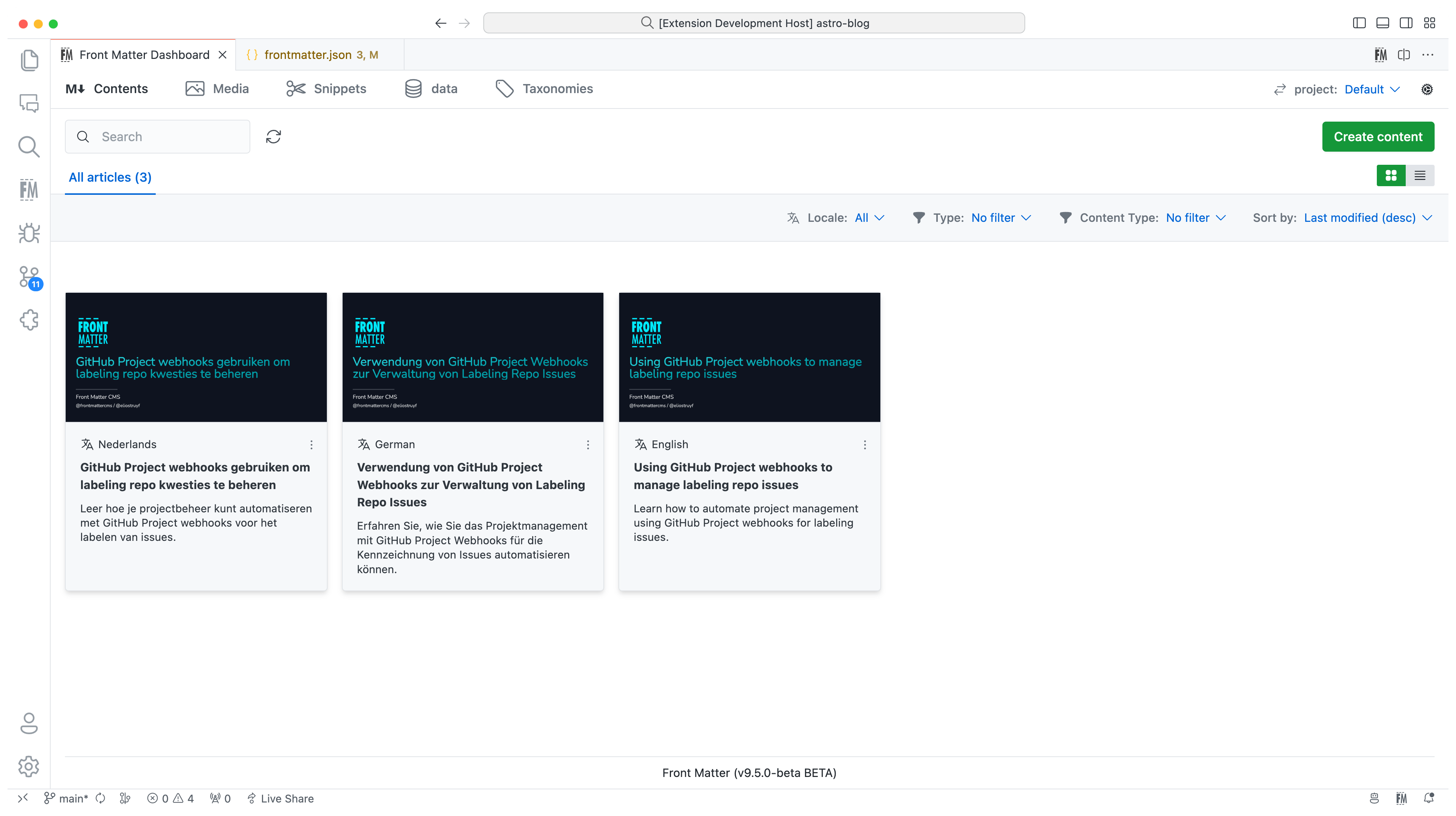
In version 10, we introduced the new i18n/multilingual support for your content. You can now manage your content in multiple languages, more information can be found in the [multilingual](https://frontmatter.codes/docs/content-creation/multilingual) section of our documentation.
|
||||
In version 10, we introduced the new i18n/multilingual support for your content.
|
||||
You can now manage your content in multiple languages, more information can be
|
||||
found in the
|
||||
[multilingual](https://frontmatter.codes/docs/content-creation/multilingual)
|
||||
section of our documentation.
|
||||
|
||||
|
||||
|
||||
**Version 9**
|
||||
|
||||
The extension is now available in multiple languages: English, German, and Japanese. Want to add your language? Check out the [localization the extension](https://frontmatter.codes/docs/contributing#translating-the-extension).
|
||||
The extension is now available in multiple languages: English, German, and
|
||||
Japanese. Want to add your language? Check out the
|
||||
[localization the extension](https://frontmatter.codes/docs/contributing#translating-the-extension).
|
||||
|
||||
**Version 8**
|
||||
|
||||
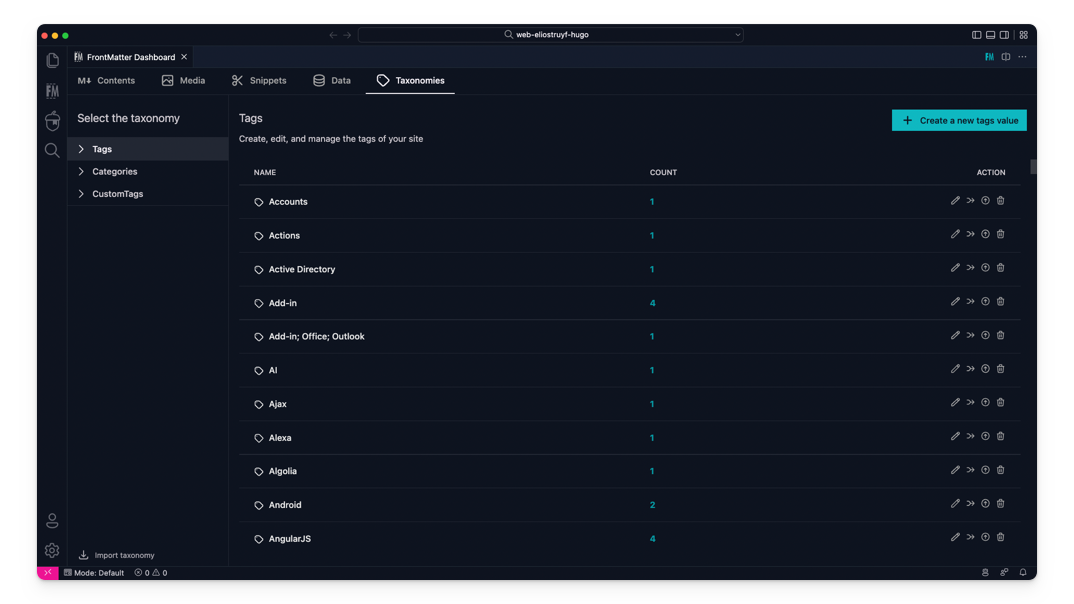
The taxonomy dashboard got introduced on which you can manage your tags, categories, and custom taxonomy.
|
||||
The taxonomy dashboard got introduced on which you can manage your tags,
|
||||
categories, and custom taxonomy.
|
||||
|
||||
|
||||
|
||||
@@ -76,17 +114,24 @@ Snippets support for Front Matter has been added!
|
||||
|
||||
**Version 6**
|
||||
|
||||
In this version, we introduced the new data files/folders dashboard. You can find more information about the release in our [v6.0.0 release notes](https://frontmatter.codes/updates/v6.0.0).
|
||||
In this version, we introduced the new data files/folders dashboard. You can
|
||||
find more information about the release in our
|
||||
[v6.0.0 release notes](https://frontmatter.codes/updates/v6.0.0).
|
||||
|
||||
<p align="center">
|
||||
<img src="https://frontmatter.codes/assets/marketplace/v6.0.0/data-dashboard.png" alt="Data dashboard" style="display: inline-block" />
|
||||
</p>
|
||||
|
||||
> Data files/folders are pieces of content that do not belong to any markdown content, but live on their own. Most of the time, these data files are used to store additional information about your project/blog/website that will be used to render the content.
|
||||
> Data files/folders are pieces of content that do not belong to any markdown
|
||||
> content, but live on their own. Most of the time, these data files are used to
|
||||
> store additional information about your project/blog/website that will be used
|
||||
> to render the content.
|
||||
|
||||
**Version 5**
|
||||
|
||||
The new media dashboard redesign got introduced + support for setting metadata on media files [v5.0.0 release notes](https://frontmatter.codes/updates/v5.0.0).
|
||||
The new media dashboard redesign got introduced + support for setting metadata
|
||||
on media files
|
||||
[v5.0.0 release notes](https://frontmatter.codes/updates/v5.0.0).
|
||||
|
||||
<p align="center">
|
||||
<img src="https://frontmatter.codes/assets/marketplace/v5.9.0/media-dashboard.png" alt="Data dashboard" style="display: inline-block" />
|
||||
@@ -94,15 +139,21 @@ The new media dashboard redesign got introduced + support for setting metadata o
|
||||
|
||||
**Version 4**
|
||||
|
||||
Support for Team level settings, content-types, and image support. Get to know more at: [v4.0.0 release notes](https://frontmatter.codes/updates/v4_0_0).
|
||||
Support for Team level settings, content-types, and image support. Get to know
|
||||
more at: [v4.0.0 release notes](https://frontmatter.codes/updates/v4_0_0).
|
||||
|
||||
**Version 3**
|
||||
|
||||
In version v3 we introduced the welcome and dashboard webview. The welcome view allows to get you started using the extension, and the dashboard allows you to manage all your markdown pages in one place. This makes it easy to search, filter, sort, and more.
|
||||
In version v3 we introduced the welcome and dashboard webview. The welcome view
|
||||
allows to get you started using the extension, and the dashboard allows you to
|
||||
manage all your markdown pages in one place. This makes it easy to search,
|
||||
filter, sort, and more.
|
||||
|
||||
**Version 2**
|
||||
|
||||
In version v2 we released the re-designed sidebar panel with improved SEO support. This extension makes it the only extension to manage your Markdown pages for your static sites in Visual Studio Code.
|
||||
In version v2 we released the re-designed sidebar panel with improved SEO
|
||||
support. This extension makes it the only extension to manage your Markdown
|
||||
pages for your static sites in Visual Studio Code.
|
||||
|
||||
<p align="center" style="margin-top: 2rem;">
|
||||
<a href="https://www.producthunt.com/posts/front-matter?utm_source=badge-featured&utm_medium=badge&utm_souce=badge-front-matter" target="_blank">
|
||||
@@ -114,33 +165,47 @@ In version v2 we released the re-designed sidebar panel with improved SEO suppor
|
||||
|
||||
You can get the extension via:
|
||||
|
||||
- The VS Code marketplace: [VS Code Marketplace - Front Matter](https://marketplace.visualstudio.com/items?itemName=eliostruyf.vscode-front-matter).
|
||||
- The VS Code marketplace:
|
||||
[VS Code Marketplace - Front Matter](https://marketplace.visualstudio.com/items?itemName=eliostruyf.vscode-front-matter).
|
||||
- The extension CLI: `ext install eliostruyf.vscode-front-matter`
|
||||
- Or by clicking on the following link: <a href="" title="open extension in VS Code" data-vscode="vscode:extension/eliostruyf.vscode-front-matter">open extension in VS Code</a>
|
||||
- Or by clicking on the following link: <a href="" title="open extension in VS
|
||||
Code" data-vscode="vscode:extension/eliostruyf.vscode-front-matter">open
|
||||
extension in VS Code</a>
|
||||
|
||||
> **Info**: The docs can be found on [frontmatter.codes](https://frontmatter.codes).
|
||||
> **Info**: The docs can be found on
|
||||
> [frontmatter.codes](https://frontmatter.codes).
|
||||
|
||||
### 🧪 Beta version
|
||||
|
||||
If you have the courage to test out the beta features, we made available a beta version as well. You can install this via:
|
||||
If you have the courage to test out the beta features, we made available a beta
|
||||
version as well. You can install this via:
|
||||
|
||||
- Uninstall the main Front Matter version
|
||||
- Install the beta version
|
||||
- VS Code marketplace: [VS Code Marketplace - Front Matter BETA](https://marketplace.visualstudio.com/items?itemName=eliostruyf.vscode-front-matter-beta).
|
||||
- VS Code marketplace:
|
||||
[VS Code Marketplace - Front Matter BETA](https://marketplace.visualstudio.com/items?itemName=eliostruyf.vscode-front-matter-beta).
|
||||
- The extension CLI: `ext install eliostruyf.vscode-front-matter-beta`
|
||||
- Or by clicking on the following link: <a href="" title="open extension in VS Code" data-vscode="vscode:extension/eliostruyf.vscode-front-matter-beta">open extension in VS Code</a>
|
||||
- Or by clicking on the following link: <a href="" title="open extension in VS
|
||||
Code"
|
||||
data-vscode="vscode:extension/eliostruyf.vscode-front-matter-beta">open
|
||||
extension in VS Code</a>
|
||||
|
||||
> **Info**: The BETA docs can be found on [beta.frontmatter.codes](https://beta.frontmatter.codes).
|
||||
> **Info**: The BETA docs can be found on
|
||||
> [beta.frontmatter.codes](https://beta.frontmatter.codes).
|
||||
|
||||
## 📖 Documentation
|
||||
|
||||
All documentation can be found on [frontmatter.codes](https://frontmatter.codes).
|
||||
All documentation can be found on
|
||||
[frontmatter.codes](https://frontmatter.codes).
|
||||
|
||||
Documentation repository: [GitHub - Front Matter DOCs](https://github.com/FrontMatter/web-documentation-nextjs)
|
||||
Documentation repository:
|
||||
[GitHub - Front Matter DOCs](https://github.com/FrontMatter/web-documentation-nextjs)
|
||||
|
||||
## 💪 Contributing
|
||||
|
||||
Pull requests are welcome. Please open an issue first to discuss what you would like to change, or which problem you would like to fix. This makes it easier for us to follow-up and plan for future releases.
|
||||
Pull requests are welcome. Please open an issue first to discuss what you would
|
||||
like to change, or which problem you would like to fix. This makes it easier for
|
||||
us to follow-up and plan for future releases.
|
||||
|
||||
You can always help us improve the extension in varous ways like:
|
||||
|
||||
@@ -153,7 +218,8 @@ You can always help us improve the extension in varous ways like:
|
||||
- Tutorials
|
||||
- etc.
|
||||
|
||||
Eager to start contributing? Great 🤩, you can contribute to the following projects:
|
||||
Eager to start contributing? Great 🤩, you can contribute to the following
|
||||
projects:
|
||||
|
||||
- [Extension](https://github.com/estruyf/vscode-front-matter)
|
||||
- [Documentation](https://github.com/FrontMatter/web-documentation-nextjs)
|
||||
@@ -161,13 +227,16 @@ Eager to start contributing? Great 🤩, you can contribute to the following pro
|
||||
|
||||
## 👀 Show the work you are using Front Matter
|
||||
|
||||
Are you using Front Matter and are you interested in showing for which websites you use it? You can show your work by opening a [showcase issue](https://github.com/estruyf/vscode-front-matter/issues/new?assignees=&labels=&template=showcase.md&title=Showcase%3A+).
|
||||
Are you using Front Matter and are you interested in showing for which websites
|
||||
you use it? You can show your work by opening a
|
||||
[showcase issue](https://github.com/estruyf/vscode-front-matter/issues/new?assignees=&labels=&template=showcase.md&title=Showcase%3A+).
|
||||
|
||||
You can open showcase issues for the following things:
|
||||
|
||||
- Show the website for which you use Front Matter;
|
||||
- Share an article/video/webcast/... that explains how you use Front Matter;
|
||||
- Got something else to share? Open an issue and we can see where it fits on our website.
|
||||
- Got something else to share? Open an issue and we can see where it fits on our
|
||||
website.
|
||||
|
||||
## 👉 Contributors 🤘
|
||||
|
||||
@@ -185,33 +254,23 @@ You can open showcase issues for the following things:
|
||||
|
||||
<br />
|
||||
|
||||
<p align="center" title="Support by run.events">
|
||||
<a href="https://run.events/?utm_source=frontmatter&utm_campaign=oss">
|
||||
<img src="https://frontmatter.codes/assets/sponsors/runevents-purple.webp" alt="run.events - Event Management Platform" height="50px" />
|
||||
</a>
|
||||
</p>
|
||||
|
||||
<br />
|
||||
|
||||
<p align="center" title="Powered by Netlify">
|
||||
<a href="https://www.netlify.com?utm_source=vscode-frontmatter&utm_campaign=oss">
|
||||
<img src="https://frontmatter.codes/assets/sponsors/netlify-dark.png" alt="Deploys by Netlify" height="51px" />
|
||||
</a>
|
||||
</p>
|
||||
|
||||
<br />
|
||||
|
||||
<p align="center">
|
||||
<a href="http://bejs.io/" title="Supported by the BEJS Community">
|
||||
<img src="https://frontmatter.codes/assets/sponsors/bejs-community.png" alt="Supported by the BEJS Community" height="50px"/>
|
||||
</a>
|
||||
</p>
|
||||
|
||||
## 📊 Telemetry
|
||||
|
||||
The Front Matter CMS extension only uses telemetry on application crashes. The extension respects the `telemetry.enableTelemetry` setting which you can learn more about in the [Visual Studio Code FAQ](https://aka.ms/vscode-remote/telemetry).
|
||||
The Front Matter CMS extension only uses telemetry on application crashes. The
|
||||
extension respects the `telemetry.enableTelemetry` setting which you can learn
|
||||
more about in the
|
||||
[Visual Studio Code FAQ](https://aka.ms/vscode-remote/telemetry).
|
||||
|
||||
For crash reports in the webviews, we make use of Sentry to help us understand what went wrong. This data is only used to fix issues and improve the extension. You can find more information about the Sentry implementation in the following files:
|
||||
For crash reports in the webviews, we make use of Sentry to help us understand
|
||||
what went wrong. This data is only used to fix issues and improve the extension.
|
||||
You can find more information about the Sentry implementation in the following
|
||||
files:
|
||||
|
||||
- [Sentry config](https://github.com/estruyf/vscode-front-matter/blob/63e296d62f11be73ac86d9e823084247952a7ddc/src/utils/sentryInit.ts)
|
||||
|
||||
|
||||
821
l10n/bundle.l10n.zh-cn.json
Normal file
821
l10n/bundle.l10n.zh-cn.json
Normal file
@@ -0,0 +1,821 @@
|
||||
{
|
||||
"common.add": "添加",
|
||||
"common.edit": "编辑",
|
||||
"common.delete": "删除",
|
||||
"common.cancel": "取消",
|
||||
"common.apply": "应用",
|
||||
"common.clear": "清除",
|
||||
"common.clear.value": "清除值",
|
||||
"common.search": "搜索",
|
||||
"common.save": "保存",
|
||||
"common.menu": "菜单",
|
||||
"common.insert": "插入",
|
||||
"common.insert.snippet": "插入片段",
|
||||
"common.title": "标题",
|
||||
"common.description": "描述",
|
||||
"common.retry": "重试",
|
||||
"common.update": "更新",
|
||||
"common.information": "信息",
|
||||
"common.important": "重要",
|
||||
"common.sync": "同步",
|
||||
"common.slug": "别名",
|
||||
"common.support": "支持",
|
||||
"common.remove.value": "移除 {0}",
|
||||
"common.filter": "筛选",
|
||||
"common.filter.value": "按 {0} 筛选",
|
||||
"common.error.message": "抱歉,出错了。",
|
||||
"common.openOnWebsite": "在网站上打开",
|
||||
"common.settings": "设置",
|
||||
"common.refreshSettings": "刷新设置",
|
||||
"common.pin": "固定",
|
||||
"common.unpin": "取消固定",
|
||||
"common.noResults": "无结果",
|
||||
"common.error": "抱歉,出错了。",
|
||||
"common.yes": "是",
|
||||
"common.no": "否",
|
||||
"common.openSettings": "打开设置",
|
||||
"common.back": "返回",
|
||||
"common.open": "打开",
|
||||
"common.openWithValue": "打开:{0}",
|
||||
"common.openCustomActions": "打开自定义操作",
|
||||
"common.view": "查看",
|
||||
"common.translate": "翻译",
|
||||
"common.languages": "语言",
|
||||
"common.scripts": "脚本",
|
||||
"common.rename": "重命名",
|
||||
"common.docs": "文档",
|
||||
|
||||
"loading.initPages": "正在加载内容",
|
||||
|
||||
"notifications.outputChannel.link": "输出窗口",
|
||||
"notifications.outputChannel.description": "更多详情请查看 {0}。",
|
||||
|
||||
"settings.view.common": "通用",
|
||||
"settings.view.contentFolders": "内容文件夹",
|
||||
"settings.view.astro": "Astro",
|
||||
"settings.view.integration": "集成",
|
||||
|
||||
"settings.openOnStartup": "启动时打开仪表盘",
|
||||
"settings.openPanelForSupportedFiles": "为支持的文件打开面板",
|
||||
"settings.openPanelForSupportedFiles.label": "是否要为支持的文件打开面板?",
|
||||
"settings.contentTypes": "内容类型",
|
||||
"settings.contentFolders": "内容文件夹",
|
||||
"settings.diagnostic": "诊断",
|
||||
"settings.diagnostic.description": "您可以运行诊断程序来检查整个 Front Matter CMS 配置。",
|
||||
"settings.diagnostic.link": "运行完整诊断",
|
||||
"settings.git": "Git 同步",
|
||||
"settings.git.enabled": "启用 Git 同步,以便轻松将更改同步到您的仓库。",
|
||||
"settings.git.commitMessage": "提交消息",
|
||||
"settings.git.submoduleInfo": "当使用 Git 子模块时,您可以在文档中参考子模块设置。",
|
||||
"settings.git.submoduleLink": "了解更多关于 Git 子模块",
|
||||
"settings.integration.title": "集成",
|
||||
|
||||
"settings.commonSettings.website.title": "网站和 SSG 设置",
|
||||
"settings.commonSettings.previewUrl": "预览 URL",
|
||||
"settings.commonSettings.websiteUrl": "网站 URL",
|
||||
"settings.commonSettings.startCommand": "SSG/框架 启动命令",
|
||||
|
||||
"settings.integrationsView.deepl.title": "DeepL",
|
||||
"settings.integrationsView.deepl.intput.label": "API 密钥",
|
||||
"settings.integrationsView.deepl.intput.placeholder": "输入您的 Deepl API 密钥",
|
||||
|
||||
"settings.integrationsView.azure.title": "Azure AI 翻译服务",
|
||||
"settings.integrationsView.azure.intput.label": "订阅密钥",
|
||||
"settings.integrationsView.azure.intput.placeholder": "输入您的 Azure AI 翻译 - 订阅密钥",
|
||||
"settings.integrationsView.azure.region.label": "区域",
|
||||
"settings.integrationsView.azure.region.placeholder": "输入您的 Azure AI 翻译 - 区域。例如:westeurope",
|
||||
|
||||
"developer.title": "开发者模式",
|
||||
"developer.reload.title": "重新加载仪表盘",
|
||||
"developer.reload.label": "重新加载",
|
||||
"developer.devTools.title": "打开开发者工具",
|
||||
"developer.devTools.label": "开发者工具",
|
||||
|
||||
"field.required": "必填字段",
|
||||
"field.unknown": "未知字段",
|
||||
|
||||
"dashboard.chatbot.answer.answer": "答案",
|
||||
"dashboard.chatbot.answer.resources": "资源",
|
||||
"dashboard.chatbot.answer.warning": "警告:答案可能有误。如有疑问,请查阅文档。",
|
||||
|
||||
"dashboard.chatbot.chatbot.loading": "助手正在准备中",
|
||||
"dashboard.chatbot.chatbot.ready": "我准备好了,您想知道什么?",
|
||||
|
||||
"dashboard.chatbot.chatbox.placeholder": "如何配置 Front Matter?",
|
||||
|
||||
"dashboard.chatbot.header.heading": "询问 Front Matter AI",
|
||||
"dashboard.chatbot.header.description": "我们的 AI 由 mendable.ai 提供支持,已处理文档,可以协助您解决任何关于 Front Matter 的疑问。请随时提问!",
|
||||
|
||||
"dashboard.common.choiceButton.open": "打开选项",
|
||||
|
||||
"dashboard.contents.contentActions.actionMenuButton.title": "菜单",
|
||||
"dashboard.contents.contentActions.menuItem.view": "查看",
|
||||
"dashboard.contents.contentActions.alert.title": "删除:{0}",
|
||||
"dashboard.contents.contentActions.alert.description": "您确定要删除 \"{0}\" 内容吗?",
|
||||
"dashboard.contents.contentActions.translations.create": "创建翻译",
|
||||
"dashboard.contents.contentActions.translations.menu": "翻译",
|
||||
|
||||
"dashboard.contents.item.invalidTitle": "<无效标题>",
|
||||
"dashboard.contents.item.invalidDescription": "<无效描述>",
|
||||
|
||||
"dashboard.contents.list.title": "标题",
|
||||
"dashboard.contents.list.date": "日期",
|
||||
"dashboard.contents.list.status": "状态",
|
||||
|
||||
"dashboard.contents.overview.noMarkdown": "无 Markdown 可显示",
|
||||
"dashboard.contents.overview.noFolders": "请确保在项目中注册了一个内容文件夹,以便 Front Matter 能够找到内容。",
|
||||
"dashboard.contents.overview.pinned": "已固定",
|
||||
|
||||
"dashboard.contents.status.draft": "草稿",
|
||||
"dashboard.contents.status.published": "已发布",
|
||||
"dashboard.contents.status.scheduled": "已排期",
|
||||
|
||||
"dashboard.dataView.dataForm.modify": "修改数据",
|
||||
"dashboard.dataView.dataForm.add": "添加新数据",
|
||||
|
||||
"dashboard.dataView.dataView.select": "选择您的数据类型",
|
||||
"dashboard.dataView.dataView.title": "您的 {0} 数据项",
|
||||
"dashboard.dataView.dataView.add": "添加新条目",
|
||||
"dashboard.dataView.dataView.empty": "未找到 {0} 数据条目",
|
||||
"dashboard.dataView.dataView.createOrModify": "创建或修改您的 {0} 数据",
|
||||
"dashboard.dataView.dataView.getStarted": "选择一个数据类型开始",
|
||||
"dashboard.dataView.dataView.noDataFiles": "未找到数据文件",
|
||||
"dashboard.dataView.dataView.getStarted.link": "阅读更多以开始使用数据文件",
|
||||
"dashboard.dataView.dataView.update.message": "已更新您的数据条目",
|
||||
"dashboard.dataView.dataView.createNew": "创建新数据文件",
|
||||
"dashboard.dataView.dataView.selectDataFolder": "选择数据文件夹",
|
||||
"dashboard.dataView.dataView.closeSelectedDataFile": "关闭数据文件",
|
||||
|
||||
"dashboard.dataView.emptyView.heading": "请先选择您的数据类型",
|
||||
"dashboard.dataView.emptyView.heading.create": "通过创建新的数据文件开始",
|
||||
|
||||
"dashboard.dataView.sortableItem.editButton.title": "编辑 \"{0}\"",
|
||||
"dashboard.dataView.sortableItem.deleteButton.title": "删除 \"{0}\"",
|
||||
"dashboard.dataView.sortableItem.alert.title": "删除数据条目",
|
||||
"dashboard.dataView.sortableItem.alert.description": "您确定要删除该数据条目吗?",
|
||||
|
||||
"dashboard.errorView.description": "请关闭仪表盘并重试。",
|
||||
|
||||
"dashboard.filters.languageFilter.label": "语言",
|
||||
"dashboard.filters.languageFilter.all": "全部",
|
||||
|
||||
"dashboard.header.actionsBar.itemsSelected": "已选 {0} 项",
|
||||
"dashboard.header.actionsBar.selectAll": "全选",
|
||||
"dashboard.header.actionsBar.alertDelete.title": "删除所选文件",
|
||||
"dashboard.header.actionsBar.alertDelete.description": "您确定要删除所选文件吗?",
|
||||
|
||||
"dashboard.header.breadcrumb.home": "首页",
|
||||
|
||||
"dashboard.header.clearFilters.title": "清除筛选、分组和排序",
|
||||
|
||||
"dashboard.header.filter.default": "无筛选条件",
|
||||
|
||||
"dashboard.header.folders.default": "所有类型",
|
||||
"dashboard.header.folders.menuButton.showing": "显示",
|
||||
|
||||
"dashboard.header.grouping.option.none": "无",
|
||||
"dashboard.header.grouping.option.year": "年份",
|
||||
"dashboard.header.grouping.option.draft": "草稿/已发布",
|
||||
"dashboard.header.grouping.menuButton.label": "分组方式",
|
||||
|
||||
"dashboard.header.navigation.allArticles": "所有文章",
|
||||
"dashboard.header.navigation.published": "已发布",
|
||||
"dashboard.header.navigation.scheduled": "已排期",
|
||||
"dashboard.header.navigation.draft": "草稿中",
|
||||
|
||||
"dashboard.header.header.createContent": "创建内容",
|
||||
"dashboard.header.header.createByContentType": "按内容类型创建",
|
||||
"dashboard.header.header.createByTemplate": "按模板创建",
|
||||
|
||||
"dashboard.header.pagination.first": "首页",
|
||||
"dashboard.header.pagination.previous": "上一页",
|
||||
"dashboard.header.pagination.next": "下一页",
|
||||
"dashboard.header.pagination.last": "末页",
|
||||
|
||||
"dashboard.header.paginationStatus.text": "显示第 {0} 到 {1} 条,共 {2} 条结果",
|
||||
|
||||
"dashboard.header.projectSwitcher.label": "项目",
|
||||
|
||||
"dashboard.header.refreshDashboard.label": "刷新仪表盘",
|
||||
|
||||
"dashboard.header.sorting.lastModified.asc": "最后修改时间 (升序)",
|
||||
"dashboard.header.sorting.lastModified.desc": "最后修改时间 (降序)",
|
||||
"dashboard.header.sorting.filename.asc": "按文件名 (升序)",
|
||||
"dashboard.header.sorting.filename.desc": "按文件名 (降序)",
|
||||
"dashboard.header.sorting.published.asc": "发布日期 (升序)",
|
||||
"dashboard.header.sorting.published.desc": "发布日期 (降序)",
|
||||
"dashboard.header.sorting.size.asc": "大小 (升序)",
|
||||
"dashboard.header.sorting.size.desc": "大小 (降序)",
|
||||
"dashboard.header.sorting.caption.asc": "说明文字 (升序)",
|
||||
"dashboard.header.sorting.caption.desc": "说明文字 (降序)",
|
||||
"dashboard.header.sorting.alt.asc": "替代文本 (升序)",
|
||||
"dashboard.header.sorting.alt.desc": "替代文本 (降序)",
|
||||
"dashboard.header.sorting.label": "排序方式",
|
||||
|
||||
"dashboard.header.startup.label": "启动时打开?",
|
||||
|
||||
"dashboard.header.tabs.contents": "内容",
|
||||
"dashboard.header.tabs.media": "媒体",
|
||||
"dashboard.header.tabs.snippets": "片段",
|
||||
"dashboard.header.tabs.data": "数据",
|
||||
"dashboard.header.tabs.taxonomies": "分类法",
|
||||
|
||||
"dashboard.header.viewSwitch.toGrid": "切换到网格视图",
|
||||
"dashboard.header.viewSwitch.toList": "切换到列表视图",
|
||||
|
||||
"dashboard.layout.sponsor.support.msg": "支持 Front Matter",
|
||||
"dashboard.layout.sponsor.review.label": "评价",
|
||||
"dashboard.layout.sponsor.review.msg": "评价 Front Matter",
|
||||
|
||||
"dashboard.media.common.title": "标题",
|
||||
"dashboard.media.common.caption": "说明文字",
|
||||
"dashboard.media.common.alt": "替代文本",
|
||||
"dashboard.media.common.size": "大小",
|
||||
|
||||
"dashboard.media.dialog.title": "查看详情",
|
||||
"dashboard.media.panel.close": "关闭面板",
|
||||
"dashboard.media.metadata.panel.title": "更新元数据",
|
||||
"dashboard.media.metadata.panel.description": "请指定您要为文件设置的元数据。",
|
||||
"dashboard.media.metadata.panel.field.fileName": "文件名",
|
||||
"dashboard.media.metadata.panel.form.metadata.title": "元数据",
|
||||
"dashboard.media.metadata.panel.form.information.title": "信息",
|
||||
"dashboard.media.metadata.panel.form.information.createdDate": "创建时间",
|
||||
"dashboard.media.metadata.panel.form.information.modifiedDate": "最后修改时间",
|
||||
"dashboard.media.metadata.panel.form.information.dimensions": "尺寸",
|
||||
"dashboard.media.metadata.panel.form.information.folder": "文件夹",
|
||||
|
||||
"dashboard.media.folderCreation.hexo.create": "创建文章资源文件夹",
|
||||
"dashboard.media.folderCreation.folder.create": "创建新文件夹",
|
||||
|
||||
"dashboard.media.folderItem.contentDirectory": "内容目录",
|
||||
"dashboard.media.folderItem.publicDirectory": "公共目录",
|
||||
"dashboard.media.folderItem.deleteDescription": "您确定要删除该文件夹 ({0}) 吗?",
|
||||
|
||||
"dashboard.media.item.buttom.insert.image": "插入图片",
|
||||
"dashboard.media.item.buttom.insert.snippet": "插入片段",
|
||||
|
||||
"dashboard.media.item.quickAction.insert.field": "为您的 \"{0}\" 字段插入图片",
|
||||
"dashboard.media.item.quickAction.insert.markdown": "使用 Markdown 标记插入图片",
|
||||
"dashboard.media.item.quickAction.copy.path": "复制媒体路径",
|
||||
"dashboard.media.item.quickAction.delete": "删除媒体文件",
|
||||
"dashboard.media.item.menuItem.view": "查看媒体详情",
|
||||
"dashboard.media.item.menuItem.edit.metadata": "编辑元数据",
|
||||
"dashboard.media.item.menuItem.insert.image": "插入图片",
|
||||
"dashboard.media.item.menuItem.reveal.media": "显示媒体位置",
|
||||
"dashboard.media.item.infoDialog.snippet.description": "选择要用于当前媒体文件的媒体片段。",
|
||||
"dashboard.media.item.alert.delete.description": "您确定要从 {0} 文件夹中删除该文件吗?",
|
||||
|
||||
"dashboard.media.media.description": "选择要添加到您内容中的媒体文件。",
|
||||
"dashboard.media.media.dragAndDrop": "您也可以从桌面拖放图片,上传后选择它们。",
|
||||
"dashboard.media.media.folder.upload": "上传到 {0}",
|
||||
"dashboard.media.media.folder.default": "未选择文件夹,您拖放的文件将被添加到 {0} 文件夹",
|
||||
"dashboard.media.media.placeholder": "无媒体文件可显示。按住 [Shift] 键可以拖放新文件。",
|
||||
"dashboard.media.media.contentFolder": "内容文件夹",
|
||||
"dashboard.media.media.publicFolder": "公共文件夹",
|
||||
|
||||
"dashboard.media.mediaHeaderTop.searchbox.placeholder": "在文件夹中搜索",
|
||||
|
||||
"dashboard.media.mediaSnippetForm.formDialog.title": "插入媒体:{0}",
|
||||
"dashboard.media.mediaSnippetForm.formDialog.description": "将 {0} 媒体文件插入当前文章",
|
||||
|
||||
"dashboard.preview.input.placeholder": "输入 URL",
|
||||
"dashboard.preview.button.navigate.title": "导航",
|
||||
"dashboard.preview.button.refresh.title": "刷新",
|
||||
"dashboard.preview.button.open.title": "打开",
|
||||
|
||||
"dashboard.snippetsView.item.type.content": "内容片段",
|
||||
"dashboard.snippetsView.item.type.media": "媒体片段",
|
||||
"dashboard.snippetsView.item.quickAction.editSnippet": "编辑片段",
|
||||
"dashboard.snippetsView.item.quickAction.deleteSnippet": "删除片段",
|
||||
"dashboard.snippetsView.item.quickAction.viewSnippet": "查看片段文件",
|
||||
"dashboard.snippetsView.item.insert.formDialog.title": "插入片段:{0}",
|
||||
"dashboard.snippetsView.item.insert.formDialog.description": "将 {0} 片段插入当前文章",
|
||||
"dashboard.snippetsView.item.edit.formDialog.title": "编辑片段:{0}",
|
||||
"dashboard.snippetsView.item.edit.formDialog.description": "编辑 {0} 片段",
|
||||
"dashboard.snippetsView.item.alert.title": "删除片段:{0}",
|
||||
"dashboard.snippetsView.item.alert.description": "您确定要删除 {0} 片段吗?",
|
||||
|
||||
"dashboard.snippetsView.newForm.snippetInput.title.placeholder": "片段标题",
|
||||
"dashboard.snippetsView.newForm.snippetInput.description.label": "描述",
|
||||
"dashboard.snippetsView.newForm.snippetInput.description.placeholder": "片段描述",
|
||||
"dashboard.snippetsView.newForm.snippetInput.snippet.label": "片段",
|
||||
"dashboard.snippetsView.newForm.snippetInput.snippet.placeholder": "片段内容",
|
||||
"dashboard.snippetsView.newForm.snippetInput.isMediaSnippet.label": "是媒体片段吗?",
|
||||
"dashboard.snippetsView.newForm.snippetInput.isMediaSnippet.checkbox.label": "媒体片段",
|
||||
"dashboard.snippetsView.newForm.snippetInput.isMediaSnippet.checkbox.description": "使用当前片段将媒体文件插入您的内容中。",
|
||||
"dashboard.snippetsView.newForm.snippetInput.docsButton.title": "阅读更多关于使用媒体片段占位符的信息",
|
||||
"dashboard.snippetsView.newForm.snippetInput.docsButton.description": "查看我们的媒体片段占位符文档,了解可以使用的占位符。",
|
||||
|
||||
"dashboard.snippetsView.snippets.ariaLabel": "片段标题",
|
||||
"dashboard.snippetsView.snippets.button.create": "创建新片段",
|
||||
"dashboard.snippetsView.snippets.select.description": "选择要添加到您内容中的片段。",
|
||||
"dashboard.snippetsView.snippets.empty.message": "未找到片段",
|
||||
"dashboard.snippetsView.snippets.readMore": "阅读更多以开始使用片段",
|
||||
"dashboard.snippetsView.snippets.formDialog.title": "创建片段",
|
||||
|
||||
"dashboard.steps.stepsToGetStarted.button.addFolder.title": "添加为 Front Matter 的内容文件夹",
|
||||
"dashboard.steps.stepsToGetStarted.initializeProject.name": "初始化项目",
|
||||
"dashboard.steps.stepsToGetStarted.initializeProject.description": "初始化项目将创建使用 Front Matter CMS 所需的文件和文件夹。点击此操作开始。",
|
||||
"dashboard.steps.stepsToGetStarted.framework.name": "框架预设",
|
||||
"dashboard.steps.stepsToGetStarted.framework.description": "选择您的站点生成器或框架以预填充一些推荐设置。",
|
||||
"dashboard.steps.stepsToGetStarted.framework.select": "选择您的框架",
|
||||
"dashboard.steps.stepsToGetStarted.framework.select.other": "其他",
|
||||
"dashboard.steps.stepsToGetStarted.assetsFolder.name": "您的资源文件夹是什么?",
|
||||
"dashboard.steps.stepsToGetStarted.assetsFolder.description": "选择包含您资源的文件夹。此文件夹将用于存储您文章的所有媒体文件。",
|
||||
"dashboard.steps.stepsToGetStarted.assetsFolder.public.title": "使用 'public' 文件夹",
|
||||
"dashboard.steps.stepsToGetStarted.assetsFolder.assets.title": "使用 Astro 资源文件夹 (src/assets)",
|
||||
"dashboard.steps.stepsToGetStarted.assetsFolder.other.description": "如果您想配置其他文件夹,可以手动在 frontmatter.json 文件中进行设置。",
|
||||
"dashboard.steps.stepsToGetStarted.contentFolders.name": "注册内容文件夹",
|
||||
"dashboard.steps.stepsToGetStarted.contentFolders.description": "将我们在您项目中找到的一个文件夹添加为内容文件夹。设置文件夹后,Front Matter 可以列出所有内容并允许您创建内容。",
|
||||
"dashboard.steps.stepsToGetStarted.contentFolders.label": "包含内容的文件夹:",
|
||||
"dashboard.steps.stepsToGetStarted.contentFolders.information.description": "您也可以通过右键单击资源管理器视图中的文件夹并选择“注册文件夹”来执行此操作。",
|
||||
"dashboard.steps.stepsToGetStarted.tags.name": "导入所有标签和分类(可选)",
|
||||
"dashboard.steps.stepsToGetStarted.tags.description": "现在 Front Matter 知道所有内容文件夹。您是否想从可用内容中导入所有标签和分类?",
|
||||
"dashboard.steps.stepsToGetStarted.git.name": "您要启用 Git 同步吗?",
|
||||
"dashboard.steps.stepsToGetStarted.git.description": "启用 Git 同步以轻松将更改同步到您的仓库。",
|
||||
"dashboard.steps.stepsToGetStarted.showDashboard.name": "显示仪表盘",
|
||||
"dashboard.steps.stepsToGetStarted.showDashboard.description": "所有操作完成后,即可加载仪表盘。",
|
||||
"dashboard.steps.stepsToGetStarted.template.name": "使用配置模板",
|
||||
"dashboard.steps.stepsToGetStarted.template.description": "选择一个模板,用推荐设置预填充 frontmatter.json 文件。",
|
||||
"dashboard.steps.stepsToGetStarted.template.warning": "选择模板会将整个配置应用到您的项目,并关闭此配置视图。",
|
||||
"dashboard.steps.stepsToGetStarted.astroContentTypes.name": "为您的 Astro 内容集合创建内容类型",
|
||||
|
||||
"dashboard.taxonomyView.button.add.title": "将 {0} 添加到分类法设置",
|
||||
"dashboard.taxonomyView.button.tag.title": "标记内容",
|
||||
"dashboard.taxonomyView.button.edit.title": "编辑 {0}",
|
||||
"dashboard.taxonomyView.button.merge.title": "合并 {0}",
|
||||
"dashboard.taxonomyView.button.move.title": "移动到其他分类法类型",
|
||||
"dashboard.taxonomyView.button.delete.title": "删除 {0}",
|
||||
|
||||
"dashboard.taxonomyView.taxonomyLookup.button.title": "显示包含 {1} 中 {0} 的内容",
|
||||
|
||||
"dashboard.taxonomyView.taxonomyManager.description": "创建、编辑和管理您网站的 {0}",
|
||||
"dashboard.taxonomyView.taxonomyManager.button.create": "创建新的 {0} 值",
|
||||
"dashboard.taxonomyView.taxonomyManager.table.heading.name": "名称",
|
||||
"dashboard.taxonomyView.taxonomyManager.table.heading.count": "数量",
|
||||
"dashboard.taxonomyView.taxonomyManager.table.heading.action": "操作",
|
||||
"dashboard.taxonomyView.taxonomyManager.table.row.empty": "未找到 {0}",
|
||||
"dashboard.taxonomyView.taxonomyManager.table.unmapped.title": "在您的设置中缺失",
|
||||
"dashboard.taxonomyView.taxonomyManager.filterInput.placeholder": "筛选",
|
||||
|
||||
"dashboard.taxonomyView.taxonomyTagging.pageTitle": "将您的内容映射到:{0}",
|
||||
"dashboard.taxonomyView.taxonomyTagging.checkbox": "使用 {0} 标记页面",
|
||||
|
||||
"dashboard.taxonomyView.taxonomyView.navigationBar.title": "选择分类法",
|
||||
"dashboard.taxonomyView.taxonomyView.button.import": "导入分类法",
|
||||
"dashboard.taxonomyView.taxonomyView.navigationItem.tags": "标签",
|
||||
"dashboard.taxonomyView.taxonomyView.navigationItem.categories": "分类",
|
||||
|
||||
"dashboard.unkownView.title": "视图不存在",
|
||||
"dashboard.unkownView.description": "您似乎进入了一个不存在的视图。请重新打开仪表盘。",
|
||||
|
||||
"dashboard.welcomeScreen.title": "使用 Front Matter 管理您的静态站点",
|
||||
"dashboard.welcomeScreen.thanks": "感谢您使用 Front Matter!",
|
||||
"dashboard.welcomeScreen.description": "我们致力于让 Front Matter 尽可能易于使用。如果您有任何问题或建议,请在 GitHub 上联系我们。",
|
||||
"dashboard.welcomeScreen.link.github.title": "GitHub",
|
||||
"dashboard.welcomeScreen.link.github.label": "GitHub",
|
||||
"dashboard.welcomeScreen.link.documentation.label": "文档",
|
||||
"dashboard.welcomeScreen.link.sponsor.title": "成为赞助商",
|
||||
"dashboard.welcomeScreen.link.sponsor.label": "赞助",
|
||||
"dashboard.welcomeScreen.link.review.title": "写评价",
|
||||
"dashboard.welcomeScreen.link.review.label": "评价",
|
||||
"dashboard.welcomeScreen.actions.heading": "执行以下步骤以开始使用该扩展",
|
||||
"dashboard.welcomeScreen.actions.description": "您也可以从 Front Matter 侧边栏使用该扩展。在那里您将找到可以专门为您的页面执行的操作。",
|
||||
"dashboard.welcomeScreen.actions.thanks": "我们希望您喜欢 Front Matter!",
|
||||
|
||||
"dashboard.media.detailsSlideOver.unmapped.description": "您是否要重新映射未映射文件的元数据?",
|
||||
|
||||
"dashboard.configuration.astro.astroContentTypes.empty": "未找到 Astro 内容集合。",
|
||||
"dashboard.configuration.astro.astroContentTypes.description": "以下 Astro 内容集合可用于生成内容类型。",
|
||||
|
||||
"panel.git.gitAction.title": "发布更改",
|
||||
"panel.git.gitAction.branch.select": "选择分支",
|
||||
"panel.git.gitAction.input.placeholder": "提交消息",
|
||||
"panel.git.gitAction.button.fetch": "获取",
|
||||
|
||||
"panel.contentType.contentTypeValidator.title": "内容类型",
|
||||
"panel.contentType.contentTypeValidator.hint": "我们注意到内容类型和 front matter 数据之间存在字段差异。\n 您想为此内容创建、更新或设置内容类型吗?",
|
||||
"panel.contentType.contentTypeValidator.button.create": "创建内容类型",
|
||||
"panel.contentType.contentTypeValidator.button.add": "将缺失字段添加到内容类型",
|
||||
"panel.contentType.contentTypeValidator.button.change": "更改文件的内容类型",
|
||||
|
||||
"panel.dataBlock.dataBlockField.group.selected.edit": "正在编辑:{0}",
|
||||
"panel.dataBlock.dataBlockField.group.selected.create": "创建新的 {0}",
|
||||
"panel.dataBlock.dataBlockField.group.select": "选择一个分组",
|
||||
"panel.dataBlock.dataBlockField.add": "添加 {0}",
|
||||
|
||||
"panel.dataBlock.dataBlockRecord.edit": "编辑记录",
|
||||
"panel.dataBlock.dataBlockRecord.delete": "删除记录",
|
||||
|
||||
"panel.dataBlock.dataBlockRecords.label": "记录",
|
||||
|
||||
"panel.dataBlock.dataBlockSelector.label": "区块类型",
|
||||
|
||||
"panel.errorBoundary.fieldBoundary.label": "查看字段失败",
|
||||
|
||||
"panel.fields.choiceField.select": "选择 {0}",
|
||||
"panel.fields.choiceField.clear": "清除值",
|
||||
|
||||
"panel.fields.contentTypeRelationshipField.loading": "正在获取可能的值...",
|
||||
|
||||
"panel.fields.dateTimeField.button.pick": "选择日期",
|
||||
"panel.fields.dateTimeField.time": "时间:",
|
||||
|
||||
"panel.fields.fieldMessage.required": "{0} 字段是必填的",
|
||||
|
||||
"panel.fields.fileField.delete": "删除文件",
|
||||
"panel.fields.fileField.add": "添加您的 {0}",
|
||||
|
||||
"panel.fields.imageFallback.label": "图片加载失败",
|
||||
|
||||
"panel.fields.listField.edit": "编辑记录",
|
||||
"panel.fields.listField.delete": "删除记录",
|
||||
|
||||
"panel.fields.previewImage.remove": "移除图片",
|
||||
|
||||
"panel.fields.previewImageField.add": "添加您的 {0}",
|
||||
|
||||
"panel.fields.slugField.update": "有更新可用",
|
||||
"panel.fields.slugField.generate": "生成别名",
|
||||
|
||||
"panel.fields.textField.ai.message": "使用 Front Matter AI 建议 {0}",
|
||||
"panel.fields.textField.copilot.message": "使用 Copilot 建议 {0}",
|
||||
"panel.fields.textField.ai.generate": "正在生成建议...",
|
||||
"panel.fields.textField.loading": "正在加载字段",
|
||||
"panel.fields.textField.limit": "字段限制已达 {0}",
|
||||
|
||||
"panel.fields.wrapperField.unknown": "未知字段类型:{0}",
|
||||
|
||||
"panel.fields.fieldCustomAction.button.title": "自定义操作",
|
||||
"panel.fields.fieldCustomAction.executing": "正在执行字段操作...",
|
||||
|
||||
"panel.actions.title": "操作",
|
||||
|
||||
"panel.articleDetails.headings": "标题",
|
||||
"panel.articleDetails.paragraphs": "段落",
|
||||
"panel.articleDetails.internalLinks": "内部链接",
|
||||
"panel.articleDetails.externalLinks": "外部链接",
|
||||
"panel.articleDetails.images": "图片",
|
||||
|
||||
"panel.baseView.initialize": "初始化项目",
|
||||
"panel.baseView.actions.title": "操作",
|
||||
"panel.baseView.action.openDashboard": "打开仪表盘",
|
||||
"panel.baseView.action.createContent": "创建内容",
|
||||
"panel.baseView.empty": "打开文件以查看更多操作",
|
||||
|
||||
"panel.fileList.label.singular": "个文件",
|
||||
"panel.fileList.label.plural": "个文件",
|
||||
|
||||
"panel.folderAndFiles.title": "最近修改",
|
||||
|
||||
"panel.globalSettings.title": "全局设置",
|
||||
"panel.globalSettings.action.modifiedDate.label": "修改日期",
|
||||
"panel.globalSettings.action.modifiedDate.description": "自动更新修改日期",
|
||||
"panel.globalSettings.action.frontMatter.label": "Front Matter 高亮",
|
||||
"panel.globalSettings.action.frontMatter.description": "高亮显示 Front Matter",
|
||||
"panel.globalSettings.action.preview.label": "本地预览",
|
||||
"panel.globalSettings.action.preview.placeholder": "例如:{0}",
|
||||
"panel.globalSettings.action.server.label": "本地服务器命令",
|
||||
"panel.globalSettings.action.server.placeholder": "例如:{0}",
|
||||
|
||||
"panel.metadata.title": "元数据",
|
||||
"panel.metadata.focusProblems": "查看问题视图获取更多信息",
|
||||
|
||||
"panel.otherActions.title": "其他操作",
|
||||
"panel.otherActions.writingSettings.enabled": "写作设置已启用",
|
||||
"panel.otherActions.writingSettings.disabled": "启用写作设置",
|
||||
"panel.otherActions.centerMode": "切换居中模式",
|
||||
"panel.otherActions.createTemplate": "创建模板",
|
||||
"panel.otherActions.revealFile": "在文件夹中显示文件",
|
||||
"panel.otherActions.openProject": "显示项目文件夹",
|
||||
"panel.otherActions.documentation": "打开文档",
|
||||
"panel.otherActions.settings": "设置概览",
|
||||
"panel.otherActions.issue": "报告问题",
|
||||
|
||||
"panel.preview.title": "打开预览",
|
||||
|
||||
"panel.publishAction.publish": "发布",
|
||||
"panel.publishAction.unpublish": "恢复为草稿",
|
||||
|
||||
"panel.seoDetails.recommended": "推荐",
|
||||
|
||||
"panel.seoKeywords.checks": "检查项",
|
||||
"panel.seoKeywords.density.tableTitle": "频率",
|
||||
"panel.seoKeywords.density": "关键词密度",
|
||||
"panel.seoKeywordInfo.validInfo.label": "标题",
|
||||
"panel.seoKeywordInfo.validInfo.content": "内容",
|
||||
"panel.seoKeywordInfo.density.tooltip": "推荐频率:0.75% - 1.5%",
|
||||
|
||||
"panel.seoKeywords.title": "关键词",
|
||||
"panel.seoKeywords.header.keyword": "关键词",
|
||||
"panel.seoKeywords.header.details": "详情",
|
||||
"panel.seoKeywords.density.description": "* 在大多数情况下,1-1.5% 的关键词密度就足够了。",
|
||||
|
||||
"panel.seoStatus.title": "洞察",
|
||||
"panel.seoStatus.header.property": "属性",
|
||||
"panel.seoStatus.header.valid": "有效",
|
||||
"panel.seoStatus.seoFieldInfo.characters": "{0} 个字符",
|
||||
"panel.seoStatus.seoFieldInfo.words": "{0} 个单词",
|
||||
"panel.seoStatus.seoFieldInfo.article": "文章长度",
|
||||
"panel.seoStatus.collapsible.title": "SEO 状态",
|
||||
"panel.seoStatus.required": "{0} 或 {1} 是必需的。",
|
||||
|
||||
"panel.slugAction.title": "优化别名",
|
||||
|
||||
"panel.spinner.loading": "加载中...",
|
||||
|
||||
"panel.startServerbutton.start": "启动服务器",
|
||||
"panel.startServerbutton.stop": "停止服务器",
|
||||
|
||||
"panel.tag.add": "将 {0} 添加到您的设置中",
|
||||
|
||||
"panel.tagPicker.inputPlaceholder.empty": "选择您的 {0}",
|
||||
"panel.tagPicker.inputPlaceholder.disabled": "您已达到 {0} 的限制",
|
||||
"panel.tagPicker.ai.suggest": "使用 Front Matter AI 建议 {0}",
|
||||
"panel.tagPicker.copilot.suggest": "使用 GitHub Copilot 建议 {0}",
|
||||
"panel.tagPicker.ai.generating": "正在生成建议...",
|
||||
"panel.tagPicker.limit": "最大:{0}",
|
||||
"panel.tagPicker.unkown": "添加未知标签",
|
||||
|
||||
"panel.tags.tag.warning": "请注意,标签 \"{0}\" 未保存在您的设置中。一旦移除,它将永久消失。",
|
||||
|
||||
"panel.viewPanel.mediaInsert": "继续在媒体仪表盘中选择您想要插入的图片。",
|
||||
|
||||
"commands.article.setDate.error": "解析日期格式时出错。请检查您的 \"{0}\" 设置。",
|
||||
"commands.article.updateSlug.error": "重命名文件失败:{0}",
|
||||
"commands.article.rename.fileNotExists.error": "文件不存在",
|
||||
"commands.article.rename.fileExists.error": "名为 \"{0}\" 的文件已存在",
|
||||
"commands.article.rename.fileName.title": "重命名:{0}",
|
||||
"commands.article.rename.fileName.prompt": "文件名",
|
||||
|
||||
"commands.cache.cleared": "缓存已清除",
|
||||
|
||||
"commands.chatbot.title": "问我任何问题",
|
||||
|
||||
"commands.content.option.contentType.label": "按内容类型创建内容",
|
||||
"commands.content.option.contentType.description": "选择是否要根据可用的内容类型创建新内容",
|
||||
"commands.content.option.template.label": "按模板创建内容",
|
||||
"commands.content.option.template.description": "选择是否要根据可用的模板创建新内容",
|
||||
"commands.content.quickPick.title": "创建内容",
|
||||
"commands.content.quickPick.placeholder": "选择您想要创建新内容的方式",
|
||||
|
||||
"commands.dashboard.title": "仪表盘",
|
||||
|
||||
"commands.folders.addMediaFolder.inputBox.title": "添加媒体文件夹",
|
||||
"commands.folders.addMediaFolder.inputBox.prompt": "您想给您的文件夹起什么名字(使用 \"/\" 创建多级文件夹)?",
|
||||
"commands.folders.addMediaFolder.noFolder.warning": "未指定文件夹名称。",
|
||||
"commands.folders.create.folderExists.warning": "文件夹已注册",
|
||||
"commands.folders.create.input.title": "注册文件夹",
|
||||
"commands.folders.create.input.prompt": "您想为此文件夹指定什么名称?",
|
||||
"commands.folders.create.input.placeholder": "文件夹名称",
|
||||
"commands.folders.create.success": "文件夹已注册",
|
||||
"commands.folders.getWorkspaceFolder.workspaceFolderPick.placeholder": "请选择 Front Matter 要使用的主工作区文件夹。",
|
||||
"commands.folders.get.notificationError.title": "文件夹 \"{0}\" 不存在。请从设置中移除它。",
|
||||
"commands.folders.get.notificationError.remove.action": "移除文件夹",
|
||||
"commands.folders.get.notificationError.create.action": "创建文件夹",
|
||||
|
||||
"commands.i18n.create.warning.noFileSelected": "未选择文件。",
|
||||
"commands.i18n.create.warning.noFile": "无法检索到文件。",
|
||||
"commands.i18n.create.warning.noContentType": "无法检索当前文件的内容类型。",
|
||||
"commands.i18n.create.warning.noConfig": "未找到 i18n 配置。",
|
||||
"commands.i18n.create.error.noLocaleDefinition": "无法检索当前文件的区域设置。",
|
||||
"commands.i18n.create.error.noLocales": "当前文件已翻译为所有可用语言。",
|
||||
"commands.i18n.create.error.noContentFolder": "无法为当前文件定义内容文件夹。",
|
||||
"commands.i18n.create.error.fileExists": "i18n 翻译已存在。",
|
||||
"commands.i18n.create.success.created": "已创建 \"{0}\" i18n 内容文件。",
|
||||
"commands.i18n.create.quickPick.title": "为区域创建内容",
|
||||
"commands.i18n.create.quickPick.placeHolder": "您想为哪个区域创建新内容?",
|
||||
"commands.i18n.createOrOpen.quickPick.title": "打开或创建翻译",
|
||||
"commands.i18n.createOrOpen.quickPick.category.existing": "现有翻译",
|
||||
"commands.i18n.createOrOpen.quickPick.action.open": "打开 \"{0}\"",
|
||||
"commands.i18n.createOrOpen.quickPick.category.new": "新翻译",
|
||||
"commands.i18n.createOrOpen.quickPick.action.create": "创建 \"{0}\"",
|
||||
"commands.i18n.translate.progress.title": "正在翻译内容...",
|
||||
|
||||
"commands.preview.panel.title": "预览:{0}",
|
||||
"commands.preview.askUserToPickFolder.title": "选择要预览的文章所在文件夹",
|
||||
|
||||
"commands.project.initialize.success": "项目初始化成功。",
|
||||
"commands.project.switchProject.title": "您想切换到哪个项目?",
|
||||
"commands.project.createSampleTemplate.info": "示例模板已创建。",
|
||||
|
||||
"commands.settings.create.input.prompt": "插入您要添加到配置中的 {0} 的值。",
|
||||
"commands.settings.create.input.placeholder": "{0} 的名称",
|
||||
"commands.settings.create.warning": "提供的 {0} 已存在。",
|
||||
"commands.settings.create.quickPick.placeholder": "您要将新的 {0} 添加到页面吗?",
|
||||
"commands.settings.export.progress.title": "{0}: 正在导出标签和分类",
|
||||
"commands.settings.export.progress.success": "导出完成。标签:{0} - 分类:{1}。",
|
||||
"commands.settings.remap.quickpick.title": "重新映射",
|
||||
"commands.settings.remap.quickpick.placeholder": "您想重新映射什么?",
|
||||
"commands.settings.remap.noTaxonomy.warning": "未配置 {0}。",
|
||||
"commands.settings.remap.selectTaxonomy.placeholder": "选择要插入的 {0}。",
|
||||
"commands.settings.remap.newOption.input.prompt": "指定您想用哪个 {0} 的值来重新映射 \"{1}\"。如果要从所有文章中移除该 {0},请将输入留空。",
|
||||
"commands.settings.remap.newOption.input.placeholder": "{0} 的名称",
|
||||
"commands.settings.remap.delete.placeholder": "删除 {0} {1}?",
|
||||
|
||||
"commands.statusListener.verifyRequiredFields.diagnostic.emptyField": "{0} 字段是必填的。请为该字段定义一个值。",
|
||||
"commands.statusListener.verifyRequiredFields.notification.error": "以下字段必须包含值:{0}",
|
||||
|
||||
"commands.template.generate.input.title": "模板标题",
|
||||
"commands.template.generate.input.prompt": "您想给模板起什么名字?",
|
||||
"commands.template.generate.input.placeholder": "文章",
|
||||
"commands.template.generate.noTitle.warning": "您未指定模板标题。",
|
||||
"commands.template.generate.keepContents.title": "保留内容",
|
||||
"commands.template.generate.keepContents.placeholder": "您想保留模板的内容吗?",
|
||||
"commands.template.generate.keepContents.noOption.warning": "您没有选择保留模板内容的任何选项。",
|
||||
"commands.template.generate.keepContents.success": "模板已创建,现在可在您的 {0} 文件夹中使用。",
|
||||
"commands.template.getTemplates.warning": "未找到模板。",
|
||||
"commands.template.create.folderPath.warning": "检索到的项目文件夹路径不正确。",
|
||||
"commands.template.create.noTemplates.warning": "未找到模板。",
|
||||
"commands.template.create.selectTemplate.title": "选择一个模板",
|
||||
"commands.template.create.selectTemplate.placeholder": "选择要使用的内容模板",
|
||||
"commands.template.create.selectTemplate.noTemplate.warning": "未选择模板。",
|
||||
"commands.template.create.selectTemplate.notFound.warning": "找不到内容模板。",
|
||||
"commands.template.create.success": "您的新内容现已可用。",
|
||||
|
||||
"commands.wysiwyg.command.unorderedList.label": "无序列表",
|
||||
"commands.wysiwyg.command.unorderedList.detail": "添加无序列表",
|
||||
"commands.wysiwyg.command.orderedList.label": "有序列表",
|
||||
"commands.wysiwyg.command.orderedList.detail": "添加有序列表",
|
||||
"commands.wysiwyg.command.taskList.label": "任务列表",
|
||||
"commands.wysiwyg.command.taskList.detail": "添加任务列表",
|
||||
"commands.wysiwyg.command.code.label": "代码",
|
||||
"commands.wysiwyg.command.code.detail": "添加内联代码片段",
|
||||
"commands.wysiwyg.command.codeblock.label": "代码块",
|
||||
"commands.wysiwyg.command.codeblock.detail": "添加代码块",
|
||||
"commands.wysiwyg.command.blockquote.label": "引用",
|
||||
"commands.wysiwyg.command.blockquote.detail": "添加引用块",
|
||||
"commands.wysiwyg.command.strikethrough.label": "删除线",
|
||||
"commands.wysiwyg.command.strikethrough.detail": "添加删除线文本",
|
||||
"commands.wysiwyg.quickPick.title": "WYSIWYG 选项",
|
||||
"commands.wysiwyg.quickPick.placeholder": "您想插入哪种类型的标记?",
|
||||
"commands.wysiwyg.addHyperlink.hyperlinkInput.title": "WYSIWYG 超链接",
|
||||
"commands.wysiwyg.addHyperlink.hyperlinkInput.prompt": "输入 URL",
|
||||
"commands.wysiwyg.addHyperlink.textInput.title": "WYSIWYG 文本",
|
||||
"commands.wysiwyg.addHyperlink.textInput.prompt": "输入超链接的文本",
|
||||
"commands.wysiwyg.insertText.heading.input.title": "标题级别",
|
||||
"commands.wysiwyg.insertText.heading.input.placeholder": "您想插入哪个标题级别?",
|
||||
|
||||
"helpers.articleHelper.createContent.pageBundle.error": "名为 {0} 的页面捆绑包已存在于 {1} 中。",
|
||||
"helpers.articleHelper.createContent.contentExists.warning": "标题的内容已存在。请指定一个新标题。",
|
||||
"helpers.articleHelper.processCustomPlaceholders.placeholder.error": "处理 {0} 占位符时出错。",
|
||||
"helpers.articleHelper.parseFile.diagnostic.error": "解析 {0} 的 front matter 时出错。",
|
||||
|
||||
"helpers.contentType.generate.noFrontMatter.error": "未找到 front matter 数据来生成内容类型。",
|
||||
"helpers.contentType.generate.override.quickPick.title": "覆盖默认内容类型",
|
||||
"helpers.contentType.generate.override.quickPick.placeholder": "您是否想用当前字段中使用的字段覆盖默认内容类型配置?",
|
||||
"helpers.contentType.generate.contentTypeInput.title": "生成内容类型",
|
||||
"helpers.contentType.generate.contentTypeInput.prompt": "输入要生成的内容类型的名称",
|
||||
"helpers.contentType.generate.contentTypeInput.validation.enterName": "请输入内容类型的名称。",
|
||||
"helpers.contentType.generate.contentTypeInput.validation.nameExists": "已存在具有此名称的内容类型。",
|
||||
"helpers.contentType.generate.noContentTypeName.warning": "您未指定内容类型的名称。",
|
||||
"helpers.contentType.generate.pageBundle.quickPick.title": "用作页面捆绑包",
|
||||
"helpers.contentType.generate.pageBundle.quickPick.placeHolder": "您想将此内容类型用作页面捆绑包吗?",
|
||||
"helpers.contentType.generate.updated.success": "内容类型 {0} 已更新。",
|
||||
"helpers.contentType.generate.generated.success": "内容类型 {0} 已生成。",
|
||||
"helpers.contentType.addMissingFields.noFrontMatter.warning": "未找到 front matter 数据来添加缺失字段。",
|
||||
"helpers.contentType.addMissingFields.updated.success": "内容类型 {0} 已更新。",
|
||||
"helpers.contentType.setContentType.noFrontMatter.warning": "未找到 front matter 数据来设置内容类型。",
|
||||
"helpers.contentType.setContentType.quickPick.title": "选择内容类型",
|
||||
"helpers.contentType.setContentType.quickPick.placeholder": "您想使用哪个内容类型?",
|
||||
"helpers.contentType.create.allowSubContent.title": "您想将其创建为子内容吗?",
|
||||
"helpers.contentType.create.allowSubContent.placeHolder": "您想将其创建为子内容吗?",
|
||||
"helpers.contentType.create.allowSubContent.showOpenDialog.openLabel": "选择文件夹",
|
||||
"helpers.contentType.create.allowSubContent.showOpenDialog.title": "选择创建内容的文件夹",
|
||||
"helpers.contentType.create.pageBundle.title": "创建为页面捆绑包?",
|
||||
"helpers.contentType.create.pageBundle.placeHolder": "您想将子内容创建为页面捆绑包吗?",
|
||||
"helpers.contentType.create.progress.title": "{0}: 正在创建内容...",
|
||||
"helpers.contentType.create.success": "您的新内容已创建。",
|
||||
"helpers.contentType.verify.warning": "内容类型操作在此模式下不可用。",
|
||||
|
||||
"helpers.customScript.executing": "正在执行:{0}",
|
||||
"helpers.customScript.singleRun.article.warning": "{0}: 无法检索到文章。",
|
||||
"helpers.customScript.bulkRun.noFiles.warning": "{0}: 未找到文件",
|
||||
"helpers.customScript.runMediaScript.noFolder.warning": "{0}: 未指定文件夹或媒体路径。",
|
||||
"helpers.customScript.showOutput.frontMatter.success": "{0}: front matter 已更新。",
|
||||
"helpers.customScript.showOutput.copyOutput.action": "复制输出",
|
||||
"helpers.customScript.showOutput.success": "{0}: 已执行您的自定义脚本。",
|
||||
"helpers.customScript.validateCommand.error": "无效命令:{0}",
|
||||
|
||||
"helpers.dataFileHelper.process.error": "处理数据文件时出错。",
|
||||
|
||||
"helpers.extension.getVersion.changelog": "查看更新日志",
|
||||
"helpers.extension.getVersion.starIt": "给它一个 ⭐️",
|
||||
"helpers.extension.getVersion.update.notification": "{0} 已更新至 v{1} — 查看新功能!",
|
||||
"helpers.extension.migrateSettings.templates.quickPick.title": "{0} - 模板",
|
||||
"helpers.extension.migrateSettings.templates.quickPick.placeholder": "您想继续使用模板功能吗?",
|
||||
"helpers.extension.checkIfExtensionCanRun.warning": "Front Matter BETA 无法在安装了稳定版本的情况下使用。请确保您只安装了一个版本。",
|
||||
|
||||
"helpers.mediaHelper.saveFile.folder.error": "我们找不到您选择的文件夹。",
|
||||
"helpers.mediaHelper.saveFile.file.uploaded.success": "文件 {0} 已上传至:{1}",
|
||||
"helpers.mediaHelper.saveFile.file.uploaded.failed": "抱歉,上传 {0} 时出错",
|
||||
"helpers.mediaHelper.deleteFile.file.deletion.failed": "抱歉,删除 {0} 时出错",
|
||||
|
||||
"helpers.mediaLibrary.remove.warning": "名称 \"{0}\" 在文件位置已存在。",
|
||||
"helpers.mediaLibrary.remove.error": "抱歉,将 \"{0}\" 更新为 \"{1}\" 时出错。",
|
||||
|
||||
"helpers.openFileInEditor.error": "无法打开文件。",
|
||||
|
||||
"helpers.questions.contentTitle.aiInput.title": "标题或描述",
|
||||
"helpers.questions.contentTitle.aiInput.prompt": "您想写什么?",
|
||||
"helpers.questions.contentTitle.aiInput.placeholder": "您想写什么?",
|
||||
"helpers.questions.contentTitle.aiInput.quickPick.title.separator": "您的标题/描述",
|
||||
"helpers.questions.contentTitle.aiInput.quickPick.ai.separator": "AI 生成的标题",
|
||||
"helpers.questions.contentTitle.aiInput.quickPick.copilot.separator": "GitHub Copilot 建议",
|
||||
"helpers.questions.contentTitle.aiInput.select.title": "选择一个标题",
|
||||
"helpers.questions.contentTitle.aiInput.select.placeholder": "为您的内容选择一个标题",
|
||||
"helpers.questions.contentTitle.aiInput.failed": "获取 AI 标题失败。请尝试使用您自己的标题或稍后再试。",
|
||||
"helpers.questions.contentTitle.copilotInput.failed": "获取 GitHub Copilot 标题建议失败。请尝试使用您自己的标题或稍后再试。",
|
||||
"helpers.questions.contentTitle.aiInput.warning": "您未指定内容的标题。",
|
||||
"helpers.questions.contentTitle.titleInput.title": "内容标题",
|
||||
"helpers.questions.contentTitle.titleInput.prompt": "您想为要创建的内容使用什么标题?",
|
||||
"helpers.questions.contentTitle.titleInput.placeholder": "内容标题",
|
||||
"helpers.questions.contentTitle.titleInput.warning": "您未指定内容的标题。",
|
||||
"helpers.questions.selectContentFolder.quickPick.title": "选择一个文件夹",
|
||||
"helpers.questions.selectContentFolder.quickPick.placeholder": "选择您要创建内容的位置",
|
||||
"helpers.questions.selectContentFolder.quickPick.noSelection.warning": "您没有选择要创建内容的位置。",
|
||||
"helpers.questions.selectContentType.noContentType.warning": "未找到内容类型。请先创建内容类型。",
|
||||
"helpers.questions.selectContentType.quickPick.title": "内容类型",
|
||||
"helpers.questions.selectContentType.quickPick.placeholder": "选择用于创建新内容的内容类型",
|
||||
"helpers.questions.selectContentType.noSelection.warning": "未选择内容类型。",
|
||||
"helpers.questions.selectContentType.quickPick.error.noContentTypes": "此文件夹没有配置匹配的内容类型。",
|
||||
|
||||
"helpers.seoHelper.checkLength.diagnostic.message": "文章 {0} 长度超过 {1} 个字符(当前长度:{2})。出于 SEO 原因,最好将其控制在 {1} 个字符以内。",
|
||||
|
||||
"helpers.settingsHelper.checkToPromote.message": "您有本地设置。是否要将它们提升为全局设置(\"frontmatter.json\")?",
|
||||
"helpers.settingsHelper.promote.success": "所有设置已提升到团队级别。",
|
||||
"helpers.settingsHelper.readConfig.progress.title": "{0}: 正在读取动态配置文件...",
|
||||
"helpers.settingsHelper.readConfig.error": "读取配置时出错。",
|
||||
"helpers.settingsHelper.refreshConfig.success": "设置已刷新。",
|
||||
"helpers.settingsHelper.safeUpdate.warning": "无法更新设置 \"{0}\",因为您已扩展或拆分 Front Matter CMS 配置。请手动添加您的更改。请查看输出以获取设置更新。",
|
||||
|
||||
"helpers.taxonomyHelper.rename.input.title": "重命名 {0}",
|
||||
"helpers.taxonomyHelper.rename.validate.equalValue": "新值必须与旧值不同。",
|
||||
"helpers.taxonomyHelper.rename.validate.noValue": "必须提供新值。",
|
||||
"helpers.taxonomyHelper.merge.quickPick.title": "将 \"{0}\" 与另一个 {1} 值合并",
|
||||
"helpers.taxonomyHelper.merge.quickPick.placeholder": "选择要合并的 {0} 值",
|
||||
"helpers.taxonomyHelper.delete.quickPick.title": "删除 \"{0}\" {1} 值",
|
||||
"helpers.taxonomyHelper.delete.quickPick.placeholder": "您确定要删除 \"{0}\" {1} 值吗?",
|
||||
"helpers.taxonomyHelper.createNew.input.title": "创建新的 {0} 值",
|
||||
"helpers.taxonomyHelper.createNew.input.placeholder": "输入您要添加的值",
|
||||
"helpers.taxonomyHelper.createNew.input.validate.noValue": "必须提供一个值。",
|
||||
"helpers.taxonomyHelper.createNew.input.validate.exists": "该值已存在。",
|
||||
"helpers.taxonomyHelper.process.insert": "{0}: 正在将 \"{1}\" 插入您选择的页面。",
|
||||
"helpers.taxonomyHelper.process.edit": "{0}: 正在将 \"{1}\" 从 {2} 重命名为 {3}。",
|
||||
"helpers.taxonomyHelper.process.merge": "{0}: 正在将 \"{1}\" 从 {2} 合并到 {3}。",
|
||||
"helpers.taxonomyHelper.process.delete": "{0}: 正在从 {2} 中删除 \"{1}\"。",
|
||||
"helpers.taxonomyHelper.process.insert.success": "插入完成。",
|
||||
"helpers.taxonomyHelper.process.edit.success": "编辑完成。",
|
||||
"helpers.taxonomyHelper.process.merge.success": "合并完成。",
|
||||
"helpers.taxonomyHelper.process.delete.success": "删除完成。",
|
||||
"helpers.taxonomyHelper.move.quickPick.title": "将 \"{0}\" 移动到其他类型",
|
||||
"helpers.taxonomyHelper.move.quickPick.placeholder": "选择要移动到的类型",
|
||||
"helpers.taxonomyHelper.move.progress.title": "{0}: 正在将 \"{1}\" 从 {2} 移动到 \"{3}\"。",
|
||||
"helpers.taxonomyHelper.move.success": "移动完成。",
|
||||
|
||||
"listeners.dashboard.dashboardListener.openConfig.notification": "如果您想查看配置,请打开 \"frontmatter.json\" 文件。",
|
||||
"listeners.dashboard.dashboardListener.pinItem.noPath.error": "未提供路径。",
|
||||
"listeners.dashboard.dashboardListener.pinItem.coundNotPin.error": "无法固定项目。",
|
||||
"listeners.dashboard.dashboardListener.pinItem.coundNotUnPin.error": "无法取消固定项目。",
|
||||
|
||||
"listeners.dashboard.mediaListeners.deleteMediaFolder.progress.title": "正在删除文件夹...",
|
||||
"listeners.dashboard.mediaListeners.updateMediaFolder.progress.title": "正在更新文件夹...",
|
||||
|
||||
"listeners.dashboard.settingsListener.triggerTemplate.notification": "模板文件已复制。",
|
||||
"listeners.dashboard.settingsListener.triggerTemplate.progress.title": "正在下载并初始化模板...",
|
||||
"listeners.dashboard.settingsListener.triggerTemplate.download.error": "下载模板失败。",
|
||||
"listeners.dashboard.settingsListener.triggerTemplate.init.error": "初始化模板失败。",
|
||||
"listeners.dashboard.settingsListener.setSecretValue.message": "设置已更新。",
|
||||
|
||||
"listeners.dashboard.snippetListener.addSnippet.missingFields.warning": "片段缺少标题或正文",
|
||||
"listeners.dashboard.snippetListener.addSnippet.exists.warning": "已存在具有相同标题的片段",
|
||||
"listeners.dashboard.snippetListener.updateSnippet.noSnippets.warning": "没有要更新的片段",
|
||||
|
||||
"listeners.general.gitListener.push.error": "推送子模块失败。",
|
||||
|
||||
"listeners.panel.dataListener.aiSuggestTaxonomy.noEditor.error": "无活动编辑器",
|
||||
"listeners.panel.dataListener.aiSuggestTaxonomy.noData.error": "无文章数据",
|
||||
"listeners.panel.dataListener.getDataFileEntries.noDataFiles.error": "找不到数据文件条目",
|
||||
"listeners.panel.dataListener.pushMetadata.frontMatter.error": "解析您的 front matter 时出错。请检查文件内容。",
|
||||
"listeners.panel.dataListener.createDataFile.inputTitle": "数据文件的名称是什么?",
|
||||
"listeners.panel.dataListener.createDataFile.error": "未定义数据文件 ID 或路径。",
|
||||
"listeners.panel.dataListener.createDataFile.noFileName": "未提供文件名。",
|
||||
|
||||
"listeners.panel.taxonomyListener.aiSuggestTaxonomy.noEditor.error": "无活动编辑器",
|
||||
"listeners.panel.taxonomyListener.aiSuggestTaxonomy.noData.error": "无文章数据",
|
||||
|
||||
"services.copilot.getChatResponse.error": "未能从 GitHub Copilot 获得响应。",
|
||||
|
||||
"services.modeSwitch.switchMode.quickPick.placeholder": "选择您要使用的模式",
|
||||
"services.modeSwitch.switchMode.quickPick.title": "{0}: 模式选择",
|
||||
"services.modeSwitch.setText.mode": "模式:{0}",
|
||||
|
||||
"services.pagesParser.parsePages.statusBar.text": "正在处理...",
|
||||
"services.pagesParser.parsePages.file.error": "文件错误:{0}",
|
||||
|
||||
"services.sponsorAi.getTitles.warning": "AI 标题生成耗时过长。请稍后再试。",
|
||||
"services.sponsorAi.getDescription.warning": "AI 描述生成耗时过长。请稍后再试。",
|
||||
"services.sponsorAi.getTaxonomySuggestions.warning": "AI 分类法生成耗时过长。请稍后再试。",
|
||||
|
||||
"services.terminal.openLocalServerTerminal.terminalOption.message": "正在启动本地服务器"
|
||||
}
|
||||
4
package-lock.json
generated
4
package-lock.json
generated
@@ -1,12 +1,12 @@
|
||||
{
|
||||
"name": "vscode-front-matter-beta",
|
||||
"version": "10.8.0",
|
||||
"version": "10.9.0",
|
||||
"lockfileVersion": 3,
|
||||
"requires": true,
|
||||
"packages": {
|
||||
"": {
|
||||
"name": "vscode-front-matter-beta",
|
||||
"version": "10.8.0",
|
||||
"version": "10.9.0",
|
||||
"license": "MIT",
|
||||
"devDependencies": {
|
||||
"@actions/core": "^1.10.0",
|
||||
|
||||
@@ -3,7 +3,7 @@
|
||||
"displayName": "Front Matter CMS",
|
||||
"description": "Front Matter is a CMS that runs within Visual Studio Code. It gives you the power and control of a full-blown CMS while also providing you the flexibility and speed of the static site generator of your choice like: Hugo, Jekyll, Docusaurus, NextJs, Gatsby, and many more...",
|
||||
"icon": "assets/frontmatter-teal-128x128.png",
|
||||
"version": "10.8.0",
|
||||
"version": "10.9.0",
|
||||
"preview": false,
|
||||
"publisher": "eliostruyf",
|
||||
"galleryBanner": {
|
||||
|
||||
296
package.nls.zh-cn.json
Normal file
296
package.nls.zh-cn.json
Normal file
@@ -0,0 +1,296 @@
|
||||
{
|
||||
"command.frontMatter.project.switch": "切换项目",
|
||||
"command.frontMatter.config.reload": "重新加载配置",
|
||||
"command.frontMatter.authenticate": "身份验证",
|
||||
"command.frontMatter.contenttype.generate": "从当前文件生成内容类型",
|
||||
"command.frontMatter.contenttype.addMissingFields": "将缺失字段从前端元数据添加到内容类型",
|
||||
"command.frontMatter.contenttype.setContentType": "设置当前文件使用的内容类型",
|
||||
"command.frontMatter.markup.blockquote": "引用",
|
||||
"command.frontMatter.markup.bold": "加粗",
|
||||
"command.frontMatter.dashboard.close": "关闭仪表盘",
|
||||
"command.frontMatter.markup.code": "代码",
|
||||
"command.frontMatter.markup.codeblock": "代码块",
|
||||
"command.frontMatter.markup.hyperlink": "超链接",
|
||||
"command.frontMatter.collapseSections": "折叠部分",
|
||||
"command.frontMatter.initTemplate": "初始化模板文件夹",
|
||||
"command.frontMatter.createTemplate": "从当前文件创建模板",
|
||||
"command.frontMatter.createCategory": "创建分类",
|
||||
"command.frontMatter.createContent": "创建新内容",
|
||||
"command.frontMatter.createTag": "创建标签",
|
||||
"command.frontMatter.diagnostics": "诊断日志",
|
||||
"command.frontMatter.exportTaxonomy": "将所有标签和分类导出到设置",
|
||||
"command.frontMatter.createFromTemplate": "从模板创建新文章",
|
||||
"command.frontMatter.registerFolder": "注册文件夹",
|
||||
"command.frontMatter.unregisterFolder": "取消注册文件夹",
|
||||
"command.frontMatter.generateSlug": "基于内容标题生成别名",
|
||||
"command.frontMatter.markup.heading": "标题",
|
||||
"command.frontMatter.init": "初始化项目",
|
||||
"command.frontMatter.insertCategories": "插入分类",
|
||||
"command.frontMatter.insertMedia": "将媒体插入内容",
|
||||
"command.frontMatter.insertSnippet": "将片段插入内容",
|
||||
"command.frontMatter.insertTags": "插入标签",
|
||||
"command.frontMatter.markup.italic": "斜体",
|
||||
"command.frontMatter.dashboard": "打开仪表盘",
|
||||
"command.frontMatter.dashboard.data": "打开数据仪表盘",
|
||||
"command.frontMatter.dashboard.media": "打开媒体仪表盘",
|
||||
"command.frontMatter.dashboard.snippets": "打开片段仪表盘",
|
||||
"command.frontMatter.dashboard.taxonomy": "打开分类法仪表盘",
|
||||
"command.frontMatter.markup.orderedlist": "有序列表",
|
||||
"command.frontMatter.markup.options": "其他标记选项",
|
||||
"command.frontMatter.preview": "预览内容",
|
||||
"command.frontMatter.docs": "文档",
|
||||
"command.frontMatter.chatbot": "向 Front Matter AI 寻求帮助",
|
||||
"command.frontMatter.promoteSettings": "将设置从本地提升到团队级别",
|
||||
"command.frontMatter.remap": "在所有文章中重新映射或移除标签/分类",
|
||||
"command.frontMatter.setLastModifiedDate": "设置最后修改日期",
|
||||
"command.frontMatter.markup.strikethrough": "删除线",
|
||||
"command.frontMatter.mode.switch": "切换模式",
|
||||
"command.frontMatter.markup.tasklist": "任务列表",
|
||||
"command.frontMatter.markup.unorderedlist": "无序列表",
|
||||
"command.frontMatter.git.sync": "同步",
|
||||
"command.frontMatter.cache.clear": "清除缓存",
|
||||
"command.frontMatter.i18n.create": "创建新翻译",
|
||||
"command.frontMatter.i18n.createOrOpen": "创建或打开翻译",
|
||||
"settings.configuration.title": "Front Matter: 使用 frontmatter.json 进行团队共享设置",
|
||||
"setting.frontMatter.projects.markdownDescription": "指定要在 Front Matter CMS 中加载的项目列表。[本地](https://file%2B.vscode-resource.vscode-cdn.net/Users/eliostruyf/nodejs/frontmatter-test-projects/astro-blog/test.html) - [文档](https://frontmatter.codes/docs/settings/overview#frontmatter.projects) - [在 VS Code 中查看](vscode://simpleBrowser.show?%5B%22https://frontmatter.codes/docs/settings/overview%23frontmatter.projects%22%5D)",
|
||||
"setting.frontMatter.projects.items.properties.name.markdownDescription": "指定项目名称。",
|
||||
"setting.frontMatter.projects.items.properties.default.markdownDescription": "指定此项目是否为默认加载项目。",
|
||||
"setting.frontMatter.sponsors.ai.enabled.markdownDescription": "指定是否启用 AI 建议。[文档](https://frontmatter.codes/docs/settings/overview#frontmatter.sponsors.ai.enabled) - [在 VS Code 中查看](command:simpleBrowser.show?%5B%22https://frontmatter.codes/docs/settings/overview%23frontmatter.sponsors.ai.enabled%22%5D)",
|
||||
"setting.frontMatter.extensibility.scripts.markdownDescription": "指定要在 Front Matter CMS 中加载的脚本列表。[文档](https://frontmatter.codes/docs/settings/overview#frontmatter.extensibility.scripts) - [在 VS Code 中查看](command:simpleBrowser.show?%5B%22https://frontmatter.codes/docs/settings/overview%23frontmatter.extensibility.scripts%22%5D)",
|
||||
"setting.frontMatter.experimental.markdownDescription": "指定是否启用实验性功能。[文档](https://frontmatter.codes/docs/settings/overview#frontmatter.experimental) - [在 VS Code 中查看](command:simpleBrowser.show?%5B%22https://frontmatter.codes/docs/settings/overview%23frontmatter.experimental%22%5D)",
|
||||
"setting.frontMatter.extends.markdownDescription": "指定扩展 Front Matter CMS 配置的路径/URL 列表。[文档](https://frontmatter.codes/docs/settings/overview#frontmatter.extends) - [在 VS Code 中查看](command:simpleBrowser.show?%5B%22https://frontmatter.codes/docs/settings/overview%23frontmatter.extends%22%5D)",
|
||||
"setting.frontMatter.content.autoUpdateDate.markdownDescription": "指定是否自动更新文章/页面的修改日期(仅限内容文件夹中的内容)。[文档](https://frontmatter.codes/docs/settings/overview#frontmatter.content.autoupdatedate) - [在 VS Code 中查看](command:simpleBrowser.show?%5B%22https://frontmatter.codes/docs/settings/overview%23frontmatter.content.autoupdatedate%22%5D)",
|
||||
"setting.frontMatter.content.defaultFileType.markdownDescription": "指定要创建内容的默认文件类型。[文档](https://frontmatter.codes/docs/settings/overview%23frontmatter.content.defaultfiletype) - [在 VS Code 中查看](command:simpleBrowser.show?%5B%22https://frontmatter.codes/docs/settings/overview%23frontmatter.content.defaultfiletype%22%5D)",
|
||||
"setting.frontMatter.content.defaultSorting.markdownDescription": "指定内容仪表盘的默认排序选项。您可以使用枚举中的值或定义自己的 ID。[文档](https://frontmatter.codes/docs/settings/overview#frontmatter.content.defaultsorting) - [在 VS Code 中查看](command:simpleBrowser.show?%5B%22https://frontmatter.codes/docs/settings/overview%23frontmatter.content.defaultsorting%22%5D)",
|
||||
"setting.frontMatter.content.draftField.markdownDescription": "定义要用于管理内容的草稿字段。[文档](https://frontmatter.codes/docs/settings/overview#frontmatter.content.draftfield) - [在 VS Code 中查看](command:simpleBrowser.show?%5B%22https://frontmatter.codes/docs/settings/overview%23frontmatter.content.draftfield%22%5D)",
|
||||
"setting.frontMatter.content.draftField.properties.type.description": "要使用的草稿字段类型",
|
||||
"setting.frontMatter.content.draftField.properties.name.description": "要使用的字段名称",
|
||||
"setting.frontMatter.content.draftField.properties.invert.description": "默认情况下,当内容为草稿时,draft 字段值为 true。如需将draft字段设为 false,请将此值设置为 true。",
|
||||
"setting.frontMatter.content.draftField.properties.choices.description": "字段的选择列表",
|
||||
"setting.frontMatter.content.fmHighlight.markdownDescription": "指定是否在 Markdown 文件中高亮显示 Front Matter。[文档](https://frontmatter.codes/docs/settings/overview#frontmatter.content.fmhighlight) - [在 VS Code 中查看](command:simpleBrowser.show?%5B%22https://frontmatter.codes/docs/settings/overview%23frontmatter.content.fmhighlight%22%5D)",
|
||||
"setting.frontMatter.content.hideFm.markdownDescription": "指定是否在 Markdown 文件中隐藏 Front Matter。[文档](https://frontmatter.codes/docs/settings/overview#frontmatter.content.hidefm) - [在 VS Code 中查看](command:simpleBrowser.show?%5B%22https://frontmatter.codes/docs/settings/overview%23frontmatter.content.hidefm%22%5D)",
|
||||
"setting.frontMatter.content.hideFmMessage.markdownDescription": "指定隐藏 Front Matter 时显示的消息。[文档](https://frontmatter.codes/docs/settings/overview#frontmatter.content.hidefmMessage) - [在 VS Code 中查看](command:simpleBrowser.show?%5B%22https://frontmatter.codes/docs/settings/overview%23frontmatter.content.hidefmMessage%22%5D)",
|
||||
"setting.frontMatter.content.pageFolders.markdownDescription": "此文件夹数组定义扩展程序可以检索或创建新页面的位置。[文档](https://frontmatter.codes/docs/settings/overview#frontmatter.content.pagefolders) - [在 VS Code 中查看](command:simpleBrowser.show?%5B%22https://frontmatter.codes/docs/settings/overview%23frontmatter.content.pagefolders%22%5D)",
|
||||
"setting.frontMatter.content.pageFolders.items.properties.title.description": "文件夹名称",
|
||||
"setting.frontMatter.content.pageFolders.items.properties.path.description": "文件夹路径",
|
||||
"setting.frontMatter.content.pageFolders.items.properties.excludeSubdir.description": "排除子目录",
|
||||
"setting.frontMatter.content.pageFolders.items.properties.excludePaths.description": "排除路径(例如 api, _*.*)",
|
||||
"setting.frontMatter.content.pageFolders.items.properties.previewPath.description": "为文件夹定义自定义预览路径。",
|
||||
"setting.frontMatter.content.pageFolders.items.properties.trailingSlash.description": "指定是否在预览 URL 中添加尾部斜杠。",
|
||||
"setting.frontMatter.content.pageFolders.items.properties.filePrefix.description": "定义文件名的前缀。",
|
||||
"setting.frontMatter.content.pageFolders.items.properties.contentTypes.description": "定义当前位置可用的内容类型。如果未定义,则所有内容类型都可用。",
|
||||
"setting.frontMatter.content.pageFolders.items.properties.disableCreation.description": "禁止在文件夹中创建新内容。",
|
||||
"setting.frontMatter.content.pageFolders.items.properties.defaultLocale.description": "设置页面文件夹的默认区域设置 ID。此文件夹中的所有内容均可翻译为 `frontMatter.content.i18n` 设置中定义的语言。",
|
||||
"setting.frontMatter.content.pageFolders.items.properties.locales.description": "定义页面文件夹的区域设置。这将用于内容翻译。",
|
||||
"setting.frontMatter.content.pageFolders.items.properties.slugTemplate.description": "定义自定义别名模板。",
|
||||
"setting.frontMatter.content.i18n.markdownDescription": "指定要用于网站的区域设置。此设置可在页面文件夹级别覆盖。[文档](https://frontmatter.codes/docs/settings/overview#frontmatter.content.i18n) - [在 VS Code 中查看](command:simpleBrowser.show?%5B%22https://frontmatter.codes/docs/settings/overview%23frontmatter.content.i18n%22%5D)",
|
||||
"setting.frontMatter.content.i18n.items.properties.title.description": "区域设置标题",
|
||||
"setting.frontMatter.content.i18n.items.properties.locale.description": "区域设置代码",
|
||||
"setting.frontMatter.content.i18n.items.properties.path.description": "区域设置文件夹的相对路径",
|
||||
"setting.frontMatter.content.placeholders.markdownDescription": "此占位符数组定义了可在内容类型和模板中使用的占位符,用于自动填充内容的前端元数据。[文档](https://frontmatter.codes/docs/settings/overview#frontmatter.content.placeholders) - [在 VS Code 中查看](command:simpleBrowser.show?%5B%22https://frontmatter.codes/docs/settings/overview%23frontmatter.content.placeholders%22%5D)",
|
||||
"setting.frontMatter.content.placeholders.items.properties.id.description": "占位符 ID,在内容类型或模板中按如下方式使用:{{placeholder}}",
|
||||
"setting.frontMatter.content.placeholders.items.properties.value.description": "占位符的值",
|
||||
"setting.frontMatter.content.placeholders.items.properties.script.description": "用于获取占位符值的要执行的脚本",
|
||||
"setting.frontMatter.content.publicFolder.markdownDescription": "指定所有资源所在的文件夹名称。例如在 Hugo 中这是 `static` 文件夹。[文档](https://frontmatter.codes/docs/settings/overview#frontmatter.content.publicfolder) - [在 VS Code 中查看](command:simpleBrowser.show?%5B%22https://frontmatter.codes/docs/settings/overview%23frontmatter.content.publicfolder%22%5D)",
|
||||
"setting.frontMatter.content.publicFolder.properties.path.description": "指定资源文件夹的路径",
|
||||
"setting.frontMatter.content.publicFolder.properties.relative.description": "定义媒体文件的路径是否相对于内容文件?",
|
||||
"setting.frontMatter.snippets.wrapper.enabled.markdownDescription": "指定是否包装片段。[文档](https://frontmatter.codes/docs/settings/overview#frontMatter.snippets.wrapper.enabled) - [在 VS Code 中查看](command:simpleBrowser.show?%5B%22https://frontmatter.codes/docs/settings/overview%23frontMatter.snippets.wrapper.enabled%22%5D)",
|
||||
"setting.frontMatter.content.snippets.markdownDescription": "定义要在内容中使用的片段。[文档](https://frontmatter.codes/docs/settings/overview#frontmatter.content.snippets) - [在 VS Code 中查看](command:simpleBrowser.show?%5B%22https://frontmatter.codes/docs/settings/overview%23frontmatter.content.snippets%22%5D)",
|
||||
"setting.frontMatter.content.grouping.markdownDescription": "指定仪表盘内容的分组选项。[文档](https://frontmatter.codes/docs/settings/overview#frontmatter.content.grouping) - [在 VS Code 中查看](command:simpleBrowser.show?%5B%22https://frontmatter.codes/docs/settings/overview%23frontmatter.content.grouping%22%5D)",
|
||||
"setting.frontMatter.content.grouping.items.properties.id.description": "分组选项的 ID。",
|
||||
"setting.frontMatter.content.grouping.items.properties.title.description": "将在 UI 中显示的分组标题。",
|
||||
"setting.frontMatter.content.grouping.items.properties.name.description": "要按之分组的 content-type 字段名称。",
|
||||
"setting.frontMatter.content.sorting.markdownDescription": "定义仪表盘内容的排序选项。[文档](https://frontmatter.codes/docs/settings/overview#frontmatter.content.sorting) - [在 VS Code 中查看](command:simpleBrowser.show?%5B%22https://frontmatter.codes/docs/settings/overview%23frontmatter.content.sorting%22%5D)",
|
||||
"setting.frontMatter.content.sorting.items.properties.id.description": "排序选项的 ID。将用于存储上次使用的排序选项或默认选项。",
|
||||
"setting.frontMatter.content.sorting.items.properties.title.description": "排序标签的名称",
|
||||
"setting.frontMatter.content.sorting.items.properties.name.description": "要按之排序的元数据字段名称",
|
||||
"setting.frontMatter.content.sorting.items.properties.order.description": "排序顺序",
|
||||
"setting.frontMatter.content.sorting.items.properties.type.description": "字段值的类型",
|
||||
"setting.frontMatter.content.supportedFileTypes.markdownDescription": "指定要在 Front Matter 中使用的文件类型。[文档](https://frontmatter.codes/docs/settings/overview#frontmatter.content.supportedfiletypes) - [在 VS Code 中查看](command:simpleBrowser.show?%5B%22https://frontmatter.codes/docs/settings/overview%23frontmatter.content.supportedfiletypes%22%5D)",
|
||||
"setting.frontMatter.content.wysiwyg.markdownDescription": "指定是否启用所见即所得 (WYSIWYG) Markdown 控件。[文档](https://frontmatter.codes/docs/settings/overview#frontmatter.content.wysiwyg) - [在 VS Code 中查看](command:simpleBrowser.show?%5B%22https://frontmatter.codes/docs/settings/overview%23frontmatter.content.wysiwyg%22%5D)",
|
||||
"setting.frontMatter.content.filters.markdownDescription": "指定内容仪表盘要使用的筛选器。[文档](https://frontmatter.codes/docs/settings/overview#frontmatter.content.filters) - [在 VS Code 中查看](command:simpleBrowser.show?%5B%22https://frontmatter.codes/docs/settings/overview%23frontmatter.content.filters%22%5D)",
|
||||
"setting.frontMatter.custom.scripts.markdownDescription": "指定要执行的 Node.js 脚本的路径。当前文件路径将作为参数提供。[文档](https://frontmatter.codes/docs/settings/overview#frontmatter.custom.scripts) - [在 VS Code 中查看](command:simpleBrowser.show?%5B%22https://frontmatter.codes/docs/settings/overview%23frontmatter.custom.scripts%22%5D)",
|
||||
"setting.frontMatter.custom.scripts.items.properties.id.description": "脚本的 ID。",
|
||||
"setting.frontMatter.custom.scripts.items.properties.title.description": "要为脚本指定的标题。将显示为按钮的标题。",
|
||||
"setting.frontMatter.custom.scripts.items.properties.script.description": "要执行的脚本路径",
|
||||
"setting.frontMatter.custom.scripts.items.properties.nodeBin.description": "node 可执行文件的路径。使用 NVM 时需要此选项,以避免混淆使用哪个 node 版本。(已弃用:改用 command 属性)",
|
||||
"setting.frontMatter.custom.scripts.items.properties.bulk.description": "对所有内容文件运行脚本",
|
||||
"setting.frontMatter.custom.scripts.items.properties.output.description": "定义脚本输出的位置。默认为通知,但可以指定在编辑器面板中显示。",
|
||||
"setting.frontMatter.custom.scripts.items.properties.outputType.description": "编辑器面板的输出类型。例如,可更改为 'markdown'",
|
||||
"setting.frontMatter.custom.scripts.items.properties.type.description": "脚本将使用的类型。",
|
||||
"setting.frontMatter.custom.scripts.items.properties.command.description": "要执行的脚本类型。",
|
||||
"setting.frontMatter.custom.scripts.items.properties.hidden.description": "从 UI 中隐藏操作",
|
||||
"setting.frontMatter.custom.scripts.items.properties.environments.items.properties.type.description": "需要使用脚本的环境类型",
|
||||
"setting.frontMatter.custom.scripts.items.properties.environments.items.properties.script.description": "要执行的脚本路径",
|
||||
"setting.frontMatter.custom.scripts.items.properties.contentTypes.description": "定义脚本将使用的内容类型。如果未定义任何类型,则对所有类型可用。",
|
||||
"setting.frontMatter.dashboard.content.pagination.markdownDescription": "指定是否为内容启用分页。最多可定义页码为 52。默认每页项目数为 `16`。通过设置为 `false` 可禁用分页。[文档](https://frontmatter.codes/docs/settings/overview#frontmatter.dashboard.content.pagination) - [在 VS Code 中查看](command:simpleBrowser.show?%5B%22https://frontmatter.codes/docs/settings/overview%23frontmatter.dashboard.content.pagination%22%5D)",
|
||||
"setting.frontMatter.dashboard.content.cardTags.markdownDescription": "指定将用于在内容卡片上显示标签的元数据字段名称。为空或 null 时,将从卡片中隐藏标签。[文档](https://frontmatter.codes/docs/settings/overview#frontmatter.dashboard.content.cardtags) - [在 VS Code 中查看](command:simpleBrowser.show?%5B%22https://frontmatter.codes/docs/settings/overview%23frontmatter.dashboard.content.cardtags%22%5D)",
|
||||
"setting.frontMatter.dashboard.content.card.fields.state.markdownDescription": "指定是否在内容卡片视图上显示状态/草稿状态。[文档](https://frontmatter.codes/docs/settings/overview#frontMatter.dashboard.content.card.fields.state) - [在 VS Code 中查看](command:simpleBrowser.show?%5B%22https://frontmatter.codes/docs/settings/overview%23frontMatter.dashboard.content.card.fields.state%22%5D)",
|
||||
"setting.frontMatter.dashboard.content.card.fields.date.markdownDescription": "指定是否在内容卡片视图上显示日期。[文档](https://frontmatter.codes/docs/settings/overview#frontMatter.dashboard.content.card.fields.date) - [在 VS Code 中查看](command:simpleBrowser.show?%5B%22https://frontmatter.codes/docs/settings/overview%23frontMatter.dashboard.content.card.fields.date%22%5D)",
|
||||
"setting.frontMatter.dashboard.content.card.fields.description.markdownDescription": "指定将用于在内容卡片上显示描述的元数据字段名称。[文档](https://frontmatter.codes/docs/settings/overview#frontMatter.dashboard.content.card.fields.description) - [在 VS Code 中查看](command:simpleBrowser.show?%5B%22https://frontmatter.codes/docs/settings/overview%23frontMatter.dashboard.content.card.fields.description%22%5D)",
|
||||
"setting.frontMatter.dashboard.content.card.fields.title.markdownDescription": "指定将用于在内容卡片上显示标题的元数据字段名称。[文档](https://frontmatter.codes/docs/settings/overview#frontMatter.dashboard.content.card.fields.title) - [在 VS Code 中查看](command:simpleBrowser.show?%5B%22https://frontmatter.codes/docs/settings/overview%23frontMatter.dashboard.content.card.fields.title%22%5D)",
|
||||
"setting.frontMatter.dashboard.mediaSnippet.markdownDescription": "指定自定义媒体插入标记的片段。[文档](https://frontmatter.codes/docs/settings/overview#frontmatter.dashboard.mediasnippet) - [在 VS Code 中查看](command:simpleBrowser.show?%5B%22https://frontmatter.codes/docs/settings/overview%23frontmatter.dashboard.mediasnippet%22%5D)",
|
||||
"setting.frontMatter.dashboard.mediaSnippet.items.description": "在片段中使用 `{mediaUrl}`、`{caption}`、`{alt}`、`{filename}`、`{mediaHeight}` 和 `{mediaWidth}` 占位符以自动插入媒体信息。",
|
||||
"setting.frontMatter.dashboard.openOnStart.markdownDescription": "指定启动 VS Code 时是否打开仪表盘。[文档](https://frontmatter.codes/docs/settings/overview#frontmatter.dashboard.openonstart) - [在 VS Code 中查看](command:simpleBrowser.show?%5B%22https://frontmatter.codes/docs/settings/overview%23frontmatter.dashboard.openonstart%22%5D)",
|
||||
"setting.frontMatter.data.files.markdownDescription": "指定要用于网站的数据文件。[文档](https://frontmatter.codes/docs/settings/overview#frontmatter.data.files) - [在 VS Code 中查看](command:simpleBrowser.show?%5B%22https://frontmatter.codes/docs/settings/overview%23frontmatter.data.files%22%5D)",
|
||||
"setting.frontMatter.data.files.items.properties.id.description": "要为数据文件使用的唯一 ID。",
|
||||
"setting.frontMatter.data.files.items.properties.title.description": "要为数据文件指定的标题。",
|
||||
"setting.frontMatter.data.files.items.properties.labelField.description": "要用作数据条目标签的字段。",
|
||||
"setting.frontMatter.data.files.items.properties.file.description": "要加载的文件路径。仅支持 JSON 或 YAML 文件。",
|
||||
"setting.frontMatter.data.files.items.properties.fileType.description": "定义如何解析文件。默认为 JSON。",
|
||||
"setting.frontMatter.data.files.items.properties.schema.description": "数据的 JSON 模式,将用于渲染数据表单。",
|
||||
"setting.frontMatter.data.files.items.properties.schema.properties.title.description": "表单标题。",
|
||||
"setting.frontMatter.data.files.items.properties.schema.properties.type.description": "定义表单的类型。默认为 'object'。",
|
||||
"setting.frontMatter.data.files.items.properties.schema.properties.required.description": "定义表单的必填字段。",
|
||||
"setting.frontMatter.data.files.items.properties.schema.properties.properties.description": "定义表单的字段。",
|
||||
"setting.frontMatter.data.files.items.properties.type.description": "如果使用数据类型,可指定类型 ID。",
|
||||
"setting.frontMatter.data.files.items.properties.singleEntry.description": "是否要对数据文件使用单个条目。",
|
||||
"setting.frontMatter.data.folders.markdownDescription": "指定要用于网站的数据文件夹。[文档](https://frontmatter.codes/docs/settings/overview#frontmatter.data.folders) - [在 VS Code 中查看](command:simpleBrowser.show?%5B%22https://frontmatter.codes/docs/settings/overview%23frontmatter.data.folders%22%5D)",
|
||||
"setting.frontMatter.data.folders.items.properties.id.description": "要为数据文件夹使用的唯一 ID。",
|
||||
"setting.frontMatter.data.folders.items.properties.labelField.description": "要用作数据条目标签的字段。",
|
||||
"setting.frontMatter.data.folders.items.properties.path.description": "要加载文件的文件夹路径。",
|
||||
"setting.frontMatter.data.folders.items.properties.type.description": "如果使用数据类型,可指定类型 ID。",
|
||||
"setting.frontMatter.data.folders.items.properties.singleEntry.description": "是否要对文件夹中的数据文件使用单个条目。",
|
||||
"setting.frontMatter.data.folders.items.properties.enableFileCreation.description": "启用文件夹中创建新数据文件。",
|
||||
"setting.frontMatter.data.folders.items.properties.fileType.description": "启用文件创建时定义文件类型。默认为 JSON。",
|
||||
"setting.frontMatter.data.types.markdownDescription": "指定数据类型。这些类型可用于数据文件。[文档](https://frontmatter.codes/docs/settings/overview#frontmatter.data.types) - [在 VS Code 中查看](command:simpleBrowser.show?%5B%22https://frontmatter.codes/docs/settings/overview%23frontmatter.data.types%22%5D)",
|
||||
"setting.frontMatter.data.types.items.properties.id.description": "要为数据类型使用的唯一 ID。",
|
||||
"setting.frontMatter.file.preserveCasing.markdownDescription": "指定是否保留文件名的标题大小写。[文档](https://frontmatter.codes/docs/settings/overview#frontmatter.file.preservecasing) - [在 VS Code 中查看](command:simpleBrowser.show?%5B%22https://frontmatter.codes/docs/settings/overview%23frontmatter.file.preservecasing%22%5D)",
|
||||
"setting.frontMatter.framework.id.markdownDescription": "指定用于网站的静态站点生成器或框架的 ID。[文档](https://frontmatter.codes/docs/settings/overview#frontmatter.framework.id) - [在 VS Code 中查看](command:simpleBrowser.show?%5B%22https://frontmatter.codes/docs/settings/overview%23frontmatter.framework.id%22%5D)",
|
||||
"setting.frontMatter.framework.startCommand.markdownDescription": "指定用于启动静态站点生成器或框架的命令。[文档](https://frontmatter.codes/docs/settings/overview#frontmatter.framework.startcommand) - [在 VS Code 中查看](command:simpleBrowser.show?%5B%22https://frontmatter.codes/docs/settings/overview%23frontmatter.framework.startcommand%22%5D)",
|
||||
"setting.frontMatter.git.enabled.markdownDescription": "指定是否要为网站使用 Git 操作。[文档](https://frontmatter.codes/docs/settings/overview#frontmatter.git.enabled) - [在 VS Code 中查看](command:simpleBrowser.show?%5B%22https://frontmatter.codes/docs/settings/overview%23frontmatter.git.enabled%22%5D)",
|
||||
"setting.frontMatter.git.commitMessage.markdownDescription": "指定同步要使用的提交消息。[文档](https://frontmatter.codes/docs/settings/overview#frontmatter.git.commitmessage) - [在 VS Code 中查看](command:simpleBrowser.show?%5B%22https://frontmatter.codes/docs/settings/overview%23frontmatter.git.commitmessage%22%5D)",
|
||||
"setting.frontMatter.git.submodule.pull.markdownDescription": "指定同步时是否拉取子模块。[文档](https://frontmatter.codes/docs/settings/overview#frontmatter.git.submodule.pull) - [在 VS Code 中查看](command:simpleBrowser.show?%5B%22https://frontmatter.codes/docs/settings/overview%23frontmatter.git.submodule.pull%22%5D)",
|
||||
"setting.frontMatter.git.submodule.push.markdownDescription": "指定同步时是否推送子模块。[文档](https://frontmatter.codes/docs/settings/overview#frontmatter.git.submodule.push) - [在 VS Code 中查看](command:simpleBrowser.show?%5B%22https://frontmatter.codes/docs/settings/overview%23frontmatter.git.submodule.push%22%5D)",
|
||||
"setting.frontMatter.git.submodule.branch.markdownDescription": "指定要签出的子模块分支。[文档](https://frontmatter.codes/docs/settings/overview#frontmatter.git.submodule.branch) - [在 VS Code 中查看](command:simpleBrowser.show?%5B%22https://frontmatter.codes/docs/settings/overview%23frontmatter.git.submodule.branch%22%5D)",
|
||||
"setting.frontMatter.git.submodule.folder.markdownDescription": "指定内容的子模块文件夹,当使用多个子模块时可能有用。[文档](https://frontmatter.codes/docs/settings/overview#frontmatter.git.submodule.folder) - [在 VS Code 中查看](command:simpleBrowser.show?%5B%22https://frontmatter.codes/docs/settings/overview%23frontmatter.git.submodule.folder%22%5D)",
|
||||
"setting.frontMatter.global.activeMode.markdownDescription": "指定 Front Matter 的激活模式。[文档](https://frontmatter.codes/docs/settings/overview#frontmatter.global.activemode) - [在 VS Code 中查看](command:simpleBrowser.show?%5B%22https://frontmatter.codes/docs/settings/overview%23frontmatter.global.activemode%22%5D)",
|
||||
"setting.frontMatter.global.modes.markdownDescription": "指定要用于 Front Matter 的模式。[文档](https://frontmatter.codes/docs/settings/overview#frontmatter.global.modes) - [在 VS Code 中查看](command:simpleBrowser.show?%5B%22https://frontmatter.codes/docs/settings/overview%23frontmatter.global.modes%22%5D)",
|
||||
"setting.frontMatter.global.modes.items.properties.id.description": "模式的 ID。",
|
||||
"setting.frontMatter.global.modes.items.properties.features.description": "要为模式使用的功能。",
|
||||
"setting.frontMatter.global.notifications.markdownDescription": "指定要查看的通知类型。默认情况下,将显示所有通知类型。[文档](https://frontmatter.codes/docs/settings/overview#frontmatter.global.notifications) - [在 VS Code 中查看](command:simpleBrowser.show?%5B%22https://frontmatter.codes/docs/settings/overview%23frontmatter.global.notifications%22%5D)",
|
||||
"setting.frontMatter.global.disabledNotifications.markdownDescription": "这是一个包含可为 Front Matter CMS 禁用的通知类型的数组。[文档](https://frontmatter.codes/docs/settings/overview#frontmatter.global.disablednotifications) - [在 VS Code 中查看](command:simpleBrowser.show?%5B%22https://frontmatter.codes/docs/settings/overview%23frontmatter.global.disablednotifications%22%5D)",
|
||||
"setting.frontMatter.global.timezone.markdownDescription": "指定日期格式化的时区。[文档](https://frontmatter.codes/docs/settings/overview#frontmatter.taxonomy.datetimezone) - [在 VS Code 中查看](command:simpleBrowser.show?%5B%22https://frontmatter.codes/docs/settings/overview%23frontmatter.taxonomy.datetimezone%22%5D)",
|
||||
"setting.frontMatter.media.defaultSorting.markdownDescription": "指定媒体仪表盘的默认排序选项。[文档](https://frontmatter.codes/docs/settings/overview#frontmatter.media.defaultsorting) - [在 VS Code 中查看](command:simpleBrowser.show?%5B%22https://frontmatter.codes/docs/settings/overview%23frontmatter.media.defaultsorting%22%5D)",
|
||||
"setting.frontMatter.media.supportedMimeTypes.markdownDescription": "指定媒体文件支持的 MIME 类型。[文档](https://frontmatter.codes/docs/settings/overview#frontmatter.media.supportedmimetypes) - [在 VS Code 中查看](command:simpleBrowser.show?%5B%22https://frontmatter.codes/docs/settings/overview%23frontmatter.media.supportedmimetypes%22%5D)",
|
||||
|
||||
"setting.frontMatter.media.contentTypes.markdownDescription": "指定要在 Front Matter 中使用的媒体内容类型。[文档](https://frontmatter.codes/docs/settings/overview#frontmatter.media.contenttypes) - [在 VS Code 中查看](command:simpleBrowser.show?%5B%22https://frontmatter.codes/docs/settings/overview%23frontmatter.media.contenttypes%22%5D)",
|
||||
"setting.frontMatter.media.contentTypes.items.description": "定义要在 Front Matter 中使用的媒体内容类型。",
|
||||
"setting.frontMatter.media.contentTypes.items.properties.name.description": "媒体内容类型的名称",
|
||||
"setting.frontMatter.media.contentTypes.items.properties.fileTypes.description": "指定媒体内容类型允许的文件类型",
|
||||
"setting.frontMatter.media.contentTypes.items.properties.fields.description": "定义媒体内容类型的字段",
|
||||
"setting.frontMatter.media.contentTypes.items.properties.fields.properties.title.description": "在 UI 中显示的标题",
|
||||
"setting.frontMatter.media.contentTypes.items.properties.fields.properties.name.description": "要使用的字段名称",
|
||||
"setting.frontMatter.media.contentTypes.items.properties.fields.properties.type.description": "定义字段类型",
|
||||
"setting.frontMatter.media.contentTypes.items.properties.fields.properties.single.description": "是否为单行字段",
|
||||
|
||||
"setting.frontMatter.panel.openOnSupportedFile.markdownDescription": "指定打开支持的文件时是否打开面板。[文档](https://frontmatter.codes/docs/settings/overview#frontmatter.panel.openonsupportedfile) - [在 VS Code 中查看](command:simpleBrowser.show?%5B%22https://frontmatter.codes/docs/settings/overview%23frontmatter.panel.openonsupportedfile%22%5D)",
|
||||
"setting.frontMatter.panel.freeform.markdownDescription": "指定是否允许在标签选择器中输入未知标签/分类(启用后,之后将可以选择存储它们)。默认值:true。[文档](https://frontmatter.codes/docs/settings/overview#frontmatter.panel.freeform) - [在 VS Code 中查看](command:simpleBrowser.show?%5B%22https://frontmatter.codes/docs/settings/overview%23frontmatter.panel.freeform%22%5D)",
|
||||
"setting.frontMatter.panel.actions.disabled.markdownDescription": "指定要在面板中禁用的操作。[文档](https://frontmatter.codes/docs/settings/overview#frontmatter.panel.actions.disabled) - [在 VS Code 中查看](command:simpleBrowser.show?%5B%22https://frontmatter.codes/docs/settings/overview%23frontmatter.panel.actions.disabled%22%5D)",
|
||||
"setting.frontMatter.preview.host.markdownDescription": "指定打开预览时要使用的主机 URL(例如:http://localhost:1313)。[文档](https://frontmatter.codes/docs/settings/overview#frontmatter.preview.host) - [在 VS Code 中查看](command:simpleBrowser.show?%5B%22https://frontmatter.codes/docs/settings/overview%23frontmatter.preview.host%22%5D)",
|
||||
"setting.frontMatter.preview.trailingSlash.markdownDescription": "指定是否在预览 URL 中添加尾部斜杠。[文档](https://frontmatter.codes/docs/settings/overview#frontmatter.preview.trailingslash) - [在 VS Code 中查看](command:simpleBrowser.show?%5B%22https://frontmatter.codes/docs/settings/overview%23frontmatter.preview.trailingslash%22%5D)",
|
||||
"setting.frontMatter.preview.pathName.markdownDescription": "指定在主机和别名之间要添加的路径。例如,可用于包含年份/月份,如:`yyyy/MM`。日期将根据文章的日期字段值生成。[文档](https://frontmatter.codes/docs/settings/overview#frontmatter.preview.pathname) - [在 VS Code 中查看](command:simpleBrowser.show?%5B%22https://frontmatter.codes/docs/settings/overview%23frontmatter.preview.pathname%22%5D)",
|
||||
"setting.frontMatter.site.baseURL.markdownDescription": "指定网站的基本 URL,这将用于 SEO 检查。[文档](https://frontmatter.codes/docs/settings/overview#frontmatter.site.baseurl) - [在 VS Code 中查看](command:simpleBrowser.show?%5B%22https://frontmatter.codes/docs/settings/overview%23frontmatter.site.baseurl%22%5D)",
|
||||
"setting.frontMatter.taxonomy.alignFilename.markdownDescription": "生成新别名时使文件名与新别名对齐。[文档](https://frontmatter.codes/docs/settings/overview#frontmatter.taxonomy.alignfilename) - [在 VS Code 中查看](command:simpleBrowser.show?%5B%22https://frontmatter.codes/docs/settings/overview%23frontmatter.taxonomy.alignfilename%22%5D)",
|
||||
"setting.frontMatter.taxonomy.categories.markdownDescription": "指定可在 Front Matter 中使用的分类。[文档](https://frontmatter.codes/docs/settings/overview#frontmatter.taxonomy.categories) - [在 VS Code 中查看](command:simpleBrowser.show?%5B%22https://frontmatter.codes/docs/settings/overview%23frontmatter.taxonomy.categories%22%5D)",
|
||||
"setting.frontMatter.taxonomy.commaSeparatedFields.markdownDescription": "指定 Front Matter 应视为逗号分隔数组的字段名称。[文档](https://frontmatter.codes/docs/settings/overview#frontmatter.taxonomy.commaseparatedfields) - [在 VS Code 中查看](command:simpleBrowser.show?%5B%22https://frontmatter.codes/docs/settings/overview%23frontmatter.taxonomy.commaseparatedfields%22%5D)",
|
||||
"setting.frontMatter.taxonomy.commaSeparatedFields.items.description": "要用作逗号分隔数组的字段名称。",
|
||||
"setting.frontMatter.taxonomy.contentTypes.markdownDescription": "指定要用于文章/页面等的内容类型。确保在 front matter 中正确设置了 `type`。[文档](https://frontmatter.codes/docs/settings/overview#frontmatter.taxonomy.contenttypes) - [在 VS Code 中查看](command:simpleBrowser.show?%5B%22https://frontmatter.codes/docs/settings/overview%23frontmatter.taxonomy.contenttypes%22%5D)",
|
||||
"setting.frontMatter.taxonomy.contentTypes.items.description": "定义要在 Front Matter 中使用的内容类型。",
|
||||
"setting.frontMatter.taxonomy.contentTypes.items.properties.name.description": "定义字段类型",
|
||||
"setting.frontMatter.taxonomy.contentTypes.items.properties.fileType.description": "指定要创建的内容类型。",
|
||||
"setting.frontMatter.taxonomy.contentTypes.items.properties.fields.description": "定义内容类型的字段",
|
||||
"setting.frontMatter.taxonomy.contentTypes.items.properties.fields.items.description": "定义要在 Front Matter 中使用的内容类型。",
|
||||
"setting.frontMatter.taxonomy.contentTypes.items.properties.fields.items.properties.type.description": "定义字段类型",
|
||||
"setting.frontMatter.taxonomy.contentTypes.items.properties.fields.items.properties.name.description": "要使用的字段名称",
|
||||
"setting.frontMatter.taxonomy.contentTypes.items.properties.fields.items.properties.title.description": "在 UI 中显示的标题",
|
||||
"setting.frontMatter.taxonomy.contentTypes.items.properties.fields.items.properties.description.description": "在 UI 中显示的描述",
|
||||
"setting.frontMatter.taxonomy.contentTypes.items.properties.fields.items.properties.default.description": "默认值",
|
||||
"setting.frontMatter.taxonomy.contentTypes.items.properties.fields.items.properties.choices.description": "定义您的选项",
|
||||
"setting.frontMatter.taxonomy.contentTypes.items.properties.fields.items.properties.choices.items.properties.id.description": "选项 ID",
|
||||
"setting.frontMatter.taxonomy.contentTypes.items.properties.fields.items.properties.choices.items.properties.title.description": "选项标题",
|
||||
"setting.frontMatter.taxonomy.contentTypes.items.properties.fields.items.properties.single.description": "是否为单行字段",
|
||||
"setting.frontMatter.taxonomy.contentTypes.items.properties.fields.items.properties.wysiwyg.description": "是否为所见即所得字段。可设置为 markdown 或 HTML。",
|
||||
"setting.frontMatter.taxonomy.contentTypes.items.properties.fields.items.properties.multiple.description": "是否允许多选?",
|
||||
"setting.frontMatter.taxonomy.contentTypes.items.properties.fields.items.properties.isPreviewImage.description": "指定图像字段是否可用作预览。注意,每个内容类型只能有一个预览图像。",
|
||||
"setting.frontMatter.taxonomy.contentTypes.items.properties.fields.items.properties.hidden.description": "是否要从元数据部分隐藏该字段?",
|
||||
"setting.frontMatter.taxonomy.contentTypes.items.properties.fields.items.properties.taxonomyId.description": "分类法字段的 ID。不能包含 \"tags\" 或 \"categories\" 值。",
|
||||
"setting.frontMatter.taxonomy.contentTypes.items.properties.fields.items.properties.fileExtensions.description": "指定文件选择器允许的文件扩展名",
|
||||
"setting.frontMatter.taxonomy.contentTypes.items.properties.fields.items.properties.fieldGroup.description": "在 `frontMatter.taxonomy.fieldGroups` 设置中定义的字段组 ID",
|
||||
"setting.frontMatter.taxonomy.contentTypes.items.properties.fields.items.properties.dataType.description": "在 `frontMatter.data.types` 设置中定义的数据类型 ID",
|
||||
"setting.frontMatter.taxonomy.contentTypes.items.properties.fields.items.properties.numberOptions.description": "指定数字字段的选项",
|
||||
"setting.frontMatter.taxonomy.contentTypes.items.properties.fields.items.properties.numberOptions.properties.isDecimal.description": "指定数字是否为小数",
|
||||
"setting.frontMatter.taxonomy.contentTypes.items.properties.fields.items.properties.numberOptions.properties.min.description": "最小值",
|
||||
"setting.frontMatter.taxonomy.contentTypes.items.properties.fields.items.properties.numberOptions.properties.max.description": "最大值",
|
||||
"setting.frontMatter.taxonomy.contentTypes.items.properties.fields.items.properties.numberOptions.properties.step.description": "步进值",
|
||||
"setting.frontMatter.taxonomy.contentTypes.items.properties.fields.items.properties.taxonomyLimit.description": "限制可选择分类法的数量。设为 0 表示无限制。",
|
||||
"setting.frontMatter.taxonomy.contentTypes.items.properties.fields.items.properties.singleValueAsString.description": "指定是否将单个数组值存储为字符串而非数组。",
|
||||
"setting.frontMatter.taxonomy.contentTypes.items.properties.fields.items.properties.isPublishDate.description": "指定该字段是否为发布日期字段",
|
||||
"setting.frontMatter.taxonomy.contentTypes.items.properties.fields.items.properties.isModifiedDate.description": "指定该字段是否为修改日期字段",
|
||||
"setting.frontMatter.taxonomy.contentTypes.items.properties.fields.items.properties.dataFileId.description": "指定用于此字段的数据文件 ID",
|
||||
"setting.frontMatter.taxonomy.contentTypes.items.properties.fields.items.properties.dataFileKey.description": "指定用于此字段的数据文件键",
|
||||
"setting.frontMatter.taxonomy.contentTypes.items.properties.fields.items.properties.dataFileValue.description": "指定将用于显示字段值的属性名称",
|
||||
"setting.frontMatter.taxonomy.contentTypes.items.properties.fields.items.properties.editable.description": "指定字段是否可编辑",
|
||||
"setting.frontMatter.taxonomy.contentTypes.items.properties.fields.items.properties.encodeEmoji.description": "指定字段是否应编码表情符号",
|
||||
"setting.frontMatter.taxonomy.contentTypes.items.properties.fields.items.properties.dateFormat.description": "指定要使用的日期格式",
|
||||
"setting.frontMatter.taxonomy.contentTypes.items.properties.fields.items.properties.required.description": "指定字段是否为必填项",
|
||||
"setting.frontMatter.taxonomy.contentTypes.items.properties.fields.items.properties.contentTypeName.description": "指定用于筛选内容的内容类型名称(用于内容关联字段)",
|
||||
"setting.frontMatter.taxonomy.contentTypes.items.properties.fields.items.properties.contentTypeValue.description": "指定要插入内容关联字段的值",
|
||||
"setting.frontMatter.taxonomy.contentTypes.items.properties.fields.items.properties.sameContentLocale.description": "指定是否仅显示相同区域设置的内容",
|
||||
"setting.frontMatter.taxonomy.contentTypes.items.properties.fields.items.properties.when.description": "指定显示字段的条件",
|
||||
"setting.frontMatter.taxonomy.contentTypes.items.properties.fields.items.properties.when.properties.fieldRef.description": "要使用的字段 ID",
|
||||
"setting.frontMatter.taxonomy.contentTypes.items.properties.fields.items.properties.when.properties.operator.description": "要使用的运算符",
|
||||
"setting.frontMatter.taxonomy.contentTypes.items.properties.fields.items.properties.when.properties.value.description": "要比较的值",
|
||||
"setting.frontMatter.taxonomy.contentTypes.items.properties.fields.items.properties.when.properties.caseSensitive.description": "指定比较是否区分大小写。默认值:true",
|
||||
"setting.frontMatter.taxonomy.contentTypes.items.properties.fields.items.properties.actions.description": "指定字段自定义操作",
|
||||
"setting.frontMatter.taxonomy.contentTypes.items.properties.pageBundle.description": "指定创建新内容时是否创建文件夹。",
|
||||
"setting.frontMatter.taxonomy.contentTypes.items.properties.previewPath.description": "为内容类型定义自定义预览路径。",
|
||||
"setting.frontMatter.taxonomy.contentTypes.items.properties.trailingSlash.description": "指定是否在预览 URL 中添加尾部斜杠。",
|
||||
"setting.frontMatter.taxonomy.contentTypes.items.properties.slugTemplate.description": "为内容类型定义自定义别名模板。",
|
||||
"setting.frontMatter.taxonomy.contentTypes.items.properties.template.description": "可用于创建新内容的可选模板。",
|
||||
"setting.frontMatter.taxonomy.contentTypes.items.properties.postScript.description": "可在新内容创建后使用的可选后置脚本。",
|
||||
"setting.frontMatter.taxonomy.contentTypes.items.properties.filePrefix.description": "定义文件名的前缀。",
|
||||
"setting.frontMatter.taxonomy.contentTypes.items.properties.defaultFileName.description": "创建新内容时使用的默认文件名。",
|
||||
"setting.frontMatter.taxonomy.customTaxonomy.markdownDescription": "指定自定义分类法字段数据。[文档](https://frontmatter.codes/docs/settings/overview#frontmatter.taxonomy.tags) - [在 VS Code 中查看](command:simpleBrowser.show?%5B%22https://frontmatter.codes/docs/settings/overview%23frontmatter.taxonomy.tags%22%5D)",
|
||||
"setting.frontMatter.taxonomy.customTaxonomy.items.properties.id.description": "分类法字段的 ID。不能包含 \"tags\" 或 \"categories\" 值。",
|
||||
"setting.frontMatter.taxonomy.customTaxonomy.items.properties.options.description": "可供选择的选项。",
|
||||
"setting.frontMatter.taxonomy.dateField.markdownDescription": "此设置用于定义文章的发布日期字段。[文档](https://frontmatter.codes/docs/settings/overview#frontmatter.taxonomy.datefield) - [在 VS Code 中查看](command:simpleBrowser.show?%5B%22https://frontmatter.codes/docs/settings/overview%23frontmatter.taxonomy.datefield%22%5D)",
|
||||
"setting.frontMatter.taxonomy.dateFormat.markdownDescription": "指定文章的日期格式。查看 [date-fns 格式](https://date-fns.org/v2.0.1/docs/format) 获取更多信息。[文档](https://frontmatter.codes/docs/settings/overview#frontmatter.taxonomy.dateformat) - [在 VS Code 中查看](command:simpleBrowser.show?%5B%22https://frontmatter.codes/docs/settings/overview%23frontmatter.taxonomy.dateformat%22%5D)",
|
||||
"setting.frontMatter.taxonomy.fieldGroups.markdownDescription": "定义要用于区块字段或集合字段的字段组。[文档](https://frontmatter.codes/docs/settings/overview#frontmatter.taxonomy.fieldgroups) - [在 VS Code 中查看](command:simpleBrowser.show?%5B%22https://frontmatter.codes/docs/settings/overview%23frontmatter.taxonomy.fieldgroups%22%5D)",
|
||||
"setting.frontMatter.taxonomy.fieldGroups.items.properties.id.description": "字段组的名称",
|
||||
"setting.frontMatter.taxonomy.fieldGroups.items.properties.labelField.description": "要用作显示值的字段名称",
|
||||
"setting.frontMatter.taxonomy.frontMatterType.markdownDescription": "指定要使用的 Front Matter 类型。[文档](https://frontmatter.codes/docs/settings/overview#frontmatter.taxonomy.frontmattertype) - [在 VS Code 中查看](command:simpleBrowser.show?%5B%22https://frontmatter.codes/docs/settings/overview%23frontmatter.taxonomy.frontmattertype%22%5D)",
|
||||
"setting.frontMatter.taxonomy.indentArrays.markdownDescription": "指定前端元数据中的数组是否缩进。默认值:true。[文档](https://frontmatter.codes/docs/settings/overview#frontmatter.taxonomy.indentarrays) - [在 VS Code 中查看](command:simpleBrowser.show?%5B%22https://frontmatter.codes/docs/settings/overview%23frontmatter.taxonomy.indentarrays%22%5D)",
|
||||
"setting.frontMatter.taxonomy.modifiedField.markdownDescription": "此设置用于定义文章的修改日期字段。[文档](https://frontmatter.codes/docs/settings/overview#frontmatter.taxonomy.modifiedfield) - [在 VS Code 中查看](command:simpleBrowser.show?%5B%22https://frontmatter.codes/docs/settings/overview%23frontmatter.taxonomy.modifiedfield%22%5D)",
|
||||
"setting.frontMatter.taxonomy.quoteStringValues.markdownDescription": "指定是否引用前端元数据中的字符串值。[文档](https://frontmatter.codes/docs/settings/overview#frontmatter.taxonomy.quotestringvalues) - [在 VS Code 中查看](command:simpleBrowser.show?%5B%22https://frontmatter.codes/docs/settings/overview%23frontmatter.taxonomy.quotestringvalues%22%5D)",
|
||||
"setting.frontMatter.taxonomy.noPropertyValueQuotes.markdownDescription": "指定需要移除引号的属性。[文档](https://frontmatter.codes/docs/settings/overview#frontmatter.taxonomy.nopropertyvaluequotes) - [在 VS Code 中查看](command:simpleBrowser.show?%5B%22https://frontmatter.codes/docs/settings/overview%23frontmatter.taxonomy.nopropertyvaluequotes%22%5D)",
|
||||
"setting.frontMatter.taxonomy.noPropertyValueQuotes.items.description": "要移除引号的属性名称。",
|
||||
"setting.frontMatter.taxonomy.seoContentLengh.markdownDescription": "指定文章的最佳最小长度。1,760 到 2,400 词是 SEO(2021年) 的绝对理想文章长度(设为 `-1` 可关闭)。[文档](https://frontmatter.codes/docs/settings/overview#frontmatter.taxonomy.seocontentlengh) - [在 VS Code 中查看](command:simpleBrowser.show?%5B%22https://frontmatter.codes/docs/settings/overview%23frontmatter.taxonomy.seocontentlengh%22%5D)",
|
||||
"setting.frontMatter.taxonomy.seoDescriptionField.markdownDescription": "指定页面的 SEO 描述字段名称。默认为 'description'。[文档](https://frontmatter.codes/docs/settings/overview#frontmatter.taxonomy.seodescriptionfield) - [在 VS Code 中查看](command:simpleBrowser.show?%5B%22https://frontmatter.codes/docs/settings/overview%23frontmatter.taxonomy.seodescriptionfield%22%5D)",
|
||||
"setting.frontMatter.taxonomy.seoDescriptionLength.markdownDescription": "指定 SEO 的最佳描述长度(设为 `-1` 可关闭)。[文档](https://frontmatter.codes/docs/settings/overview#frontmatter.taxonomy.seodescriptionlength) - [在 VS Code 中查看](command:simpleBrowser.show?%5B%22https://frontmatter.codes/docs/settings/overview%23frontmatter.taxonomy.seodescriptionlength%22%5D)",
|
||||
"setting.frontMatter.taxonomy.seoSlugLength.markdownDescription": "指定 SEO 的最佳别名长度(设为 `-1` 可关闭)。[文档](https://frontmatter.codes/docs/settings/overview#frontmatter.taxonomy.seosluglength) - [在 VS Code 中查看](command:simpleBrowser.show?%5B%22https://frontmatter.codes/docs/settings/overview%23frontmatter.taxonomy.seosluglength%22%5D)",
|
||||
"setting.frontMatter.taxonomy.seoTitleField.markdownDescription": "指定页面的 SEO 标题字段名称。默认为 'title'。[文档](https://frontmatter.codes/docs/settings/overview#frontmatter.taxonomy.seotitlefield) - [在 VS Code 中查看](command:simpleBrowser.show?%5B%22https://frontmatter.codes/docs/settings/overview%23frontmatter.taxonomy.seotitlefield%22%5D)",
|
||||
"setting.frontMatter.taxonomy.seoTitleLength.markdownDescription": "指定 SEO 的最佳标题长度(设为 `-1` 可关闭)。[文档](https://frontmatter.codes/docs/settings/overview#frontmatter.taxonomy.seotitlelength) - [在 VS Code 中查看](command:simpleBrowser.show?%5B%22https://frontmatter.codes/docs/settings/overview%23frontmatter.taxonomy.seotitlelength%22%5D)",
|
||||
"setting.frontMatter.taxonomy.slugPrefix.markdownDescription": "指定别名的前缀。[文档](https://frontmatter.codes/docs/settings/overview#frontmatter.taxonomy.slugprefix) - [在 VS Code 中查看](command:simpleBrowser.show?%5B%22https://frontmatter.codes/docs/settings/overview%23frontmatter.taxonomy.slugprefix%22%5D)",
|
||||
"setting.frontMatter.taxonomy.slugSuffix.markdownDescription": "指定别名的后缀。[文档](https://frontmatter.codes/docs/settings/overview#frontmatter.taxonomy.slugsuffix) - [在 VS Code 中查看](command:simpleBrowser.show?%5B%22https://frontmatter.codes/docs/settings/overview%23frontmatter.taxonomy.slugsuffix%22%5D)",
|
||||
"setting.frontMatter.taxonomy.slugTemplate.markdownDescription": "定义要创建内容的自定义别名模板。[文档](https://frontmatter.codes/docs/settings/overview#frontmatter.taxonomy.slugtemplate) - [在 VS Code 中查看](command:simpleBrowser.show?%5B%22https://frontmatter.codes/docs/settings/overview%23frontmatter.taxonomy.slugtemplate%22%5D)",
|
||||
"setting.frontMatter.taxonomy.tags.markdownDescription": "指定可在 Front Matter 中使用的标签。[文档](https://frontmatter.codes/docs/settings/overview#frontmatter.taxonomy.tags) - [在 VS Code 中查看](command:simpleBrowser.show?%5B%22https://frontmatter.codes/docs/settings/overview%23frontmatter.taxonomy.tags%22%5D)",
|
||||
"setting.frontMatter.telemetry.disable.markdownDescription": "指定是否禁用遥测。[文档](https://frontmatter.codes/docs/settings/overview#frontmatter.telemetry.disable) - [在 VS Code 中查看](command:simpleBrowser.show?%5B%22https://frontmatter.codes/docs/settings/overview%23frontmatter.telemetry.disable%22%5D)",
|
||||
"setting.frontMatter.templates.enabled.markdownDescription": "指定是否使用模板。[文档](https://frontmatter.codes/docs/settings/overview#frontmatter.templates.enabled) - [在 VS Code 中查看](command:simpleBrowser.show?%5B%22https://frontmatter.codes/docs/settings/overview%23frontmatter.templates.enabled%22%5D)",
|
||||
"setting.frontMatter.templates.folder.markdownDescription": "指定文章模板要使用的文件夹。[文档](https://frontmatter.codes/docs/settings/overview#frontmatter.templates.folder) - [在 VS Code 中查看](command:simpleBrowser.show?%5B%22https://frontmatter.codes/docs/settings/overview%23frontmatter.templates.folder%22%5D)",
|
||||
"setting.frontMatter.templates.prefix.markdownDescription": "指定要为新文章文件名添加的前缀。[文档](https://frontmatter.codes/docs/settings/overview#frontmatter.templates.prefix) - [在 VS Code 中查看](command:simpleBrowser.show?%5B%22https://frontmatter.codes/docs/settings/overview%23frontmatter.templates.prefix%22%5D)",
|
||||
"setting.frontMatter.dashboard.mediaSnippet.deprecationMessage": "此设置已弃用,将在下一个主要版本中移除。请在 `frontMatter.content.snippet` 设置中定义媒体片段。",
|
||||
"setting.frontMatter.taxonomy.dateField.deprecationMessage": "此设置已弃用,将在下一个主要版本中移除。请在内容类型的日期字段中使用新的 `isPublishDate` 设置。",
|
||||
"setting.frontMatter.taxonomy.modifiedField.deprecationMessage": "此设置已弃用,将在下一个主要版本中移除。请在内容类型的日期字段中使用新的 `isModifiedDate` 设置。",
|
||||
"setting.frontMatter.taxonomy.contentTypes.items.properties.fields.items.properties.customType.description": "指定要使用的自定义字段类型的名称。",
|
||||
"setting.frontMatter.taxonomy.contentTypes.items.properties.clearEmpty.description": "指定是否应清除空值。",
|
||||
"setting.frontMatter.website.host.markdownDescription": "指定网站的主机 URL。[文档](https://frontmatter.codes/docs/settings/overview#frontmatter.website.url) - [在 VS Code 中查看](command:simpleBrowser.show?%5B%22https://frontmatter.codes/docs/settings/overview%23frontmatter.website.url%22%5D)",
|
||||
"command.frontMatter.settings.refresh": "刷新 Front Matter 设置",
|
||||
"setting.frontMatter.config.dynamicFilePath.markdownDescription": "指定动态配置文件的路径(例如:[[workspace]]/config.js)。[文档](https://frontmatter.codes/docs/settings/overview#frontmatter.config.dynamicfilepath) - [在 VS Code 中查看](command:simpleBrowser.show?%5B%22https://frontmatter.codes/docs/settings/overview%23frontmatter.config.dynamicfilepath%22%5D)",
|
||||
"setting.frontMatter.taxonomy.contentTypes.items.properties.allowAsSubContent.description": "指定内容类型是否可用作子内容。",
|
||||
"setting.frontMatter.taxonomy.contentTypes.items.properties.isSubContent.description": "指定内容类型是否为子内容。",
|
||||
|
||||
"setting.frontMatter.git.disableOnBranches.markdownDescription": "指定要禁用 Git 操作的分支。[文档](https://frontmatter.codes/docs/settings/overview#frontmatter.git.disableonbranches) - [在 VS Code 中查看](command:simpleBrowser.show?%5B%22https://frontmatter.codes/docs/settings/overview%23frontmatter.git.disableonbranches%22%5D)",
|
||||
"setting.frontMatter.git.requiresCommitMessage.markdownDescription": "指定在发布指定分支的更改时是否需要提交消息。[文档](https://frontmatter.codes/docs/settings/overview#frontmatter.git.requirescommitmessage) - [在 VS Code 中查看](command:simpleBrowser.show?%5B%22https://frontmatter.codes/docs/settings/overview%23frontmatter.git.requirescommitmessage%22%5D)",
|
||||
"setting.frontMatter.copilot.family.markdownDescription": "指定要使用的 Copilot 的 LLM 系列。[文档](https://frontmatter.codes/docs/settings/overview#frontmatter.copilot.family) - [在 VS Code 中查看](command:simpleBrowser.show?%5B%22https://frontmatter.codes/docs/settings/overview%23frontmatter.copilot.family%22%5D)"
|
||||
}
|
||||
@@ -1,4 +1,5 @@
|
||||
import { parse, parseISO, parseJSON, format } from 'date-fns';
|
||||
import { formatInTimeZone } from 'date-fns-tz';
|
||||
|
||||
export class DateHelper {
|
||||
public static formatUpdate(value: string | null | undefined): string | null {
|
||||
@@ -19,6 +20,20 @@ export class DateHelper {
|
||||
return format(date, DateHelper.formatUpdate(dateFormat) as string);
|
||||
}
|
||||
|
||||
public static formatInTimezone(
|
||||
date?: Date,
|
||||
dateFormat?: string,
|
||||
timezone?: string
|
||||
): string | null {
|
||||
if (!date || !dateFormat) {
|
||||
return null;
|
||||
}
|
||||
|
||||
return timezone
|
||||
? formatInTimeZone(date, timezone, DateHelper.formatUpdate(dateFormat) as string)
|
||||
: format(date, DateHelper.formatUpdate(dateFormat) as string);
|
||||
}
|
||||
|
||||
public static tryParse(date: any, format?: string): Date | null {
|
||||
if (!date) {
|
||||
return null;
|
||||
|
||||
@@ -172,7 +172,14 @@ export class MediaHelpers {
|
||||
}
|
||||
})
|
||||
);
|
||||
files = files.filter((f) => f.mtime !== undefined);
|
||||
files = files
|
||||
.filter((f) => f.mtime !== undefined || f.mtimeMs !== undefined)
|
||||
.map((f) => {
|
||||
if (f.mtime === undefined && f.mtimeMs !== undefined) {
|
||||
return { ...f, mtime: new Date(f.mtimeMs as number) };
|
||||
}
|
||||
return f;
|
||||
});
|
||||
|
||||
// Sort the files
|
||||
if (crntSort?.type === SortType.string) {
|
||||
|
||||
@@ -1,4 +1,5 @@
|
||||
import {
|
||||
SETTING_GLOBAL_TIMEZONE,
|
||||
SETTING_PANEL_ACTIONS_DISABLED,
|
||||
SETTING_SPONSORS_AI_ENABLED,
|
||||
SETTING_WEBSITE_URL
|
||||
@@ -68,7 +69,8 @@ export class PanelSettings {
|
||||
updateFileName: !!Settings.get<boolean>(SETTING_SLUG_UPDATE_FILE_NAME)
|
||||
},
|
||||
date: {
|
||||
format: Settings.get<string>(SETTING_DATE_FORMAT) || ''
|
||||
format: Settings.get<string>(SETTING_DATE_FORMAT) || '',
|
||||
timezone: Settings.get<string>(SETTING_GLOBAL_TIMEZONE) || ''
|
||||
},
|
||||
tags: (await TaxonomyHelper.get(TaxonomyType.Tag)) || [],
|
||||
categories: (await TaxonomyHelper.get(TaxonomyType.Category)) || [],
|
||||
|
||||
@@ -40,6 +40,11 @@ export class SlugHelper {
|
||||
const fileName = SlugHelper.slugify(file.name);
|
||||
const regex = new RegExp('{{sluggedFileName}}', 'g');
|
||||
slugTemplate = slugTemplate.replace(regex, fileName);
|
||||
} else if (slugTemplate.includes(`{{slugifiedFileName}}`)) {
|
||||
const file = parse(filePath || '');
|
||||
const fileName = SlugHelper.slugify(file.name);
|
||||
const regex = new RegExp('{{slugifiedFileName}}', 'g');
|
||||
slugTemplate = slugTemplate.replace(regex, fileName);
|
||||
}
|
||||
|
||||
const dateFormat = Settings.get(SETTING_DATE_FORMAT) as string;
|
||||
|
||||
@@ -16,6 +16,7 @@ export interface MediaInfo {
|
||||
dimensions?: ISizeCalculationResult | undefined;
|
||||
mimeType?: string | undefined;
|
||||
mtime?: Date;
|
||||
mtimeMs?: number;
|
||||
ctime?: Date;
|
||||
size?: number;
|
||||
|
||||
|
||||
@@ -177,6 +177,7 @@ export interface WhenClause {
|
||||
|
||||
export interface DateInfo {
|
||||
format: string;
|
||||
timezone?: string;
|
||||
}
|
||||
|
||||
export interface SEO {
|
||||
|
||||
@@ -11,6 +11,7 @@ import { LocalizationKey } from '../../../localization';
|
||||
|
||||
export interface IDateTimeFieldProps extends BaseFieldProps<Date | null> {
|
||||
format?: string;
|
||||
timezone?: string;
|
||||
onChange: (date: string) => void;
|
||||
}
|
||||
|
||||
@@ -30,6 +31,7 @@ export const DateTimeField: React.FunctionComponent<IDateTimeFieldProps> = ({
|
||||
value,
|
||||
required,
|
||||
format,
|
||||
timezone,
|
||||
onChange
|
||||
}: React.PropsWithChildren<IDateTimeFieldProps>) => {
|
||||
const DEFAULT_FORMAT = 'MM/dd/yyyy HH:mm';
|
||||
@@ -38,7 +40,7 @@ export const DateTimeField: React.FunctionComponent<IDateTimeFieldProps> = ({
|
||||
const onDateChange = React.useCallback((date: Date) => {
|
||||
setDateValue(date);
|
||||
if (format) {
|
||||
onChange(DateHelper.format(date, format) || "");
|
||||
onChange(DateHelper.formatInTimezone(date, format, timezone) || "");
|
||||
} else {
|
||||
onChange(date.toISOString());
|
||||
}
|
||||
|
||||
@@ -193,6 +193,7 @@ export const WrapperField: React.FunctionComponent<IWrapperFieldProps> = ({
|
||||
required={!!field.required}
|
||||
format={field.dateFormat || settings?.date?.format}
|
||||
onChange={onFieldChange}
|
||||
timezone={settings?.date?.timezone}
|
||||
/>
|
||||
</FieldBoundary>
|
||||
);
|
||||
|
||||
@@ -1,11 +1,7 @@
|
||||
import { format } from 'date-fns';
|
||||
import { formatInTimeZone } from 'date-fns-tz';
|
||||
import { SETTING_GLOBAL_TIMEZONE } from '../constants';
|
||||
import { DateHelper, Settings } from '../helpers';
|
||||
|
||||
export const formatInTimezone = (date: Date, dateFormat: string) => {
|
||||
const timezone = Settings.get<string>(SETTING_GLOBAL_TIMEZONE);
|
||||
return timezone
|
||||
? formatInTimeZone(date, timezone, DateHelper.formatUpdate(dateFormat) as string)
|
||||
: format(date, DateHelper.formatUpdate(dateFormat) as string);
|
||||
return DateHelper.formatInTimezone(date, dateFormat, timezone) || '';
|
||||
};
|
||||
|
||||
Reference in New Issue
Block a user