
IPFS Blog & News





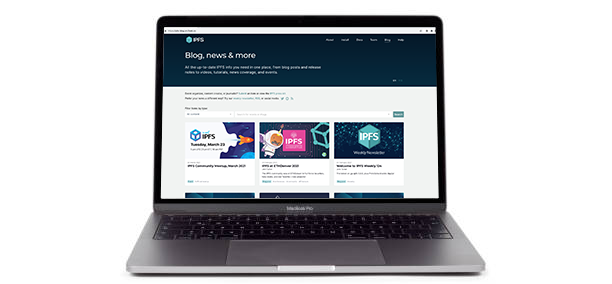
This repository is home to in-development work on a VuePress/Forestry-based replacement for the existing IPFS blog. Target go-live is in late Q1 2021. Contact @jessicaschilling with any questions.
This work is part of a larger product-market fit realignment/enhancement effort on the IPFS website as a whole. View tracking board.
⚠️⚠️⚠️
If you want to publish a blog post, don't do it here yet — use the existing blog instead!
⚠️⚠️⚠️
Workflow for post authors/editors
This site uses the staging branch as a work-in-progress scratchpad for blog content. Once approved for go-live, staging is merged into main; the production site is automatically deployed from the latest main using Fleek.
Post authors and editors are strongly encouraged to use this site's Forestry integration for drafting and editing, including perks like WYSIWYG editing image upload/crop tools, and instant previews. If you're an IPFS core team member and don't have Forestry access, contact @jessicaschilling to arrange access and a quick orientation session. (If you prefer writing in Markdown, don't fear: Forestry also has a raw Markdown view.)
Forestry authoring/editing tips
- Use the "Content Types" section of the left-hand menu to drill down to the type of item (e.g. blog post, video, news coverage, event) you want to create or edit.
- Use the image crop/scale tool to resize and save images so they're the perfect dimensions for link cards and blog post header images. (Don't have an image? Don't worry; the site falls back to generic images in all cases.)
- If you're in edit mode for a blog post, you can switch between WYSIWYG and raw Markdown (for example, if you want to add HTML embed code to the Markdown) by choosing "Raw Editor/WYSIWYG Editor" from the dots menu at the top right of the page:

Forestry build preview tips
While WYSIWYG mode can often give you a good enough idea of what a blog post will look like, you can also load Forestry's built-in build preview in a new tab by clicking the eye icon at the top right of the page:
This build preview lets you preview changes to any content type (not just blog posts), and does not require you to save your changes in order to see them.
Other tips for using Forestry build previews:
- Click the eye icon to regenerate a build preview at any time from the edit page. You may need to reload the build preview page if you don't see changes come through immediately.
- Occasionally, a build preview page gets stuck at a URL ending in
forestry/pendingor simply won't load. Try these troubleshooting tips:- Remove
forestry/pendingfrom the URL and try again. - Check the Previews section of Forestry's
Site > Settingspage to see the preview server's current status, start/stop/restart the server, or examine the logs for errors. Simply restarting the preview server can correct a multitude of problems. - If all else fails, save your changes, wait a few minutes, and take a look at Fleek's build of the latest version of the
stagingbranch. It's a considerably slower build/deploy time, but does reflect the latest changes once it finishes deploying.
- Remove
To deploy to the live site
Forestry writes directly to staging, with staging previews available at https://ipfs-blog-staging.on.fleek.co/.
Once a staged post is ready to go live, please PR staging to main using this handy shortcut. Note that if multiple posts are in-flight in staging and only one is approved to go live, your PR may need some massaging.
PR reviewers: While we continue to dogfood Forestry, please leave your edits in comments rather than making additional commits. As our overall workflow continues to solidify, this suggested direction may change.
Need to add a redirect?
Please add a new line to src/.vuepress/redirects and make a PR of the changes to main.
Just want to add a new "link card"?
Feel free to use Forestry to add details for "link cards" like videos, release notes or news items, and submit a PR for review/merge. However, if you're in a hurry, simply fill in the public submission form and a site maintainer will take care of the rest.
Workflow for site developers
Important! All site development forks/PRs (as opposed to blog posts) should be based on and merged into main, not staging.
Build and run locally
This site is built in Vuepress, and uses Vue/JavaScript for functional code and Markdown for post content.
To build a local copy, run the following:
-
Clone this repository:
git clone https://github.com/ipfs/ipfs-blog.git -
Move into the
ipfs-blogfolder and install the NPM dependencies:cd ipfs-docs npm install -
Boot up the application in dev mode:
npm start -
Open localhost:8080 in your browser.
-
Close the local server with
CTRL+c. -
To restart the local server, run
npm startfrom within theipfs-blogfolder.
PR and preview
Once you're happy with your local changes, please make a PR against the main branch. Including detailed notes on your PR helps smooth the approval and deployment process, so make sure to thoroughly document your changes, including screenshots to depict any changes in UI.
PRs against main will automatically generate Fleek previews for ease of review. A successful run of a Fleek preview build generates a live preview viewable by clicking Details in the fleek/build check at the bottom of your PR page:

A reviewer will be by shortly to have a look!
Maintainers
This site is under active maintenance by members of the core IPFS team.
License
© Protocol Labs | Code is licensed with the MIT License. Except as noted, other content licensed CC-BY 3.0.