mirror of
https://github.com/ipfs/ipfs-blog.git
synced 2026-03-28 17:32:37 +01:00

128 lines
6.2 KiB
Markdown
128 lines
6.2 KiB
Markdown
# IPFS Blog & News
|
||
|
||
[](https://protocol.ai)
|
||
[](http://ipfs.io/)
|
||
[](https://vuepress.vuejs.org/)
|
||
[](https://forestry.io)
|
||
[](http://fleek.co/)
|
||
|
||
|
||
|
||
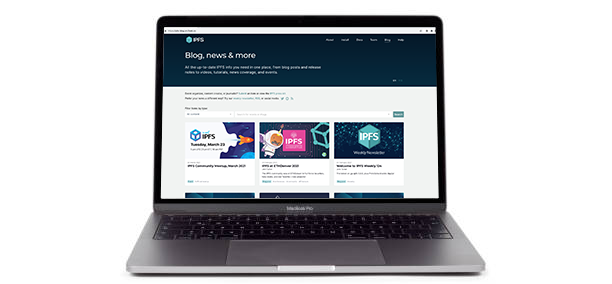
This repository contains code and content for the [IPFS Blog & News](https://blog.ipfs.tech) website. To contribute to the site, please follow the instructions below for _post authors/editors_ and _site developers_.
|
||
|
||
**If you just want to submit a link (event, academic paper, tutorial, video or news coverage) to add to the site, [use this easy form](https://airtable.com/shrNH8YWole1xc70I)!**
|
||
|
||
### Creating a new blog post via Github pull request
|
||
|
||
Each blog post is a markdown file in the [`src/_blog`](./src/_blog) folder, with a little metadata at the top (known as YAML frontmatter) to help us create the post index page.
|
||
|
||
A blog post looks like this:
|
||
|
||
```markdown
|
||
---
|
||
title: Announcing the New IPFS Community Calendar
|
||
description: 'Check out the new IPFS community calendar where you can participate and contribute to one of the many working groups advancing IPFS.'
|
||
author: Daniel Norman
|
||
date: 2022-12-15
|
||
permalink: '/2022-12-ipfs-community-calendar/'
|
||
header_image: '/ipfs-calendar/ipfs-calendar-cover.png'
|
||
tags:
|
||
- 'community'
|
||
- 'calendar'
|
||
- 'working groups'
|
||
---
|
||
|
||
## The IPFS community is growing
|
||
|
||
...
|
||
```
|
||
|
||
**To create your new post** create a new markdown `md` file in `src/_blog` prefixed with the year and month (as a convention) and change the name to be relevant for your post. e.g.
|
||
|
||
```console
|
||
$ cd src/_blog
|
||
$ touch 2022-12-community-calendar.md
|
||
```
|
||
|
||
Now edit the metadata at the top of the file.
|
||
|
||
- `title` - used as the `h1` and `title` tag on the post-page, and the name of the post on the index page. **required**
|
||
- `description` - used as the meta description tag on the post-page. **required**
|
||
- `date` - the "_published at_" date, shown on the [blog index page](https://blog.ipfs.io), please update at posting time to reflect current date - **required** (posts will not be displayed until this date on the live blog, but you will see them locally when using `make dev`)
|
||
- `author` - used to give you credit for your words - **required**
|
||
- `tags` - used to categorize the blog post
|
||
- `permalink` - can be used to override the post URL if needed. Please start and end URLs with a `/` (`/my/url/`).
|
||
- `header_image` - name of the image displayed on the [blog homepage](https://blog.ipfs.tech/). See [Custom header image](#custom-header-image) for more details.
|
||
|
||
#### Custom header image
|
||
|
||
Each post can have a custom image that is shown on the [blog homepage](https://blog.ipfs.tech/). To set an image:
|
||
|
||
1. Add the image into `assets\header_images`. Typically the image is `2048×1152px` in jpg/png.
|
||
1. Rename the image to match the file name of your post. For example, the `2022-12-community-calendar.md` post uses `2022-12-community-calendar.png` as the header.
|
||
1. In the post markdown, edit the front-matter to include the `header_image` variable:
|
||
|
||
```markdown
|
||
header_image: 2022-12-community-calendar.png
|
||
```
|
||
|
||
#### Creating a pull request
|
||
|
||
To create a pull request, you will need to fork this repository. See the GitHub docs on [how to create a pull request from a fork](https://docs.github.com/en/pull-requests/collaborating-with-pull-requests/proposing-changes-to-your-work-with-pull-requests/creating-a-pull-request-from-a-fork). If you have the [GitHub CLI](https://cli.github.com/) installed, you can use the [`gh pr create` command](https://cli.github.com/manual/gh_pr_create) from the terminal to conveniently create a pull request.
|
||
|
||
Once you create the pull request, await review. If you have permissions to merge, always preview the post first to ensure everything looks right. You can do this by clicking on the "Details" link next to the **fleek/build** check that runs automatically. Clicking this link will take you to a staging site where you will then need to click on the intended post in the feed to see it.
|
||
|
||
### To add a URL redirect for a blog post
|
||
|
||
Please add a new line to [`src/.vuepress/redirects`](https://github.com/ipfs/ipfs-blog/blob/main/src/.vuepress/redirects) and make a PR of the change to `main`.
|
||
|
||
## For site developers
|
||
|
||
⚠️ **Important!** All _site development work_ (as opposed to blog posts) should be based on and merged into `main`, **not** `staging`.
|
||
|
||
### Build and run locally
|
||
|
||
This site is built in [Vuepress](https://vuepress.vuejs.org/guide/), and uses Vue/JavaScript for functional code and Markdown for post content.
|
||
|
||
To build a local copy, run the following:
|
||
|
||
1. Clone this repository:
|
||
|
||
```bash
|
||
git clone https://github.com/ipfs/ipfs-blog.git
|
||
```
|
||
|
||
1. Move into the `ipfs-blog` folder and install the npm dependencies:
|
||
|
||
```bash
|
||
cd ipfs-blog
|
||
npm install
|
||
```
|
||
|
||
1. Start the application in _dev mode_:
|
||
|
||
```bash
|
||
npm start
|
||
```
|
||
|
||
1. Open [localhost:8080](http://localhost:8080) in your browser.
|
||
|
||
You can close the local server with `CTRL` + `c`. To restart the local server, run `npm start` from inside the `ipfs-blog` directory.
|
||
|
||
### PR and preview
|
||
|
||
Once you're happy with your local changes, please make a PR **against the `main` branch**. Including detailed notes on your PR - particularly screenshots to depict any changes in UI - will help speed up approval and deployment.
|
||
|
||
All PRs against `main` automatically generate Fleek previews to make it easier to "check your work". You can view your PR's preview by clicking `Details` in the `fleek/build` check at the bottom of your PR page:<br/>
|
||

|
||
|
||
A reviewer will be by shortly to have a look!
|
||
|
||
## Maintainers
|
||
|
||
This site's codebase is under active maintenance by members of the core [IPFS team](https://ipfs.io/team/).
|
||
|
||
## License
|
||
|
||
© Protocol Labs | Code is licensed with the [MIT](LICENSE) License. Except as noted, other content licensed [CC-BY 3.0](https://creativecommons.org/licenses/by/3.0/us/).
|