mirror of
https://github.com/l5yth/potato-mesh.git
synced 2026-10-31 03:51:58 +01:00

367 lines
10 KiB
Markdown
367 lines
10 KiB
Markdown
<!-- Copyright © 2025-26 l5yth & contributors -->
|
||
<!-- Licensed under the Apache License, Version 2.0 (see LICENSE) -->
|
||
|
||
# potatomesh-matrix-bridge
|
||
|
||
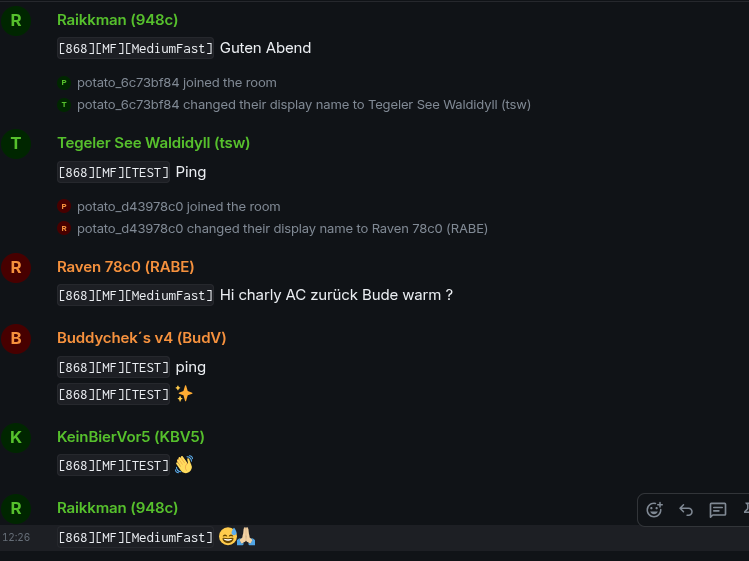
A small Rust daemon that bridges PotatoMesh LoRa messages into a Matrix room.
|
||
|
||
|
||
|
||
For each PotatoMesh node, the bridge creates (or uses) a Matrix puppet user:
|
||
|
||
- Matrix localpart: `potato_` + the hex node id (without `!`), e.g. `!67fc83cb` → `@potato_67fc83cb:example.org`
|
||
- Matrix display name: the node’s `long_name` from the PotatoMesh API
|
||
|
||
Messages from PotatoMesh are periodically fetched and forwarded to a single Matrix room as those puppet users.
|
||
|
||
---
|
||
|
||
## Features
|
||
|
||
- Polls `https://potatomesh.net/api/messages` (deriving `/api` from the configured base domain)
|
||
- Looks up node metadata via `GET /api/nodes/{hex}` and caches it
|
||
- One Matrix user per node:
|
||
- username: `potato_{hex node id}`
|
||
- display name: `long_name`
|
||
- Forwards `TEXT_MESSAGE_APP` messages into a single Matrix room
|
||
- Persists last-seen message ID to avoid duplicates across restarts
|
||
|
||
---
|
||
|
||
## Requirements
|
||
|
||
- Rust (stable) and `cargo`
|
||
- A Matrix homeserver you control (e.g. Synapse)
|
||
- An application service registration on your homeserver that:
|
||
- Whitelists the puppet user namespace (e.g. `@potato_[0-9a-f]{8}:example.org`)
|
||
- Provides an `as_token` the bridge can use (Matrix Client-Server API; the
|
||
bridge impersonates puppets via
|
||
`user_id=@potato_{hex}:{server_name}&access_token={as_token}` and is not a
|
||
full appservice framework - it speaks only the HTTP this needs)
|
||
|
||
- Network access from the bridge host to:
|
||
- `https://potatomesh.net/` (bridge appends `/api`)
|
||
- Your Matrix homeserver (`https://matrix.example.org`)
|
||
|
||
---
|
||
|
||
## Configuration
|
||
|
||
Configuration can come from a TOML file, CLI flags, environment variables, or secret files. The bridge merges inputs in this order (highest to lowest):
|
||
|
||
1. CLI flags
|
||
2. Environment variables
|
||
3. Secret files (`*_FILE` paths or container defaults)
|
||
4. TOML config file
|
||
5. Container defaults (paths + poll interval)
|
||
|
||
If no TOML file is provided, required values must be supplied via CLI/env/secret inputs.
|
||
|
||
Example TOML:
|
||
|
||
```toml
|
||
[potatomesh]
|
||
# Base domain (bridge will call {base_url}/api)
|
||
base_url = "https://potatomesh.net/"
|
||
# Poll interval in seconds
|
||
poll_interval_secs = 10
|
||
|
||
[matrix]
|
||
# Homeserver base URL (client API) without trailing slash
|
||
homeserver = "https://matrix.example.org"
|
||
# Appservice access token (from your registration.yaml)
|
||
as_token = "YOUR_APPSERVICE_AS_TOKEN"
|
||
# Appservice homeserver token (must match registration hs_token)
|
||
hs_token = "SECRET_HS_TOKEN"
|
||
# Server name (domain) part of Matrix user IDs
|
||
server_name = "example.org"
|
||
# Room ID to send into (must be joined by the appservice / puppets)
|
||
room_id = "!yourroomid:example.org"
|
||
|
||
[state]
|
||
# Where to persist last seen message id
|
||
state_file = "bridge_state.json"
|
||
```
|
||
|
||
The `hs_token` is used to validate inbound appservice transactions. Keep it identical in `Config.toml` and your Matrix appservice registration file.
|
||
|
||
### CLI Flags
|
||
|
||
Run `potatomesh-matrix-bridge --help` for the full list. Common flags:
|
||
|
||
* `--config PATH`
|
||
* `--state-file PATH`
|
||
* `--potatomesh-base-url URL`
|
||
* `--potatomesh-poll-interval-secs SECS`
|
||
* `--matrix-homeserver URL`
|
||
* `--matrix-as-token TOKEN`
|
||
* `--matrix-as-token-file PATH`
|
||
* `--matrix-hs-token TOKEN`
|
||
* `--matrix-hs-token-file PATH`
|
||
* `--matrix-server-name NAME`
|
||
* `--matrix-room-id ROOM`
|
||
* `--container` / `--no-container`
|
||
* `--secrets-dir PATH`
|
||
|
||
### Environment Variables
|
||
|
||
* `POTATOMESH_CONFIG`
|
||
* `POTATOMESH_BASE_URL`
|
||
* `POTATOMESH_POLL_INTERVAL_SECS`
|
||
* `MATRIX_HOMESERVER`
|
||
* `MATRIX_AS_TOKEN`
|
||
* `MATRIX_AS_TOKEN_FILE`
|
||
* `MATRIX_HS_TOKEN`
|
||
* `MATRIX_HS_TOKEN_FILE`
|
||
* `MATRIX_SERVER_NAME`
|
||
* `MATRIX_ROOM_ID`
|
||
* `STATE_FILE`
|
||
* `POTATOMESH_CONTAINER`
|
||
* `POTATOMESH_SECRETS_DIR`
|
||
|
||
### Secret Files
|
||
|
||
If you supply `*_FILE` values, the bridge reads the secret contents and trims whitespace. When running inside a container, the bridge also checks the default secrets directory (default: `/run/secrets`) for:
|
||
|
||
* `matrix_as_token`
|
||
* `matrix_hs_token`
|
||
|
||
### Container Defaults
|
||
|
||
Container detection checks `POTATOMESH_CONTAINER`, `CONTAINER`, and `/proc/1/cgroup`. When detected (or forced with `--container`), defaults shift to:
|
||
|
||
* Config path: `/app/Config.toml`
|
||
* State file: `/app/bridge_state.json`
|
||
* Secrets dir: `/run/secrets`
|
||
* Poll interval: 15 seconds (if not otherwise configured)
|
||
|
||
Set `POTATOMESH_CONTAINER=0` or `--no-container` to opt out of container defaults.
|
||
|
||
### Docker Compose First Run
|
||
|
||
Before starting Compose, complete this preflight checklist:
|
||
|
||
1. Ensure `matrix/Config.toml` exists as a regular file on the host (not a directory).
|
||
2. Fill required Matrix values in `matrix/Config.toml`:
|
||
- `matrix.as_token`
|
||
- `matrix.hs_token`
|
||
- `matrix.server_name`
|
||
- `matrix.room_id`
|
||
- `matrix.homeserver`
|
||
|
||
Then follow the token and namespace requirements in [Matrix Appservice Setup (Synapse example)](#matrix-appservice-setup-synapse-example).
|
||
|
||
#### Troubleshooting
|
||
|
||
| Symptom | Likely cause | What to check |
|
||
| --- | --- | --- |
|
||
| `Is a directory (os error 21)` | Host mount source became a directory | `matrix/Config.toml` was missing at mount time and got created as a directory on host. |
|
||
| `M_UNKNOWN_TOKEN` / `401 Unauthorized` | Matrix appservice token mismatch | Verify `matrix.as_token` matches your appservice registration and setup in [Matrix Appservice Setup (Synapse example)](#matrix-appservice-setup-synapse-example). |
|
||
|
||
#### Recovery from accidental `Config.toml` directory creation
|
||
|
||
```bash
|
||
# from repo root
|
||
rm -rf matrix/Config.toml
|
||
touch matrix/Config.toml
|
||
# then edit matrix/Config.toml and set valid matrix.as_token, matrix.hs_token,
|
||
# matrix.server_name, matrix.room_id, and matrix.homeserver before starting compose
|
||
```
|
||
|
||
### PotatoMesh API
|
||
|
||
The bridge assumes:
|
||
|
||
* Messages: `GET {base_url}/api/messages` → JSON array, for example:
|
||
|
||
```json
|
||
[
|
||
{
|
||
"id": 2947676906,
|
||
"rx_time": 1764241436,
|
||
"rx_iso": "2025-11-27T11:03:56Z",
|
||
"from_id": "!da6556d4",
|
||
"to_id": "^all",
|
||
"channel": 1,
|
||
"portnum": "TEXT_MESSAGE_APP",
|
||
"text": "Ping",
|
||
"rssi": -111,
|
||
"hop_limit": 1,
|
||
"lora_freq": 868,
|
||
"modem_preset": "MediumFast",
|
||
"channel_name": "TEST",
|
||
"snr": -9.0,
|
||
"node_id": "!06871773"
|
||
}
|
||
]
|
||
```
|
||
|
||
* Nodes: `GET {base_url}/api/nodes/{hex}` → JSON, for example:
|
||
|
||
```json
|
||
{
|
||
"node_id": "!67fc83cb",
|
||
"short_name": "83CB",
|
||
"long_name": "Meshtastic 83CB",
|
||
"role": "CLIENT_HIDDEN",
|
||
"last_heard": 1764250515,
|
||
"first_heard": 1758993817,
|
||
"last_seen_iso": "2025-11-27T13:35:15Z"
|
||
}
|
||
```
|
||
|
||
Node hex ID is derived from `node_id` by stripping the leading `!` and using the remainder inside the puppet localpart prefix (`potato_{hex}`).
|
||
|
||
---
|
||
|
||
## Matrix Appservice Setup (Synapse example)
|
||
|
||
You need an appservice registration file (e.g. `potatomesh-bridge.yaml`) configured in Synapse.
|
||
|
||
A minimal example sketch (you must adjust URLs, secrets, namespaces):
|
||
|
||
```yaml
|
||
id: potatomesh-bridge
|
||
url: "http://your-bridge-host:41448"
|
||
as_token: "YOUR_APPSERVICE_AS_TOKEN"
|
||
hs_token: "SECRET_HS_TOKEN"
|
||
sender_localpart: "potatomesh-bridge"
|
||
rate_limited: false
|
||
namespaces:
|
||
users:
|
||
- exclusive: true
|
||
regex: "@potato_[0-9a-f]{8}:example.org"
|
||
```
|
||
|
||
Listens for Synapse appservice callbacks on port `41448` (acknowledged, not
|
||
bridged - this is one-way PotatoMesh → Matrix only). `as_token` and
|
||
`namespaces.users` are required for outbound calls; `url` should point at this
|
||
listener.
|
||
|
||
In Synapse’s `homeserver.yaml`, add the registration file under `app_service_config_files`, restart, and invite a puppet user to your target room (or use room ID directly).
|
||
|
||
The bridge validates inbound callbacks by comparing the `access_token` query
|
||
param to `hs_token` - keep them in sync.
|
||
|
||
---
|
||
|
||
## Build
|
||
|
||
```bash
|
||
# clone
|
||
git clone https://github.com/l5yth/potato-mesh.git
|
||
cd potato-mesh/matrix
|
||
|
||
# build
|
||
cargo build --release
|
||
```
|
||
|
||
The resulting binary will be at:
|
||
|
||
```bash
|
||
target/release/potatomesh-matrix-bridge
|
||
```
|
||
|
||
---
|
||
|
||
## Docker
|
||
|
||
Build the container from the repo root with the included `matrix/Dockerfile`:
|
||
|
||
```bash
|
||
docker build -f matrix/Dockerfile -t potatomesh-matrix-bridge .
|
||
```
|
||
|
||
Provide your config at `/app/Config.toml` (or use CLI/env/secret overrides) and persist the bridge state file by mounting volumes. Minimal example:
|
||
|
||
```bash
|
||
docker run --rm \
|
||
-p 41448:41448 \
|
||
-v bridge_state:/app \
|
||
-v "$(pwd)/matrix/Config.toml:/app/Config.toml:ro" \
|
||
potatomesh-matrix-bridge
|
||
```
|
||
|
||
If you prefer to isolate the state file from the config, mount it directly instead of the whole `/app` directory:
|
||
|
||
```bash
|
||
docker run --rm \
|
||
-p 41448:41448 \
|
||
-v "$(pwd)/bridge_state.json:/app/bridge_state.json" \
|
||
-v "$(pwd)/matrix/Config.toml:/app/Config.toml:ro" \
|
||
potatomesh-matrix-bridge
|
||
```
|
||
|
||
The image ships `Config.example.toml` for reference. If `/app/Config.toml` is absent, set the required values via environment variables, CLI flags, or secrets instead.
|
||
|
||
---
|
||
|
||
## Run
|
||
|
||
Ensure `Config.toml` is present and valid, then:
|
||
|
||
```bash
|
||
./target/release/potatomesh-matrix-bridge
|
||
```
|
||
|
||
Environment variables you may care about:
|
||
|
||
* `RUST_LOG` - for logging, e.g.:
|
||
|
||
```bash
|
||
RUST_LOG=info,reqwest=warn ./target/release/potatomesh-matrix-bridge
|
||
```
|
||
|
||
The bridge will:
|
||
|
||
1. Load state from `bridge_state.json` (if present).
|
||
2. Poll PotatoMesh every `poll_interval_secs`.
|
||
3. For each new `TEXT_MESSAGE_APP`:
|
||
|
||
* Fetch node info.
|
||
* Ensure puppet is registered (`@potato_{hex}:{server_name}`).
|
||
* Set puppet display name to `long_name`.
|
||
* Send a formatted text message into `room_id` as that puppet.
|
||
* Update and persist `bridge_state.json`.
|
||
|
||
Delete `bridge_state.json` if you want it to replay all currently available messages.
|
||
|
||
---
|
||
|
||
## Development
|
||
|
||
Run tests:
|
||
|
||
```bash
|
||
cargo test
|
||
```
|
||
|
||
Format code:
|
||
|
||
```bash
|
||
cargo fmt
|
||
```
|
||
|
||
Lint (optional but recommended):
|
||
|
||
```bash
|
||
cargo clippy -- -D warnings
|
||
```
|
||
|
||
---
|
||
|
||
## GitHub Actions CI
|
||
|
||
`.github/workflows/rust.yml` runs on pushes and pull requests to `main`:
|
||
`cargo fmt --check`, `cargo clippy`, `cargo test`.
|
||
|
||
---
|
||
|
||
## Caveats & Future Work
|
||
|
||
* No E2EE: this bridge posts into unencrypted (or server-side managed) rooms. For encrypted rooms, you’d need real E2EE support and key management.
|
||
* No inbound Matrix → PotatoMesh direction yet. This is a one-way bridge (PotatoMesh → Matrix).
|
||
* No pagination or `since` support on the PotatoMesh API. The bridge simply deduplicates by message `id` and stores the highest seen.
|
||
|
||
If you change the PotatoMesh API, adjust the types in `src/potatomesh.rs` accordingly.
|