# How to Manage Your Repeater
This guide explains how to manage a MeshCore repeater device directly from the mc-webui interface using Direct Messages.
---
## 1. Add Your Repeater to Contacts
- Wait for your repeater's first `advert`
- Click on the Contacts icon
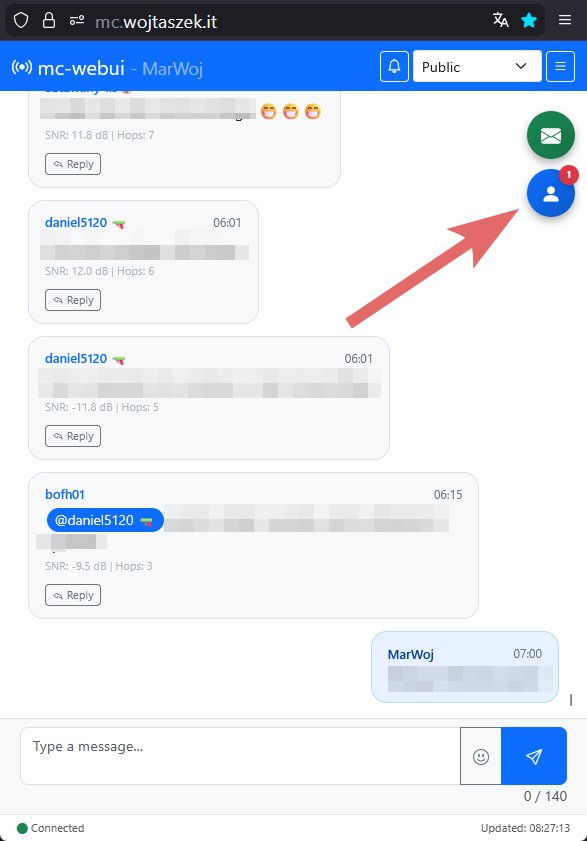 - Go to `Pending contacts` panel
 - Search for your repeater on the list and approve it
 - Reset your search filter (it is recommended to leave COM selected only) and return to the main chat view
 ---
## 2. Login to Your Repeater and Initialize Conversation
- Open the `meshcli Console`
---
## 2. Login to Your Repeater and Initialize Conversation
- Open the `meshcli Console`
 - Enter the `login ` command
- Type the `msg "Hello"` command (you can use any message text)
- Enter the `login ` command
- Type the `msg "Hello"` command (you can use any message text)
 - Return to the main chat view
---
## 3. Send Commands to Your Repeater
- From the main chat view, click on the DM icon
- Return to the main chat view
---
## 3. Send Commands to Your Repeater
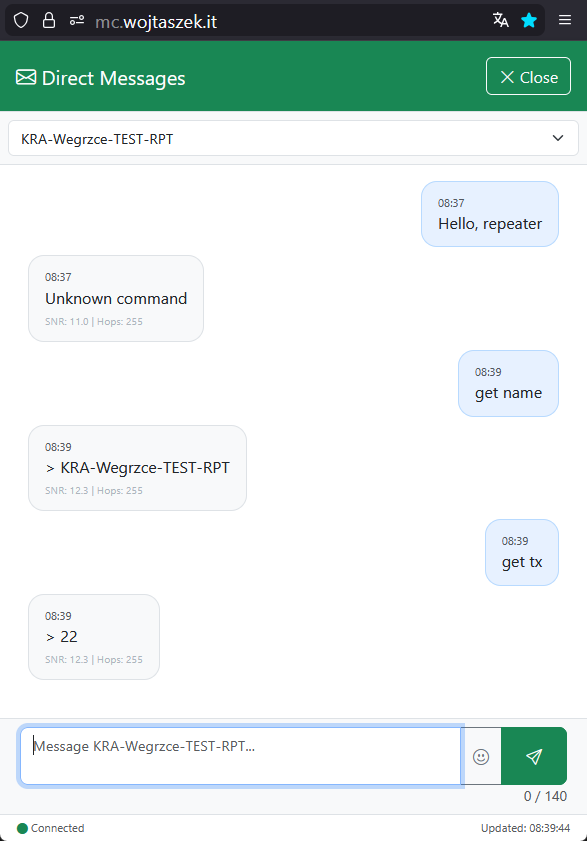
- From the main chat view, click on the DM icon
 - Find your repeater's name on the list
 - Start sending commands to your repeater as if it were a regular DM conversation
 For full commands reference, see [Repeater & Room Server CLI Reference](https://github.com/meshcore-dev/MeshCore/wiki/Repeater-&-Room-Server-CLI-Reference).
**Note:** Not all commands may work at the moment.
For full commands reference, see [Repeater & Room Server CLI Reference](https://github.com/meshcore-dev/MeshCore/wiki/Repeater-&-Room-Server-CLI-Reference).
**Note:** Not all commands may work at the moment.