# IPFS Blog & News
[](https://protocol.ai)
[](http://ipfs.io/)
[](https://vuepress.vuejs.org/)
[](https://forestry.io)
[](http://fleek.co/)
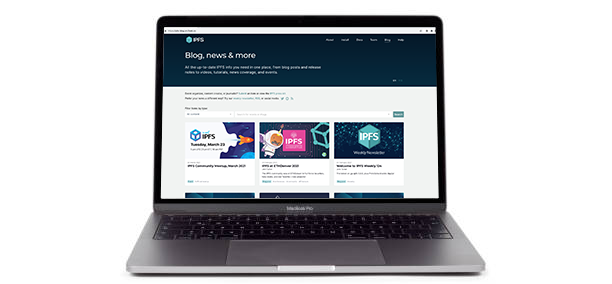
This repository contains code and content for the [IPFS Blog & News](https://blog.ipfs.tech) website. To contribute to the site, please follow the instructions below for _post authors/editors_ and _site developers_.
**If you just want to submit a link (event, academic paper, tutorial, video or news coverage) to add to the site, [use this easy form](https://airtable.com/shrNH8YWole1xc70I)!**
## For post authors/editors
There are 2 ways to create a new blog post:
- Via the [Forestry](https://forestry.io) editor
- Via a [manual pull request](#creating-a-new-blog-post-via-github-pull-request)
### Creating a new blog post using Forestry
Forestry is a content management system (CMS) that automatically creates and manages Github PRs for each new post. Using Forestry offers you WYSIWYG editing (in addition to raw markdown mode), easy image upload/crop tools, and instant previews. If you're a regular contributor to the IPFS blog and would like to request Forestry access, contact Emily Vaughan.
Forestry uses the `staging` branch as a work-in-progress scratchpad for blog content. Once content in `staging` is approved, it can be merged into `main`, which is the branch that feeds the production site at blog.ipfs.tech. Merges into `main` are _automatically deployed_ to the production site using [Fleek](https://fleek.co/).
### Forestry authoring/editing tips
- Use the "Content Types" section of Forestry's left-hand menu to drill down to the type of item (blog post, video, news coverage, event) you want to create/edit.
- For card and blog post header images, **be sure to use the [image crop/scale tool](https://blog.ipfs.tech/image-crop/)** to resize and save images so they're the correct dimensions. (Don't have an image? Don't worry, there are generic fallback images.)
- Want to embed a YouTube video in a blog post? Switch to raw markdown view and use `@[youtube](videoID)`, substituting the video's unique ID from the URL (e.g. `https://www.youtube.com/watch?v=eFbKKsEoQNg`) for `videoID`.
- To switch between WYSIWYG and raw markdown while writing a blog post, choose "Raw Editor" or "WYSIWYG Editor" from the dots menu at the top right of the page:

### Forestry build preview tips
While WYSIWYG mode usually gives you a good enough idea of what a blog post will look like, you can also load Forestry's own _build preview_ in a new tab by clicking the eye icon at the top right of the page:

This build preview lets you preview changes to any content type (not just blog posts), and _does not_ require you to save your changes in order to see them.
A few tips:
- Click the eye icon to _regenerate_ a build preview at any time from a Forestry edit page. You may need to reload the build preview tab if you don't see changes come through immediately.
- Occasionally, a build preview page gets stuck at a URL ending in `forestry/pending` or simply won't load. In this case, try the following:
- Remove `forestry/pending` from the URL and try again.
- Check the Previews section of Forestry's [`Site > Settings` page](https://app.forestry.io/sites/lg5t7mxcqbr-da/#/settings/previews) to see the preview server's current status, start/stop/restart the server, or examine the logs for errors. Simply restarting the preview server can fix many problems.
- If all else fails, save your changes, wait a few minutes, and take a look at [Fleek's build of the latest version of the `staging` branch](https://ipfs-blog-staging.on.fleek.co/). It's a considerably slower build/deploy time, but does reflect the latest changes once it finishes deploying.
### To deploy to the live site
Changes you _save_ in Forestry are written directly to the `staging` branch and automatically generate a staging preview at https://ipfs-blog-staging.on.fleek.co/.
**Once a staged post is ready to go live, please PR `staging` to `main` using [this handy shortcut](https://github.com/ipfs/ipfs-blog/compare/main...staging?expand=1).** Give your PR a title explaining what changes are inside (the default just says "Staging", which isn't helpful.) _Note that if multiple posts are in-flight in staging and only one is approved to go live, your PR may need some massaging by a reviewer._
_Note for PR reviewers: While we continue to dogfood Forestry, please leave your edits in comments rather than making additional commits._ As our overall workflow continues to solidify, this direction may change.
### Creating a new blog post via Github pull request
Each blog post is a markdown file in the [`src/_blog`](./src/_blog) folder, with a little metadata at the top (known as YAML frontmatter) to help us create the post index page.
A blog post looks like this:
```markdown
---
title: Announcing the New IPFS Community Calendar
description: 'Check out the new IPFS community calendar where you can participate and contribute to one of the many working groups advancing IPFS.'
author: Daniel Norman
date: 2022-12-15
permalink: '/2022-12-ipfs-community-calendar/'
header_image: '/ipfs-calendar/ipfs-calendar-cover.png'
tags:
- 'community'
- 'calendar'
- 'working groups'
---
## The IPFS community is growing
...
```
**To create your new post** create a new markdown `md` file in `src/_blog` prefixed with the year and month (as a convention) and change the name to be relevant for your post. e.g.
```console
$ cd src/_blog
$ touch 2022-12-community-calendar.md
```
Now edit the metadata at the top of the file.
- `title` - used as the `h1` and `title` tag on the post-page, and the name of the post on the index page. **required**
- `description` - used as the meta description tag on the post-page. **required**
- `date` - the "_published at_" date, shown on the [blog index page](https://blog.ipfs.io), please update at posting time to reflect current date - **required** (posts will not be displayed until this date on the live blog, but you will see them locally when using `make dev`)
- `author` - used to give you credit for your words - **required**
- `tags` - used to categorize the blog post
- `permalink` - can be used to override the post URL if needed. Please start and end URLs with a `/` (`/my/url/`).
- `header_image` - name of the image displayed on the [blog homepage](https://blog.ipfs.tech/). See [Custom header image](#custom-header-image) for more details.
#### Custom header image
Each post can have a custom image that is shown on the [blog homepage](https://blog.ipfs.tech/). To set an image:
1. Add the image into `assets\header_images`. Typically the image is `2048×1152px` in jpg/png.
1. Rename the image to match the file name of your post. For example, the `2022-12-community-calendar.md` post uses `2022-12-community-calendar.png` as the header.
1. In the post markdown, edit the front-matter to include the `header_image` variable:
```markdown
header_image: 2022-12-community-calendar.png
```
#### Creating a pull request
To create a pull request, you will need to fork this repository. See the GitHub docs on [how to create a pull request from a fork](https://docs.github.com/en/pull-requests/collaborating-with-pull-requests/proposing-changes-to-your-work-with-pull-requests/creating-a-pull-request-from-a-fork). If you have the [GitHub CLI](https://cli.github.com/) installed, you can use the [`gh pr create` command](https://cli.github.com/manual/gh_pr_create) from the terminal to conveniently create a pull request.
Once you create the pull request, await review.
### To add a URL redirect for a blog post
Please add a new line to [`src/.vuepress/redirects`](https://github.com/ipfs/ipfs-blog/blob/main/src/.vuepress/redirects) and make a PR of the change to `main`.
## For site developers
⚠️ **Important!** All _site development work_ (as opposed to blog posts) should be based on and merged into `main`, **not** `staging`.
### Build and run locally
This site is built in [Vuepress](https://vuepress.vuejs.org/guide/), and uses Vue/JavaScript for functional code and Markdown for post content.
To build a local copy, run the following:
1. Clone this repository:
```bash
git clone https://github.com/ipfs/ipfs-blog.git
```
1. Move into the `ipfs-blog` folder and install the npm dependencies:
```bash
cd ipfs-docs
npm install
```
1. Start the application in _dev mode_:
```bash
npm start
```
1. Open [localhost:8080](http://localhost:8080) in your browser.
You can close the local server with `CTRL` + `c`. To restart the local server, run `npm start` from inside the `ipfs-blog` directory.
### PR and preview
Once you're happy with your local changes, please make a PR **against the `main` branch**. Including detailed notes on your PR - particularly screenshots to depict any changes in UI - will help speed up approval and deployment.
All PRs against `main` automatically generate Fleek previews to make it easier to "check your work". You can view your PR's preview by clicking `Details` in the `fleek/build` check at the bottom of your PR page:

A reviewer will be by shortly to have a look!
## Maintainers
This site's codebase is under active maintenance by members of the core [IPFS team](https://ipfs.io/team/).
## License
© Protocol Labs | Code is licensed with the [MIT](LICENSE) License. Except as noted, other content licensed [CC-BY 3.0](https://creativecommons.org/licenses/by/3.0/us/).