Describe the bug
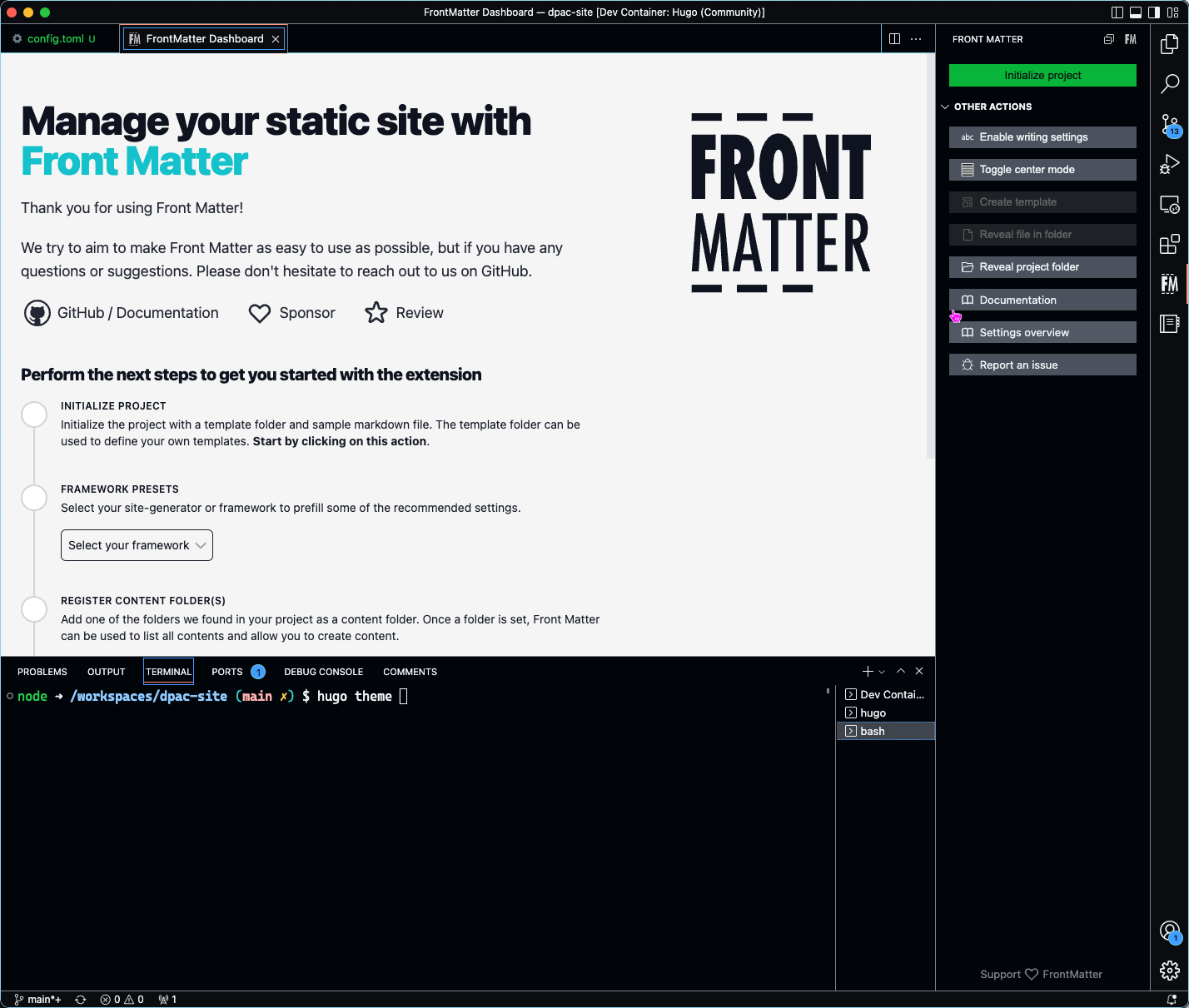
VSCode by default ships with a number of high contrast themes. Some of these are dark, and some are light. FrontMatter only displays in light mode regardless of which high contrast theme you select.
To Reproduce
Steps to reproduce the behavior:
Open FrontMatter Dashboard
Ctrl (Cmd) + Shift + P
Search for "Preferences: Color Theme"
Cycle through the themes available including high contrast themes.
Expected behavior
I would expect when using a dark high contrast theme, for the FrontMatter Dashboard to also use a dark theme.
Screenshots
Desktop (please complete the following information):
OS: macOS Ventura
Browser: VS Code?
Version: 1.74.1
Smartphone (please complete the following information):
NA
Additional context
NA
**Describe the bug**
VSCode by default ships with a number of high contrast themes. Some of these are dark, and some are light. FrontMatter only displays in light mode regardless of which high contrast theme you select.
**To Reproduce**
Steps to reproduce the behavior:
1. Open FrontMatter Dashboard
2. Ctrl (Cmd) + Shift + P
3. Search for "Preferences: Color Theme"
4. Cycle through the themes available including high contrast themes.
**Expected behavior**
I would expect when using a dark high contrast theme, for the FrontMatter Dashboard to also use a dark theme.
**Screenshots**

**Desktop (please complete the following information):**
- OS: macOS Ventura
- Browser: VS Code?
- Version: 1.74.1
**Smartphone (please complete the following information):**
NA
**Additional context**
NA
<!-- github-sync-id:1503778000 -->
@corbob thanks for opening this issue. Instead of creating a new high contrast version for Front Matter, I started to implement VSCode theme support. This is currently available in the latest beta version.
In case you would like to give it a try, you can do so by installing the beta version and add the following setting in your frontmatter.json file.
{"frontMatter.experimental":true,}
@corbob thanks for opening this issue. Instead of creating a new high contrast version for Front Matter, I started to implement VSCode theme support. This is currently available in the latest beta version.
In case you would like to give it a try, you can do so by installing the beta version and add the following setting in your `frontmatter.json` file.
```json
{
"frontMatter.experimental": true,
}
```
<!-- github-comment-id:1424701386 -->
Blocking a user prevents them from interacting with repositories, such as opening or commenting on pull requests or issues. Learn more about blocking a user.
Describe the bug
VSCode by default ships with a number of high contrast themes. Some of these are dark, and some are light. FrontMatter only displays in light mode regardless of which high contrast theme you select.
To Reproduce
Steps to reproduce the behavior:
Expected behavior
I would expect when using a dark high contrast theme, for the FrontMatter Dashboard to also use a dark theme.
Screenshots

Desktop (please complete the following information):
Smartphone (please complete the following information):
NA
Additional context
NA
@corbob thanks for opening this issue. Instead of creating a new high contrast version for Front Matter, I started to implement VSCode theme support. This is currently available in the latest beta version.
In case you would like to give it a try, you can do so by installing the beta version and add the following setting in your
frontmatter.jsonfile.