Describe the bug
Even if a pageFolder path is set to exclude subdirectories, and the content of the sub directories does not show in the Content dashboard, the folders and media of the subdirectories still shows in the Media dashboard
To Reproduce
Steps to reproduce the behavior:
Set this in frontmatter.json and populate subfolders:
Open Media dashboard and see under PAGES all the subdirectories.
Expected behavior
Media dashboard obeys exclude subdirectory settings
Screenshots
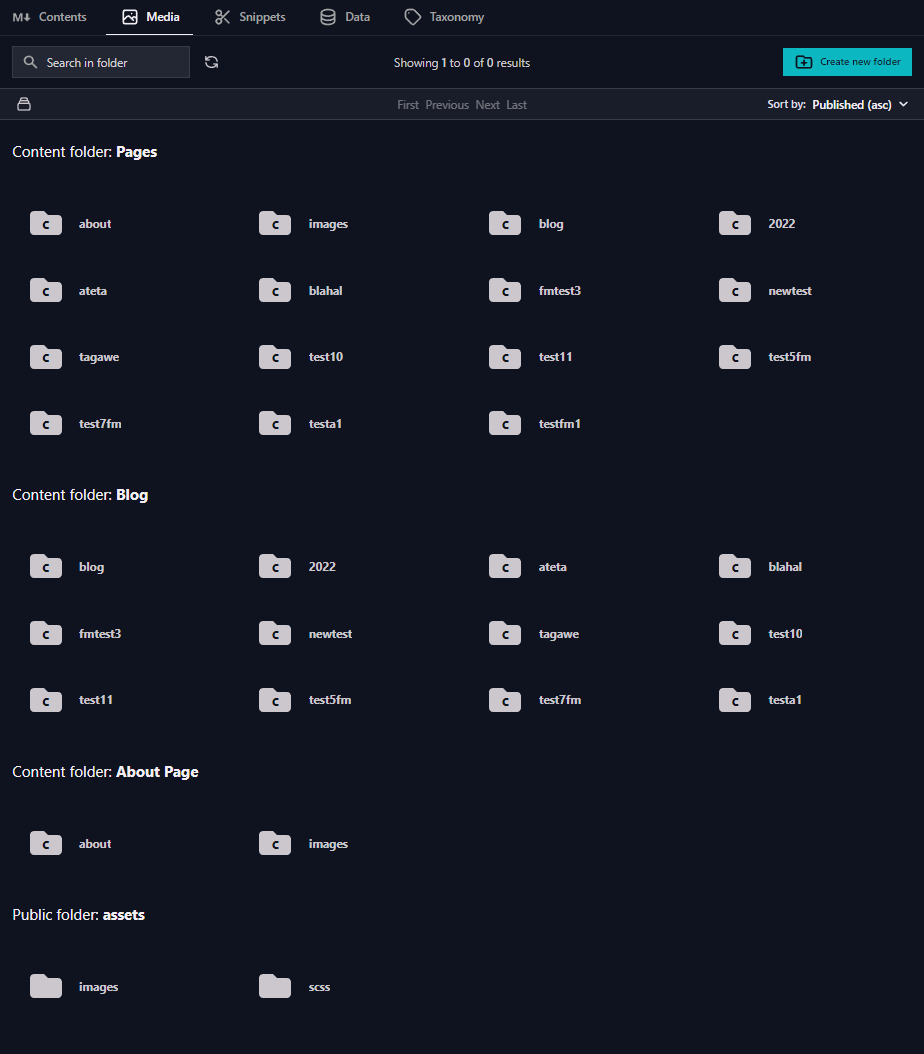
Desktop (please complete the following information):
OS: Windows 10
VScode 1.7.0
Front Matter 8.0.1
**Describe the bug**
Even if a pageFolder path is set to exclude subdirectories, and the content of the sub directories does not show in the Content dashboard, the folders and media of the subdirectories still shows in the Media dashboard
**To Reproduce**
Steps to reproduce the behavior:
Set this in frontmatter.json and populate subfolders:
```json
"frontMatter.content.pageFolders": [
{
"title": "Pages",
"path": "[[workspace]]/content",
"excludeSubdir": true
},
{
"title": "Blog",
"path": "[[workspace]]/content/blog"
},
{
"title": "About Page",
"path": "[[workspace]]/content/about"
}
],
```
Open Media dashboard and see under PAGES all the subdirectories.
**Expected behavior**
Media dashboard obeys exclude subdirectory settings
**Screenshots**

**Desktop (please complete the following information):**
- OS: Windows 10
- VScode 1.7.0
- Front Matter 8.0.1
<!-- github-sync-id:1333959789 -->
@anakinsleftleg, this is actually how the feature is designed. Its purpose is to create groups for your content. More information on the original request can be found here: https://github.com/estruyf/vscode-front-matter/issues/174
The media dashboard will, by default, show all of the content.
@anakinsleftleg, this is actually how the feature is designed. Its purpose is to create groups for your content. More information on the original request can be found here: https://github.com/estruyf/vscode-front-matter/issues/174
The media dashboard will, by default, show all of the content.
<!-- github-comment-id:1212159953 -->
That original feature is clear enough, and works, but doesn't address the media display. It seems confusing and cluttered to have the same folders in different locations.
Also seems like it would be less confusing to not list ALL subfolders, but to traverse as a tree. If I have an /images/ folder in all of my blog page bundles, then how would i know which one to select?
That original feature is clear enough, and works, but doesn't address the media display. It seems confusing and cluttered to have the same folders in different locations.
Also seems like it would be less confusing to not list ALL subfolders, but to traverse as a tree. If I have an /images/ folder in all of my blog page bundles, then how would i know which one to select?
<!-- github-comment-id:1212211686 -->
Blocking a user prevents them from interacting with repositories, such as opening or commenting on pull requests or issues. Learn more about blocking a user.
Describe the bug
Even if a pageFolder path is set to exclude subdirectories, and the content of the sub directories does not show in the Content dashboard, the folders and media of the subdirectories still shows in the Media dashboard
To Reproduce
Steps to reproduce the behavior:
Set this in frontmatter.json and populate subfolders:
Open Media dashboard and see under PAGES all the subdirectories.
Expected behavior
Media dashboard obeys exclude subdirectory settings
Screenshots

Desktop (please complete the following information):
@anakinsleftleg, this is actually how the feature is designed. Its purpose is to create groups for your content. More information on the original request can be found here: https://github.com/estruyf/vscode-front-matter/issues/174
The media dashboard will, by default, show all of the content.
That original feature is clear enough, and works, but doesn't address the media display. It seems confusing and cluttered to have the same folders in different locations.
Also seems like it would be less confusing to not list ALL subfolders, but to traverse as a tree. If I have an /images/ folder in all of my blog page bundles, then how would i know which one to select?