Is your feature request related to a problem? Please describe.
Data files can be set up to store things like author information (e.g. name, slug, url), but if you want to use this information in your front matter as a dropdown you have to set up this data in duplicate as choices to a choice field in frontMatter.taxonomy.contentTypes.
Describe the solution you'd like
Add an option to use data files as the source for choice fields with key/value mapping.
Describe alternatives you've considered
I don't see any alternatives other than setting it up in duplicate or just manually entering the details instead of a choice dropdown.
Additional context
For example set up an authors data file:
**Is your feature request related to a problem? Please describe.**
Data files can be set up to store things like author information (e.g. name, slug, url), but if you want to use this information in your front matter as a dropdown you have to set up this data in duplicate as `choices` to a `choice` field in `frontMatter.taxonomy.contentTypes`.
**Describe the solution you'd like**
Add an option to use data files as the source for `choice` fields with key/value mapping.
**Describe alternatives you've considered**
I don't see any alternatives other than setting it up in duplicate or just manually entering the details instead of a choice dropdown.
**Additional context**
For example set up an authors data file:
```json
"frontMatter.data.files": [
{
"id": "authors",
"title": "Authors",
"file": "[[workspace]]/data/authors.json",
"fileType": "json",
"labelField": "name",
"schema": {
"title": "Authors",
"type": "object",
"required": [
"slug",
"name"
],
"properties": {
"slug": {
"type": "string",
"title": "Slug"
},
"name": {
"type": "string",
"title": "Name"
},
"url": {
"type": "string",
"title": "URL"
}
}
}
}
]
```
In the field configuration to store an ID/slug but display a name:
```json
{
"title": "Author",
"name": "author-slug",
"type": "choice",
"dataSource": "authors",
"key": "slug",
"value": "name"
}
```
Or for displaying/storing only a string:
```json
{
"title": "Author",
"name": "author-slug",
"type": "choice",
"dataSource": "authors",
"value": "name"
}
```
<!-- github-sync-id:1227130999 -->
Thanks, @barrymieny for the suggestion of how we can improve this feature.
Never used it in such a way, so need some more information. What I currently thinking of is to create it as a new field type, where, like you suggested, provide the data source. As that would make it easier to document and use.
What do you want to see in the UI? The value you define in the value property (Person 1, Person 2)?
When selecting the data, do you want to have the whole author object added to the front matter or only the name?
I already know the answer, but it is more to consider the type of data structures we need to support.
Thanks, @barrymieny for the suggestion of how we can improve this feature.
Never used it in such a way, so need some more information. What I currently thinking of is to create it as a new field type, where, like you suggested, provide the data source. As that would make it easier to document and use.
**Example data**
```json
[
{
"name": "Person 1",
"profile": "https://..."
},
{
"name": "Person 2",
"profile": "https://..."
}
]
```
**Example field**
```json
{
"title": "Author",
"name": "author-slug",
"type": "datasource",
"dataSource": "authors",
"key": "slug",
"value": "name"
}
```
**Questions**
- What do you want to see in the UI? The value you define in the `value` property (`Person 1`, `Person 2`)?
- When selecting the data, do you want to have the whole author object added to the front matter or only the name?
- I already know the answer, but it is more to consider the type of data structures we need to support.
<!-- github-comment-id:1119421738 -->
The way I manually do it at the moment is that every data record has a unique identifier, whether it's a country code, slug, id, etc and only this unique identifier is stored in the front matter. When the SSG processes the entries it uses this unique identifier to find the related data record and use the data from it (for example store DE country code but render Germany).
To stick to the author example, the data is stored with a slug, their name and a link to their homepage as a file as defined in the documentation:
dataSource would refer to the id as defined in frontMatter.data.files. I'm not sure what the best naming is for key/value to make it clear what they represent. Naming really is hard.
To answer your last question -- I would store only the identifier since the data file is the single source of truth, but in other scenarios it might make sense to store the entire object.
Apart from where it gets its data, it should work similar to choice which would also allow multiple selection.
The way I manually do it at the moment is that every data record has a unique identifier, whether it's a country code, slug, id, etc and only this unique identifier is stored in the front matter. When the SSG processes the entries it uses this unique identifier to find the related data record and use the data from it (for example store `DE` country code but render `Germany`).
To stick to the author example, the data is stored with a slug, their name and a link to their homepage as a file [as defined in the documentation](https://frontmatter.codes/docs/dashboard#data-files-view):
```json
[
{
"slug": "peter-parker",
"name": "Peter Parker",
"url": "https://www.dailybugle.com/peter-parker"
},
{
"slug": "dorothy-parker",
"name": "Dorothy Parker",
"url": "https://www.poetry.com/dorothy-parker"
}
]
```
The field would be set up as per your suggestion:
```json
{
"title": "Author",
"name": "author-slug",
"type": "datasource",
"dataSource": "authors",
"key": "slug",
"value": "name"
}
```
`dataSource` would refer to the `id` as defined in `frontMatter.data.files`. I'm not sure what the best naming is for `key`/`value` to make it clear what they represent. _Naming really is hard._
This would display the "proper" name in the UI:

And store the identifier in the front matter:
```yaml
---
date: 1926-05-06
title: Threnody
author-slug: dorothy-parker
---
```
To answer your last question -- I would store only the identifier since the data file is the single source of truth, but in other scenarios it might make sense to store the entire object.
Apart from where it gets its data, it should work similar to `choice` which would also allow multiple selection.
<!-- github-comment-id:1119463515 -->
I've got good news for you. The new dataFile field just got implemented.
The field definition for your content type looks as follows:
{"title":"Author","name":"author","type":"dataFile",// ID of the data file
"dataFileId":"authors",// Data key that will be set in the front matter
"dataFileKey":"slug",// Optional: the value defines the field that will be used for the label in the dropdown, if not present, the dataFileKey will be used instead
"dataFileValue":"name","multiple":true}
Hi @barrymieny,
I've got good news for you. The new `dataFile` field just got implemented.
The field definition for your content type looks as follows:
```JSON
{
"title": "Author",
"name": "author",
"type": "dataFile",
// ID of the data file
"dataFileId": "authors",
// Data key that will be set in the front matter
"dataFileKey": "slug",
// Optional: the value defines the field that will be used for the label in the dropdown, if not present, the dataFileKey will be used instead
"dataFileValue": "name",
"multiple": true
}
```

<!-- github-comment-id:1129884982 -->
Blocking a user prevents them from interacting with repositories, such as opening or commenting on pull requests or issues. Learn more about blocking a user.
Is your feature request related to a problem? Please describe.
Data files can be set up to store things like author information (e.g. name, slug, url), but if you want to use this information in your front matter as a dropdown you have to set up this data in duplicate as
choicesto achoicefield infrontMatter.taxonomy.contentTypes.Describe the solution you'd like
Add an option to use data files as the source for
choicefields with key/value mapping.Describe alternatives you've considered
I don't see any alternatives other than setting it up in duplicate or just manually entering the details instead of a choice dropdown.
Additional context
For example set up an authors data file:
In the field configuration to store an ID/slug but display a name:
Or for displaying/storing only a string:
Thanks, @barrymieny for the suggestion of how we can improve this feature.
Never used it in such a way, so need some more information. What I currently thinking of is to create it as a new field type, where, like you suggested, provide the data source. As that would make it easier to document and use.
Example data
Example field
Questions
valueproperty (Person 1,Person 2)?The way I manually do it at the moment is that every data record has a unique identifier, whether it's a country code, slug, id, etc and only this unique identifier is stored in the front matter. When the SSG processes the entries it uses this unique identifier to find the related data record and use the data from it (for example store
DEcountry code but renderGermany).To stick to the author example, the data is stored with a slug, their name and a link to their homepage as a file as defined in the documentation:
The field would be set up as per your suggestion:
dataSourcewould refer to theidas defined infrontMatter.data.files. I'm not sure what the best naming is forkey/valueto make it clear what they represent. Naming really is hard.This would display the "proper" name in the UI:
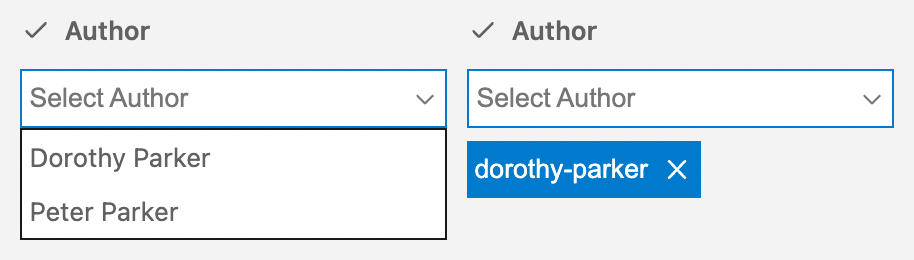
And store the identifier in the front matter:
To answer your last question -- I would store only the identifier since the data file is the single source of truth, but in other scenarios it might make sense to store the entire object.
Apart from where it gets its data, it should work similar to
choicewhich would also allow multiple selection.Hi @barrymieny,
I've got good news for you. The new
dataFilefield just got implemented.The field definition for your content type looks as follows:
Available in the latest beta.
That's great news! I'll check it out ASAP.
It will be release in v7.3.0