Describe the bug
I changed the default content type and everytime I hit the button "create new content" and choose "create content by content type" the required .md file get's created, yet it doesn't open automatically.
If I choose "create content by template" the required template gets created and the file opens automatically.
Is there the possibility in the settings to choose if the file opens automatically or not or is this some kind of bug?
To Reproduce
What I did:
Changed the default content type
Select "Create new content"
Choose "Create content by content type"
It seems as nothing would happen, but the new .md file gets created
Expected behavior
I expect the .md file with the required metadata to open directly, so I can start working on it instantly.
Desktop (please complete the following information):
OS: Windows 10
Visual Studio Code Version 1.63.2
Additional context
As I said, it's not crucial, since it works, when I create content by template, yet I thought this isn't the expected behaviour 😉
**Describe the bug**
I changed the default content type and everytime I hit the button "create new content" and choose "create content by content type" the required .md file get's created, yet it doesn't open automatically.
If I choose "create content by template" the required template gets created and the file opens automatically.
Is there the possibility in the settings to choose if the file opens automatically or not or is this some kind of bug?
**To Reproduce**
What I did:
1. Changed the default content type
2. Select "Create new content"
3. Choose "Create content by content type"
4. It seems as nothing would happen, but the new .md file gets created
**Expected behavior**
I expect the .md file with the required metadata to open directly, so I can start working on it instantly.
**Desktop (please complete the following information):**
- OS: Windows 10
- Visual Studio Code Version 1.63.2
**Additional context**
As I said, it's not crucial, since it works, when I create content by template, yet I thought this isn't the expected behaviour 😉
<!-- github-sync-id:1090058254 -->
@MichaelRoth42 would you be able to share your configuration?
Normally, when you select create by content type, you get a question to specify in which folder it needs to be created and next to define the title. Is this the same experience for you? If not, what file does get created?
@MichaelRoth42 would you be able to share your configuration?
Normally, when you select create by content type, you get a question to specify in which folder it needs to be created and next to define the title. Is this the same experience for you? If not, what file does get created?
<!-- github-comment-id:1002255130 -->
Sorry, I wasn't very precise.
I define the folder and the title, too. After that I hit enter and nothing seems to happen (the file doesn't open), but in a .md file is created in the correct folder with a date prefix and the correct title (even though I didn't define the date prefix)
Sorry, I wasn't very precise.
I define the folder and the title, too. After that I hit enter and nothing seems to happen (the file doesn't open), but in a .md file is created in the correct folder with a date prefix and the correct title (even though I didn't define the date prefix)
<img width="281" alt="mdfile-created" src="https://user-images.githubusercontent.com/58400001/147601820-de70bfbc-4e66-4baa-a928-f10faf8722fa.png">
<!-- github-comment-id:1002256961 -->
Both template and content type creation should open the file. Just to be sure, I have changed one line to use the internal open file command from VS Code. Let us see if this does the trick.
Would you be able to give the latest beta a try? Should be available in a couple of minutes. Version to be installed should be: v5.9.1631668
Both template and content type creation should open the file. Just to be sure, I have changed one line to use the internal open file command from VS Code. Let us see if this does the trick.
Would you be able to give the latest beta a try? Should be available in a couple of minutes. Version to be installed should be: v5.9.1631668
<!-- github-comment-id:1002259288 -->
Thanks @MichaelRoth42, in that case, it will be available in the upcoming release. Thank you so much for opening and testing the issue.
<!-- github-comment-id:1002267280 -->
Blocking a user prevents them from interacting with repositories, such as opening or commenting on pull requests or issues. Learn more about blocking a user.
Describe the bug
I changed the default content type and everytime I hit the button "create new content" and choose "create content by content type" the required .md file get's created, yet it doesn't open automatically.
If I choose "create content by template" the required template gets created and the file opens automatically.
Is there the possibility in the settings to choose if the file opens automatically or not or is this some kind of bug?
To Reproduce
What I did:
Expected behavior
I expect the .md file with the required metadata to open directly, so I can start working on it instantly.
Desktop (please complete the following information):
Additional context
As I said, it's not crucial, since it works, when I create content by template, yet I thought this isn't the expected behaviour 😉
@MichaelRoth42 would you be able to share your configuration?
Normally, when you select create by content type, you get a question to specify in which folder it needs to be created and next to define the title. Is this the same experience for you? If not, what file does get created?
Sorry, I wasn't very precise.
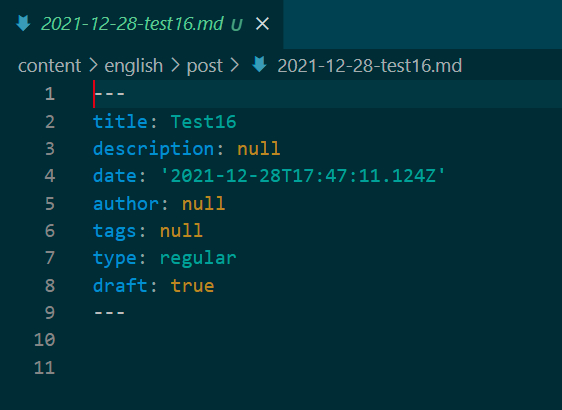
I define the folder and the title, too. After that I hit enter and nothing seems to happen (the file doesn't open), but in a .md file is created in the correct folder with a date prefix and the correct title (even though I didn't define the date prefix)
Both template and content type creation should open the file. Just to be sure, I have changed one line to use the internal open file command from VS Code. Let us see if this does the trick.
Would you be able to give the latest beta a try? Should be available in a couple of minutes. Version to be installed should be: v5.9.1631668
Awesome, will try that
Alright, I tried the v5.9.1631668 BETA and all works flawless ❤
Thank you so much for this quick support 👏
Thanks @MichaelRoth42, in that case, it will be available in the upcoming release. Thank you so much for opening and testing the issue.