I use Fedora Silverblue, VS Code runs on a Flatpak and Hugo runs on a separate Toolbx container (Docker-compatible). At the moment the Front Matter extension does not load any content.
Thanks in advance for considering this.
It would be great if the Remote Containers extension ( https://marketplace.visualstudio.com/items?itemName=ms-vscode-remote.remote-containers ) could be supported, please.
I use Fedora Silverblue, VS Code runs on a Flatpak and Hugo runs on a separate Toolbx container (Docker-compatible). At the moment the Front Matter extension does not load any content.
Thanks in advance for considering this.
<!-- github-sync-id:1062497828 -->
In the case of toolbx yes, as the home directory is available to the container. What is not available is the /usr, /etc partitions, so Front Matter is not able to find Hugo.
<!-- github-comment-id:978091408 -->
I've been experimenting with the Remote Containers extension. What I did, was in my hugo project, I've added a .devcontainer folder with the devcontainer.json and dockerfile.
When starting up the project, load it from the container. I installed the Front Matter extension.
Opening the dashboard, loads all my markdown files without an issue.
The extension looks for files in its current workspace. Do your files live outside the VS Code workspace? If so, how do you connect your content folder? If you could guide me through it, I can also test it on my end, and hopefully find a solution.
I've been experimenting with the Remote Containers extension. What I did, was in my hugo project, I've added a `.devcontainer` folder with the `devcontainer.json` and `dockerfile`.
When starting up the project, load it from the container. I installed the `Front Matter` extension.

Opening the dashboard, loads all my markdown files without an issue.
<img width="1888" alt="Screenshot 2021-11-24 at 20 48 37" src="https://user-images.githubusercontent.com/2900833/143304687-c0a390a9-8336-47ec-8e9b-daa9ea4ff47b.png">
The extension looks for files in its current workspace. Do your files live outside the VS Code workspace? If so, how do you connect your content folder? If you could guide me through it, I can also test it on my end, and hopefully find a solution.
<!-- github-comment-id:978177427 -->
Thanks for looking into this, I appreciate your time.
I run Fedora Silverblue (35). In Silverblue the base operating system is immutable and gets upgrade on an atomic way. GUI applications are packaged in Flatpaks (which are essentially containers) and development environment run on (pet) containers using Toolbx (which is a Podman wrapper).
In my set up I run VS Code as a Flatpak (which has access to $HOME), my blog is stored a directory in $HOME, and hugo is installed on a Toolbx container called "blog" that has access to $HOME.
If you wanted to replicate my environment (in a VM) on top of the standard Silverblue setup you would need to install VS Code from https://flathub.org/apps/details/com.visualstudio.code , follow the instructions at https://github.com/owtaylor/toolbox-vscode to enable the integration of VS Code and Toolbx, create a Toolbx and install hugo on it.
These are the steps I followed this morning:
1. Entered the toolbx: `toolbox enter blog`
2. Navigated to the folder that contains the blog.
3. Launched VS code from within the toolbox `code . &`
4. Opened the blog as a workspace.
5. Deleted the Front Matter files are re-initialised the project.
6. The dashboard shows empty for Markdown entries. The media folder has files though.
This is how it looks like:

This is the container configuration file from the Remote Containers extension:
```
{
// Support requested in https://github.com/microsoft/vscode-remote-release/issues/4053.
// "name": "Toolbox blog",
"remoteUser": "${localEnv:USER}",
"remoteEnv": {
"PATH": "/var/home/jorgeml/.local/bin:/var/home/jorgeml/bin:/usr/local/sbin:/usr/local/bin:/usr/sbin:/usr/bin:/sbin:/bin"
},
"workspaceFolder": "/var/home/jorgeml/Workspace/blog/jorgeml",
"extensions": [
"eliostruyf.vscode-front-matter"
]
}
```
It's also possible to start the container, open the VS Code Flatpak (in the host OS) and then attach VS Code to the running container ( like shown in https://code.visualstudio.com/docs/remote/attach-container ).
Please let me know if this helps.
<!-- github-comment-id:979009769 -->
Just one more quick check, if you right-click on a file in the explorer panel from VS Code, and click on copy path, which path do you get?
Just one more quick check, if you right-click on a file in the explorer panel from VS Code, and click on `copy path`, which path do you get?
<!-- github-comment-id:979015464 -->
Thanks for the details @jorgeml. The path was what I was hoping for, but that doesn't clarify yet why the extension doesn't find the files.
I have created a new #190 diagnostic output. It will be available in a couple of minutes in the BETA version of the extension. Would you be able to give it a try?
First uninstall the main version, second install the Front Matter BETA version. Nothing will be lost during the process. Once installed, can you execute the Front Matter: Diagnostics command? It should give some details about the project, workspace, and folders to process. Hoping to see an issue in the paths.
Important
: Make sure it is version 5.7.1503166 which is installed. It might take a bit of time before you see it in VS Code.
Thanks for the details @jorgeml. The path was what I was hoping for, but that doesn't clarify yet why the extension doesn't find the files.
I have created a new #190 diagnostic output. It will be available in a couple of minutes in the BETA version of the extension. Would you be able to give it a try?
First uninstall the main version, second install the `Front Matter BETA` version. Nothing will be lost during the process. Once installed, can you execute the `Front Matter: Diagnostics` command? It should give some details about the project, workspace, and folders to process. Hoping to see an issue in the paths.
> **Important**: Make sure it is version `5.7.1503166` which is installed. It might take a bit of time before you see it in VS Code.
<!-- github-comment-id:979053564 -->
# Project name
jorgeml
# Folders
# Workspace folder
/var/home/jorgeml/Workspace/blog/jorgeml
# Folders to search files
Installed the extension and opened the workspace:
```
# Project name
jorgeml
# Folders
# Workspace folder
/var/home/jorgeml/Workspace/blog/jorgeml
# Folders to search files
```
<!-- github-comment-id:979090206 -->
Oh, interesting, it is the folders which you aren't receiving. Do you have a frontMatter.content.pageFolders setting configuration in the settings.json file?
Oh, interesting, it is the folders which you aren't receiving. Do you have a `frontMatter.content.pageFolders` setting configuration in the `settings.json` file?
<!-- github-comment-id:979092150 -->
Right, this was weird... I couldn't see the buttons to open the dashboard so I used the command palette to initialise the project, then I registered the content folder and the I could access the dashboard. Still empty though.
# Project name
jorgeml
# Folders
- posts: "/var/home/jorgeml/Workspace/blog/jorgeml/content/posts"
# Workspace folder
/var/home/jorgeml/Workspace/blog/jorgeml
# Folders to search files
- content/posts/**/*.md
Right, this was weird... I couldn't see the buttons to open the dashboard so I used the command palette to initialise the project, then I registered the content folder and the I could access the dashboard. Still empty though.
```
# Project name
jorgeml
# Folders
- posts: "/var/home/jorgeml/Workspace/blog/jorgeml/content/posts"
# Workspace folder
/var/home/jorgeml/Workspace/blog/jorgeml
# Folders to search files
- content/posts/**/*.md
```
<!-- github-comment-id:979093926 -->
Ok, based on the post's path and the path you gave me before, it seems to be correct. I'll add the file retrieval count as well to the diagnostics.
<!-- github-comment-id:979096166 -->
New beta version is building at the moment and available in a couple of minutes.
This should include the number of files it finds in the folder.
```markdown
# Project name
web-eliostruyf-hugo
# Folders
- Pages: "/Users/eliostruyf/blog/web-eliostruyf-hugo/content"
- Blog posts: "/Users/eliostruyf/blog/web-eliostruyf-hugo/content/posts"
- projects: "/Users/eliostruyf/blog/web-eliostruyf-hugo/content/projects"
# Workspace folder
/Users/eliostruyf/blog/web-eliostruyf-hugo
# Folders to search files
- Project start length: 7 | Search in: "content/*.*" | mdFiles: 0 | mdxFiles: 0
- Project start length: 13 | Search in: "content/posts/**/*.*" | mdFiles: 430 | mdxFiles: 0
- Project start length: 16 | Search in: "content/projects/**/*.*" | mdFiles: 1 | mdxFiles: 0
```
<!-- github-comment-id:979104754 -->
Thanks again, it seems to be related to the VS Code its workspace API of finding files. As a test, I did another update which will just retrieve all files in your current workspace. What I'm expecting is that there is some sort of limitation or restriction that prevents VS Code from using the findFiles method in your workspace.
FIrst let us check what the new BETA Diagnostics output gives.
Thanks again, it seems to be related to the VS Code its workspace API of finding files. As a test, I did another update which will just retrieve all files in your current workspace. What I'm expecting is that there is some sort of limitation or restriction that prevents VS Code from using the `findFiles` method in your workspace.
FIrst let us check what the new BETA Diagnostics output gives.
<!-- github-comment-id:979146654 -->
That is good news, but now I'm even more confused 😂
Would you be able to share a screenshot of the project files and folders treeview?
That is good news, but now I'm even more confused 😂
Would you be able to share a screenshot of the project files and folders treeview?
<!-- github-comment-id:979217737 -->
Mystery resolved... Just realised my files have extension ".markdown" instead of ".md". Renaming one of the files made it appear.
I'm truly sorry for wasting your time :-(
Mystery resolved... Just realised my files have extension ".markdown" instead of ".md". Renaming one of the files made it appear.
I'm truly sorry for wasting your time :-(
<!-- github-comment-id:979235223 -->
I just renamed all of them. Also standardised on "type: posts" as I had both "post" and "posts" values to the same key.
Thanks for putting together this extension, it's truly awesome.
I just renamed all of them. Also standardised on "type: posts" as I had both "post" and "posts" values to the same key.
Thanks for putting together this extension, it's truly awesome.
<!-- github-comment-id:979247544 -->
Blocking a user prevents them from interacting with repositories, such as opening or commenting on pull requests or issues. Learn more about blocking a user.
It would be great if the Remote Containers extension ( https://marketplace.visualstudio.com/items?itemName=ms-vscode-remote.remote-containers ) could be supported, please.
I use Fedora Silverblue, VS Code runs on a Flatpak and Hugo runs on a separate Toolbx container (Docker-compatible). At the moment the Front Matter extension does not load any content.
Thanks in advance for considering this.
Haven't used the Remote Containers extension. Where does the content live? Is it still on your file system?
In the case of toolbx yes, as the home directory is available to the container. What is not available is the /usr, /etc partitions, so Front Matter is not able to find Hugo.
I've been experimenting with the Remote Containers extension. What I did, was in my hugo project, I've added a
.devcontainerfolder with thedevcontainer.jsonanddockerfile.When starting up the project, load it from the container. I installed the
Front Matterextension.Opening the dashboard, loads all my markdown files without an issue.
The extension looks for files in its current workspace. Do your files live outside the VS Code workspace? If so, how do you connect your content folder? If you could guide me through it, I can also test it on my end, and hopefully find a solution.
Thanks for looking into this, I appreciate your time.
I run Fedora Silverblue (35). In Silverblue the base operating system is immutable and gets upgrade on an atomic way. GUI applications are packaged in Flatpaks (which are essentially containers) and development environment run on (pet) containers using Toolbx (which is a Podman wrapper).
In my set up I run VS Code as a Flatpak (which has access to $HOME), my blog is stored a directory in $HOME, and hugo is installed on a Toolbx container called "blog" that has access to $HOME.
If you wanted to replicate my environment (in a VM) on top of the standard Silverblue setup you would need to install VS Code from https://flathub.org/apps/details/com.visualstudio.code , follow the instructions at https://github.com/owtaylor/toolbox-vscode to enable the integration of VS Code and Toolbx, create a Toolbx and install hugo on it.
These are the steps I followed this morning:
toolbox enter blogcode . &This is how it looks like:
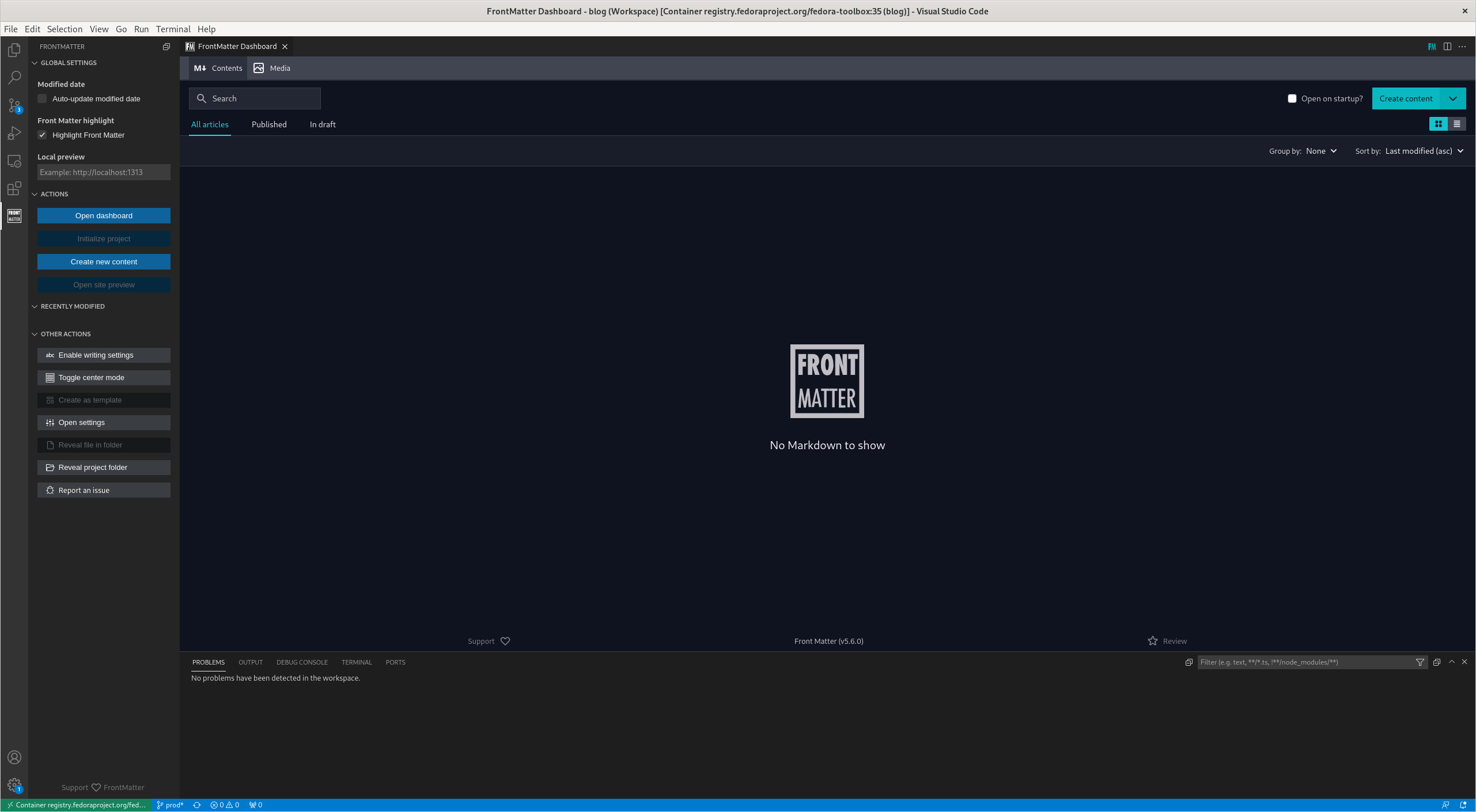
This is the container configuration file from the Remote Containers extension:
It's also possible to start the container, open the VS Code Flatpak (in the host OS) and then attach VS Code to the running container ( like shown in https://code.visualstudio.com/docs/remote/attach-container ).
Please let me know if this helps.
Just one more quick check, if you right-click on a file in the explorer panel from VS Code, and click on
copy path, which path do you get?/var/home/jorgeml/Workspace/blog/jorgeml/content/postsfrontmatter.json
Thanks for the details @jorgeml. The path was what I was hoping for, but that doesn't clarify yet why the extension doesn't find the files.
I have created a new #190 diagnostic output. It will be available in a couple of minutes in the BETA version of the extension. Would you be able to give it a try?
First uninstall the main version, second install the
Front Matter BETAversion. Nothing will be lost during the process. Once installed, can you execute theFront Matter: Diagnosticscommand? It should give some details about the project, workspace, and folders to process. Hoping to see an issue in the paths.Installed the extension and opened the workspace:
Oh, interesting, it is the folders which you aren't receiving. Do you have a
frontMatter.content.pageFolderssetting configuration in thesettings.jsonfile?Right, this was weird... I couldn't see the buttons to open the dashboard so I used the command palette to initialise the project, then I registered the content folder and the I could access the dashboard. Still empty though.
Ok, based on the post's path and the path you gave me before, it seems to be correct. I'll add the file retrieval count as well to the diagnostics.
New beta version is building at the moment and available in a couple of minutes.
This should include the number of files it finds in the folder.
Changing the settings to look at content instead of posts doesn't look better:
Thanks again, it seems to be related to the VS Code its workspace API of finding files. As a test, I did another update which will just retrieve all files in your current workspace. What I'm expecting is that there is some sort of limitation or restriction that prevents VS Code from using the
findFilesmethod in your workspace.FIrst let us check what the new BETA Diagnostics output gives.
That is good news, but now I'm even more confused 😂
Would you be able to share a screenshot of the project files and folders treeview?
Mystery resolved... Just realised my files have extension ".markdown" instead of ".md". Renaming one of the files made it appear.
I'm truly sorry for wasting your time :-(
hahaha. 🙃
Ok, so that's pretty easy to get fixed. I'll add support for
.markdownfiles in that case.I just renamed all of them. Also standardised on "type: posts" as I had both "post" and "posts" values to the same key.
Thanks for putting together this extension, it's truly awesome.
Support for
.markdownhas also been added. Just in case others have it as well.