Tried different PHP versions and Processors. Reinstalled on new Server, still not working.
Tried different Browsers, same Error.
Please help, this gets frustrating.
- Open Admin Panel
- Add new Photo(s)
- First Image stuck at 100 %
....
nothing happens (1 Image gets uploaded)
- Ubuntu 16.04.3 Updated
- Php 7 & 5
- Mysql 5.7.21
- Ispconfig 3.1.11
Tried different PHP versions and Processors. Reinstalled on new Server, still not working.
Tried different Browsers, same Error.
Please help, this gets frustrating.

<!-- github-sync-id:302307016 -->
Hi there!
Could you check under /upload if the picture is there? And if you have chunk in _data/ (if it's really thee, I can't remember for sure where the chunks should go)?
Hi there!
Could you check under /upload if the picture is there? And if you have chunk in _data/ (if it's really thee, I can't remember for sure where the chunks should go)?
<!-- github-comment-id:370426149 -->
Yes there are files in it, but the Upload Bar always Stucks even if i add 30 Images to the Upload Section, 1 Image gets uploaded and the rest stucks... And the pictures wont show up in the album

<!-- github-comment-id:370427866 -->
Sounds like not all the pictures have been uploaded : since a while no picture has been really uploaded, and among the ones uploaded some are only partial. So I think it's an issue coming from the server and its environment. Piwigo and the upload script does the job but the server has inconsistencies
Could you install http://piwigo.org/ext/extension_view.php?eid=303 the Revision 2.8.a and test with the old Flash uploader?
Sounds like not all the pictures have been uploaded : since a while no picture has been really uploaded, and among the ones uploaded some are only partial. So I think it's an issue coming from the server and its environment. Piwigo and the upload script does the job but the server has inconsistencies
Could you install http://piwigo.org/ext/extension_view.php?eid=303 the Revision 2.8.a and test with the old Flash uploader?
<!-- github-comment-id:370442066 -->
Facing the exact same issue, fixed for now with commenting the ‘’’fetchRemote’’’
Fixed from iPhone so no option to look in detail. Have to look when returning from holiday.
Facing the exact same issue, fixed for now with commenting the ‘’’fetchRemote’’’
Fixed from iPhone so no option to look in detail. Have to look when returning from holiday.
<!-- github-comment-id:409761919 -->
I just setup a Piwigo site for the first time and it looks like a great application
Only uploading does not work.. I thought it had to do with folder permissions so i changed that.
strangely enough i then managed to upload one photo and after that whatever i've tried no photo's could be uploaded. All get stuck with a progress bar showing and nothing happening.
I've commented out "fetchRemote" as suggested but that does not help it unfortunately.
Which logs files and where could i check to debug this?
In case i get this working: how do you increase the maximum file size? At the moment it's 2Mb only which is a bit small.
Thanks!

I just setup a Piwigo site for the first time and it looks like a great application
Only uploading does not work.. I thought it had to do with folder permissions so i changed that.
strangely enough i then managed to upload one photo and after that whatever i've tried no photo's could be uploaded. All get stuck with a progress bar showing and nothing happening.
I've commented out "fetchRemote" as suggested but that does not help it unfortunately.
Which logs files and where could i check to debug this?
In case i get this working: how do you increase the maximum file size? At the moment it's 2Mb only which is a bit small.
Thanks!

<!-- github-comment-id:411887480 -->
Thanks for your reply.
I'm checking with the webhost if SELINUX is enabled (sestatus command is not available)
I've tried different versions of Piwigo as well has PHP but without much result to be honest.
When the photos upload starts the progress bar is shown including the file name in the 'Select file' box:
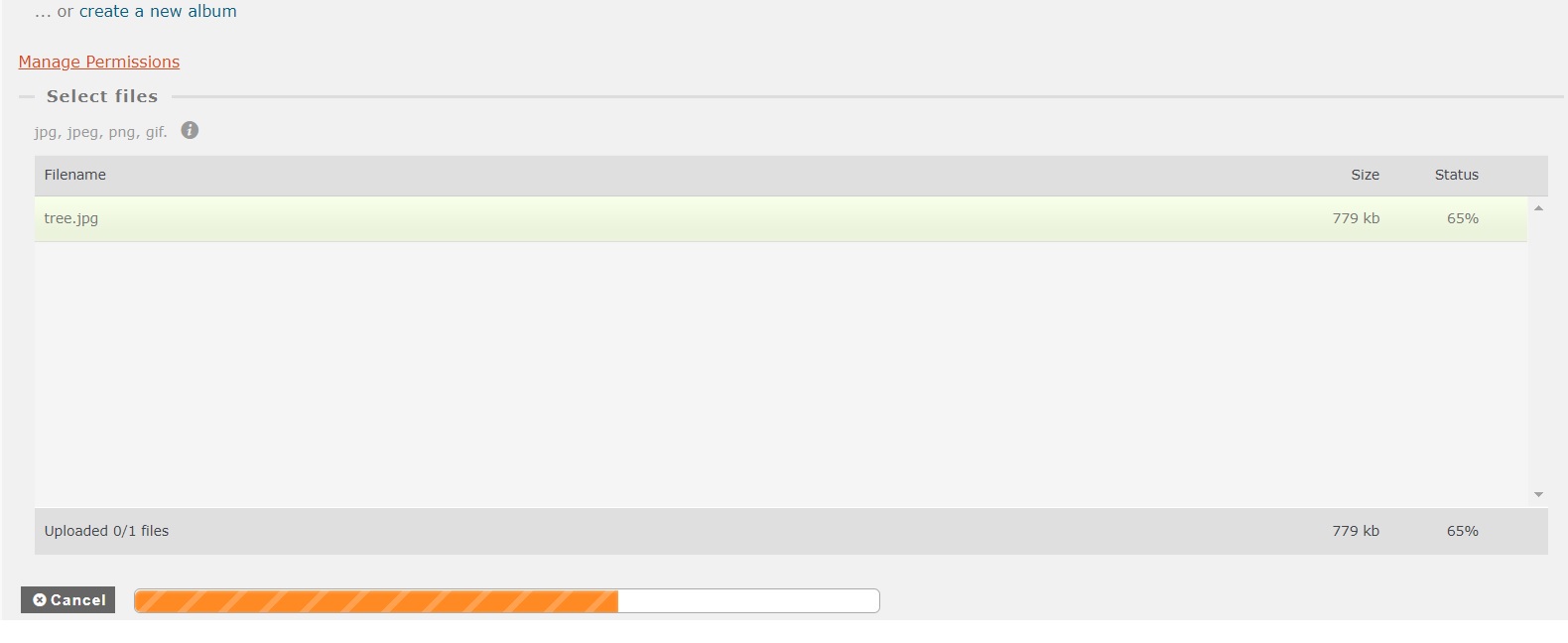
Soon after this disappears and only the progress bar is shown and no further updates.
which logs files would be recommended to check and where can i find these?
Thanks
Thanks for your reply.
I'm checking with the webhost if SELINUX is enabled (sestatus command is not available)
I've tried different versions of Piwigo as well has PHP but without much result to be honest.
When the photos upload starts the progress bar is shown including the file name in the 'Select file' box:

Soon after this disappears and only the progress bar is shown and no further updates.

which logs files would be recommended to check and where can i find these?
Thanks
<!-- github-comment-id:412088806 -->
just tried with many photos and then the 'Select files' box is a bit longer visible
with a 'HTTP error' status behind each file.
Now i need to figure out what the underlying error is.
what's the best place to find logs? Ideally via the the webinterface if possible, even if that means changing something in a php file?
Reason is that i don't have full access to the server as it's managed by the webhost and the installation is through their environment - which they claim has been tested and is working for other users.
just tried with many photos and then the 'Select files' box is a bit longer visible
with a 'HTTP error' status behind each file.
Now i need to figure out what the underlying error is.
what's the best place to find logs? Ideally via the the webinterface if possible, even if that means changing something in a php file?
Reason is that i don't have full access to the server as it's managed by the webhost and the installation is through their environment - which they claim has been tested and is working for other users.

<!-- github-comment-id:412148468 -->
not sure if these console errors have anything to do with it:

<!-- github-comment-id:412162154 -->
I have the same problem. The images are getting uploaded to a folder called 'buffer' inside my config'd upload folder, but the web form gets stuck on a filled loading bar.
<!-- github-comment-id:416581114 -->
Hello as answered check the file and folder permissions. Also post and
search on our forum. Each person may have a different issue even if the
symptoms are the same
Hello as answered check the file and folder permissions. Also post and
search on our forum. Each person may have a different issue even if the
symptoms are the same
Le mar. 28 août 2018 à 15:20, autodonncha <notifications@github.com> a
écrit :
> I have the same problem. The images are getting uploaded to a folder
> called 'buffer' but the web form gets stuck on a filled loading bar.
>
> —
> You are receiving this because you commented.
> Reply to this email directly, view it on GitHub
> <https://github.com/Piwigo/Piwigo/issues/849#issuecomment-416581114>, or mute
> the thread
> <https://github.com/notifications/unsubscribe-auth/AAs-jVTBH9kNusVFSMDWMKESlWqcRcEEks5uVUODgaJpZM4ScUSM>
> .
>
<!-- github-comment-id:416604509 -->
For me, solve the problem by add comment
// fetchRemote($thumb_url, $dest)
(/admin/include/functions_upload.inc.php line 409)
It's WORK.
For me, solve the problem by add comment
// fetchRemote($thumb_url, $dest)
(/admin/include/functions_upload.inc.php line 409)
It's WORK.
<!-- github-comment-id:426717861 -->
I also have the same problem with upload getting stuck at 100% for EVERY image.
Commenting out line 409 of /admin/include/functions_upload.inc.php (// fetchRemote($thumb_url, $dest)) solves the problem immediately.
+1
I also have the same problem with upload getting stuck at 100% for EVERY image.
Commenting out line 409 of /admin/include/functions_upload.inc.php (// fetchRemote($thumb_url, $dest)) solves the problem immediately.
<!-- github-comment-id:495126269 -->
Same problem. Waiting for an hour to just upload 5 photos. Comment out this line and I can upload 50 photos in less than a minute. Something is wrong in this function.
Another symptom I had, which is gone now: generation of thumbnails after batch upload would always hang. Now it works as it is supposed to be.
I am in a reverse proxy situation, where SSL traffic is terminated at the proxy and forwarded as http.
Piwigo seems to not like that anymore since some of the newer versions?
I'm curious what the function fetchRemote actually does, because I find no broken functionality anywehere.
+1
Same problem. Waiting for an hour to just upload 5 photos. Comment out this line and I can upload 50 photos in less than a minute. Something is wrong in this function.
Another symptom I had, which is gone now: generation of thumbnails after batch upload would always hang. Now it works as it is supposed to be.
I am in a reverse proxy situation, where SSL traffic is terminated at the proxy and forwarded as http.
Piwigo seems to not like that anymore since some of the newer versions?
I'm curious what the function fetchRemote actually does, because I find no broken functionality anywehere.
<!-- github-comment-id:500106725 -->
interesting
fecthremote load the thumbnails url, maybe to generate the thumbnails itself
do you have slow or issues with the generation of resized pictures?
interesting
fecthremote load the thumbnails url, maybe to generate the thumbnails itself
do you have slow or issues with the generation of resized pictures?
<!-- github-comment-id:500117294 -->
I can also confirm having this slow or stalled upload issue fixed by commenting out the fetchRemote line. However perhaps in a newer version the line now reads:
fetchRemote($derivative_url, $dest);
After commenting that out the upload speed is normal.
I can also confirm having this slow or stalled upload issue fixed by commenting out the fetchRemote line. However perhaps in a newer version the line now reads:
fetchRemote($derivative_url, $dest);
After commenting that out the upload speed is normal.
<!-- github-comment-id:613629792 -->
Also had this error, and commenting out line 401 in /admin/include/functions_upload.inc.php (//fetchRemote($derivative_url, $dest);) also resolved it. Thank you to the above people who discovered this.
Setup details: Piwigo 11.4.0, Ubuntu 18.04, php7.2, lighttpd, proxy through Caddy.
<!-- github-comment-id:824568426 -->
does this "hack" have any side-effect? what does it do exactly when you comment this line out? (no DB breakage? no real backlash somewhere?)
<!-- github-comment-id:830351802 -->
Adding another (probably) unhelpful "me too" in this issue. Commenting the line resolves the issue (which repros from both the web page and iOS app).
Details: Piwigo 12.1.0 (Docker tag), Ubuntu 20.04
Adding another (probably) unhelpful "me too" in this issue. Commenting the line resolves the issue (which repros from both the web page and iOS app).
Details: Piwigo 12.1.0 (Docker tag), Ubuntu 20.04
<!-- github-comment-id:989571378 -->
I also encountered this issue, and the fix for me was much more basic - the issue was the server couldn't reach itself on the generated URL. In the new versions there's a log file that tells you what URL it's trying to fetch (in _data/logs/):
In my case xxxxxxx.com wasn't correctly resolving - correcting my hosts file resolved it. It could also be caused by incorrect NAT configuration or other issues.
Ensure this URL can be reached by the upload script - try wget <URL> on the CLI to verify,
I also encountered this issue, and the fix for me was much more basic - the issue was the server couldn't reach itself on the generated URL. In the new versions there's a log file that tells you what URL it's trying to fetch (in _data/logs/):
`root@xxxxx:/var/www/photos# cat _data/logs/log_2022-11-05_2da7f981e0e79d42ea0351187a992d25f36737bc.txt | grep add_uploaded_file`
`[2022-11-05 19:08:34] [INFO] add_uploaded_file : force cache generation, derivative_url = https://xxxxxxx.com/photos/i.php?/upload/2022/11/05/20221105190834-b6b9575f-me.jpg`
In my case xxxxxxx.com wasn't correctly resolving - correcting my hosts file resolved it. It could also be caused by incorrect NAT configuration or other issues.
Ensure this URL can be reached by the upload script - try `wget <URL>` on the CLI to verify,
<!-- github-comment-id:1304615928 -->
my.domain is resolving locally on our physical server, so it will not be faster if I add it directly to etc/hosts
this issue appeared only with 13.* version of Piwigo, the size of my gallery didn't increased significantly from pre-13 times.
Though, my Piwigo gallery is quite big - about 110.000 images and about 3.500 albums. It's interesting to know about other galleries with the same issue - are they also big or it doesn't depend from gallery size?
The hack with commenting out
fetchRemote($derivative_url, $dest);
in /admin/include/functions_upload.inc.php works but I would like to be sure that there are no any side effects.
I'm not sure that the problem is in resolving speed as written in the last comment.
I had this issue today again. With three small jpg-files. From the log:
cat _data/logs/log_2023-03-09_73c50348a3fce82fe5467dd3ffc74477765903e8.txt | grep add_uploaded_file
[2023-03-09 10:17:44] [INFO] add_uploaded_file : force cache generation, derivative_url = https://my.domain/photos/i.php?/upload/2023/03/09/20230309101743-a79278a3-me.jpg
[2023-03-09 18:15:36] [INFO] add_uploaded_file : force cache generation, derivative_url = https://my.domain/photos/i.php?/upload/2023/03/09/20230309181536-3e7fcde5-me.jpg
[2023-03-09 18:15:38] [INFO] add_uploaded_file : force cache generation, derivative_url = https://my.domain/photos/i.php?/upload/2023/03/09/20230309181537-4d8e622d-me.jpg
My hesitations on this issue:
1) my.domain is resolving locally on our physical server, so it will not be faster if I add it directly to etc/hosts
2) this issue appeared only with 13.* version of Piwigo, the size of my gallery didn't increased significantly from pre-13 times.
3) Though, my Piwigo gallery is quite big - about 110.000 images and about 3.500 albums. It's interesting to know about other galleries with the same issue - are they also big or it doesn't depend from gallery size?
The hack with commenting out
fetchRemote($derivative_url, $dest);
in /admin/include/functions_upload.inc.php works but I would like to be sure that there are no any side effects.
Details:
Piwigo 13.6.0
Linux: 5.10.0-19-amd64 #1 SMP Debian 5.10.149-2 (2022-10-21) x86_64 GNU/Linux
PHP: 7.4.33
MySQL: 8.0.29-21
ImageMagick 6.9.11-60
Cache size 80576.82
<!-- github-comment-id:1462701337 -->
I had the same problem on my server. The error was in the hostname resolution. The Docker host is behind NAT with an internal address, but there is a public IP address in DNS that it couldn't reach. It helped to add this to the compose.yaml file (php container):
extra_hosts:
- "gallery.server.net:192.168.x.y"
Then it is possible to check the server availability directly from the php container:
The fetchRemote is imho used to display previews of photos that have just been uploaded. It may not be the only similar call to a custom server.
I had the same problem on my server. The error was in the hostname resolution. The Docker host is behind NAT with an internal address, but there is a public IP address in DNS that it couldn't reach. It helped to add this to the compose.yaml file (php container):
extra_hosts:
- "gallery.server.net:192.168.x.y"
Then it is possible to check the server availability directly from the php container:
docker exec -it www-gallery.server.net-php /bin/bash
cd /tmp
wget https://gallery.server.net
(or curl instead of wget)
The fetchRemote is imho used to display previews of photos that have just been uploaded. It may not be the only similar call to a custom server.
<!-- github-comment-id:2270705253 -->
I have the same problem, using the docker container from linuxserver.
I Don't think I have changed anything in my server configuration since the last upload I've done (17 September 2024).
The upload is stuck after one image.
If I only upload one image, it's stuck at 100% and Nothing appens when 100% is reached.
But if I quit the upload page after that, the picture is present in my gallery.
The hack with commenting out "fetchRemote($derivative_url, $dest);" did'nt work.
I can do a wget of the url of my gallery from the inside of the container, and I receive the html of the front page, so it did'nt seems to be a problem in the resolution of domain name.
Any clues of what can be the problem ?
I have the same problem, using the docker container from linuxserver.
I Don't think I have changed anything in my server configuration since the last upload I've done (17 September 2024).
The upload is stuck after one image.
If I only upload one image, it's stuck at 100% and Nothing appens when 100% is reached.
But if I quit the upload page after that, the picture is present in my gallery.
The hack with commenting out "fetchRemote($derivative_url, $dest);" did'nt work.
I can do a wget of the url of my gallery from the inside of the container, and I receive the html of the front page, so it did'nt seems to be a problem in the resolution of domain name.
Any clues of what can be the problem ?
<!-- github-comment-id:2446260343 -->
I have the same problem, using the docker container from linuxserver. I Don't think I have changed anything in my server configuration since the last upload I've done (17 September 2024).
The upload is stuck after one image. If I only upload one image, it's stuck at 100% and Nothing appens when 100% is reached. But if I quit the upload page after that, the picture is present in my gallery.
The hack with commenting out "fetchRemote($derivative_url, $dest);" did'nt work.
I can do a wget of the url of my gallery from the inside of the container, and I receive the html of the front page, so it did'nt seems to be a problem in the resolution of domain name.
Any clues of what can be the problem ?
Exactly the same behaviour here, using docker container from linuxserver. hack doesnt work and wget does.
Only log or clue of error I've found is the developer console of the browser, where I get this after trying to upload a single image that gets stuck at 100%:
Uncaught DOMException: Node.removeChild: The node to be removed is not a child of this node
removeFaviconTag https://gallery.server.net/_data/combined/9tn3dm.js:154
setFaviconTag https://gallery.server.net/_data/combined/9tn3dm.js:154
drawFavicon https://gallery.server.net/_data/combined/9tn3dm.js:156
setProgress https://gallery.server.net/_data/combined/9tn3dm.js:160
UploadProgress https://gallery.server.net/_data/combined/9tn3dm.js:43
bind https://gallery.server.net/_data/combined/9tn3dm.js:212
dispatchEvent https://gallery.server.net/_data/combined/9tn3dm.js:197
i https://gallery.server.net/_data/combined/9tn3dm.js:197
dispatchEvent https://gallery.server.net/_data/combined/9tn3dm.js:197
i https://gallery.server.net/_data/combined/9tn3dm.js:197
dispatchEvent https://gallery.server.net/_data/combined/9tn3dm.js:197
i https://gallery.server.net/_data/combined/9tn3dm.js:197
r https://gallery.server.net/_data/combined/9tn3dm.js:197
dispatchEvent https://gallery.server.net/_data/combined/9tn3dm.js:197
trigger https://gallery.server.net/_data/combined/9tn3dm.js:197
onprogress https://gallery.server.net/_data/combined/9tn3dm.js:212
dispatchEvent https://gallery.server.net/_data/combined/9tn3dm.js:197
i https://gallery.server.net/_data/combined/9tn3dm.js:197
r https://gallery.server.net/_data/combined/9tn3dm.js:197
dispatchEvent https://gallery.server.net/_data/combined/9tn3dm.js:197
r https://gallery.server.net/_data/combined/9tn3dm.js:198
dispatchEvent https://gallery.server.net/_data/combined/9tn3dm.js:197
i https://gallery.server.net/_data/combined/9tn3dm.js:197
r https://gallery.server.net/_data/combined/9tn3dm.js:197
dispatchEvent https://gallery.server.net/_data/combined/9tn3dm.js:197
trigger https://gallery.server.net/_data/combined/9tn3dm.js:197
send https://gallery.server.net/_data/combined/9tn3dm.js:198
exec https://gallery.server.net/_data/combined/9tn3dm.js:197
shimExec https://gallery.server.net/_data/combined/9tn3dm.js:197
exec https://gallery.server.net/_data/combined/9tn3dm.js:197
r https://gallery.server.net/_data/combined/9tn3dm.js:198
u https://gallery.server.net/_data/combined/9tn3dm.js:198
send https://gallery.server.net/_data/combined/9tn3dm.js:198
p https://gallery.server.net/_data/combined/9tn3dm.js:212
k https://gallery.server.net/_data/combined/9tn3dm.js:212
bind https://gallery.server.net/_data/combined/9tn3dm.js:212
dispatchEvent https://gallery.server.net/_data/combined/9tn3dm.js:197
i https://gallery.server.net/_data/combined/9tn3dm.js:197
dispatchEvent https://gallery.server.net/_data/combined/9tn3dm.js:197
i https://gallery.server.net/_data/combined/9tn3dm.js:197
r https://gallery.server.net/_data/combined/9tn3dm.js:197
dispatchEvent https://gallery.server.net/_data/combined/9tn3dm.js:197
trigger https://gallery.server.net/_data/combined/9tn3dm.js:197
g https://gallery.server.net/_data/combined/9tn3dm.js:212
start https://gallery.server.net/_data/combined/9tn3dm.js:212
Init https://gallery.server.net/_data/combined/9tn3dm.js:32
jQuery 7
Init https://gallery.server.net/_data/combined/9tn3dm.js:32
bind https://gallery.server.net/_data/combined/9tn3dm.js:212
dispatchEvent https://gallery.server.net/_data/combined/9tn3dm.js:197
i https://gallery.server.net/_data/combined/9tn3dm.js:197
dispatchEvent https://gallery.server.net/_data/combined/9tn3dm.js:197
i https://gallery.server.net/_data/combined/9tn3dm.js:197
r https://gallery.server.net/_data/combined/9tn3dm.js:197
dispatchEvent https://gallery.server.net/_data/combined/9tn3dm.js:197
trigger https://gallery.server.net/_data/combined/9tn3dm.js:197
init https://gallery.server.net/_data/combined/9tn3dm.js:212
x https://gallery.server.net/_data/combined/9tn3dm.js:212
i https://gallery.server.net/_data/combined/9tn3dm.js:197
onready https://gallery.server.net/_data/combined/9tn3dm.js:212
dispatchEvent https://gallery.server.net/_data/combined/9tn3dm.js:197
i https://gallery.server.net/_data/combined/9tn3dm.js:197
r https://gallery.server.net/_data/combined/9tn3dm.js:197
dispatchEvent https://gallery.server.net/_data/combined/9tn3dm.js:197
init https://gallery.server.net/_data/combined/9tn3dm.js:197
dispatchEvent https://gallery.server.net/_data/combined/9tn3dm.js:197
i https://gallery.server.net/_data/combined/9tn3dm.js:197
r https://gallery.server.net/_data/combined/9tn3dm.js:197
dispatchEvent https://gallery.server.net/_data/combined/9tn3dm.js:197
trigger https://gallery.server.net/_data/combined/9tn3dm.js:197
o https://gallery.server.net/_data/combined/9tn3dm.js:197
setTimeout handler*i/connectRuntime/o/< https://gallery.server.net/_data/combined/9tn3dm.js:197
dispatchEvent https://gallery.server.net/_data/combined/9tn3dm.js:197
i https://gallery.server.net/_data/combined/9tn3dm.js:197
r https://gallery.server.net/_data/combined/9tn3dm.js:197
dispatchEvent https://gallery.server.net/_data/combined/9tn3dm.js:197
trigger https://gallery.server.net/_data/combined/9tn3dm.js:197
init https://gallery.server.net/_data/combined/9tn3dm.js:198
o https://gallery.server.net/_data/combined/9tn3dm.js:197
connectRuntime https://gallery.server.net/_data/combined/9tn3dm.js:197
init https://gallery.server.net/_data/combined/9tn3dm.js:197
x https://gallery.server.net/_data/combined/9tn3dm.js:212
i https://gallery.server.net/_data/combined/9tn3dm.js:197
onready https://gallery.server.net/_data/combined/9tn3dm.js:212
dispatchEvent https://gallery.server.net/_data/combined/9tn3dm.js:197
setTimeout handler*n/dispatchEvent/</< https://gallery.server.net/_data/combined/9tn3dm.js:197
i https://gallery.server.net/_data/combined/9tn3dm.js:197
dispatchEvent https://gallery.server.net/_data/combined/9tn3dm.js:197
Error: Promised response from onMessage listener went out of scope [ExtensionMessagingService.js:89:34](moz-extension://889ddf55-40e0-4543-aa10-90a3d305722f/scripts/services/ExtensionMessagingService.js)
This has been happening for the last 2 months or so, after an update.
> I have the same problem, using the docker container from linuxserver. I Don't think I have changed anything in my server configuration since the last upload I've done (17 September 2024).
>
> The upload is stuck after one image. If I only upload one image, it's stuck at 100% and Nothing appens when 100% is reached. But if I quit the upload page after that, the picture is present in my gallery.
>
> The hack with commenting out "fetchRemote($derivative_url, $dest);" did'nt work.
>
> I can do a wget of the url of my gallery from the inside of the container, and I receive the html of the front page, so it did'nt seems to be a problem in the resolution of domain name.
>
> Any clues of what can be the problem ?
Exactly the same behaviour here, using docker container from linuxserver. hack doesnt work and wget does.
Only log or clue of error I've found is the developer console of the browser, where I get this after trying to upload a single image that gets stuck at 100%:
```
Uncaught DOMException: Node.removeChild: The node to be removed is not a child of this node
removeFaviconTag https://gallery.server.net/_data/combined/9tn3dm.js:154
setFaviconTag https://gallery.server.net/_data/combined/9tn3dm.js:154
drawFavicon https://gallery.server.net/_data/combined/9tn3dm.js:156
setProgress https://gallery.server.net/_data/combined/9tn3dm.js:160
UploadProgress https://gallery.server.net/_data/combined/9tn3dm.js:43
bind https://gallery.server.net/_data/combined/9tn3dm.js:212
dispatchEvent https://gallery.server.net/_data/combined/9tn3dm.js:197
i https://gallery.server.net/_data/combined/9tn3dm.js:197
dispatchEvent https://gallery.server.net/_data/combined/9tn3dm.js:197
i https://gallery.server.net/_data/combined/9tn3dm.js:197
dispatchEvent https://gallery.server.net/_data/combined/9tn3dm.js:197
i https://gallery.server.net/_data/combined/9tn3dm.js:197
r https://gallery.server.net/_data/combined/9tn3dm.js:197
dispatchEvent https://gallery.server.net/_data/combined/9tn3dm.js:197
trigger https://gallery.server.net/_data/combined/9tn3dm.js:197
onprogress https://gallery.server.net/_data/combined/9tn3dm.js:212
dispatchEvent https://gallery.server.net/_data/combined/9tn3dm.js:197
i https://gallery.server.net/_data/combined/9tn3dm.js:197
r https://gallery.server.net/_data/combined/9tn3dm.js:197
dispatchEvent https://gallery.server.net/_data/combined/9tn3dm.js:197
r https://gallery.server.net/_data/combined/9tn3dm.js:198
dispatchEvent https://gallery.server.net/_data/combined/9tn3dm.js:197
i https://gallery.server.net/_data/combined/9tn3dm.js:197
r https://gallery.server.net/_data/combined/9tn3dm.js:197
dispatchEvent https://gallery.server.net/_data/combined/9tn3dm.js:197
trigger https://gallery.server.net/_data/combined/9tn3dm.js:197
send https://gallery.server.net/_data/combined/9tn3dm.js:198
exec https://gallery.server.net/_data/combined/9tn3dm.js:197
shimExec https://gallery.server.net/_data/combined/9tn3dm.js:197
exec https://gallery.server.net/_data/combined/9tn3dm.js:197
r https://gallery.server.net/_data/combined/9tn3dm.js:198
u https://gallery.server.net/_data/combined/9tn3dm.js:198
send https://gallery.server.net/_data/combined/9tn3dm.js:198
p https://gallery.server.net/_data/combined/9tn3dm.js:212
k https://gallery.server.net/_data/combined/9tn3dm.js:212
bind https://gallery.server.net/_data/combined/9tn3dm.js:212
dispatchEvent https://gallery.server.net/_data/combined/9tn3dm.js:197
i https://gallery.server.net/_data/combined/9tn3dm.js:197
dispatchEvent https://gallery.server.net/_data/combined/9tn3dm.js:197
i https://gallery.server.net/_data/combined/9tn3dm.js:197
r https://gallery.server.net/_data/combined/9tn3dm.js:197
dispatchEvent https://gallery.server.net/_data/combined/9tn3dm.js:197
trigger https://gallery.server.net/_data/combined/9tn3dm.js:197
g https://gallery.server.net/_data/combined/9tn3dm.js:212
start https://gallery.server.net/_data/combined/9tn3dm.js:212
Init https://gallery.server.net/_data/combined/9tn3dm.js:32
jQuery 7
Init https://gallery.server.net/_data/combined/9tn3dm.js:32
bind https://gallery.server.net/_data/combined/9tn3dm.js:212
dispatchEvent https://gallery.server.net/_data/combined/9tn3dm.js:197
i https://gallery.server.net/_data/combined/9tn3dm.js:197
dispatchEvent https://gallery.server.net/_data/combined/9tn3dm.js:197
i https://gallery.server.net/_data/combined/9tn3dm.js:197
r https://gallery.server.net/_data/combined/9tn3dm.js:197
dispatchEvent https://gallery.server.net/_data/combined/9tn3dm.js:197
trigger https://gallery.server.net/_data/combined/9tn3dm.js:197
init https://gallery.server.net/_data/combined/9tn3dm.js:212
x https://gallery.server.net/_data/combined/9tn3dm.js:212
i https://gallery.server.net/_data/combined/9tn3dm.js:197
onready https://gallery.server.net/_data/combined/9tn3dm.js:212
dispatchEvent https://gallery.server.net/_data/combined/9tn3dm.js:197
i https://gallery.server.net/_data/combined/9tn3dm.js:197
r https://gallery.server.net/_data/combined/9tn3dm.js:197
dispatchEvent https://gallery.server.net/_data/combined/9tn3dm.js:197
init https://gallery.server.net/_data/combined/9tn3dm.js:197
dispatchEvent https://gallery.server.net/_data/combined/9tn3dm.js:197
i https://gallery.server.net/_data/combined/9tn3dm.js:197
r https://gallery.server.net/_data/combined/9tn3dm.js:197
dispatchEvent https://gallery.server.net/_data/combined/9tn3dm.js:197
trigger https://gallery.server.net/_data/combined/9tn3dm.js:197
o https://gallery.server.net/_data/combined/9tn3dm.js:197
setTimeout handler*i/connectRuntime/o/< https://gallery.server.net/_data/combined/9tn3dm.js:197
dispatchEvent https://gallery.server.net/_data/combined/9tn3dm.js:197
i https://gallery.server.net/_data/combined/9tn3dm.js:197
r https://gallery.server.net/_data/combined/9tn3dm.js:197
dispatchEvent https://gallery.server.net/_data/combined/9tn3dm.js:197
trigger https://gallery.server.net/_data/combined/9tn3dm.js:197
init https://gallery.server.net/_data/combined/9tn3dm.js:198
o https://gallery.server.net/_data/combined/9tn3dm.js:197
connectRuntime https://gallery.server.net/_data/combined/9tn3dm.js:197
init https://gallery.server.net/_data/combined/9tn3dm.js:197
x https://gallery.server.net/_data/combined/9tn3dm.js:212
i https://gallery.server.net/_data/combined/9tn3dm.js:197
onready https://gallery.server.net/_data/combined/9tn3dm.js:212
dispatchEvent https://gallery.server.net/_data/combined/9tn3dm.js:197
setTimeout handler*n/dispatchEvent/</< https://gallery.server.net/_data/combined/9tn3dm.js:197
i https://gallery.server.net/_data/combined/9tn3dm.js:197
dispatchEvent https://gallery.server.net/_data/combined/9tn3dm.js:197
Error: Promised response from onMessage listener went out of scope [ExtensionMessagingService.js:89:34](moz-extension://889ddf55-40e0-4543-aa10-90a3d305722f/scripts/services/ExtensionMessagingService.js)
```
This has been happening for the last 2 months or so, after an update.
<!-- github-comment-id:2525545918 -->
I had this same issue as this last comment - it was caused by my config/www/themes/default theme being out of date with the latest code.
The fix was to replace it with the corresponding folder from this repo (for the version I'm running).
What it don't know is how this theme is supposed to get upgraded when the docker container is bumped. I can't find anything in the docker-piwigo or the manual update guide. Perhaps I'm missing something?
I had this same issue as this last comment - it was caused by my `config/www/themes/default` theme being out of date with the latest code.
The fix was to replace it with the corresponding folder from this repo (for the version I'm running).
What it don't know is how this theme is supposed to get upgraded when the docker container is bumped. I can't find anything in the [docker-piwigo](https://github.com/linuxserver/docker-piwigo) or the [manual update guide](https://piwigo.org/guides/update/manual). Perhaps I'm missing something?
<!-- github-comment-id:2564760009 -->
I had this same issue as this last comment - it was caused by my config/www/themes/default theme being out of date with the latest code.
The fix was to replace it with the corresponding folder from this repo (for the version I'm running).
What it don't know is how this theme is supposed to get upgraded when the docker container is bumped. I can't find anything in the docker-piwigo or the manual update guide. Perhaps I'm missing something?
It worked!! Thanks for the fix!!
> I had this same issue as this last comment - it was caused by my `config/www/themes/default` theme being out of date with the latest code.
>
> The fix was to replace it with the corresponding folder from this repo (for the version I'm running).
>
> What it don't know is how this theme is supposed to get upgraded when the docker container is bumped. I can't find anything in the [docker-piwigo](https://github.com/linuxserver/docker-piwigo) or the [manual update guide](https://piwigo.org/guides/update/manual). Perhaps I'm missing something?
It worked!! Thanks for the fix!!
<!-- github-comment-id:2564825147 -->
Blocking a user prevents them from interacting with repositories, such as opening or commenting on pull requests or issues. Learn more about blocking a user.
....
nothing happens (1 Image gets uploaded)
Tried different PHP versions and Processors. Reinstalled on new Server, still not working.
Tried different Browsers, same Error.
Please help, this gets frustrating.
Hi there!
Could you check under /upload if the picture is there? And if you have chunk in _data/ (if it's really thee, I can't remember for sure where the chunks should go)?
Yes there are files in it, but the Upload Bar always Stucks even if i add 30 Images to the Upload Section, 1 Image gets uploaded and the rest stucks... And the pictures wont show up in the album

Ok ty
may I have a admin access to you gallery? flop25 at piwigo.org
Sounds like not all the pictures have been uploaded : since a while no picture has been really uploaded, and among the ones uploaded some are only partial. So I think it's an issue coming from the server and its environment. Piwigo and the upload script does the job but the server has inconsistencies
Could you install http://piwigo.org/ext/extension_view.php?eid=303 the Revision 2.8.a and test with the old Flash uploader?
Where to put the files?
in plugins?
Facing the exact same issue, fixed for now with commenting the ‘’’fetchRemote’’’
Fixed from iPhone so no option to look in detail. Have to look when returning from holiday.
I just setup a Piwigo site for the first time and it looks like a great application
Only uploading does not work.. I thought it had to do with folder permissions so i changed that.
strangely enough i then managed to upload one photo and after that whatever i've tried no photo's could be uploaded. All get stuck with a progress bar showing and nothing happening.
I've commented out "fetchRemote" as suggested but that does not help it unfortunately.
Which logs files and where could i check to debug this?
In case i get this working: how do you increase the maximum file size? At the moment it's 2Mb only which is a bit small.
Thanks!

Thanks for your reply.
I'm checking with the webhost if SELINUX is enabled (sestatus command is not available)
I've tried different versions of Piwigo as well has PHP but without much result to be honest.
When the photos upload starts the progress bar is shown including the file name in the 'Select file' box:

Soon after this disappears and only the progress bar is shown and no further updates.
which logs files would be recommended to check and where can i find these?
Thanks
just tried with many photos and then the 'Select files' box is a bit longer visible
with a 'HTTP error' status behind each file.
Now i need to figure out what the underlying error is.
what's the best place to find logs? Ideally via the the webinterface if possible, even if that means changing something in a php file?
Reason is that i don't have full access to the server as it's managed by the webhost and the installation is through their environment - which they claim has been tested and is working for other users.
not sure if these console errors have anything to do with it:

I have the same problem. The images are getting uploaded to a folder called 'buffer' inside my config'd upload folder, but the web form gets stuck on a filled loading bar.
Hello as answered check the file and folder permissions. Also post and
search on our forum. Each person may have a different issue even if the
symptoms are the same
Le mar. 28 août 2018 à 15:20, autodonncha notifications@github.com a
écrit :
For me, solve the problem by add comment
// fetchRemote($thumb_url, $dest)
(/admin/include/functions_upload.inc.php line 409)
It's WORK.
+1
I also have the same problem with upload getting stuck at 100% for EVERY image.
Commenting out line 409 of /admin/include/functions_upload.inc.php (// fetchRemote($thumb_url, $dest)) solves the problem immediately.
+1
Same problem. Waiting for an hour to just upload 5 photos. Comment out this line and I can upload 50 photos in less than a minute. Something is wrong in this function.
Another symptom I had, which is gone now: generation of thumbnails after batch upload would always hang. Now it works as it is supposed to be.
I am in a reverse proxy situation, where SSL traffic is terminated at the proxy and forwarded as http.
Piwigo seems to not like that anymore since some of the newer versions?
I'm curious what the function fetchRemote actually does, because I find no broken functionality anywehere.
interesting
fecthremote load the thumbnails url, maybe to generate the thumbnails itself
do you have slow or issues with the generation of resized pictures?
I can also confirm having this slow or stalled upload issue fixed by commenting out the fetchRemote line. However perhaps in a newer version the line now reads:
fetchRemote($derivative_url, $dest);
After commenting that out the upload speed is normal.
Also had this error, and commenting out line 401 in /admin/include/functions_upload.inc.php (//fetchRemote($derivative_url, $dest);) also resolved it. Thank you to the above people who discovered this.
Setup details: Piwigo 11.4.0, Ubuntu 18.04, php7.2, lighttpd, proxy through Caddy.
does this "hack" have any side-effect? what does it do exactly when you comment this line out? (no DB breakage? no real backlash somewhere?)
Yep, I still see this issue in 11.5 in docker. Uncommenting the line (now 401) resolves the issue.
Adding another (probably) unhelpful "me too" in this issue. Commenting the line resolves the issue (which repros from both the web page and iOS app).
Details: Piwigo 12.1.0 (Docker tag), Ubuntu 20.04
I also encountered this issue, and the fix for me was much more basic - the issue was the server couldn't reach itself on the generated URL. In the new versions there's a log file that tells you what URL it's trying to fetch (in _data/logs/):
root@xxxxx:/var/www/photos# cat _data/logs/log_2022-11-05_2da7f981e0e79d42ea0351187a992d25f36737bc.txt | grep add_uploaded_file[2022-11-05 19:08:34] [INFO] add_uploaded_file : force cache generation, derivative_url = https://xxxxxxx.com/photos/i.php?/upload/2022/11/05/20221105190834-b6b9575f-me.jpgIn my case xxxxxxx.com wasn't correctly resolving - correcting my hosts file resolved it. It could also be caused by incorrect NAT configuration or other issues.
Ensure this URL can be reached by the upload script - try
wget <URL>on the CLI to verify,I'm not sure that the problem is in resolving speed as written in the last comment.
I had this issue today again. With three small jpg-files. From the log:
cat _data/logs/log_2023-03-09_73c50348a3fce82fe5467dd3ffc74477765903e8.txt | grep add_uploaded_file
[2023-03-09 10:17:44] [INFO] add_uploaded_file : force cache generation, derivative_url = https://my.domain/photos/i.php?/upload/2023/03/09/20230309101743-a79278a3-me.jpg
[2023-03-09 18:15:36] [INFO] add_uploaded_file : force cache generation, derivative_url = https://my.domain/photos/i.php?/upload/2023/03/09/20230309181536-3e7fcde5-me.jpg
[2023-03-09 18:15:38] [INFO] add_uploaded_file : force cache generation, derivative_url = https://my.domain/photos/i.php?/upload/2023/03/09/20230309181537-4d8e622d-me.jpg
My hesitations on this issue:
The hack with commenting out
fetchRemote($derivative_url, $dest);
in /admin/include/functions_upload.inc.php works but I would like to be sure that there are no any side effects.
Details:
Piwigo 13.6.0
Linux: 5.10.0-19-amd64 #1 SMP Debian 5.10.149-2 (2022-10-21) x86_64 GNU/Linux
PHP: 7.4.33
MySQL: 8.0.29-21
ImageMagick 6.9.11-60
Cache size 80576.82
I had the same problem on my server. The error was in the hostname resolution. The Docker host is behind NAT with an internal address, but there is a public IP address in DNS that it couldn't reach. It helped to add this to the compose.yaml file (php container):
Then it is possible to check the server availability directly from the php container:
docker exec -it www-gallery.server.net-php /bin/bash
cd /tmp
wget https://gallery.server.net
(or curl instead of wget)
The fetchRemote is imho used to display previews of photos that have just been uploaded. It may not be the only similar call to a custom server.
I have the same problem, using the docker container from linuxserver.
I Don't think I have changed anything in my server configuration since the last upload I've done (17 September 2024).
The upload is stuck after one image.
If I only upload one image, it's stuck at 100% and Nothing appens when 100% is reached.
But if I quit the upload page after that, the picture is present in my gallery.
The hack with commenting out "fetchRemote($derivative_url, $dest);" did'nt work.
I can do a wget of the url of my gallery from the inside of the container, and I receive the html of the front page, so it did'nt seems to be a problem in the resolution of domain name.
Any clues of what can be the problem ?
Exactly the same behaviour here, using docker container from linuxserver. hack doesnt work and wget does.
Only log or clue of error I've found is the developer console of the browser, where I get this after trying to upload a single image that gets stuck at 100%:
This has been happening for the last 2 months or so, after an update.
I had this same issue as this last comment - it was caused by my
config/www/themes/defaulttheme being out of date with the latest code.The fix was to replace it with the corresponding folder from this repo (for the version I'm running).
What it don't know is how this theme is supposed to get upgraded when the docker container is bumped. I can't find anything in the docker-piwigo or the manual update guide. Perhaps I'm missing something?
It worked!! Thanks for the fix!!