Drag and drop image files from digikam or nautillus to the file upload
Expected behavior: images are added to the queue.
Actual behavior: nothing happens for a while (~10 seconds), and then some images are opened in Firefox in separate tabs (each image in its own tab with a file:// URL pointing to the file).
This still works with Chrome. This is all on Debian stable. I can reproduce the issue with an empty Firefox profile.
Not sure where the bug is (Firefox? Piwigo? Plupload?) :-(.
Is anyone else getting the issue?
Thanks,
Hi,
I did love the HTML5 file upload. It was working great until I upgraded to Firefox 58. Now, it doesn't anymore.
Steps to reproduce:
* Open a page like http://$user.piwigo.com/admin.php?page=photos_add&album=$number in firefox 58
* Drag and drop image files from digikam or nautillus to the file upload
Expected behavior: images are added to the queue.
Actual behavior: nothing happens for a while (~10 seconds), and then some images are opened in Firefox in separate tabs (each image in its own tab with a file:// URL pointing to the file).
This still works with Chrome. This is all on Debian stable. I can reproduce the issue with an empty Firefox profile.
Not sure where the bug is (Firefox? Piwigo? Plupload?) :-(.
Is anyone else getting the issue?
Thanks,
<!-- github-sync-id:300778806 -->
Working fine with Piwigo 2.9.3 (on Piwigo.com as described in your test), Firefox 58.0.2 (64bits) on MacOSX, photos dragged & dropped from Finder (the file explorer on Mac)
Hi @moy
Working fine with Piwigo 2.9.3 (on Piwigo.com as described in your test), Firefox 58.0.2 (64bits) on MacOSX, photos dragged & dropped from Finder (the file explorer on Mac)
<!-- github-comment-id:369028012 -->
Hmm, I could test on Ubuntu 16.04, Firefox 58.0.2 and I'm not getting the issue either.
There must be something wrong on the other machine, I'll try to investigate if I get time (which may or may not happen). I think we can leave the bug open for a while in case someone else gets the problem and has something to add, but feel free to close as "can't reproduce" if you prefer.
Hmm, I could test on Ubuntu 16.04, Firefox 58.0.2 and I'm not getting the issue either.
There must be something wrong on the other machine, I'll try to investigate if I get time (which may or may not happen). I think we can leave the bug open for a while in case someone else gets the problem and has something to add, but feel free to close as "can't reproduce" if you prefer.
<!-- github-comment-id:369541451 -->
Just to confirm, are you dragging into the "Drop Files Here" (shown in green) and NOT overtop the "Add Photos" button(red) ? Are the photo files in an archive?
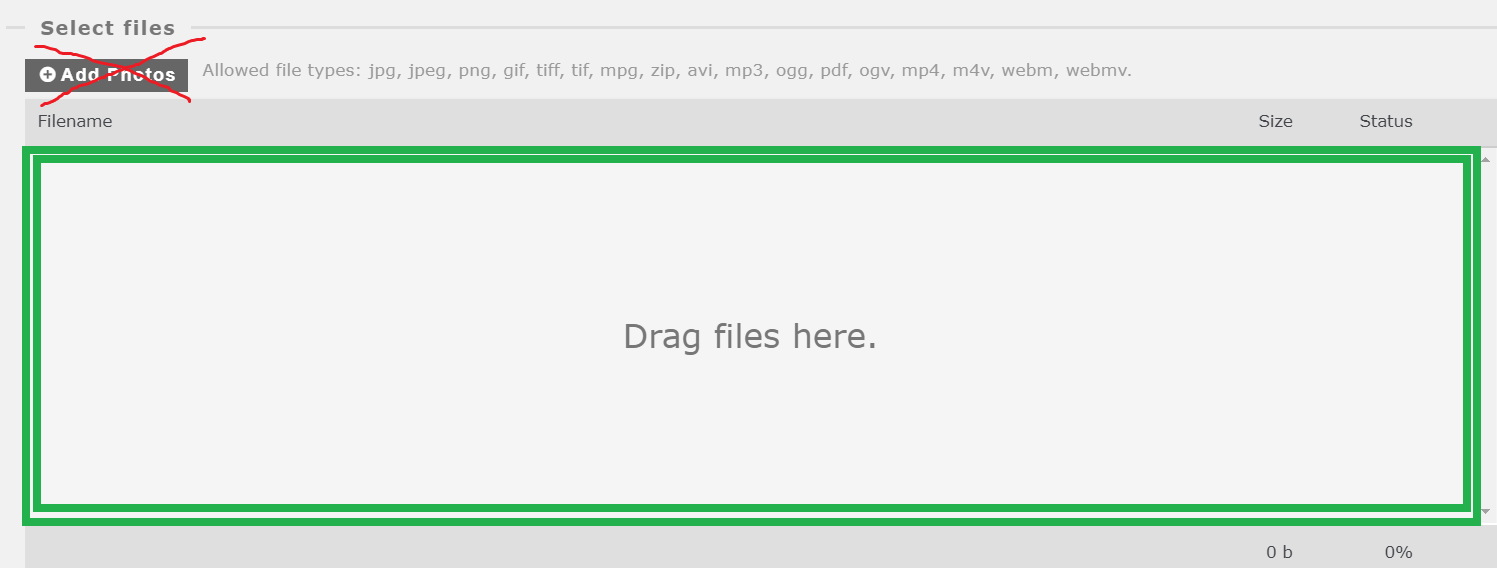

<!-- github-comment-id:370030986 -->
Yes, I'm dragging the files to the "drag files here" area. They are not in an archive, just plain files on the filesystem.
<!-- github-comment-id:370055519 -->
Actually, the situation seems to have changed a bit: instead of opening the images directly in the browser, most of the time it now either does nothing (like when trying to drag-and-drop to an area that does not accept drag and drop), or freezes Firefox for a few seconds. I tried about 10 times, it did succeed once (so it's possible!), open the images directly once, and freeze the other times.
Anyway, nothing is likely to happen here (other people can't reproduce), so let's close the bug for now.
Yes, still present. Firefox 61.0.1.
Actually, the situation seems to have changed a bit: instead of opening the images directly in the browser, most of the time it now either does nothing (like when trying to drag-and-drop to an area that does not accept drag and drop), or freezes Firefox for a few seconds. I tried about 10 times, it did succeed once (so it's possible!), open the images directly once, and freeze the other times.
Anyway, nothing is likely to happen here (other people can't reproduce), so let's close the bug for now.
<!-- github-comment-id:407296363 -->
Still happens.
Firefox 66, Ubuntu 18.04
It seems it is a question of timing. If you drag a bunch of images and release the mouse too quickly, nothings happens. If you drag the images and wait for the cursor to change and immediately releases the mouse, you get a warning that you are about to open a large number of tabs, or if you only drag a fewer number of images, they will open in the browser.
If you wait some more time (5 - 10 - 20 secs?) after the cursor changes, then the file upload acts as expected.
Chrome on the same system does not exhibit this behaviour.
Still happens.
Firefox 66, Ubuntu 18.04
It seems it is a question of timing. If you drag a bunch of images and release the mouse too quickly, nothings happens. If you drag the images and wait for the cursor to change and immediately releases the mouse, you get a warning that you are about to open a large number of tabs, or if you only drag a fewer number of images, they will open in the browser.
If you wait some more time (5 - 10 - 20 secs?) after the cursor changes, then the file upload acts as expected.
Chrome on the same system does not exhibit this behaviour.
<!-- github-comment-id:487292827 -->
Blocking a user prevents them from interacting with repositories, such as opening or commenting on pull requests or issues. Learn more about blocking a user.
Hi,
I did love the HTML5 file upload. It was working great until I upgraded to Firefox 58. Now, it doesn't anymore.
Steps to reproduce:
Expected behavior: images are added to the queue.
Actual behavior: nothing happens for a while (~10 seconds), and then some images are opened in Firefox in separate tabs (each image in its own tab with a file:// URL pointing to the file).
This still works with Chrome. This is all on Debian stable. I can reproduce the issue with an empty Firefox profile.
Not sure where the bug is (Firefox? Piwigo? Plupload?) :-(.
Is anyone else getting the issue?
Thanks,
Hi @moy
Working fine with Piwigo 2.9.3 (on Piwigo.com as described in your test), Firefox 58.0.2 (64bits) on MacOSX, photos dragged & dropped from Finder (the file explorer on Mac)
Hmm, I could test on Ubuntu 16.04, Firefox 58.0.2 and I'm not getting the issue either.
There must be something wrong on the other machine, I'll try to investigate if I get time (which may or may not happen). I think we can leave the bug open for a while in case someone else gets the problem and has something to add, but feel free to close as "can't reproduce" if you prefer.
Just to confirm, are you dragging into the "Drop Files Here" (shown in green) and NOT overtop the "Add Photos" button(red) ? Are the photo files in an archive?

Yes, I'm dragging the files to the "drag files here" area. They are not in an archive, just plain files on the filesystem.
FYI, I couldn't investigate in detail, but I still have the issue with Firefox 59.0.
Still having the problem?
Yes, still present. Firefox 61.0.1.
Actually, the situation seems to have changed a bit: instead of opening the images directly in the browser, most of the time it now either does nothing (like when trying to drag-and-drop to an area that does not accept drag and drop), or freezes Firefox for a few seconds. I tried about 10 times, it did succeed once (so it's possible!), open the images directly once, and freeze the other times.
Anyway, nothing is likely to happen here (other people can't reproduce), so let's close the bug for now.
happening here too, 1.12.18, FF 52.9 (XP)
Still happens.
Firefox 66, Ubuntu 18.04
It seems it is a question of timing. If you drag a bunch of images and release the mouse too quickly, nothings happens. If you drag the images and wait for the cursor to change and immediately releases the mouse, you get a warning that you are about to open a large number of tabs, or if you only drag a fewer number of images, they will open in the browser.
If you wait some more time (5 - 10 - 20 secs?) after the cursor changes, then the file upload acts as expected.
Chrome on the same system does not exhibit this behaviour.