Hi
The upgrade to 2.9.0 works well, but after upgrading the user_list is not showed anymore. It say only "No data available in table". When installing 2.9.0 from scratch it works... but not when upgrading from 2.8.6 version.
The user are there, i checked it in the database, the user can also login, only in backend is not possible to browse users or to change it... adding user is also possible, but also new creaed users will not be showed
Thank you
Gino
Hi
The upgrade to 2.9.0 works well, but after upgrading the user_list is not showed anymore. It say only "No data available in table". When installing 2.9.0 from scratch it works... but not when upgrading from 2.8.6 version.
The user are there, i checked it in the database, the user can also login, only in backend is not possible to browse users or to change it... adding user is also possible, but also new creaed users will not be showed
Thank you
Gino
<!-- github-sync-id:236496359 -->
If you open the console in your browser, do you see any error ? including in the "network" tab?
on the page of the users, do you see the menu bar with dark gray or light gray (like on Piwigo 2.8) ?
Hi @gino909
1. Do you have a custom `$conf['gallery_url']` ?
2. If you open the console in your browser, do you see any error ? including in the "network" tab?
3. on the page of the users, do you see the menu bar with dark gray or light gray (like on Piwigo 2.8) ?
<!-- github-comment-id:309118294 -->
Hi plegall
Thanks for your feedback.
No, the value of gallery_url in config_default.inc.php is "null"
No error in Browser console, not in Firefox and also not in Chrome, same behaviour in both browsers
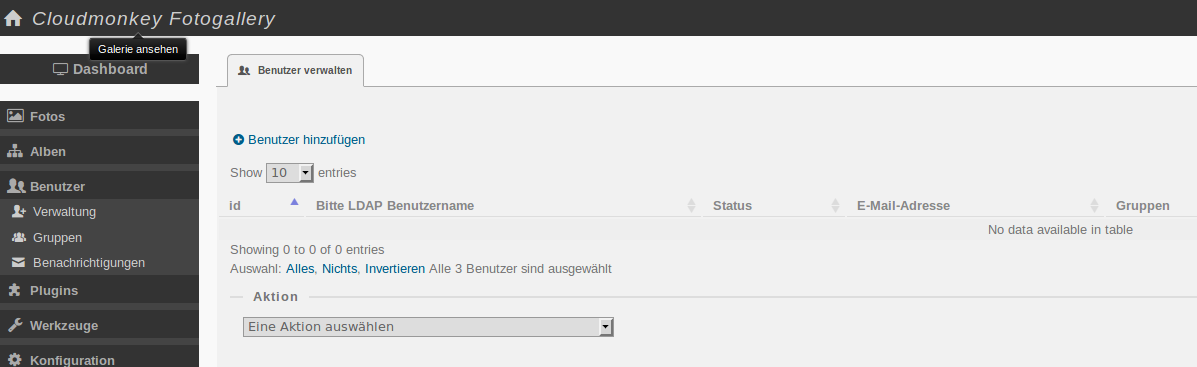
I will attach a screenshot, you can see my screen... the strange thing is, with the link select all I can select the users, it says 3 selected... but I do not see the users...
Hi plegall
Thanks for your feedback.
No, the value of gallery_url in config_default.inc.php is "null"
No error in Browser console, not in Firefox and also not in Chrome, same behaviour in both browsers
I will attach a screenshot, you can see my screen... the strange thing is, with the link select all I can select the users, it says 3 selected... but I do not see the users...

<!-- github-comment-id:309134835 -->
What I have to say for your knowledge is, that i use the Ldap plugin where I had to make some adjustments to make it working. I installed a clean 2.9.0 installation today and I added all plugins same as in the "corrupt" installation and there the userpanel works... also with ldap login...
<!-- github-comment-id:309135727 -->
Do you run 2.9.0 or 2.9.1 ? If 2.9.1, can you open file admin/user_list_backend.php and remove the 2 lines (beginning of the file):
```
check_input_parameter('iDisplayStart', $_REQUEST, false, PATTERN_ID);
check_input_parameter('iDisplayLength', $_REQUEST, false, PATTERN_ID);
```
<!-- github-comment-id:309208079 -->
Hi... I am running 2.9.0 and there this 2 lines are not present.
With the new installation, the lines are there and the user_list works fine...
Also when I update from 2.9.0 to 2.9.1 the user_list does not appear...
Hi... I am running 2.9.0 and there this 2 lines are not present.
With the new installation, the lines are there and the user_list works fine...
Also when I update from 2.9.0 to 2.9.1 the user_list does not appear...
<!-- github-comment-id:309209834 -->
OK, after nearly 1 hour of search, here is what I found in your themes/default/js/plugins/jquery.dataTables.js
* @summary DataTables
* @description Paginate, search and sort HTML tables
* @version 1.9.4
but with Piwigo 2.9.0 you should find:
/*! DataTables 1.10.11
Obviously the update was not complete. You should download Piwigo 2.9.0, extract files and overwrite them on your Piwigo installation.
OK, after nearly 1 hour of search, here is what I found in your themes/default/js/plugins/jquery.dataTables.js
```
* @summary DataTables
* @description Paginate, search and sort HTML tables
* @version 1.9.4
```
but with Piwigo 2.9.0 you should find:
```
/*! DataTables 1.10.11
```
Obviously the update was not complete. You should download Piwigo 2.9.0, extract files and overwrite them on your Piwigo installation.
<!-- github-comment-id:309215916 -->
Hi, you're right... something was wrong in the update... after overwriting the installation again with new files all works as expected... sorry for the inconvenience...probably there was a permission error during upload of files...
Thanks for the fast and professional support!
Hi, you're right... something was wrong in the update... after overwriting the installation again with new files all works as expected... sorry for the inconvenience...probably there was a permission error during upload of files...
Thanks for the fast and professional support!
<!-- github-comment-id:309233992 -->
Blocking a user prevents them from interacting with repositories, such as opening or commenting on pull requests or issues. Learn more about blocking a user.
Hi
The upgrade to 2.9.0 works well, but after upgrading the user_list is not showed anymore. It say only "No data available in table". When installing 2.9.0 from scratch it works... but not when upgrading from 2.8.6 version.
The user are there, i checked it in the database, the user can also login, only in backend is not possible to browse users or to change it... adding user is also possible, but also new creaed users will not be showed
Thank you
Gino
Hi @gino909
$conf['gallery_url']?Hi plegall
Thanks for your feedback.
No, the value of gallery_url in config_default.inc.php is "null"
No error in Browser console, not in Firefox and also not in Chrome, same behaviour in both browsers
I will attach a screenshot, you can see my screen... the strange thing is, with the link select all I can select the users, it says 3 selected... but I do not see the users...
What I have to say for your knowledge is, that i use the Ldap plugin where I had to make some adjustments to make it working. I installed a clean 2.9.0 installation today and I added all plugins same as in the "corrupt" installation and there the userpanel works... also with ldap login...
Do you run 2.9.0 or 2.9.1 ? If 2.9.1, can you open file admin/user_list_backend.php and remove the 2 lines (beginning of the file):
Hi... I am running 2.9.0 and there this 2 lines are not present.
With the new installation, the lines are there and the user_list works fine...
Also when I update from 2.9.0 to 2.9.1 the user_list does not appear...
Can you give me access to your Piwigo? please contact me by email http://piwigo.org/contact
OK, after nearly 1 hour of search, here is what I found in your themes/default/js/plugins/jquery.dataTables.js
but with Piwigo 2.9.0 you should find:
Obviously the update was not complete. You should download Piwigo 2.9.0, extract files and overwrite them on your Piwigo installation.
Hi, you're right... something was wrong in the update... after overwriting the installation again with new files all works as expected... sorry for the inconvenience...probably there was a permission error during upload of files...
Thanks for the fast and professional support!