I use sometimes Piwigo, at the moment 13.6 and always, when I use it again, I have to search how to set an image as cover for an album.
It is hidden, very good hidden as:
Administration > Alben > Verwaltung > <my_album> > Album bearbeiten (Bleistiftsymbol) > Albumfotos verwalten > Alle > <my_cover_foto> > Foto bearbeiten (Bleistiftsymbol) > Album-Vorschaubild > <my_album> > Einstellungen sichern (*)
Now only the image (my_cover_foto> will be shown as cover of my_album.
It is vice versa as expected, not the album gets a cover photo but the photo is set for the album.
At least I expect a Button like "Set as cover photo" as in other galleries.
Thank, frank
(*) the clickpath is in German, I switched language to English (this is neither that intuitive, no drop-down select box, but select and set as default and unselect the previous language, as I don't need two languages at one time) but menu is still in German. To wipe the cache there is not button, only a header "Cache leeren" without any button. I think I could open several issues for UX but when I look at the amount of open issues, I better wont 😏
I use Piwigo as it is. This issue is more a reminder for me, to find the cover image the next time a bit faster 😏
Hallo
I use sometimes Piwigo, at the moment 13.6 and always, when I use it again, I have to search how to set an image as cover for an album.
It is hidden, very good hidden as:
**Administration > Alben > Verwaltung > <my_album> > Album bearbeiten (Bleistiftsymbol) > Albumfotos verwalten > Alle > <my_cover_foto> > Foto bearbeiten (Bleistiftsymbol) > Album-Vorschaubild > <my_album> > Einstellungen sichern (*)**
Now only the image (my_cover_foto> will be shown as cover of my_album.
It is vice versa as expected, not the album gets a cover photo but the photo is set for the album.
At least I expect a Button like "Set as cover photo" as in other galleries.
Thank, frank
(*) the clickpath is in German, I switched language to English (this is neither that intuitive, no drop-down select box, but select and set as default and unselect the previous language, as I don't need two languages at one time) but menu is still in German. To wipe the cache there is not button, only a header "Cache leeren" without any button. I think I could open several issues for UX but when I look at the amount of open issues, I better wont :smirk:
I use Piwigo as it is. This issue is more a reminder for me, to find the cover image the next time a bit faster :smirk:
<!-- github-sync-id:1613738110 -->
Hi @francwalter
good catch
I put it on two slides, I translated the bold text using https://www.deepl.com/translator :-)
It is also possible to do it that way : Administration > Photos > Bach Manager ... select album & photo then it is the step 5 on the slides.
But you're right... a button "Set as cover photo" would be awesome.
Phil.
Hi @francwalter
good catch
I put it on two slides, I translated the bold text using https://www.deepl.com/translator :-)
It is also possible to do it that way : Administration > Photos > Bach Manager ... select album & photo then it is the step 5 on the slides.
But you're right... a button "Set as cover photo" would be awesome.
Phil.


<!-- github-comment-id:1458546338 -->
There is a much much simpler way to "set a photo as cover". Simply browse it from the gallery and click on the "set as album thumbnail". Job's done.
The "album thumbnail" input on the edit page of the photo is useful when the photo does not directly belong to the album.
There is a much much simpler way to "set a photo as cover". Simply browse it from the gallery and click on the "set as album thumbnail". Job's done.

The "album thumbnail" input on the edit page of the photo is useful when the photo does not directly belong to the album.
<!-- github-comment-id:1485074663 -->
ok
as a user lambda ..icon is not available:

as
webmaster , it is available:

Thank you @plegall
<!-- github-comment-id:1485157243 -->
Yes, of course
however it can be interesting to allow a user or a group of user to do.
I don't know if it is possible today to delegate this kind of word?
Yes, of course
however it can be interesting to allow a user or a group of user to do.
I don't know if it is possible today to delegate this kind of word?
<!-- github-comment-id:1487214625 -->
however it can be interesting to allow a user or a group of user to do.
And we would call it "status=administrator". I don't think it's a good idea to delegate specific admin features to non-admin users.
> however it can be interesting to allow a user or a group of user to do.
And we would call it "status=administrator". I don't think it's a good idea to delegate specific admin features to non-admin users.
<!-- github-comment-id:1653084063 -->
There is a much much simpler way to "set a photo as cover". Simply browse it from the gallery and click on the "set as album thumbnail". Job's done.
Thank you Plegalle, next time I will do it like that, much easier and even intuitive!
> There is a much much simpler way to "set a photo as cover". Simply browse it from the gallery and click on the "set as album thumbnail". Job's done.
Thank you Plegalle, next time I will do it like that, much easier and even intuitive!
<!-- github-comment-id:1653246728 -->
Blocking a user prevents them from interacting with repositories, such as opening or commenting on pull requests or issues. Learn more about blocking a user.
Hallo
I use sometimes Piwigo, at the moment 13.6 and always, when I use it again, I have to search how to set an image as cover for an album.
It is hidden, very good hidden as:
Administration > Alben > Verwaltung > <my_album> > Album bearbeiten (Bleistiftsymbol) > Albumfotos verwalten > Alle > <my_cover_foto> > Foto bearbeiten (Bleistiftsymbol) > Album-Vorschaubild > <my_album> > Einstellungen sichern (*)
Now only the image (my_cover_foto> will be shown as cover of my_album.
It is vice versa as expected, not the album gets a cover photo but the photo is set for the album.
At least I expect a Button like "Set as cover photo" as in other galleries.
Thank, frank
(*) the clickpath is in German, I switched language to English (this is neither that intuitive, no drop-down select box, but select and set as default and unselect the previous language, as I don't need two languages at one time) but menu is still in German. To wipe the cache there is not button, only a header "Cache leeren" without any button. I think I could open several issues for UX but when I look at the amount of open issues, I better wont 😏
I use Piwigo as it is. This issue is more a reminder for me, to find the cover image the next time a bit faster 😏
Hi @francwalter


good catch
I put it on two slides, I translated the bold text using https://www.deepl.com/translator :-)
It is also possible to do it that way : Administration > Photos > Bach Manager ... select album & photo then it is the step 5 on the slides.
But you're right... a button "Set as cover photo" would be awesome.
Phil.
There is a much much simpler way to "set a photo as cover". Simply browse it from the gallery and click on the "set as album thumbnail". Job's done.
The "album thumbnail" input on the edit page of the photo is useful when the photo does not directly belong to the album.
ok

as a user lambda ..icon is not available:
as
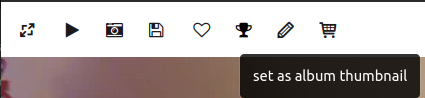
webmaster , it is available:
Thank you @plegall
of course :-) you don't want anonymous users to select your album thumbnail
Yes, of course
however it can be interesting to allow a user or a group of user to do.
I don't know if it is possible today to delegate this kind of word?
And we would call it "status=administrator". I don't think it's a good idea to delegate specific admin features to non-admin users.
Thank you Plegalle, next time I will do it like that, much easier and even intuitive!