I have a 2560x1440 pixels display set on 100% magnification.
I installed Piwigo.
I let the default settings, factory defaults:
theme: default (modus)
the thumbs: default (square)
square thumbs size: default (120x120 pixels)
number of pictures per page: default (15)
Then uploaded 100 pictures in one album.
When I go to see how the pictures look, I see this:
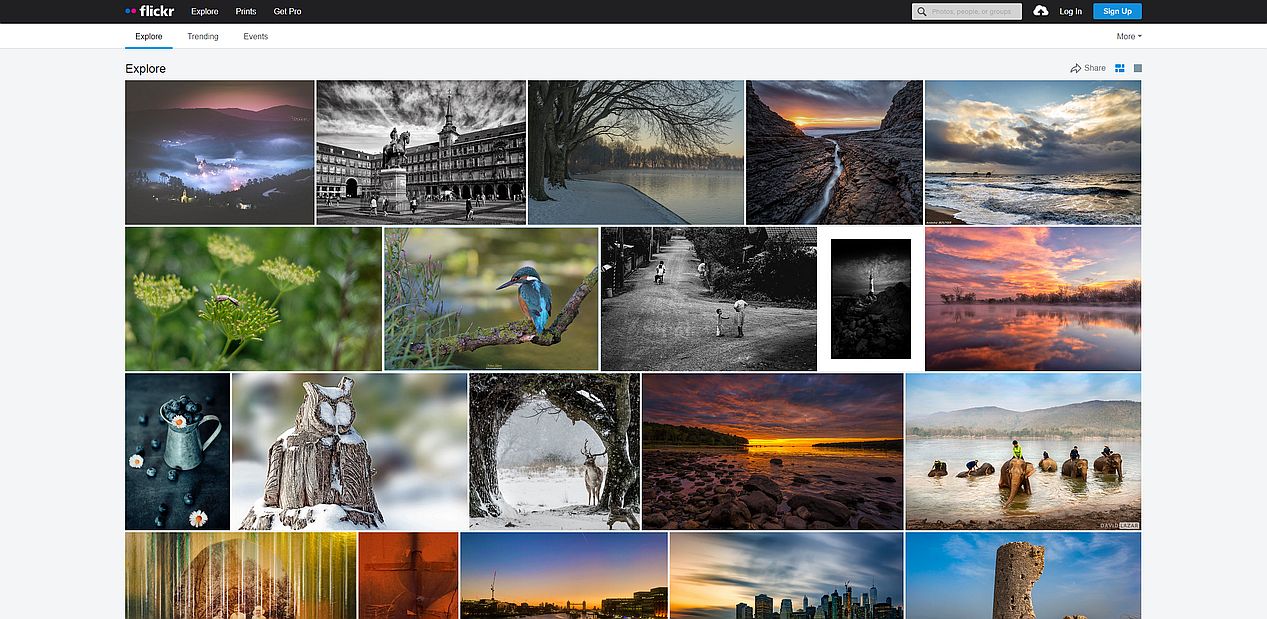
For comparation when I enter on Flickr the interface look like this:
There is something very wrong with Piwigo default settings.
Problem 1) That screen filling is a lot too small - Piwigo problem
In my opinion the default theme should use a interface optimized for most common screens 1920x1080 pixels, while mobile optimized themes should use a recalculated pagination (example: half the number of pictures per page of the default for desktop screen).
Problem 2) Pagination navigator fonts and visibility is bad - Modus problem
My suggestion to fix the problem is:
-More bigger font size for pages navigator
-Put a border square around the selected page number (a css border?), to make it more visible. Now it's using only italic fonts
I have a 2560x1440 pixels display set on 100% magnification.
I installed Piwigo.
I let the default settings, factory defaults:
- theme: default (modus)
- the thumbs: default (square)
- square thumbs size: default (120x120 pixels)
- number of pictures per page: default (15)
Then uploaded 100 pictures in one album.
When I go to see how the pictures look, I see this:

For comparation when I enter on Flickr the interface look like this:

There is something very wrong with Piwigo default settings.
Problem 1) That screen filling is a lot too small - Piwigo problem
In my opinion the default theme should use a interface optimized for most common screens 1920x1080 pixels, while mobile optimized themes should use a recalculated pagination (example: half the number of pictures per page of the default for desktop screen).
Problem 2) Pagination navigator fonts and visibility is bad - Modus problem
My suggestion to fix the problem is:
-More bigger font size for pages navigator
-Put a border square around the selected page number (a css border?), to make it more visible. Now it's using only italic fonts
<!-- github-sync-id:808036541 -->
What you're showing is not the default gallery layout in Piwigo 11. I agree that on a huge resolution like 2560x1440 the default settings are not as good as they should be to fill the available space BUT they're better than what you're showing here:
Modus is the default theme, and Newspaper is the default color scheme (or skin)
by default Modus does not display squares but thumbnails or XXS size
Hi @crisc82
What you're showing is not the default gallery layout in Piwigo 11. I agree that on a huge resolution like 2560x1440 the default settings are not as good as they should be to fill the available space BUT they're better than what you're showing here:
- Modus is the default theme, and Newspaper is the default color scheme (or skin)
- by default Modus does not display squares but thumbnails or XXS size
<!-- github-comment-id:779288324 -->
Seems you are right. I reinstalled piwigo 11.3. The reason thumbnails appeared so small is because I disabled all the sizes that are mandatory (in Configuration -> Options -> Photo sizes).
So because Themes Configuration is bellow in the Photo Sizes in menu, I had no idea that this option changed something in the default theme configuration.
Neither in the Option->Photo Sizes or the Theme->Modus->Configuration I was not announced that the default size of thumbnails (XXS) is disabled and this will cause problems in the way front end of Piwigo look.
So the fixes will be to show in Photo Sizes or/and Theme configuration a message that XXS is the default in case that XXS is disabled. In this way admin will know why the front end of Piwigo look bad.
This is how Piwigo looks with XXS enabled:
1920x1080 - this looks better, but can still be optimized to take more of the screen
2560x1440 - this look quite bad (especially see the right space), but also a lot of space bellow the last image
They are also peoples who use 31.5 inch 3840x2160 displays, set at 125% DPI scaling.
I think the only solution for the photos to look better is to load more (then 15) by default, and use some kind of masonry/justify grid. Like Flickr is doing https://www.flickr.com/explore
I know there are some option plugins like Gthumb but those are not available for Piwigo 11.
Seems you are right. I reinstalled piwigo 11.3. The reason thumbnails appeared so small is because I disabled all the sizes that are mandatory (in Configuration -> Options -> Photo sizes).
So because Themes Configuration is bellow in the Photo Sizes in menu, I had no idea that this option changed something in the default theme configuration.
Neither in the Option->Photo Sizes or the Theme->Modus->Configuration I was not announced that the default size of thumbnails (XXS) is disabled and this will cause problems in the way front end of Piwigo look.
So the fixes will be to show in Photo Sizes or/and Theme configuration a message that XXS is the default in case that XXS is disabled. In this way admin will know why the front end of Piwigo look bad.
This is how Piwigo looks with XXS enabled:
1920x1080 - this looks better, but can still be optimized to take more of the screen

2560x1440 - this look quite bad (especially see the right space), but also a lot of space bellow the last image

They are also peoples who use 31.5 inch 3840x2160 displays, set at 125% DPI scaling.
I think the only solution for the photos to look better is to load more (then 15) by default, and use some kind of masonry/justify grid. Like Flickr is doing https://www.flickr.com/explore
I know there are some option plugins like Gthumb but those are not available for Piwigo 11.
<!-- github-comment-id:779966972 -->
Using Bootstrap Darkroom with some minor customization and I think it works rather well on 4K monitors...

https://www.homeworldshots.net
<!-- github-comment-id:780377246 -->
@Ainz
Unfortunately that theme is unusable for me at the current time. It has a bug that make it unusable.
DEMO: Just try to access a picture on your website like this https://www.homeworldshots.net/picture.php?/3009/ (without the category ID). It will load a lot more slower.
With other themes there is no problem doing this. With Bootstrap it's not working properly. It's a 2 year old unfixed bug.
@Ainz
Unfortunately that theme is unusable for me at the current time. It has a bug that make it unusable.
DEMO: Just try to access a picture on your website like this https://www.homeworldshots.net/picture.php?/3009/ (without the category ID). It will load a lot more slower.
With other themes there is no problem doing this. With Bootstrap it's not working properly. It's a 2 year old unfixed bug.
<!-- github-comment-id:784582152 -->
Blocking a user prevents them from interacting with repositories, such as opening or commenting on pull requests or issues. Learn more about blocking a user.
I have a 2560x1440 pixels display set on 100% magnification.
I installed Piwigo.
I let the default settings, factory defaults:
Then uploaded 100 pictures in one album.
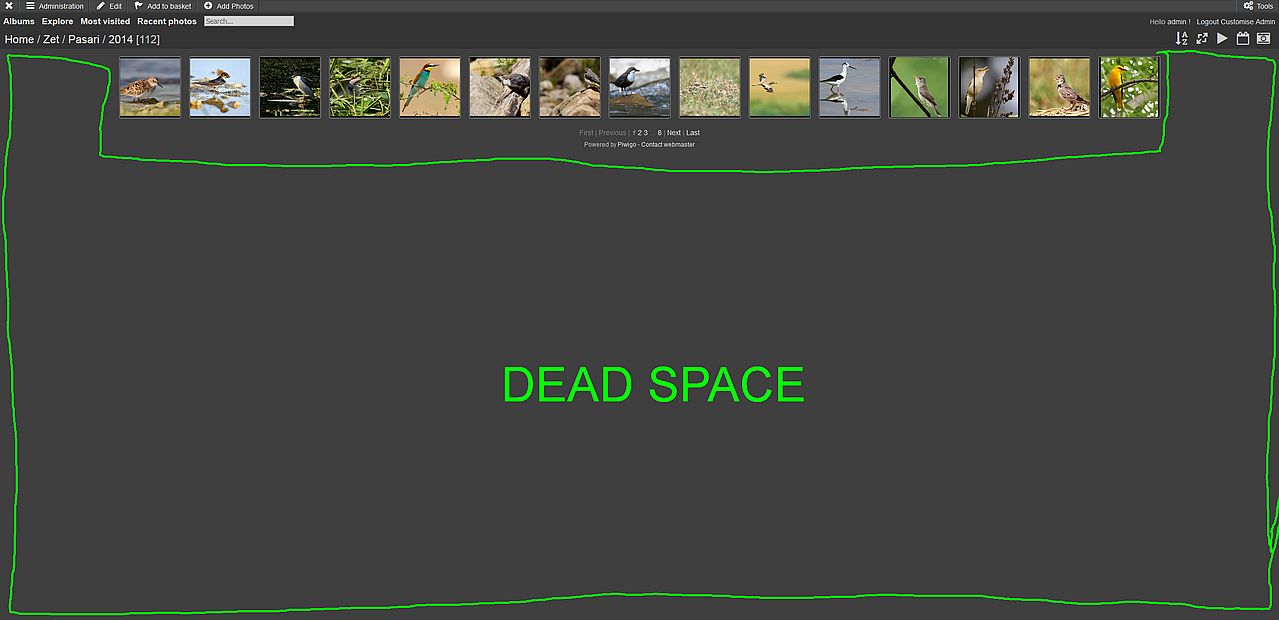
When I go to see how the pictures look, I see this:
For comparation when I enter on Flickr the interface look like this:
There is something very wrong with Piwigo default settings.
Problem 1) That screen filling is a lot too small - Piwigo problem
In my opinion the default theme should use a interface optimized for most common screens 1920x1080 pixels, while mobile optimized themes should use a recalculated pagination (example: half the number of pictures per page of the default for desktop screen).
Problem 2) Pagination navigator fonts and visibility is bad - Modus problem
My suggestion to fix the problem is:
-More bigger font size for pages navigator
-Put a border square around the selected page number (a css border?), to make it more visible. Now it's using only italic fonts
Hi @crisc82
What you're showing is not the default gallery layout in Piwigo 11. I agree that on a huge resolution like 2560x1440 the default settings are not as good as they should be to fill the available space BUT they're better than what you're showing here:
Seems you are right. I reinstalled piwigo 11.3. The reason thumbnails appeared so small is because I disabled all the sizes that are mandatory (in Configuration -> Options -> Photo sizes).
So because Themes Configuration is bellow in the Photo Sizes in menu, I had no idea that this option changed something in the default theme configuration.
Neither in the Option->Photo Sizes or the Theme->Modus->Configuration I was not announced that the default size of thumbnails (XXS) is disabled and this will cause problems in the way front end of Piwigo look.
So the fixes will be to show in Photo Sizes or/and Theme configuration a message that XXS is the default in case that XXS is disabled. In this way admin will know why the front end of Piwigo look bad.
This is how Piwigo looks with XXS enabled:
1920x1080 - this looks better, but can still be optimized to take more of the screen
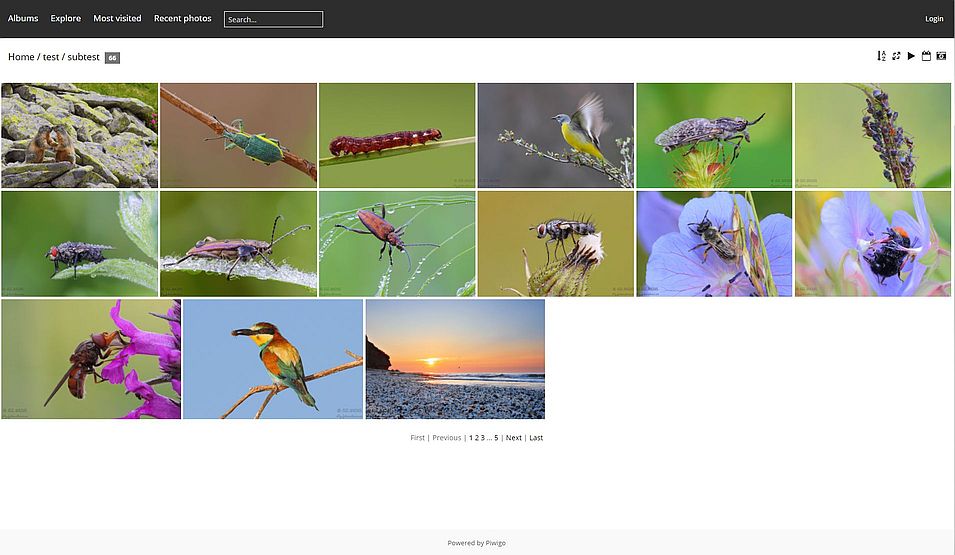
2560x1440 - this look quite bad (especially see the right space), but also a lot of space bellow the last image
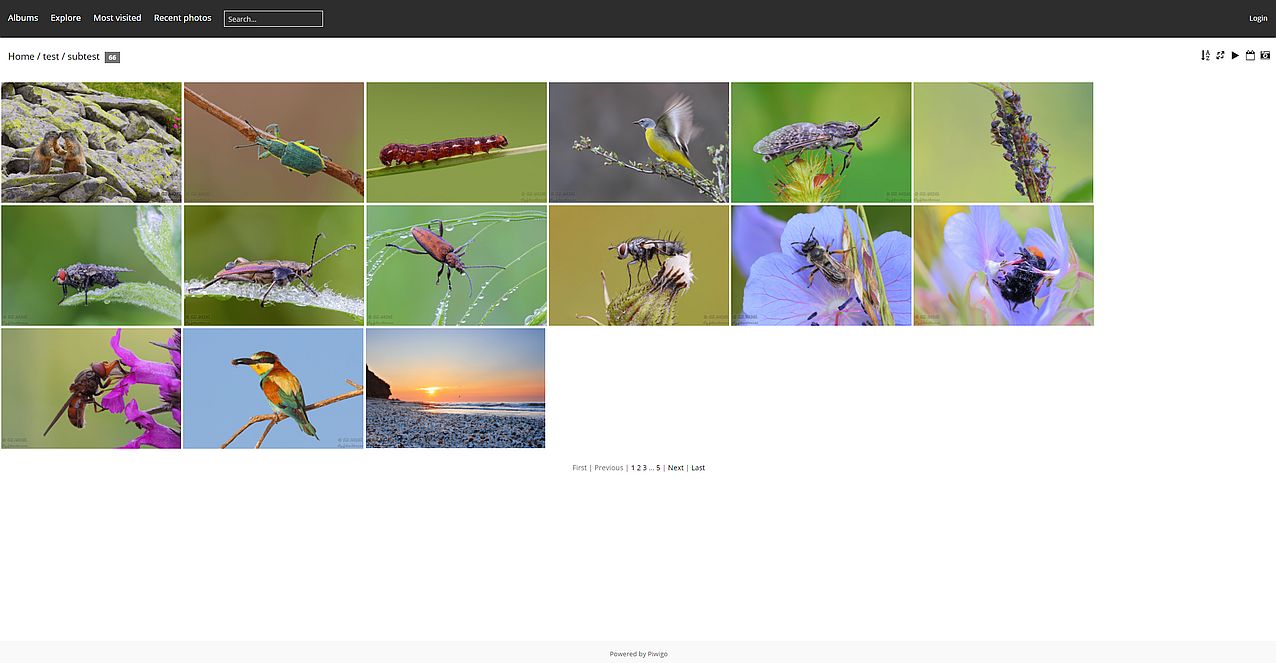
They are also peoples who use 31.5 inch 3840x2160 displays, set at 125% DPI scaling.
I think the only solution for the photos to look better is to load more (then 15) by default, and use some kind of masonry/justify grid. Like Flickr is doing https://www.flickr.com/explore
I know there are some option plugins like Gthumb but those are not available for Piwigo 11.
Using Bootstrap Darkroom with some minor customization and I think it works rather well on 4K monitors...
https://www.homeworldshots.net
@Ainz
Unfortunately that theme is unusable for me at the current time. It has a bug that make it unusable.
DEMO: Just try to access a picture on your website like this https://www.homeworldshots.net/picture.php?/3009/ (without the category ID). It will load a lot more slower.
With other themes there is no problem doing this. With Bootstrap it's not working properly. It's a 2 year old unfixed bug.
Jeez, I did not even know that was a bug. Hokay, sorry for my worthless suggestion. ;)